
[WOOCS LABS] Compatibility issue with Uni CPO free
The support doesn work on Saturdays and Sundays, so some Friday requests can be answered on Monday. If you have problems with registration ask help on contact us page pleaseIf you not got email within 24~36 business hours, firstly check your spam box, and if no any email from the support there - back to the forum and read answer here. DO NOT ANSWER ON EMAILS [noreply@pluginus.net] FROM THE FORUM!! Emails are just for your info, all answers should be published only here.
The support doesn work on Saturdays and Sundays, so some Friday requests can be answered on Monday.

Quote from Pablo Borysenco on December 29, 2020, 11:53Hello
It looks like it isn't OR you change the HTML price
Standard html - echo $product->get_price_html(); result - https://c2n.me/4apa37s.png
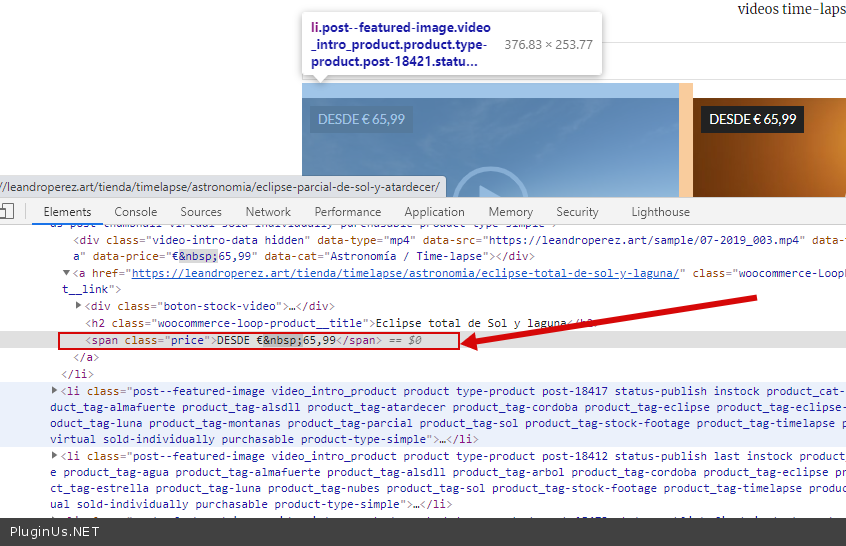
Your html - echo $product->get_price_html(); - result - https://c2n.me/4apa8cr.png
You should hire a developer to correctly change the price display template
Hello
It looks like it isn't OR you change the HTML price
Standard html - echo $product->get_price_html(); result - https://c2n.me/4apa37s.png
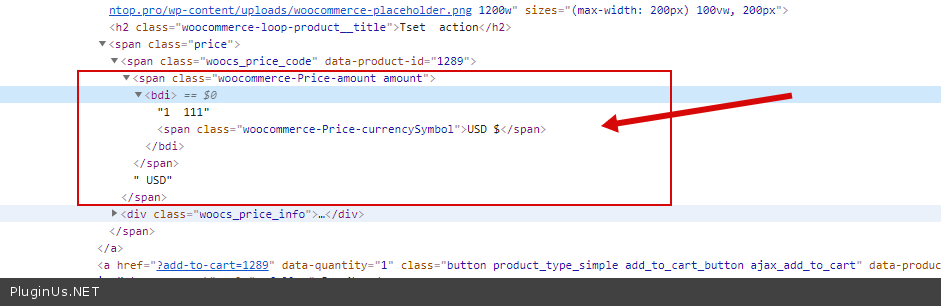
Your html - echo $product->get_price_html(); - result - https://c2n.me/4apa8cr.png
You should hire a developer to correctly change the price display template

Quote from leandroprz on January 5, 2021, 04:15I figured this out. The template is working fine.
It is showing the price you put in a product. I thought it would show the price from the Uni CPO plugin.
Just did a few price changes and everything looks good now.
I figured this out. The template is working fine.
It is showing the price you put in a product. I thought it would show the price from the Uni CPO plugin.
Just did a few price changes and everything looks good now.
Quote from Pablo Borysenco on January 5, 2021, 11:12Hello
Ok! Great!
Hello
Ok! Great!
Quote from leandroprz on August 9, 2021, 00:05Hi. I just noticed that WOOCS is not doing correct calculations when I set my currency to ARS on some of my products.
Please check this category and you will see the initial price is calculated from US$ 79, which shows as AR$ 7.699: https://leandroperez.art/tienda/categoria/timelapse/los-seismiles/
But when selecting options inside a product the initial price shows as AR$ 741.374: https://leandroperez.art/tienda/timelapse/los-seismiles/via-lactea-y-piedras/
These are the options I selected for the product: https://i.ibb.co/YPFfxGQ/uni-cpo-ars.png
This is not happening with other currencies.
I already tried disabling all my plugins and using the WordPress default theme. Also disabled everything cache related, the issue persists.
Hi. I just noticed that WOOCS is not doing correct calculations when I set my currency to ARS on some of my products.
Please check this category and you will see the initial price is calculated from US$ 79, which shows as AR$ 7.699: https://leandroperez.art/tienda/categoria/timelapse/los-seismiles/
But when selecting options inside a product the initial price shows as AR$ 741.374: https://leandroperez.art/tienda/timelapse/los-seismiles/via-lactea-y-piedras/
These are the options I selected for the product: https://i.ibb.co/YPFfxGQ/uni-cpo-ars.png

This is not happening with other currencies.
I already tried disabling all my plugins and using the WordPress default theme. Also disabled everything cache related, the issue persists.
Quote from Pablo Borysenco on August 9, 2021, 12:11Hello
I already tried disabling all my plugins and using the WordPress default theme. Also disabled everything cache related, the issue persists. - https://i.ibb.co/YPFfxGQ/uni-cpo-ars.png - So this is a third party plugin
As far as I remember, you are using a third-party code for ARS, please delete it and do a test
If the error persists. Please add FTP+wp-admin access. I will add this to the adaptation queue
Hello
I already tried disabling all my plugins and using the WordPress default theme. Also disabled everything cache related, the issue persists. - https://i.ibb.co/YPFfxGQ/uni-cpo-ars.png - So this is a third party plugin
As far as I remember, you are using a third-party code for ARS, please delete it and do a test
If the error persists. Please add FTP+wp-admin access. I will add this to the adaptation queue
Quote from leandroprz on August 9, 2021, 15:25So this is a third party plugin
Yes, it's the Uni CPO plugin discussed in this thread.
As far as I remember, you are using a third-party code for ARS, please delete it and do a test
That's correct. I also deleted that code with no luck. The code is located in themes/fluxus/user.php
I just added the login info.
So this is a third party plugin
Yes, it's the Uni CPO plugin discussed in this thread.
As far as I remember, you are using a third-party code for ARS, please delete it and do a test
That's correct. I also deleted that code with no luck. The code is located in themes/fluxus/user.php
I just added the login info.
Quote from Pablo Borysenco on August 10, 2021, 09:39Hello
Ok! I added this to the adaptation queue
Hello
Ok! I added this to the adaptation queue
Quote from Pablo Borysenco on August 13, 2021, 19:03Hello
https://c2n.me/4d0jYTm.png - why did you add the code twice . Delete one of these pieces of code.
This topic has instructions on how to adapt this third party plugin.
Next time you should hire a third party developer to add this code.
Hello
https://c2n.me/4d0jYTm.png - why did you add the code twice . Delete one of these pieces of code.
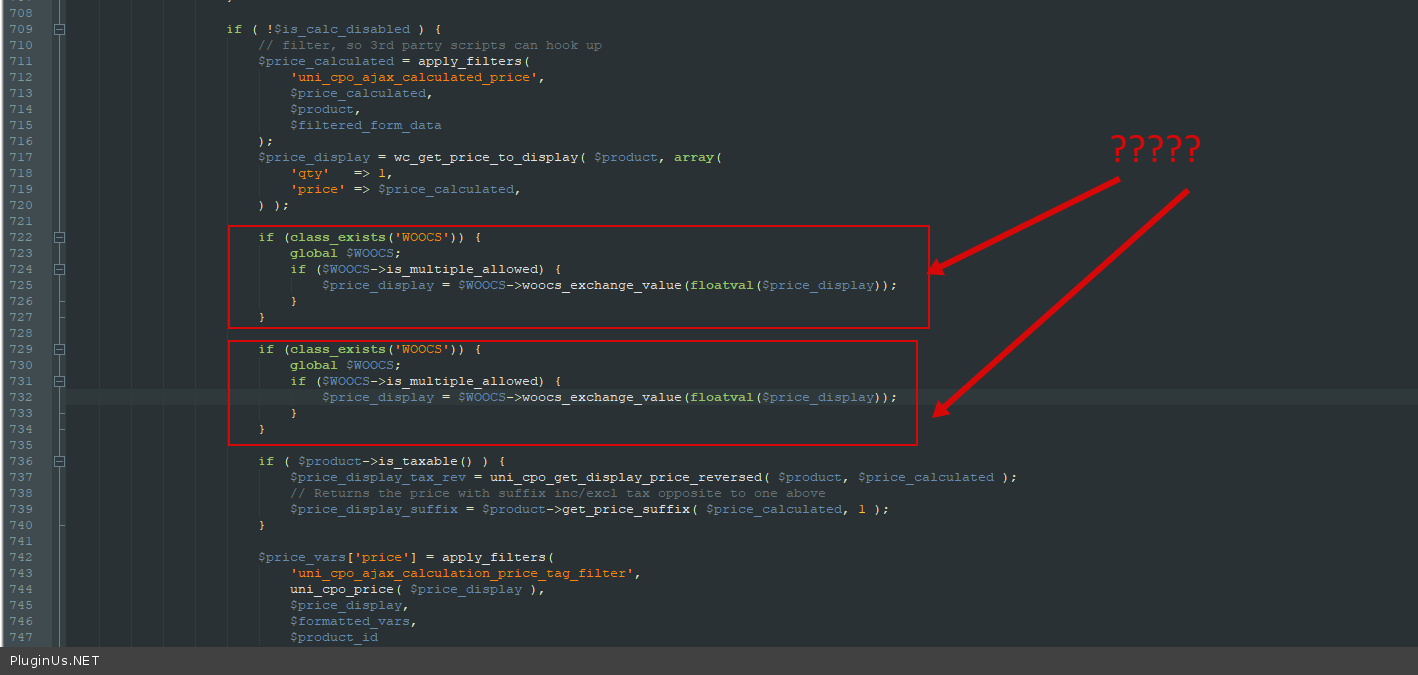
This topic has instructions on how to adapt this third party plugin.
Next time you should hire a third party developer to add this code.
Quote from leandroprz on August 13, 2021, 19:34Thanks, the issue has been fixed.
Thanks, the issue has been fixed.
Quote from Pablo Borysenco on August 16, 2021, 11:01Hello
Welcome;)
Hello
Welcome;)