

[WOOCS LABS] Compatibility issue with Uni CPO free
The support doesn work on Saturdays and Sundays, so some Friday requests can be answered on Monday. If you have problems with registration ask help on contact us page pleaseIf you not got email within 24~36 business hours, firstly check your spam box, and if no any email from the support there - back to the forum and read answer here. DO NOT ANSWER ON EMAILS [noreply@pluginus.net] FROM THE FORUM!! Emails are just for your info, all answers should be published only here.
The support doesn work on Saturdays and Sundays, so some Friday requests can be answered on Monday.

Quote from leandroprz on November 24, 2020, 00:04Hi,
I just saw this post on your site about Uni CPO compatibility but I was wondering if there’s a way to make that code compatible with the free version?
Thank you
Hi,
I just saw this post on your site about Uni CPO compatibility but I was wondering if there’s a way to make that code compatible with the free version?
Thank you

Quote from Pablo Borysenco on November 24, 2020, 11:54Hello
Ok! I added this plugin to the adaptation queue
Hello
Ok! I added this plugin to the adaptation queue
Quote from leandroprz on November 24, 2020, 19:16Awesome! Thank you so much. Let me know if I can help you test it or anything.
Awesome! Thank you so much. Let me know if I can help you test it or anything.
Quote from Pablo Borysenco on November 25, 2020, 12:19Hello
Ok! I will write to you as soon as I get the result
Hello
Ok! I will write to you as soon as I get the result
Quote from leandroprz on November 25, 2020, 16:22Just to let you know, I purchased the plugin in CodeCanyon (I was using the free version) and noticed that prices are showing up now in single product pages, but the currency convertion is still not working properly.
Just to let you know, I purchased the plugin in CodeCanyon (I was using the free version) and noticed that prices are showing up now in single product pages, but the currency convertion is still not working properly.
Quote from Pablo Borysenco on November 26, 2020, 11:20Hello
Paid and free versions have the same code
Hello
Paid and free versions have the same code
Quote from leandroprz on November 26, 2020, 19:23I'm using the latest version of the free plugin (v4.9.3) and I can't find anything as described in this post.
https://i.imgur.com/bMnu7Uy.png
I even downloaded the plugin again from the WordPress repository to be sure, there's nothing similar there.
I'm using the latest version of the free plugin (v4.9.3) and I can't find anything as described in this post.
I even downloaded the plugin again from the WordPress repository to be sure, there's nothing similar there.
Quote from Pablo Borysenco on November 27, 2020, 12:51Hello
Paid and free versions have the same code - I meant my plugin WOOCS
I will check this third-party plugin
Hello
Paid and free versions have the same code - I meant my plugin WOOCS
I will check this third-party plugin
Quote from leandroprz on November 27, 2020, 18:17Sorry, I misunderstood.
Thank you!
Sorry, I misunderstood.
Thank you!
Quote from Pablo Borysenco on December 3, 2020, 18:10Hello
Add FTP+wp-admin access
OR I can use access in this topic - https://pluginus.net/support/topic/woocs-labs-compatibility-issue-with-conditional-discounts-for-woocommerce-by-orion/
Hello
Add FTP+wp-admin access
OR I can use access in this topic - https://pluginus.net/support/topic/woocs-labs-compatibility-issue-with-conditional-discounts-for-woocommerce-by-orion/
Quote from leandroprz on December 3, 2020, 19:26Hi,
You should be able to access the wp-admin now.
Hi,
You should be able to access the wp-admin now.
Quote from leandroprz on December 3, 2020, 21:19I forgot to mention that I've hidden the price until this is resolved using:
.product_cat-timelapse .woocommerce-Price-amount bdi {
display: none;
}
I forgot to mention that I've hidden the price until this is resolved using:
.product_cat-timelapse .woocommerce-Price-amount bdi {
display: none;
}
Quote from Pablo Borysenco on December 4, 2020, 12:54Hello
ok! Thank you
Hello
ok! Thank you
Quote from Pablo Borysenco on December 17, 2020, 19:33Hello
Please drop me exact link to the product with the issue( where did you set up the formulas )
Hello
Please drop me exact link to the product with the issue( where did you set up the formulas )
Quote from leandroprz on December 17, 2020, 19:34Here: https://leandroperez.art/tienda/timelapse/los-seismiles/via-lactea-y-piedras/
Here: https://leandroperez.art/tienda/timelapse/los-seismiles/via-lactea-y-piedras/
Quote from Pablo Borysenco on December 18, 2020, 11:51Hello
Ok! Thank you
Hello
Ok! Thank you
Quote from Pablo Borysenco on December 24, 2020, 19:09Hello
In file - \wp-content\plugins\uni-woo-custom-product-options\includes\class-uni-cpo-ajax.php - add code - https://c2n.me/4ammJFn.png
if (class_exists('WOOCS')) {
global $WOOCS;
if ($WOOCS->is_multiple_allowed) {
$price_display = $WOOCS->woocs_exchange_value(floatval($price_display));
}
}In file - \wp-content\plugins\woocommerce-currency-switcher\js\front.js - Add code - https://c2n.me/4ammM6m.png
if (data.ids[jQuery(item).data('product-id')] != undefined && !jQuery(item).find('.js-cpo-price-starting')).length) {
cleare all cache and do a test
Hello
In file - \wp-content\plugins\uni-woo-custom-product-options\includes\class-uni-cpo-ajax.php - add code - https://c2n.me/4ammJFn.png
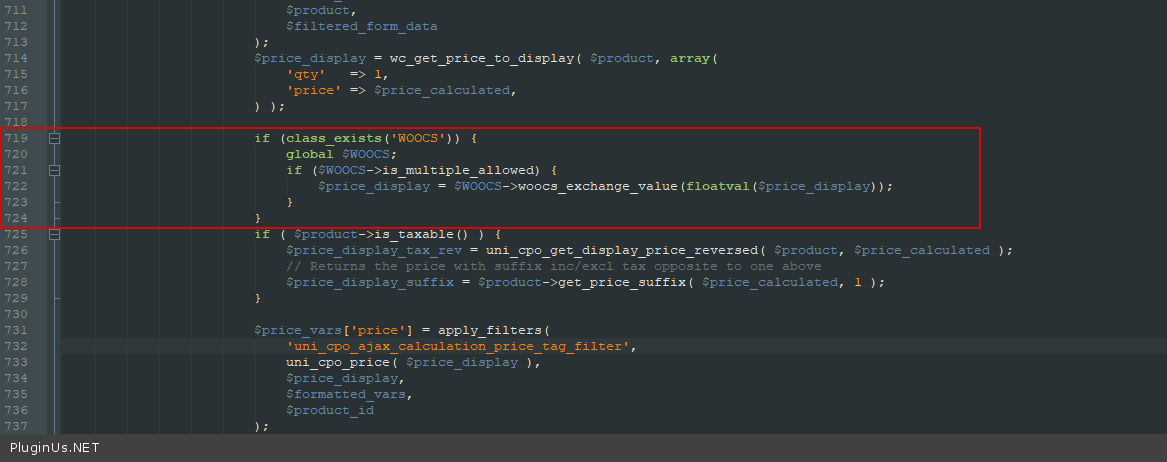
if (class_exists('WOOCS')) {
global $WOOCS;
if ($WOOCS->is_multiple_allowed) {
$price_display = $WOOCS->woocs_exchange_value(floatval($price_display));
}
}
In file - \wp-content\plugins\woocommerce-currency-switcher\js\front.js - Add code - https://c2n.me/4ammM6m.png
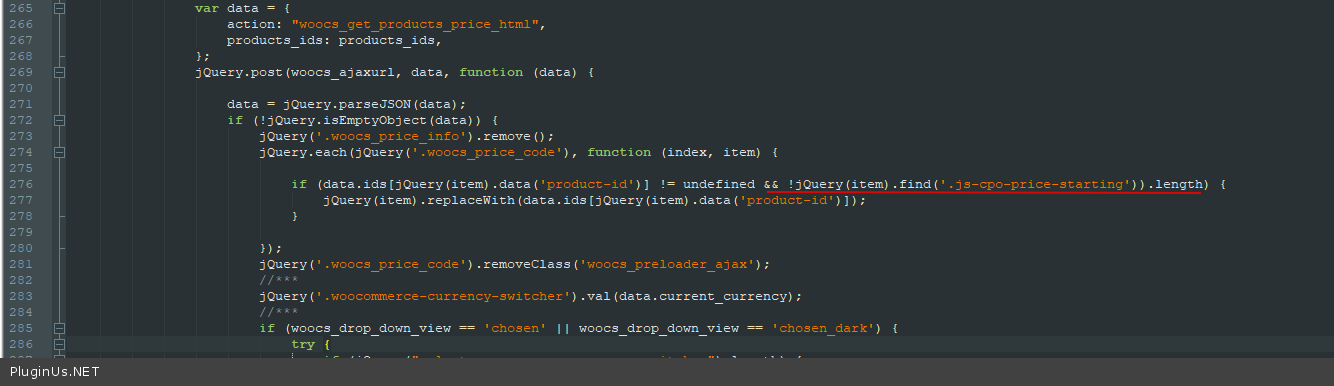
if (data.ids[jQuery(item).data('product-id')] != undefined && !jQuery(item).find('.js-cpo-price-starting')).length) {
cleare all cache and do a test
Quote from leandroprz on December 28, 2020, 03:32Awesome! The product pages are working perfectly. Thank you so much.
I've noticed that category pages aren't showing the correct price though. For example this one should say "DESDE US$ 179,00" instead of 80,00: https://leandroperez.art/tienda/categoria/timelapse/astronomia/?currency=USD
This is the code I'm using in my WooCommerce template:
<span class="price">DESDE <?php echo $product->get_price_html(); ?></span>Maybe the issue is there?
Awesome! The product pages are working perfectly. Thank you so much.
I've noticed that category pages aren't showing the correct price though. For example this one should say"DESDE US$ 179,00" instead of 80,00: https://leandroperez.art/tienda/categoria/timelapse/astronomia/?currency=USD
This is the code I'm using in my WooCommerce template:
<span class="price">DESDE <?php echo $product->get_price_html(); ?></span>
Maybe the issue is there?
Quote from Pablo Borysenco on December 28, 2020, 11:15Hello
If you display prices like this, it should work correctly. But I checked the page and it looks like you are displaying prices in a different way
Please drop me a screenshot of your custom template
Hello
If you display prices like this, it should work correctly. But I checked the page and it looks like you are displaying prices in a different way
Please drop me a screenshot of your custom template
Quote from leandroprz on December 28, 2020, 15:05This is my /mytheme/woocommerce/loop/price.php file: https://pastebin.pl/view/c2446b5b
I'm using a custom template to show different words in Spanish and English besides the price on different categories.
This is my /mytheme/woocommerce/loop/price.php file: https://pastebin.pl/view/c2446b5b
I'm using a custom template to show different words in Spanish and English besides the price on different categories.