
Prices are different in the store depending on browser
The support doesn work on Saturdays and Sundays, so some Friday requests can be answered on Monday. If you have problems with registration ask help on contact us page pleaseIf you not got email within 24~36 business hours, firstly check your spam box, and if no any email from the support there - back to the forum and read answer here. DO NOT ANSWER ON EMAILS [noreply@pluginus.net] FROM THE FORUM!! Emails are just for your info, all answers should be published only here.
The support doesn work on Saturdays and Sundays, so some Friday requests can be answered on Monday.

Quote from thealphabeta on April 6, 2021, 11:55Hi There
If you are not in the UK then the VAT is removed at checkout based on your shipping address. I am not sure if its possible to do this based on IP alone
Therefore the prices are not incorrect?
Hi There
If you are not in the UK then the VAT is removed at checkout based on your shipping address. I am not sure if its possible to do this based on IP alone
Therefore the prices are not incorrect?

Quote from Pablo Borysenco on April 6, 2021, 12:28Ok!
Drop me FTP access - https://c2n.me/43SC6rb.png ->https://c2n.me/42BAoj4.png
Do you have a test site?
You can create it with - https://wordpress.org/plugins/duplicator/
Ok!
Drop me FTP access - https://c2n.me/43SC6rb.png ->https://c2n.me/42BAoj4.png


Do you have a test site?
You can create it with - https://wordpress.org/plugins/duplicator/
Quote from thealphabeta on April 14, 2021, 11:10Hi Pablo. I can set you up a mirror of the site with FTP access to test.
I tried again yesterday with the plugin on and the same thing is still happening. It seems to apply the taxes twice. It seems weirdly transient though. At first when I turned the plugin on it worked fine, then later the prices had all updated in the UK with double VAT
What email should I use for the Woocommerce admin?
Hi Pablo. I can set you up a mirror of the site with FTP access to test.
I tried again yesterday with the plugin on and the same thing is still happening. It seems to apply the taxes twice. It seems weirdly transient though. At first when I turned the plugin on it worked fine, then later the prices had all updated in the UK with double VAT
What email should I use for the Woocommerce admin?
Quote from Pablo Borysenco on April 15, 2021, 10:19Hello
What email should I use for the Woocommerce admin? - Added to private data
Please check: This happens with all products or only with variable
Hello
What email should I use for the Woocommerce admin? - Added to private data
Please check: This happens with all products or only with variable
Quote from thealphabeta on April 15, 2021, 17:25Thanks Pablo, just added more to the private store
Good question. 95% of products are variable. I haven't noticed the standard ones
Thanks Pablo, just added more to the private store
Good question. 95% of products are variable. I haven't noticed the standard ones
Quote from Pablo Borysenco on April 16, 2021, 16:15Hello
Please clear all cache and transients - https://c2n.me/4bIPkwf.png
do a test
Hello
Please clear all cache and transients - https://c2n.me/4bIPkwf.png

do a test
Quote from thealphabeta on April 16, 2021, 16:36Have you done anything in the meantime? You asked me to do this already and it didn't solve the issue
Have you done anything in the meantime? You asked me to do this already and it didn't solve the issue
Quote from thealphabeta on April 16, 2021, 16:38I have just cleared both of those
I have just cleared both of those
Quote from Pablo Borysenco on April 19, 2021, 10:24Hello
Have you done anything in the meantime? - Yes! I changed the code on your site. It looks like a problem with the transient of variable prices/ I changed the transient key formation, now you need to do a test
Hello
Have you done anything in the meantime? - Yes! I changed the code on your site. It looks like a problem with the transient of variable prices/ I changed the transient key formation, now you need to do a test
Quote from thealphabeta on April 19, 2021, 12:19Morning Pablo
Ah I see ok. When you say I need to do a test you mean turn the plugin back on?
The code, you've changed it in the plugin or on my site? Reason I ask is you were working on the staging site so it would need to be copied over. I made some quite big changes over the weekend as well but on the live site
Morning Pablo
Ah I see ok. When you say I need to do a test you mean turn the plugin back on?
The code, you've changed it in the plugin or on my site? Reason I ask is you were working on the staging site so it would need to be copied over. I made some quite big changes over the weekend as well but on the live site
Quote from Pablo Borysenco on April 19, 2021, 16:08Hello
I changed code in the plugin on your site
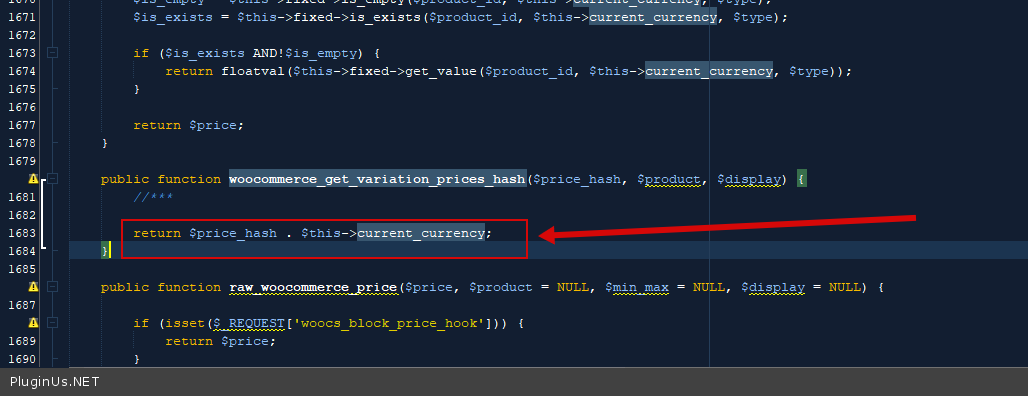
In file - wp-content\plugins\woocommerce-currency-switcher\classes\woocs_after_33.php - I changed this code - https://c2n.me/4bKrTBR.png
Hello
I changed code in the plugin on your site
In file - wp-content\plugins\woocommerce-currency-switcher\classes\woocs_after_33.php - I changed this code - https://c2n.me/4bKrTBR.png
Quote from thealphabeta on April 19, 2021, 17:40Hi Pablo. Ok great thank you for that!
So to clarify then, I need to copy that code over from the staging server to the live one?
Hi Pablo. Ok great thank you for that!
So to clarify then, I need to copy that code over from the staging server to the live one?
Quote from Pablo Borysenco on April 20, 2021, 12:22Hello
Yes! if it works correctly on the test site
Hello
Yes! if it works correctly on the test site
Quote from thealphabeta on April 28, 2021, 16:59Hi Pablo. Hope you're well. Trying to change this code on the live site and can't find the directory 'classes'?
https://ibb.co/XDnpWVv
Hi Pablo. Hope you're well. Trying to change this code on the live site and can't find the directory 'classes'?
Quote from Pablo Borysenco on April 29, 2021, 13:10Hello
So this is not my plugin .
Now I have changed this code - - wp-content\plugins\woocommerce-currency-switcher\classes\woocs_after_33.php - I changed this code - https://c2n.me/4bSkAWl.png
return md5( wp_json_encode($price_hash) . $this->current_currency);
Hello
So this is not my plugin .
Now I have changed this code - - wp-content\plugins\woocommerce-currency-switcher\classes\woocs_after_33.php - I changed this code - https://c2n.me/4bSkAWl.png
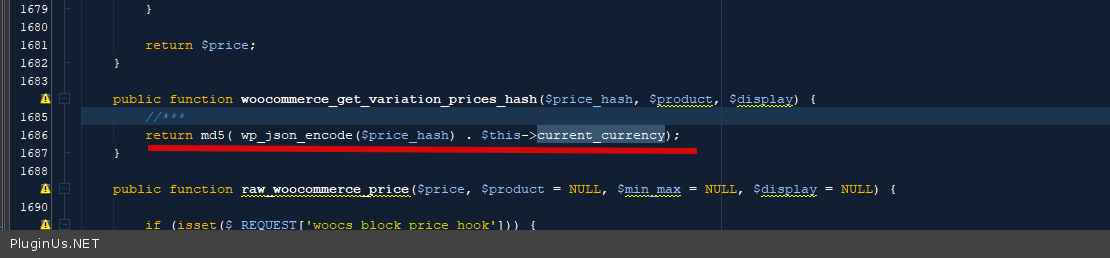
return md5( wp_json_encode($price_hash) . $this->current_currency);
Quote from thealphabeta on April 29, 2021, 14:24Sorry what do you mean its not your plugin?
Understood on the code, but when I access via FTP I can't find the directory 'classes' so can't access woocs_after_33.php to update the code
Sorry what do you mean its not your plugin?
Understood on the code, but when I access via FTP I can't find the directory 'classes' so can't access woocs_after_33.php to update the code
Quote from Pablo Borysenco on April 30, 2021, 11:12Hello
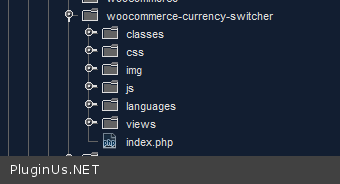
Sorry what do you mean its not your plugin? - if plugin folder does not contain folder "classes " So this is not my plugin OR this is my plugin but you deleted some folders in it
List of folders - https://c2n.me/4bT1Q4O.png
Hello
Sorry what do you mean its not your plugin? - if plugin folder does not contain folder"classes" So this is not my plugin OR this is my plugin but you deleted some folders in it
List of folders - https://c2n.me/4bT1Q4O.png
Quote from thealphabeta on May 4, 2021, 12:19Hi Pablo
This isn't working. I added the code as per your suggestion. I have just activated the plugin and it is applying VAT twice again
https://ibb.co/9wxmHQF
Hi Pablo
This isn't working. I added the code as per your suggestion. I have just activated the plugin and it is applying VAT twice again
Quote from Pablo Borysenco on May 5, 2021, 10:58Hello
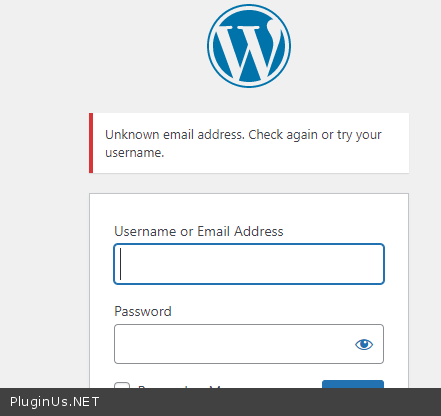
Ok! How it works on your test site?( unfortunately i can't check it - https://c2n.me/4bVtf85.png )
Hello
Ok! How it works on your test site?( unfortunately i can't check it - https://c2n.me/4bVtf85.png )
Quote from thealphabeta on May 5, 2021, 11:04I added it to the live site. Your login is still live. I have updated your password incase theres a problem with that and saved it in the private area
I added it to the live site. Your login is still live. I have updated your password incase theres a problem with that and saved it in the private area