
off-canvas
The support doesn work on Saturdays and Sundays, so some Friday requests can be answered on Monday. If you have problems with registration ask help on contact us page pleaseIf you not got email within 24~36 business hours, firstly check your spam box, and if no any email from the support there - back to the forum and read answer here. DO NOT ANSWER ON EMAILS [noreply@pluginus.net] FROM THE FORUM!! Emails are just for your info, all answers should be published only here.
The support doesn work on Saturdays and Sundays, so some Friday requests can be answered on Monday.
Quote from bennycohe on June 8, 2020, 20:01HI Pablo
Sorry, Cancel all the help requests, I found the problem, I hope it is will not happen again
It is maybe a cache problem, once I add the subcategories id number to the presets filter (Not only the main), I could see the other tree of custom taxonomy I report you in the prevition mail.
[woof taxonomies="product_cat:9778,9779+yith_product_brand:10138" dynamic_recount=1 btn_position="tb"]
product_cat: 9778 is the main and the 9779 is the subcategories. Actually I didn't have to add 9779 so I could see the rest, but without it is a problem.
I'm afraid it's not really dynamic, Because I have quite a few subcategories for each main category.
I hope you understand what I mean, do you have a solution for this, it will be a problem to enter all subcategories in the future
Thanks Benny
HI Pablo
Sorry, Cancel all the help requests, I found the problem, I hope it is will not happen again
It is maybe a cache problem, once I add the subcategories id number to the presets filter (Not only the main), I could see the other tree of custom taxonomy I report you in the prevition mail.
[woof taxonomies="product_cat:9778,9779+yith_product_brand:10138" dynamic_recount=1 btn_position="tb"]
product_cat: 9778 is the main and the 9779 is the subcategories. Actually I didn't have to add 9779 so I could see the rest, but without it is a problem.
I'm afraid it's not really dynamic, Because I have quite a few subcategories for each main category.
I hope you understand what I mean, do you have a solution for this, it will be a problem to enter all subcategories in the future
Thanks Benny

Quote from Pablo Borysenco on June 9, 2020, 12:03Hello
But it does not depend on my plugin. If you do not use standard category pages, the filter cannot determine the current category.
Hello
But it does not depend on my plugin. If you do not use standard category pages, the filter cannot determine the current category.
Quote from bennycohe on June 9, 2020, 15:08HI
Yes I do, I am using only standard category pages, And the problem behavior happends in a regular page (not the standart woo shop page) the presets filter I show you represent (product_cat:9778,9779......) the native category woocommerce.
The ID 9778 is a category level 1 and 9779 is level 2 like you see in picture 1.
From my understanding I have to add only 9778 to see the all tree in the filter but it is not happen unless I adding 9779
[woof taxonomies="product_cat:9778,9779+yith_product_brand:10138" dynamic_recount=1 btn_position="tb"]
The ID 9778 represent "beautys" main category level and 9779 is "makeup" subcategory. And there is other subcategory.
I'm afraid I'll have to enter all the ID numbers of all the subcategories below as the product entry increases.
We are building Multi Vandor Market Place, we are about to host thousands of products and vendors, The Filter has a very important role in managing this array.
hope you anderstand me now better
Benny
HI
Yes I do, I am using only standard category pages, And the problem behavior happends in a regular page (not the standart woo shop page) the presets filter I show you represent (product_cat:9778,9779......) the native category woocommerce.
The ID 9778 is a category level 1 and 9779 is level 2 like you see in picture 1.
From my understanding I have to add only 9778 to see the all tree in the filter but it is not happen unless I adding 9779
[woof taxonomies="product_cat:9778,9779+yith_product_brand:10138" dynamic_recount=1 btn_position="tb"]
The ID 9778 represent"beautys" main category level and 9779 is"makeup" subcategory. And there is other subcategory.
I'm afraid I'll have to enter all the ID numbers of all the subcategories below as the product entry increases.
We are building Multi Vandor Market Place, we are about to host thousands of products and vendors, The Filter has a very important role in managing this array.
hope you anderstand me now better
Benny
Quote from bennycohe on June 9, 2020, 15:09Forget to share the picture https://1drv.ms/u/s!AlJM7dNlHfVYoIRBHrj3w6ZqrUgT2A?e=i01nps
Forget to share the picture https://1drv.ms/u/s!AlJM7dNlHfVYoIRBHrj3w6ZqrUgT2A?e=i01nps
Quote from Pablo Borysenco on June 10, 2020, 12:19Hello
, I am using only standard category pages - No, I saw your site. you use custom pages
I understand you. Please drop me wp-admin access I will check it
Hello
, I am using only standard category pages - No, I saw your site. you use custom pages
I understand you. Please drop me wp-admin access I will check it
Quote from bennycohe on June 10, 2020, 13:16HI Pablo
Finally, after checking several times, the filter cannot associate a product to native woocomerce category Unless I write the ID categories numbers one by one, Yes I am using a custom pages. Like this one for exsample: https://myshopshop.com/beauty-care-vendor/gigi/
It is this page I am using this shortcode: [woof taxonomies="product_cat:9778,9779,9780,9800+yith_product_brand:10138" dynamic_recount=1 btn_position="tb"]
If I like to have a good results I need to I write the ID categories numbers one by one, There is about 300 hundred categories any store department, this is problem.
But I have to tell you I was not like this behaving befor.
I will send you the login in the privete data
Thank you
HI Pablo
Finally, after checking several times, the filter cannot associate a product to native woocomerce category Unless I write the ID categories numbers one by one, Yes I am using a custom pages. Like this one for exsample: https://myshopshop.com/beauty-care-vendor/gigi/
It is this page I am using this shortcode: [woof taxonomies="product_cat:9778,9779,9780,9800+yith_product_brand:10138" dynamic_recount=1 btn_position="tb"]
If I like to have a good results I need to I write the ID categories numbers one by one, There is about 300 hundred categories any store department, this is problem.
But I have to tell you I was not like this behaving befor.
I will send you the login in the privete data
Thank you
Quote from Pablo Borysenco on June 11, 2020, 11:30Hello
Please check my video - https://c2n.me/47WYWkv
Test page - https://myshopshop.com/6962-2/
yith_product_brand:10138 - there seems to be no brand for these categories, or products are not marked across the hierarchy of categories
the filter cannot associate a product to native woocomerce category - The filter works fine with this. Demo - https://demo.products-filter.com/product-category/clothing/man/pullover/
Hello
Please check my video - https://c2n.me/47WYWkv
Test page - https://myshopshop.com/6962-2/
yith_product_brand:10138 - there seems to be no brand for these categories, or products are not marked across the hierarchy of categories
the filter cannot associate a product to native woocomerce category - The filter works fine with this. Demo - https://demo.products-filter.com/product-category/clothing/man/pullover/
Quote from bennycohe on June 13, 2020, 08:07Hi Pablo
- Thank you for your help and more thanks for your patience.
- I understood your example but you did not include specific vendor id number in the shortcode, Your result showen the all categorys under product_cat:9778 and the all 5 vendors associate with this categorys, See please pictures number 1
- The yith_product_brand:10138 Absolutely support or marked across the hierarchy of category product_cat:9778 (I setup any product from this vendor to be in 9778. See please pictures number 2.
In this picture we can see the 1038 (brand) + 9778 (category) together living in harmony in the same filter and do the filtering job like expected. But with other brands that I do not want to show if I am building a custom page just fot 1038 brand ID.
This is youe shurtcode: [woof taxonomies="product_cat:9778" dynamic_recount=1]<br>
[woof_products]- My goal is to have a custom page to present a cut specific categories to specific vendor in preset shortcode like this: [woof taxonomies="product_cat:9778+yith_product_brand:10138" dynamic_recount=1 btn_position="tb"]
It is meen All the Products belong to vendor 10138 will cut and show in this page only under main category ID 9778 and the subcategory under it.Pablo some time it is not work Unless I manually insert the subcategories like the following example.
[woof taxonomies="product_cat:9778,9779,9780,9800,9869+yith_product_brand:10138" dynamic_recount=1 btn_position="tb"]
- This action makes me feel unsafe because I'm not sure the filter is working well so I need to insert the categories and all subcategories, In this way it works as expected.
https://1drv.ms/u/s!AlJM7dNlHfVYoIRmtCrLesjpvQMS5Q?e=xFgvLc
https://1drv.ms/u/s!AlJM7dNlHfVYoIRnjrYt67NNUxnzOg?e=VAr64NHope you anderstand me well now
Thanks Benny
Hi Pablo
- Thank you for your help and more thanks for your patience.
- I understood your example but you did not include specific vendor id number in the shortcode, Your result showen the all categorys under product_cat:9778 and the all 5 vendors associate with this categorys, See please pictures number 1
- The yith_product_brand:10138 Absolutely support or marked across the hierarchy of category product_cat:9778 (I setup any product from this vendor to be in 9778. See please pictures number 2.
In this picture we can see the 1038 (brand) + 9778 (category) together living in harmony in the same filter and do the filtering job like expected. But with other brands that I do not want to show if I am building a custom page just fot 1038 brand ID.
This is youe shurtcode: [woof taxonomies="product_cat:9778" dynamic_recount=1]<br>
[woof_products] - My goal is to have a custom page to present a cut specific categories to specific vendor in preset shortcode like this: [woof taxonomies="product_cat:9778+yith_product_brand:10138" dynamic_recount=1 btn_position="tb"]
It is meen All the Products belong to vendor 10138 will cut and show in this page only under main category ID 9778 and the subcategory under it.Pablo some time it is not work Unless I manually insert the subcategories like the following example.
[woof taxonomies="product_cat:9778,9779,9780,9800,9869+yith_product_brand:10138" dynamic_recount=1 btn_position="tb"]
- This action makes me feel unsafe because I'm not sure the filter is working well so I need to insert the categories and all subcategories, In this way it works as expected.
https://1drv.ms/u/s!AlJM7dNlHfVYoIRmtCrLesjpvQMS5Q?e=xFgvLc
https://1drv.ms/u/s!AlJM7dNlHfVYoIRnjrYt67NNUxnzOg?e=VAr64N
Hope you anderstand me well now
Thanks Benny
Quote from bennycohe on June 13, 2020, 09:46HI
If you can streamline Or improve this process, By inserting the primary category ID AND primary vendor ID (shortcode) in a custome page I will get the effect I described earlier.
my dream is to have Any custom page a presets filter serving sprsifuc vendor. In fact, it can be done but in a longer way
Thanks again Benny
HI
If you can streamline Or improve this process, By inserting the primary category ID AND primary vendor ID (shortcode) in a custome page I will get the effect I described earlier.
my dream is to have Any custom page a presets filter serving sprsifuc vendor. In fact, it can be done but in a longer way
Thanks again Benny
Quote from Pablo Borysenco on June 15, 2020, 12:31Hello
My test - https://c2n.me/47ZOVnQ
Hello
My test - https://c2n.me/47ZOVnQ
Quote from bennycohe on June 16, 2020, 00:08Thank you for your patience
It works great now, I changed Now the All the preasets filters to the primery product_cat and primery yith_product_brand ID numbers without the subcategories and it is work like expected, realy I don't know how but is work.
I am happy but I always need to know what I'm doing why it works now and it didn't work before (-:
Any way thanks again I hope I will not follow up on this kind of problem in the future.
Thank you for your patience
It works great now, I changed Now the All the preasets filters to the primery product_cat and primery yith_product_brand ID numbers without the subcategories and it is work like expected, realy I don't know how but is work.
I am happy but I always need to know what I'm doing why it works now and it didn't work before (-:
Any way thanks again I hope I will not follow up on this kind of problem in the future.
Quote from Pablo Borysenco on June 16, 2020, 09:56Hello
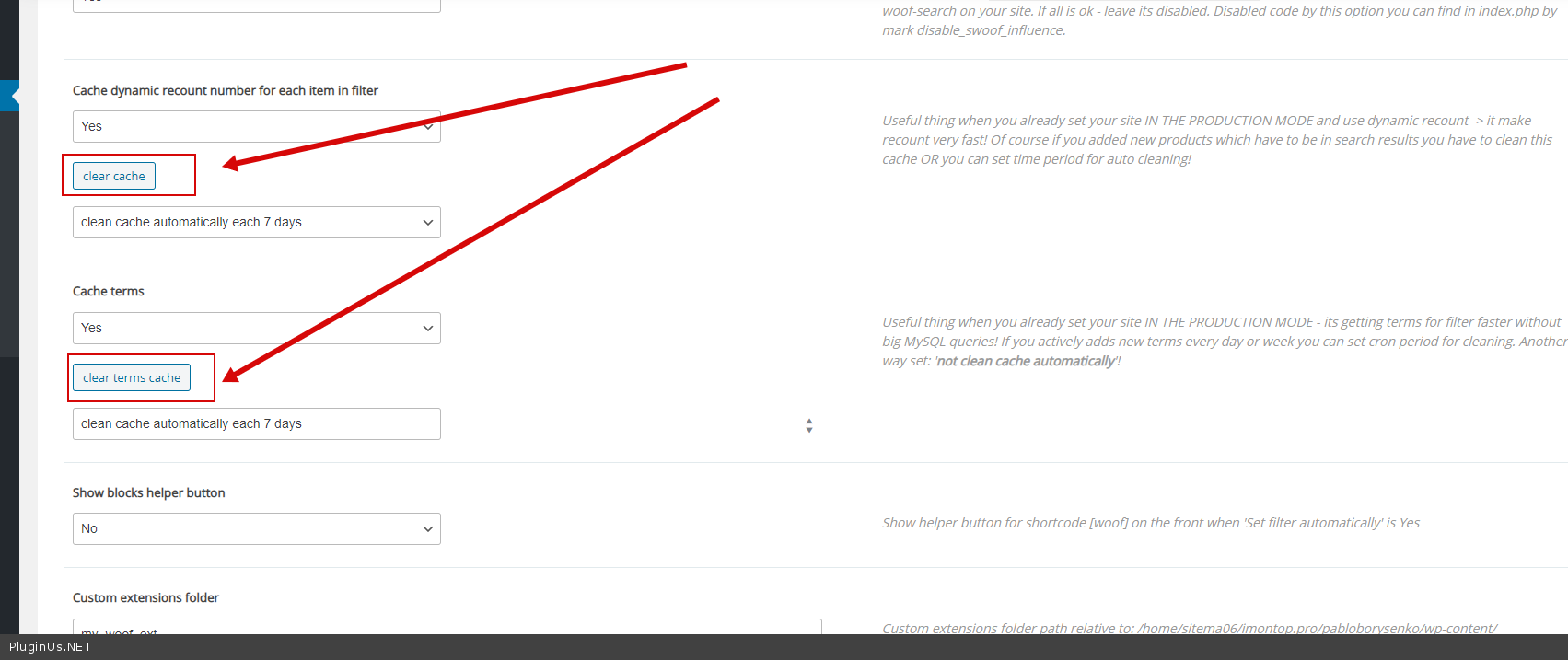
Please always clear the cache - https://c2n.me/480CG42.png
Hello
Please always clear the cache - https://c2n.me/480CG42.png
Quote from bennycohe on June 16, 2020, 10:11Oops maybe it was my problem, Thanks a lot
Oops maybe it was my problem, Thanks a lot
Quote from bennycohe on June 19, 2020, 11:24Hi Pablo
I like to change the X red icon to a custom one, how and what size and formt (jpeg, png, gif...), Please see the 2 picture attched.
https://1drv.ms/u/s!AlJM7dNlHfVYoIwRFP6Tg1mi7CJkyw?e=jAKRDn
https://1drv.ms/u/s!AlJM7dNlHfVYoIRBHrj3w6ZqrUgT2A?e=WE9jE6
Thanks Benny
Hi Pablo
I like to change the X red icon to a custom one, how and what size and formt (jpeg, png, gif...), Please see the 2 picture attched.
https://1drv.ms/u/s!AlJM7dNlHfVYoIwRFP6Tg1mi7CJkyw?e=jAKRDn
https://1drv.ms/u/s!AlJM7dNlHfVYoIRBHrj3w6ZqrUgT2A?e=WE9jE6
Thanks Benny
Quote from Pablo Borysenco on June 19, 2020, 12:57Hello
You need to replace the image here - wp-content\plugins\woocommerce-products-filter\img\delete.png Please use the same name
Hello
You need to replace the image here - wp-content\plugins\woocommerce-products-filter\img\delete.png Please use the same name
Quote from Pablo Borysenco on June 22, 2020, 11:09Hello
Welcome;)
Hello
Welcome;)
Quote from bennycohe on June 22, 2020, 17:50Hi Pablo
I'm already ashamed to ask you too many questions, But I can't find a solution to the follow strange problem. The filter work fine incloud cleaning cash you suggest and any product or vendor I added I can see it immediately on the filter list Bside vendor id 9531.
That shortcode [woof taxonomies="product_cat:9778+yith_product_brand:9531" dynamic_recount=1] supposed to place the vendor specific products from categories id 9778 And it is not happends even in your Foo test page
If you replace instad 9531 other vendors ID's belong to 9778 category ID like vendors ID's 9703 or 9529 or 10138, It work fine and show filter elements like expected.
Please try your self in your Foo test page. It drives me crazy because I find no logical reason for this result. I understand the technique of building presets filter on a custom page But it doesn't work for me here.
Due the fact that this brand 9531 is not shown, it can not be seen either On all other pages, it is set to display. Like his custome page here,
Please help to understand why because before your last visit it is was there in the filter and now disappeared and the other problems before was fixed (-:
Your admin login open
Thanks Benny
Hi Pablo
I'm already ashamed to ask you too many questions, But I can't find a solution to the follow strange problem. The filter work fine incloud cleaning cash you suggest and any product or vendor I added I can see it immediately on the filter list Bside vendor id 9531.
That shortcode [woof taxonomies="product_cat:9778+yith_product_brand:9531" dynamic_recount=1] supposed to place the vendor specific products from categories id 9778 And it is not happends even in your Foo test page
If you replace instad 9531 other vendors ID's belong to 9778 category ID like vendors ID's 9703 or 9529 or 10138, It work fine and show filter elements like expected.
Please try your self in your Foo test page. It drives me crazy because I find no logical reason for this result. I understand the technique of building presets filter on a custom page But it doesn't work for me here.
Due the fact that this brand 9531 is not shown, it can not be seen either On all other pages, it is set to display. Like his custome page here,
Please help to understand why because before your last visit it is was there in the filter and now disappeared and the other problems before was fixed (-:
Your admin login open
Thanks Benny
Quote from bennycohe on June 22, 2020, 21:30HI Pablo
Sorry, This is not your problem, The filter is workin fine, For some unclear reason all these vendor products have been deleted, we have no idea how this happened.
That's why they're not shown in the filter, I'm shocked. While I have backups, I don't know when they were deleted, Restoring this backup will erase our work in the last few days
We are now working to recover the deleted products, anyway thank you and let you know if there is still a problem, I don't think so
Thanks
HI Pablo
Sorry, This is not your problem, The filter is workin fine, For some unclear reason all these vendor products have been deleted, we have no idea how this happened.
That's why they're not shown in the filter, I'm shocked. While I have backups, I don't know when they were deleted, Restoring this backup will erase our work in the last few days
We are now working to recover the deleted products, anyway thank you and let you know if there is still a problem, I don't think so
Thanks