
off-canvas
The support doesn work on Saturdays and Sundays, so some Friday requests can be answered on Monday. If you have problems with registration ask help on contact us page pleaseIf you not got email within 24~36 business hours, firstly check your spam box, and if no any email from the support there - back to the forum and read answer here. DO NOT ANSWER ON EMAILS [noreply@pluginus.net] FROM THE FORUM!! Emails are just for your info, all answers should be published only here.
The support doesn work on Saturdays and Sundays, so some Friday requests can be answered on Monday.
Quote from bennycohe on February 19, 2020, 15:37OK In the privet data popup
Thanks Benny
OK In the privet data popup
Thanks Benny

Quote from Pablo Borysenco on February 20, 2020, 13:22Hello
Please do test.
Correct shortcode: [woof_products taxonomies="yith_product_brand:9703"]
Hello
Please do test.
Correct shortcode: [woof_products taxonomies="yith_product_brand:9703"]
Quote from bennycohe on February 20, 2020, 18:23Yes, Working like expected, I really appreciate your effort
I want to tell you that I am very pleased with the filter, Works amazing, A little hard for me to put together short code combinations, But I am slowly learning from the examples you write. Eventually the combinations are repeated and In the near future I will learn most of them that I need to my site functioning.
In the mean time, Can you please center for me the resultes filter links on the top of any page when using the filter, they are very powerfull uses but they are not look nice postion specialy in desktop view + Translate a "range price" filtter letters
there's a way to do it with css, Look please in the pictures below how it is look in mobile and desktop view
https://1drv.ms/u/s!AlJM7dNlHfVYm5J_IXIsvR-vkkjQgQ?e=ikPZvG
https://1drv.ms/u/s!AlJM7dNlHfVYm5MAj6BBAMmWPtneOg?e=2i4HrI
Thanks Benny
Yes, Working like expected, I really appreciate your effort
I want to tell you that I am very pleased with the filter, Works amazing, A little hard for me to put together short code combinations, But I am slowly learning from the examples you write. Eventually the combinations are repeated and In the near future I will learn most of them that I need to my site functioning.
In the mean time, Can you please center for me the resultes filter links on the top of any page when using the filter, they are very powerfull uses but they are not look nice postion specialy in desktop view + Translate a"range price" filtter letters
there's a way to do it with css, Look please in the pictures below how it is look in mobile and desktop view
https://1drv.ms/u/s!AlJM7dNlHfVYm5J_IXIsvR-vkkjQgQ?e=ikPZvG
https://1drv.ms/u/s!AlJM7dNlHfVYm5MAj6BBAMmWPtneOg?e=2i4HrI
Thanks Benny
Quote from Pablo Borysenco on February 21, 2020, 12:25Hello
In file index.php - https://c2n.me/4675LqA.png
Add css:
.woof_products_top_panel{
margin-left: auto;
margin-right: auto;
width: max-content;}
Hello
In file index.php - https://c2n.me/4675LqA.png
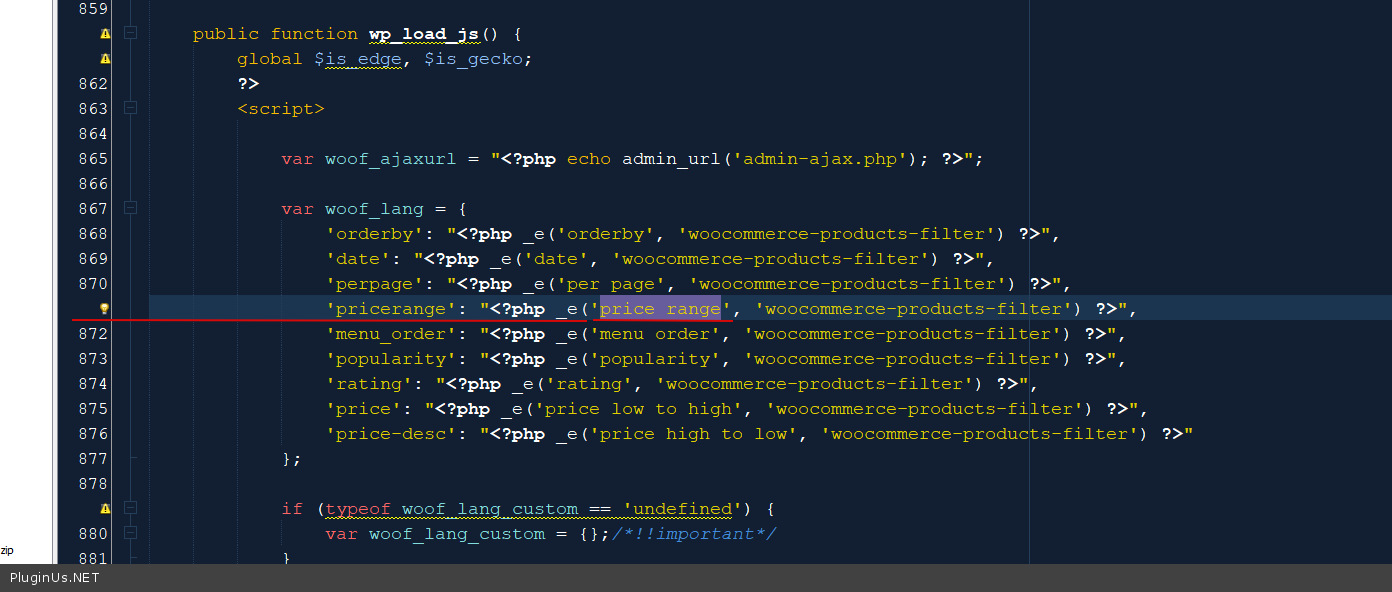
Add css:
.woof_products_top_panel{
margin-left: auto;
margin-right: auto;
width: max-content;
}
Quote from bennycohe on February 21, 2020, 14:43HI
Thank you, working
Benny
HI
Thank you, working
Benny
Quote from Pablo Borysenco on February 24, 2020, 13:13Hello Benny
Welcome;)
Hello Benny
Welcome;)
Quote from bennycohe on March 3, 2020, 12:52HI
This [woof_products taxonomies="yith_product_brand:9703" woof_products per_page=12 columns=4] shortcode working perfect and present me the only vendor product id 9703 in this page https://myshopshop.com/beauty-care-vendor/magiray-vendor/
This [woof taxonomies="product_cat:9703" dynamic_recount=1] shortcode Should display a filter that filters only the product categories and other taxonomy belong this ID 9703. It works great, But introduces other vendors as well all over the market in this preaset filter. How do I prevent them (The other vendors is not ID 9703) do not inclood in this preaset filter, Otherwise, I see a page without products if I filter on one of the vendors unrelated to that page?
Look please the screenshut https://1drv.ms/u/s!AlJM7dNlHfVYm9YZevrY-7g7xb8qYg?e=3FRGgH
Thanks Benny
HI
This [woof_products taxonomies="yith_product_brand:9703" woof_products per_page=12 columns=4] shortcode working perfect and present me the only vendor product id 9703 in this page https://myshopshop.com/beauty-care-vendor/magiray-vendor/
This [woof taxonomies="product_cat:9703" dynamic_recount=1] shortcode Should display a filter that filters only the product categories and other taxonomy belong this ID 9703. It works great, But introduces other vendors as well all over the market in this preaset filter. How do I prevent them (The other vendors is not ID 9703) do not inclood in this preaset filter, Otherwise, I see a page without products if I filter on one of the vendors unrelated to that page?
Look please the screenshut https://1drv.ms/u/s!AlJM7dNlHfVYm9YZevrY-7g7xb8qYg?e=3FRGgH
Thanks Benny
Quote from Pablo Borysenco on March 4, 2020, 13:14Hello
I'm not sure I understand you.
Try it please - [woof taxonomies="product_cat:9703+yith_product_brand:9703" dynamic_recount=1]
Hello
I'm not sure I understand you.
Try it please - [woof taxonomies="product_cat:9703+yith_product_brand:9703" dynamic_recount=1]
Quote from bennycohe on March 4, 2020, 17:12HI
You understand me very well, And it working perfect. It helped me to understand the string. I have exactly what I need. Now that string will be a sample to other preaset vendor custom pages (Just change the ID number)
I keep reading your big help documentation, There is alot of option and I am happy the woof filter is very flexible. For example, I found that your search extension is very accurate and fast than another one I know on the web for woocommerce. In the meantime, I'm studying the structure, I may need help here in the future.
Any way Thank a lot
Benny
HI
You understand me very well, And it working perfect. It helped me to understand the string. I have exactly what I need. Now that string will be a sample to other preaset vendor custom pages (Just change the ID number)
I keep reading your big help documentation, There is alot of option and I am happy the woof filter is very flexible. For example, I found that your search extension is very accurate and fast than another one I know on the web for woocommerce. In the meantime, I'm studying the structure, I may need help here in the future.
Any way Thank a lot
Benny
Quote from Pablo Borysenco on March 5, 2020, 12:23Hello
Ok! Thank you and welcome;)
Hello
Ok! Thank you and welcome;)
Quote from bennycohe on March 12, 2020, 09:59Hi,
Just to let you know, The integration between your wonderful filter and off-canvas Flyouts
Try to see in mobil and desktop view.
It is very flexible plugin and do the job like expected to contain any content, I am care customer because the filter need an off-canvas integration if you plan to do it.
I will and I think a lot of me will be happy to have this behave in one box, RTL Support too will increase the sale.
Any way the filter is amazing.
Thank Benny
Hi,
Just to let you know, The integration between your wonderful filter and off-canvas Flyouts
Try to see in mobil and desktop view.
It is very flexible plugin and do the job like expected to contain any content, I am care customer because the filter need an off-canvas integration if you plan to do it.
I will and I think a lot of me will be happy to have this behave in one box, RTL Support too will increase the sale.
Any way the filter is amazing.
Thank Benny
Quote from bennycohe on March 12, 2020, 10:00forgot the link
This the result in my site https://myshopshop.com/beauty-and-personal-care/makeup/
Thanks
forgot the link
This the result in my site https://myshopshop.com/beauty-and-personal-care/makeup/
Thanks
Quote from Pablo Borysenco on March 12, 2020, 13:31Hello
In the new version of the plugin, we will add such a feature( without third-party plugins ) - https://c2n.me/46pwEm2
Hello
In the new version of the plugin, we will add such a feature( without third-party plugins ) - https://c2n.me/46pwEm2
Quote from bennycohe on March 13, 2020, 18:53Hi
The resultes filter links on the top of any page when using the filter have a problem when I am using more then 3 filtter. Look please the results is desktop & mobile veiw, In wide screen no problem, But in mobile view it is go out the theme frame, It is look like is not responsive behave.
Desktop: https://1drv.ms/u/s!AlJM7dNlHfVYn58MGECzQKzl1syh3g?e=7SWVe0
Mobile: https://1drv.ms/u/s!AlJM7dNlHfVYn58N7VOOBn5FOHl5gw?e=LS3bOA
https://1drv.ms/u/s!AlJM7dNlHfVYn58OKlmVOlmCu2ARjA?e=hKFau8
Thanks Benny
Hi
The resultes filter links on the top of any page when using the filter have a problem when I am using more then 3 filtter. Look please the results is desktop & mobile veiw, In wide screen no problem, But in mobile view it is go out the theme frame, It is look like is not responsive behave.
Desktop: https://1drv.ms/u/s!AlJM7dNlHfVYn58MGECzQKzl1syh3g?e=7SWVe0
Mobile: https://1drv.ms/u/s!AlJM7dNlHfVYn58N7VOOBn5FOHl5gw?e=LS3bOA
https://1drv.ms/u/s!AlJM7dNlHfVYn58OKlmVOlmCu2ARjA?e=hKFau8
Thanks Benny
Quote from Pablo Borysenco on March 16, 2020, 14:26Hello Benny
Try to add this CSS:
body .woof_products_top_panel {width: 100%;
padding: 10px;
}
Hello Benny
Try to add this CSS:
width: 100%;
padding: 10px;
Quote from bennycohe on March 16, 2020, 16:42HI
Yes Perfect it is work but can you include in this CSS a center style of this block, Because this CSS align to the left of the page.
To remind you send me a prevision CSS to center the block but it was not responsive.
This one
.woof_products_top_panel{
margin-left: auto;
margin-right: auto;
width: max-content;}
Thanks Benny
HI
Yes Perfect it is work but can you include in this CSS a center style of this block, Because this CSS align to the left of the page.
To remind you send me a prevision CSS to center the block but it was not responsive.
This one
.woof_products_top_panel{
margin-left: auto;
margin-right: auto;
width: max-content;
}
Thanks Benny
Quote from Pablo Borysenco on March 17, 2020, 13:07Hello Benny
Ok
Try to delete this style - https://c2n.me/46tYOHX.png
And add :
body .woof_products_top_panel {width: 100%;
padding: 10px;
}.woof_products_top_panel ul{text-align: center;}body .woof_products_top_panel li {float: none;
display: inline-block;}
Hello Benny
Ok
Try to delete this style - https://c2n.me/46tYOHX.png
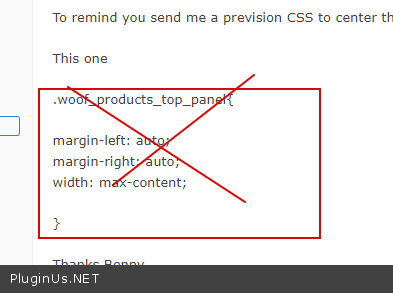
And add :
width: 100%;
padding: 10px;
display: inline-block;
Quote from bennycohe on March 17, 2020, 15:27Hi
You are the best, Thank you, working perfect
Hi
You are the best, Thank you, working perfect
Quote from Pablo Borysenco on March 18, 2020, 12:39Hello
Welcome;)
http://codecanyon.net/downloads - rate please the plugin if you liked it ...
Hello
Welcome;)
http://codecanyon.net/downloads - rate please the plugin if you liked it ...
Quote from bennycohe on March 28, 2020, 17:08HI, hope you good with the korona days (-:
- Where I can translate "Rared-5", I believe there are 1,2,3,4 as well
Pleas look the picture attached https://1drv.ms/u/s!AlJM7dNlHfVYn8AIuK-a24r1UBJyOg?e=FFgOJO
After applying the rating filter
2. How can I duplicate the "apply button" and "reset button" to the top of the filter too, I saw it in one of your sample, I like them both potion, It's need to long filter
https://1drv.ms/u/s!AlJM7dNlHfVYn8AJlFjMB1s6j5YESQ?e=v1gbRz
Thanks Benny
HI, hope you good with the korona days (-:
- Where I can translate"Rared-5", I believe there are 1,2,3,4 as well
Pleas look the picture attached https://1drv.ms/u/s!AlJM7dNlHfVYn8AIuK-a24r1UBJyOg?e=FFgOJO
After applying the rating filter
2. How can I duplicate the"apply button" and"reset button" to the top of the filter too, I saw it in one of your sample, I like them both potion, It's need to long filter
https://1drv.ms/u/s!AlJM7dNlHfVYn8AJlFjMB1s6j5YESQ?e=v1gbRz
Thanks Benny