

off-canvas
The support doesn work on Saturdays and Sundays, so some Friday requests can be answered on Monday. If you have problems with registration ask help on contact us page pleaseIf you not got email within 24~36 business hours, firstly check your spam box, and if no any email from the support there - back to the forum and read answer here. DO NOT ANSWER ON EMAILS [noreply@pluginus.net] FROM THE FORUM!! Emails are just for your info, all answers should be published only here.
The support doesn work on Saturdays and Sundays, so some Friday requests can be answered on Monday.
Quote from bennycohe on January 7, 2020, 15:16Hi,
I ask in envato If Is it possible to set different filters preset, and place an individual short code in different page to have different result. you say yes.
The second question was: Is there a built-in option to present the filter inside off-canvas Preferred RTL supported. I will explain:
This is an off-canvas sidebar: https://wordpress.org/plugins/off-canvas-sidebars/ And it is mobile friendly, As I understand from yours woof filter explanation, preset filters can be created and placed in many custom pages.
But I'm not sure If there is a builtin woof option to displayed the woof product filter floating off-canvas visibility (mobile friendly), I understanding we need to use the woof short code only in Custom Sidebars (not mobile friendly) like this https://wordpress.org/plugins/custom-sidebars/
summery woof filter builtin off-canvas without using external plugin to be mobile friendly dispelled.
Hope you understand
Thanks
Hi,
I ask in envato If Is it possible to set different filters preset, and place an individual short code in different page to have different result. you say yes.
The second question was: Is there a built-in option to present the filter inside off-canvas Preferred RTL supported. I will explain:
This is an off-canvas sidebar: https://wordpress.org/plugins/off-canvas-sidebars/ And it is mobile friendly, As I understand from yours woof filter explanation, preset filters can be created and placed in many custom pages.
But I'm not sure If there is a builtin woof option to displayed the woof product filter floating off-canvas visibility (mobile friendly), I understanding we need to use the woof short code only in Custom Sidebars (not mobile friendly) like this https://wordpress.org/plugins/custom-sidebars/
summery woof filter builtin off-canvas without using external plugin to be mobile friendly dispelled.
Hope you understand
Thanks
Quote from bennycohe on January 7, 2020, 21:47Woof filter builtin off-canvas without using external plugin to be mobile uses needed for friendly and useful customers filtering.
Woof filter builtin off-canvas without using external plugin to be mobile uses needed for friendly and useful customers filtering.

Quote from Pablo Borysenco on January 8, 2020, 12:42Hello
Unfortunately, this version of the plugin does not have such a feature. But we are preparing a new version of the plugin with a similar function - https://clip2net.com/s/45p53Et
Hello
Unfortunately, this version of the plugin does not have such a feature. But we are preparing a new version of the plugin with a similar function - https://clip2net.com/s/45p53Et
Quote from bennycohe on January 8, 2020, 13:27HI
Grate, how long it is going to take? Please consider a few things:
- RTL theme support we are using very famous flatsome theme.
- full screen view with 1, 2 OR 3 Columns to display elements such as categories, quantity, brand, etc... On a desktop display, the filter covers the entire screen, in a cellular view, the filter is responsive, and also covers the entire screen. Excellent sample of what I mean you can see here http://myshopshop.com/beauty-and-personal-care/skin-care/
- We've found that your filter does the job better than the others, but it's missing the mobile friendly and it's very important today. I don't have to tell you that.
Thanks
HI
Grate, how long it is going to take? Please consider a few things:
- RTL theme support we are using very famous flatsome theme.
- full screen view with 1, 2 OR 3 Columns to display elements such as categories, quantity, brand, etc... On a desktop display, the filter covers the entire screen, in a cellular view, the filter is responsive, and also covers the entire screen. Excellent sample of what I mean you can see here http://myshopshop.com/beauty-and-personal-care/skin-care/
- We've found that your filter does the job better than the others, but it's missing the mobile friendly and it's very important today. I don't have to tell you that.
Thanks
Quote from Pablo Borysenco on January 9, 2020, 13:08Hello
- Unfortunately we do not have such information
- This is possible in the current version of the plugin.
Hello
- Unfortunately we do not have such information
- This is possible in the current version of the plugin.
Quote from bennycohe on January 30, 2020, 10:30HiI install the plugin and I asking for shortcode helps structure.I need your help ones to build a preset shortcode structure and place it in a costume page, The goal is to display only the relevant products defined on this page.For that matter, I built one page called TES1
4 Products The name Test1-4I am using now a general Woof shortcode named [widget id="woof_widget-2"]Thant shortcode return me the all product in our website of course and it is not right.We are using 8Degree Fly Menu to store Woof shortcode to have a beautiful and friendly mobile behavior.By clicking the upper right icon on the screen the filter will openNow like you see the page is empty (this not right) but if you filtering the product upper.I need the only 4 product in category "Uncategorized" will appear when this custom page open and by keep using the filter The results will be in this page not like now.Hope you understand and tell me please if you need admin access
thanks Benny
4 Products The name Test1-4
thanks Benny
Quote from Pablo Borysenco on January 30, 2020, 14:45Hello
Paste your license key here - https://c2n.me/43SC6rb.png -> https://c2n.me/42HBIt7.png
Read this please - https://products-filter.com/documentation/#section_3_2
Hello
Paste your license key here - https://c2n.me/43SC6rb.png -> https://c2n.me/42HBIt7.png


Read this please - https://products-filter.com/documentation/#section_3_2
Quote from bennycohe on January 31, 2020, 07:23HI
Yes I did the license key an admin login information.
Yes I read the documentation before and I'm not really close to understanding the syntax. I need your help once, get it out and then it will be easier in the future I hope.
Thanks for helping.
Benny
HI
Yes I did the license key an admin login information.
Yes I read the documentation before and I'm not really close to understanding the syntax. I need your help once, get it out and then it will be easier in the future I hope.
Thanks for helping.
Benny
Quote from Pablo Borysenco on January 31, 2020, 12:53Hello Benny
Let's try to fix it together:
To show the filter please use a shortcode - https://products-filter.com/shortcode/woof/
To show the products - https://products-filter.com/shortcode/woof_products/
Now you need to limit the output of filters and products for a specific category:
use attribute: taxonomies AND category slug = product_cat
To assign a specific category you need an ID - https://c2n.me/45LW5Mc.png
Result: taxonomies="product_cat:15"
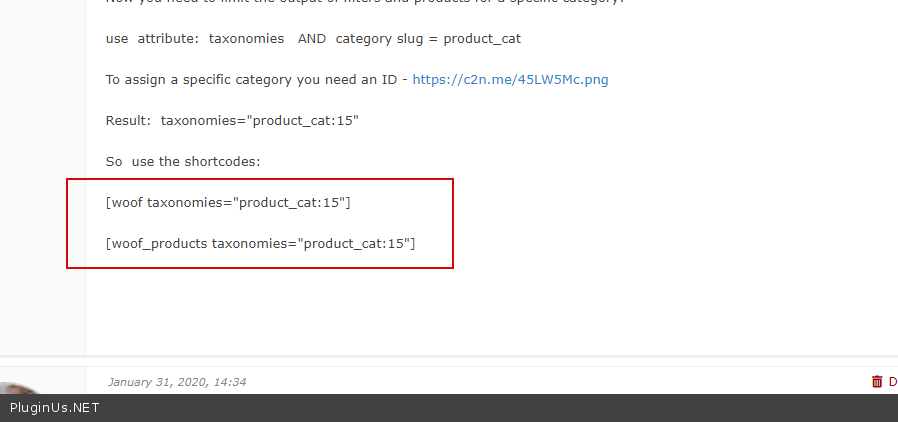
So use the shortcodes:
[woof taxonomies="product_cat:15"]
[woof_products taxonomies="product_cat:15"]
Hello Benny
Let's try to fix it together:
To show the filter please use a shortcode - https://products-filter.com/shortcode/woof/
To show the products - https://products-filter.com/shortcode/woof_products/
Now you need to limit the output of filters and products for a specific category:
use attribute: taxonomies AND category slug = product_cat
To assign a specific category you need an ID - https://c2n.me/45LW5Mc.png
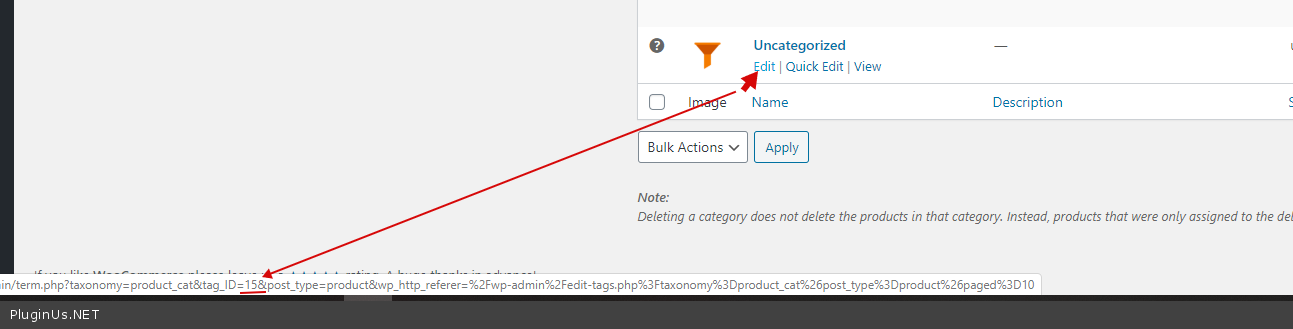
Result: taxonomies="product_cat:15"
So use the shortcodes:
[woof taxonomies="product_cat:15"]
[woof_products taxonomies="product_cat:15"]
Quote from bennycohe on January 31, 2020, 14:34Hi Pablo
Trust me but I have no idea how to get started, I understand your references but don't know how to connect them, I'm a good businessman but don't understand code syntax (-:, It's very hard for me, I plead guilty
I'm a fighter and not giving up, and I wouldn't ask you if it wasn't hard for me.
As I explained there are 4 products ID 4923, 4924, 4925, 2900 in category "Uncategorized" (ID 15), I like to filter it in http://myshopshop.com/test1/ 12 products a page. I think this all the information. Anyway You have a login to check it out.
If you build me the syntax structure, I think I will understand the direction learning for the next shortcode.
Thank you for understanding me.
Benny
Hi Pablo
Trust me but I have no idea how to get started, I understand your references but don't know how to connect them, I'm a good businessman but don't understand code syntax (-:, It's very hard for me, I plead guilty
I'm a fighter and not giving up, and I wouldn't ask you if it wasn't hard for me.
As I explained there are 4 products ID 4923, 4924, 4925, 2900 in category"Uncategorized" (ID 15), I like to filter it in http://myshopshop.com/test1/ 12 products a page. I think this all the information. Anyway You have a login to check it out.
If you build me the syntax structure, I think I will understand the direction learning for the next shortcode.
Thank you for understanding me.
Benny
Quote from bennycohe on January 31, 2020, 23:30Hi
Every weekend we are changing the admin login, I will send yours in the secure line
Have a good weekend
Benny
Hi
Every weekend we are changing the admin login, I will send yours in the secure line
Have a good weekend
Benny
Quote from Pablo Borysenco on February 3, 2020, 15:21Hello
I add these shortcodes - https://c2n.me/45OpWwF.png - to this page - http://myshopshop.com/test1/
Hello
I add these shortcodes - https://c2n.me/45OpWwF.png - to this page - http://myshopshop.com/test1/
Quote from bennycohe on February 3, 2020, 21:03Hi
OK nice working, I understand the idea.
Now How can I disappear the other categories is not belong to that page. I need only the Uncategorized category will be in that filter.
Look picture https://1drv.ms/u/s!AlJM7dNlHfVYmv44ooXPfdxfCMzCXg?e=VIGorK
Thanks
Hi
OK nice working, I understand the idea.
Now How can I disappear the other categories is not belong to that page. I need only the Uncategorized category will be in that filter.
Look picture https://1drv.ms/u/s!AlJM7dNlHfVYmv44ooXPfdxfCMzCXg?e=VIGorK
Thanks
Quote from Pablo Borysenco on February 4, 2020, 12:46Hello
Options - https://c2n.me/45PolDm.png
Please watch this video - https://products-filter.com/video-tutorials#video_beGT6p_look
Hello
Options - https://c2n.me/45PolDm.png
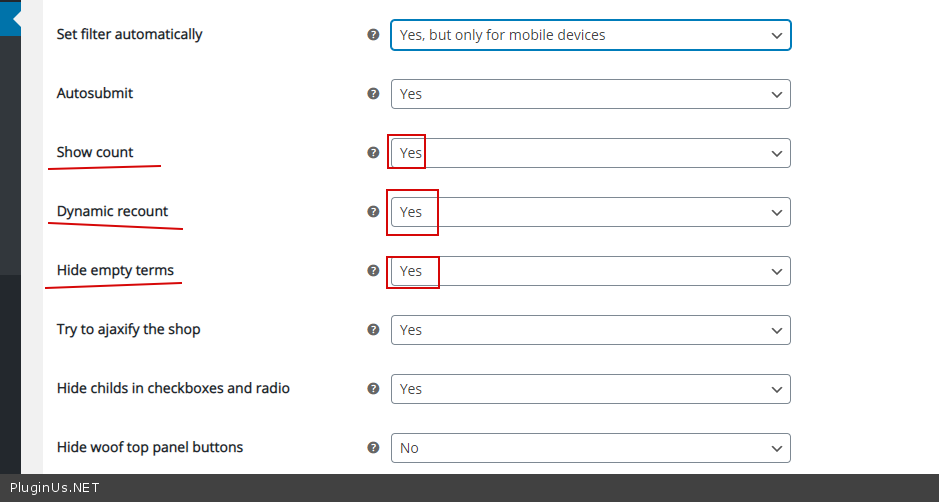
Please watch this video - https://products-filter.com/video-tutorials#video_beGT6p_look
Quote from bennycohe on February 15, 2020, 13:00OK, I get it and it is work, I am happy
How can I display a products belong to specific Brand on his custom page.
The Brand was created on Yith custom taxonomy plugin.
Brand ID is 9703
Look Please the picture
https://1drv.ms/u/s!AlJM7dNlHfVYm5JOzYcqei_nf0iZeg?e=OBUkDT
Thanks for help Benny
OK, I get it and it is work, I am happy
How can I display a products belong to specific Brand on his custom page.
The Brand was created on Yith custom taxonomy plugin.
Brand ID is 9703
Look Please the picture
https://1drv.ms/u/s!AlJM7dNlHfVYm5JOzYcqei_nf0iZeg?e=OBUkDT
Thanks for help Benny
Quote from Pablo Borysenco on February 17, 2020, 14:18Hello Benny
Try to use [woof_products taxonomy="yith_product_brand:9703"]
Hello Benny
Try to use [woof_products taxonomy="yith_product_brand:9703"]
Quote from bennycohe on February 18, 2020, 15:00HI Pablo
Not working proply, It is present the all website products. Do you think there is a solution for this?
The picture attached below show 1 preaset filter product I setup after I learen from you (-:, in this link http://myshopshop.com/beauty-and-personal-care/skin-care/
Like you see when you are open in the off-canvas menu in upper right corner, We can see the yith brand filter. https://1drv.ms/u/s!AlJM7dNlHfVYm5J0tMmh3Jgv922Xjg?e=DFsxIy
How can we filter it that custom page.
If you do not find a solution I will need to define brands like categories, I want to avoid that, Because it confuses and creates duplicity
Thank Benny
HI Pablo
Not working proply, It is present the all website products. Do you think there is a solution for this?
The picture attached below show 1 preaset filter product I setup after I learen from you (-:, in this link http://myshopshop.com/beauty-and-personal-care/skin-care/
Like you see when you are open in the off-canvas menu in upper right corner, We can see the yith brand filter. https://1drv.ms/u/s!AlJM7dNlHfVYm5J0tMmh3Jgv922Xjg?e=DFsxIy
How can we filter it that custom page.
If you do not find a solution I will need to define brands like categories, I want to avoid that, Because it confuses and creates duplicity
Thank Benny
Quote from Pablo Borysenco on February 19, 2020, 12:54Hello Benny
Please provide me admin access.
Hello Benny
Please provide me admin access.