
Woof Shortcode on other page except Shop
The support doesn work on Saturdays and Sundays, so some Friday requests can be answered on Monday. If you have problems with registration ask help on contact us page pleaseIf you not got email within 24~36 business hours, firstly check your spam box, and if no any email from the support there - back to the forum and read answer here. DO NOT ANSWER ON EMAILS [noreply@pluginus.net] FROM THE FORUM!! Emails are just for your info, all answers should be published only here.
The support doesn work on Saturdays and Sundays, so some Friday requests can be answered on Monday.

Quote from ankitpatel on November 15, 2019, 14:44Hi,
can you please check now
Hi,
can you please check now

Quote from Pablo Borysenco on November 18, 2019, 11:12Hello
I want to ask you like shop page when you select any filter it shows selected filter on top left side - https://products-filter.com/shortcode/woof_search_options/
The problem is in your custom code. The filter uses a shop template to display products. Checking is_page() in this case may not work correctly. Try defining the page by URL
Hello
I want to ask you like shop page when you select any filter it shows selected filter on top left side - https://products-filter.com/shortcode/woof_search_options/
The problem is in your custom code. The filter uses a shop template to display products. Checking is_page() in this case may not work correctly. Try defining the page by URL
Quote from ankitpatel on November 19, 2019, 01:40https://products-filter.com/shortcode/woof_search_options/
==> thanks for the above link, I put this shortcode on the top, now I can see the filter but the issue is when I clear filter it removes on sales filter as well.
The problem is in your custom code. The filter uses a shop template to display products. Checking is_page() in this case may not work correctly. Try defining the page by URL
==> I put is_page() condition based on your suggestion on earlier answer, now I also tried with
global $wp;
$current_url = home_url(add_query_arg(array(), $wp->request));
if ($current_url == "http://siteforhosting.co.in/sites/home_care_new/test-filter"){add_filter('woof_get_request_data', 'my_woof_get_request_data'); } but still when I clear filter it shows all the products not only "on sale" products. Waiting forward for reply
https://products-filter.com/shortcode/woof_search_options/
==> thanks for the above link, I put this shortcode on the top, now I can see the filter but the issue is when I clear filter it removes on sales filter as well.
The problem is in your custom code. The filter uses a shop template to display products. Checking is_page() in this case may not work correctly. Try defining the page by URL
==> I put is_page() condition based on your suggestion on earlier answer, now I also tried with
global $wp;
$current_url = home_url(add_query_arg(array(), $wp->request));
if ($current_url =="http://siteforhosting.co.in/sites/home_care_new/test-filter"){add_filter('woof_get_request_data', 'my_woof_get_request_data');
}
but still when I clear filter it shows all the products not only"on sale" products.
Waiting forward for reply
Quote from Pablo Borysenco on November 19, 2019, 17:28Hello
Oh! Yes! I know the reason!
You use Ajax mode. The function is_page does not work in Ajax mode and URL is xxxx/wp-admin
In your case, you need to disable Ajax mode ( is_ajax=0)
Hello
Oh! Yes! I know the reason!
You use Ajax mode. The function is_page does not work in Ajax mode and URL is xxxx/wp-admin
In your case, you need to disable Ajax mode ( is_ajax=0)
Quote from ankitpatel on June 26, 2020, 16:05Hello,
https://homecare.ischanging.com.au/specials/
I asked your before sales only product listing on our site, which works perfect.
Now, my question is there any way where I can set up search filter for only range of products with specific custom field value enable with each products.
what I mean to say is check this page : https://homecare.ischanging.com.au/hire/
where I list all the products which are eligible for hire ( each products has hire_price custom field in it ), I want to setup search for only hire products.
Can you please let me know how I can do this?
Hello,
https://homecare.ischanging.com.au/specials/
I asked your before sales only product listing on our site, which works perfect.
Now, my question is there any way where I can set up search filter for only range of products with specific custom field value enable with each products.
what I mean to say is check this page : https://homecare.ischanging.com.au/hire/
where I list all the products which are eligible for hire ( each products has hire_price custom field in it ), I want to setup search for only hire products.
Can you please let me know how I can do this?
Quote from Pablo Borysenco on June 29, 2020, 10:57Hello
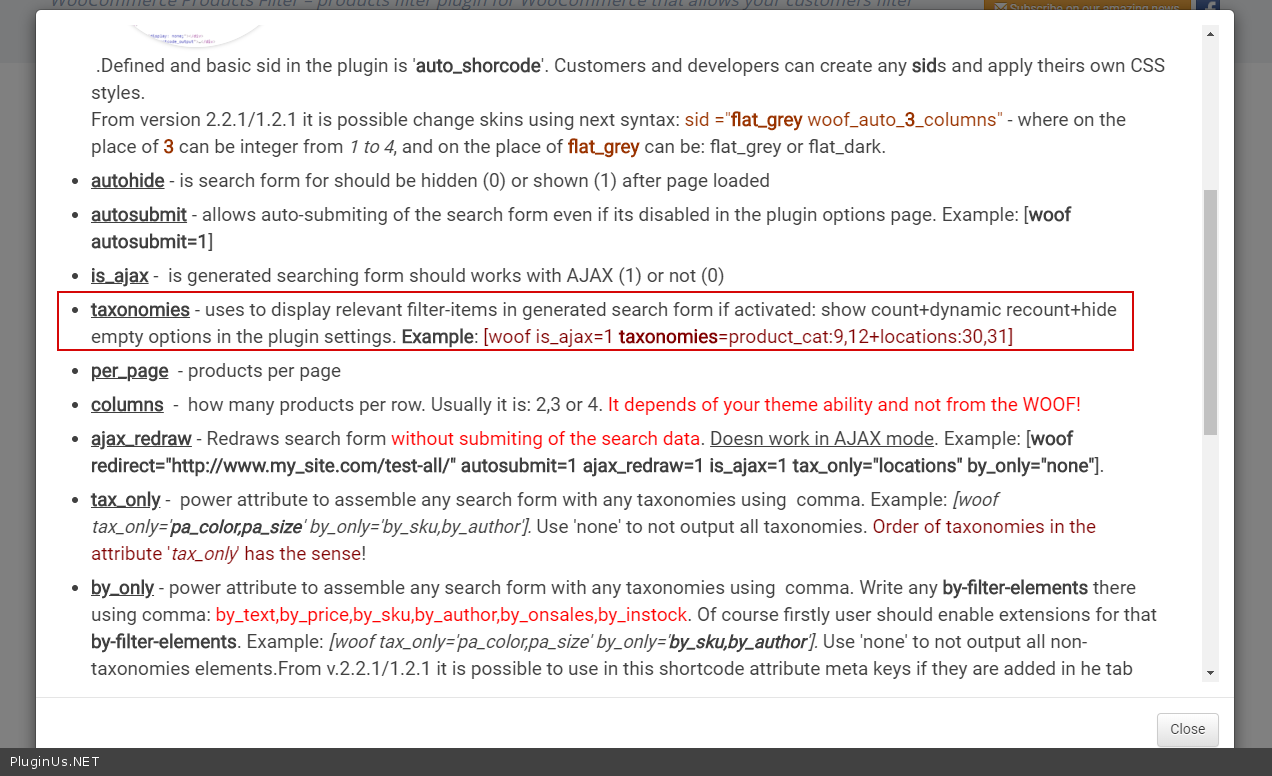
Please use shortcode - https://products-filter.com/shortcode/woof/
Use attribute - taxonomies ( https://c2n.me/48bwz9p.png )
Hello
Please use shortcode - https://products-filter.com/shortcode/woof/
Use attribute - taxonomies ( https://c2n.me/48bwz9p.png )
Quote from ankitpatel on June 29, 2020, 12:22Hey,
Thanks for your reply but I was not after taxonomies, I am looking for set up filter for the products which has specific custom field,
//////////////////////////////////////////////////////////////////////////////////////////////////////////////
Just to let you know, for On sales products (https://homecare.ischanging.com.au/specials/) , I have used
"[woof is_ajax=0]" to setup sidebar filter and
"[woof_products by_only='by_onsales' is_ajax=0]" to show onsales product, also I put condition in function.php
add_filter('woof_get_request_data', 'my_woof_get_request_data');
function my_woof_get_request_data($data)
{
$data['onsales']='salesonly';
return $data;
}//////////////////////////////////////////////////////////////////////////////////////////////////////////////
Now what I want on Hire page (https://homecare.ischanging.com.au/demo-hire/) , I have used
"[woof is_ajax=0]" to setup sidebar filter and
"[woof_products by_only='hire_price' is_ajax=0]" to show only hire product, also I put condition in function.php
add_filter('woof_get_request_data', 'my_woof_get_request_data_hire');
function my_woof_get_request_data_hire($data)
{
$data['by_only']='hire_price';
return $data;
}but this is not working, I want to list out only hire products as well as I want filters for only hire products.
Hey,
Thanks for your reply but I was not after taxonomies, I am looking for set up filter for the products which has specific custom field,
//////////////////////////////////////////////////////////////////////////////////////////////////////////////
Just to let you know, for On sales products (https://homecare.ischanging.com.au/specials/) , I have used
"[woof is_ajax=0]" to setup sidebar filter and
"[woof_products by_only='by_onsales' is_ajax=0]" to show onsales product, also I put condition in function.php
add_filter('woof_get_request_data', 'my_woof_get_request_data');
function my_woof_get_request_data($data)
{
$data['onsales']='salesonly';
return $data;
}
//////////////////////////////////////////////////////////////////////////////////////////////////////////////
Now what I want on Hire page (https://homecare.ischanging.com.au/demo-hire/) , I have used
"[woof is_ajax=0]" to setup sidebar filter and
"[woof_products by_only='hire_price' is_ajax=0]" to show only hire product, also I put condition in function.php
add_filter('woof_get_request_data', 'my_woof_get_request_data_hire');
function my_woof_get_request_data_hire($data)
{
$data['by_only']='hire_price';
return $data;
}
but this is not working, I want to list out only hire products as well as I want filters for only hire products.
Quote from Pablo Borysenco on June 30, 2020, 10:52Hello
$data['by_only']='hire_price'; - It doesn’t work like that. you need a filter by this field. If hire_price - is a meta field - https://products-filter.com/extencion/woocommerce-filter-by-meta-fields/
Hello
$data['by_only']='hire_price'; - It doesn’t work like that. you need a filter by this field. If hire_price - is a meta field - https://products-filter.com/extencion/woocommerce-filter-by-meta-fields/
Quote from ankitpatel on June 30, 2020, 15:54Hey,
Thanks for your reply, I checked that option of Wordpress-filter-by-meta-fields, but If I will change that then it is gonna affect on my shop page and special page.
so just to let you know that I am using search filter on already two pages of the site and now I want to implement on the third page (hire page)
If I am going to add as meta fields setting as you mentioned then that option will appear on all of the pages (shop, specials and hire ) which I don't want
Like I asked you in the last message, I want to list out only hire products as well as I want filters for only hire products.
Hey,
Thanks for your reply, I checked that option of Wordpress-filter-by-meta-fields, but If I will change that then it is gonna affect on my shop page and special page.
so just to let you know that I am using search filter on already two pages of the site and now I want to implement on the third page (hire page)
If I am going to add as meta fields setting as you mentioned then that option will appear on all of the pages (shop, specials and hire ) which I don't want
Like I asked you in the last message, I want to list out only hire products as well as I want filters for only hire products.
Quote from Pablo Borysenco on July 1, 2020, 13:17Hello
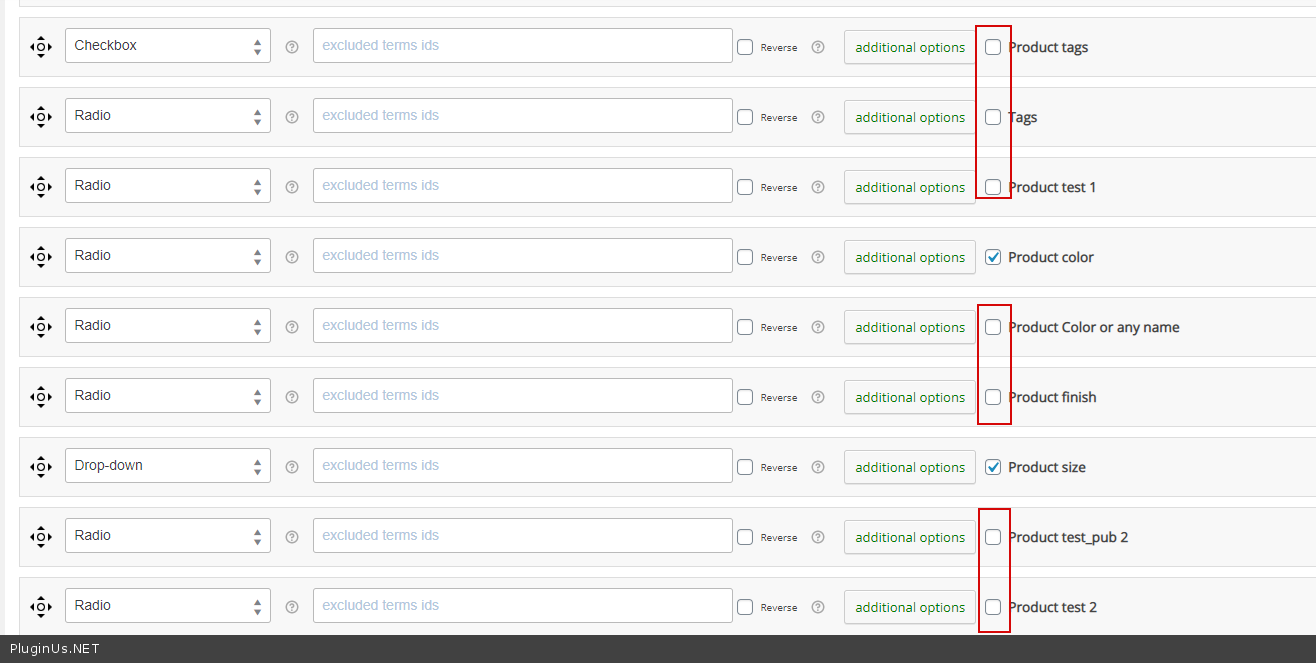
Add meta filter but don't activate it please - https://c2n.me/48dzPW5.png
Hello
Add meta filter but don't activate it please - https://c2n.me/48dzPW5.png
Quote from ankitpatel on July 1, 2020, 14:10Hey,
https://www.screencast.com/t/h1IzSXAFJ
I didn't activate https://www.screencast.com/t/FuxbWyP56CGl
still I am not getting my answer which I asked you couple of questions before "I want to list out only hire products as well as I want filters for only hire products."
I already mentioned in my above messages what I have tried to "show filter for only hire products" and "show only hire products", can you please check in detail and let me know your thoughts.
Waiting forward for your answer.
Hey,

I didn't activate https://www.screencast.com/t/FuxbWyP56CGl
still I am not getting my answer which I asked you couple of questions before"I want to list out only hire products as well as I want filters for only hire products."
I already mentioned in my above messages what I have tried to"show filter for only hire products" and "show only hire products", can you please check in detail and let me know your thoughts.
Waiting forward for your answer.
Quote from Pablo Borysenco on July 2, 2020, 11:29Hello
I answered you! https://c2n.me/48ekMcR.png - The rest depends only on how it is stored on the product side!
In your case - $data['checkbox_hire_price']="your_data";
OR you can add a meta request - https://products-filter.com/hook/woof_get_meta_query/ (for filter)
Hello
I answered you! https://c2n.me/48ekMcR.png - The rest depends only on how it is stored on the product side!
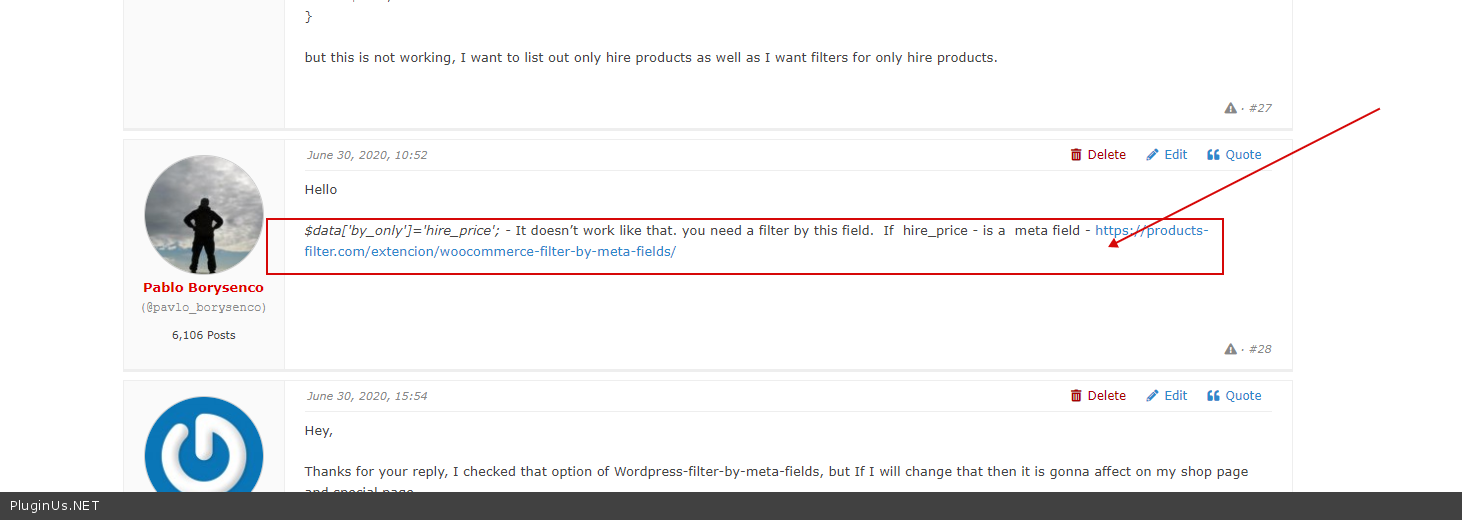
In your case - $data['checkbox_hire_price']="your_data";
OR you can add a meta request - https://products-filter.com/hook/woof_get_meta_query/ (for filter)
Quote from ankitpatel on July 9, 2020, 06:12Hello,
Thanks for your reply, meta query filter works fine.
Really appreciate it
Thanks,
Hello,
Thanks for your reply, meta query filter works fine.
Really appreciate it
Thanks,