
Website add query string v=
The support doesn work on Saturdays and Sundays, so some Friday requests can be answered on Monday. If you have problems with registration ask help on contact us page pleaseIf you not got email within 24~36 business hours, firstly check your spam box, and if no any email from the support there - back to the forum and read answer here. DO NOT ANSWER ON EMAILS [noreply@pluginus.net] FROM THE FORUM!! Emails are just for your info, all answers should be published only here.
The support doesn work on Saturdays and Sundays, so some Friday requests can be answered on Monday.

Quote from Jignesh on April 23, 2026, 21:09Hello Support,I am using FOX Currency plugin, everything works fine although one issue see below.Site adds ?v=13b5bfe96f3e for every page.In WooCommerce setting see default customer location set to Geolocate (with page caching support which create problem of adding query string, now if I change to just Geolocate it does not workIs there anything can be done to make it work without redirect ?
Quote from Jignesh on April 23, 2026, 21:11This was reply from Support
The ?v= query string you are seeing is added by WooCommerce itself, not by FOX. It is part of WooCommerce's built-in geolocation mechanism — when "Geolocate (with page caching support)" is selected, WooCommerce appends this hash to URLs so that caching plugins can serve different cached versions per visitor location. FOX has no control over this behavior.
If you want to avoid the query string entirely, here is what I recommend:
Go to FOX settings and enable the automatic currency detection by GeoIP (the option is in the FOX admin panel under the geo/auto-detect section). This lets FOX handle country detection on its own, independently from WooCommerce's geolocation.
Once FOX geo detection is enabled, you can change the WooCommerce default customer location setting to "Shop base address" instead of Geolocate. This stops WooCommerce from adding the ?v= query string completely, while FOX continues to detect and switch currencies based on the visitor's country. Please give that a try and let me know if it works for your setup.
This was reply from Support
The ?v= query string you are seeing is added by WooCommerce itself, not by FOX. It is part of WooCommerce's built-in geolocation mechanism — when"Geolocate (with page caching support)" is selected, WooCommerce appends this hash to URLs so that caching plugins can serve different cached versions per visitor location. FOX has no control over this behavior.
If you want to avoid the query string entirely, here is what I recommend:
Go to FOX settings and enable the automatic currency detection by GeoIP (the option is in the FOX admin panel under the geo/auto-detect section). This lets FOX handle country detection on its own, independently from WooCommerce's geolocation.
Once FOX geo detection is enabled, you can change the WooCommerce default customer location setting to"Shop base address" instead of Geolocate. This stops WooCommerce from adding the ?v= query string completely, while FOX continues to detect and switch currencies based on the visitor's country. Please give that a try and let me know if it works for your setup.
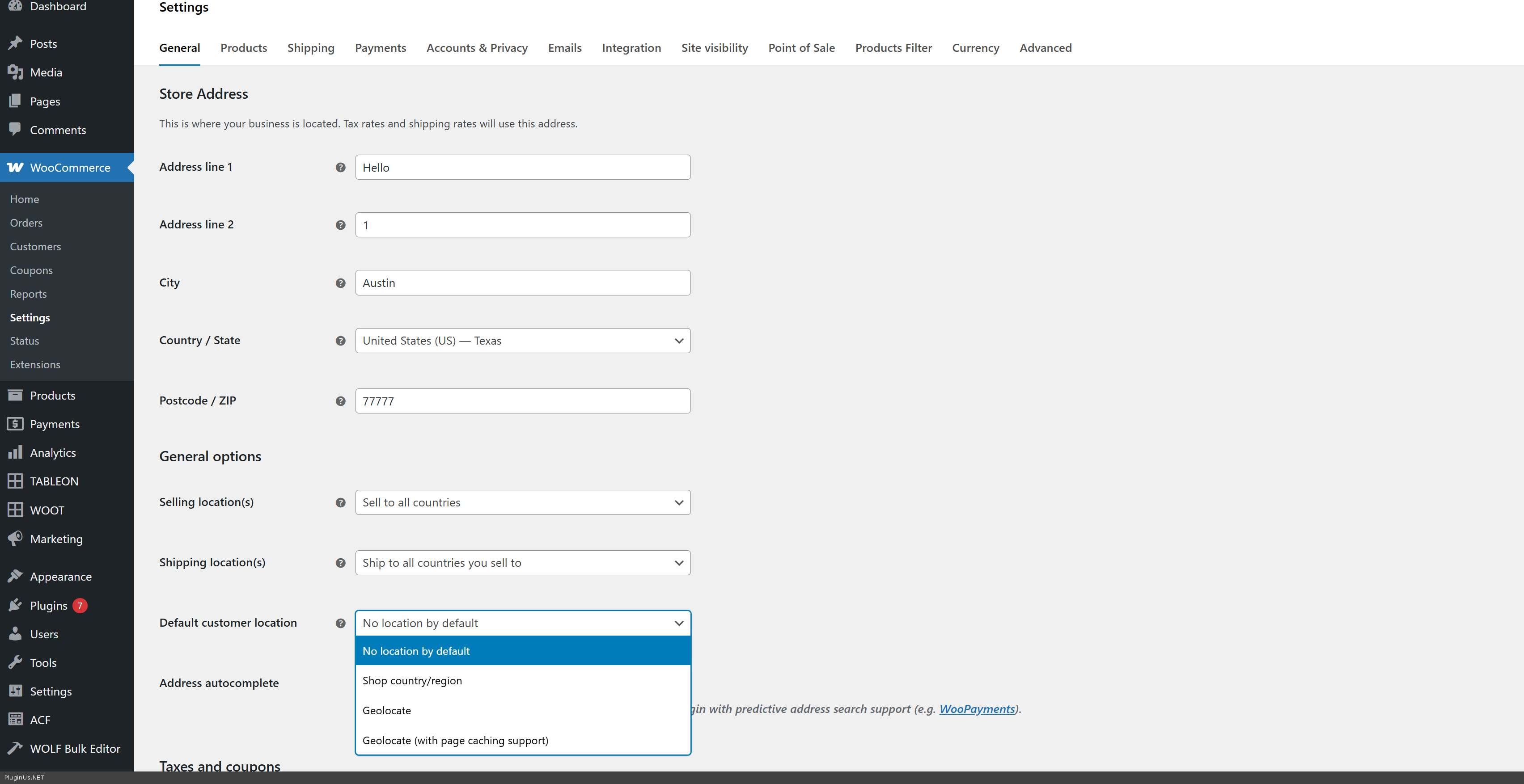
Quote from Jignesh on April 23, 2026, 21:12Thanks for reply.I am not able to find settings which you mention about auto detect by GeoIP, please review below screen shot.

Quote from Alex Dev on April 24, 2026, 20:19Hello Jignesh
Looks like you forgot to place the screenshot
If you mean disabling "?v=":
Can remove this parameter by changing how WooCommerce detects user locations:
- Change Geolocation Settings:
- Go to WooCommerce > Settings > General.
- Find the Default customer location setting.
- Change it from "Geolocate (with page caching support)" to "Geolocate" (without cache support) or "Shop base address".
- Bypass Cache for Key Pages:
- Ensure your caching plugin is configured to not cache the Cart, Checkout, and My Account pages.
- Clear Caches:
- After changing the setting, clear your WordPress caching plugin and any server-side cache (like Cloudflare or Varnish).
FOX:
The GeoIP tab in FOX appears automatically without any additional setup — it is always visible as long as WooCommerce is active on your site. You do not need to enable anything to make it show up.
If you do not see the GeoIP tab in your FOX settings, most likely you are running an older version of the plugin. Please update FOX to the latest version and the GeoIP tab will appear in the plugin menu automatically.
Hello Jignesh
Looks like you forgot to place the screenshot
If you mean disabling"?v=":
- Change Geolocation Settings:
- Go to WooCommerce > Settings > General.
- Find the Default customer location setting.
- Change it from"Geolocate (with page caching support)" to "Geolocate" (without cache support) or "Shop base address".
- Bypass Cache for Key Pages:
- Ensure your caching plugin is configured to not cache the Cart, Checkout, and My Account pages.
- Clear Caches:
- After changing the setting, clear your WordPress caching plugin and any server-side cache (like Cloudflare or Varnish).
FOX:
The GeoIP tab in FOX appears automatically without any additional setup — it is always visible as long as WooCommerce is active on your site. You do not need to enable anything to make it show up.
If you do not see the GeoIP tab in your FOX settings, most likely you are running an older version of the plugin. Please update FOX to the latest version and the GeoIP tab will appear in the plugin menu automatically.
Quote from Jignesh on April 24, 2026, 20:44Hi Alex,
Thanks for reply.
What i mean was i was not able to find geo/auto-detect section which mention by someone from staff, below is screen shot.
Regarding my problem when i set Geolocate it does not work it only work if i set Geolocate (with page caching support)
Just to inform we are using cloudflair and in wordpress we are using W3c Cache, also in my wp-config.php file below code is there
if (isset($_SERVER['HTTP_CF_CONNECTING_IP'])) {$_SERVER['REMOTE_ADDR'] = $_SERVER['HTTP_CF_CONNECTING_IP'];}
Hi Alex,
Thanks for reply.
What i mean was i was not able to find geo/auto-detect section which mention by someone from staff, below is screen shot.

Regarding my problem when i set Geolocate it does not work it only work if i set Geolocate (with page caching support)
Just to inform we are using cloudflair and in wordpress we are using W3c Cache, also in my wp-config.php file below code is there
Quote from Alex Dev on April 27, 2026, 12:09Hello Jignesh
Let me explain what is actually happening here.
The ?v= query string is added by WooCommerce itself, not by FOX. It is part of WooCommerce's built-in mechanism for geolocation with caching support — when that mode is active, WooCommerce appends a hash to URLs so that caching plugins can serve different cached versions per visitor location. FOX has no control over this behavior whatsoever.
The reason plain "Geolocate" does not work for you is most likely that WooCommerce requires a MaxMind license key to perform geolocation in that mode. Since WooCommerce 3.9 this key is mandatory. Without it, WooCommerce simply cannot detect visitor location and falls back to nothing. Please check: WooCommerce > Settings > Integration > MaxMind Geolocation. If the key field is empty, register at maxmind.com, get a free GeoLite2 license key, and enter it there. This is the most common reason plain Geolocate stops working.
Your Cloudflare fix in wp-config.php looks correct. Also make sure IP Geolocation is enabled in your Cloudflare dashboard under Network settings.
To check whether geolocation is actually working on your site right now, add this shortcode temporarily to any page:
[woocs_geo_hello]
It will show you exactly what country WooCommerce is detecting for the current visitor.
Once plain Geolocate works correctly with the MaxMind key, you can switch WooCommerce default customer location to "Geolocate" and the ?v= will stop appearing completely.
One more thing that may help regardless: in FOX settings under the Options tab, enable the option "I use caching on my site". This makes FOX reload prices via AJAX after page load, which helps ensure the correct currency is always displayed even on cached pages.
We will be honest with you — if for some reason WooCommerce geolocation cannot be made to work reliably in your environment, there is no way to remove the ?v= and keep geolocation at the same time. That is a WooCommerce architecture limitation, not something FOX can bypass. But the MaxMind key fix above solves this for the vast majority of cases.
Let us know what you find with the shortcode test!
Hello Jignesh
Let me explain what is actually happening here.
The ?v= query string is added by WooCommerce itself, not by FOX. It is part of WooCommerce's built-in mechanism for geolocation with caching support — when that mode is active, WooCommerce appends a hash to URLs so that caching plugins can serve different cached versions per visitor location. FOX has no control over this behavior whatsoever.
The reason plain"Geolocate" does not work for you is most likely that WooCommerce requires a MaxMind license key to perform geolocation in that mode. Since WooCommerce 3.9 this key is mandatory. Without it, WooCommerce simply cannot detect visitor location and falls back to nothing. Please check: WooCommerce > Settings > Integration > MaxMind Geolocation. If the key field is empty, register at maxmind.com, get a free GeoLite2 license key, and enter it there. This is the most common reason plain Geolocate stops working.
Your Cloudflare fix in wp-config.php looks correct. Also make sure IP Geolocation is enabled in your Cloudflare dashboard under Network settings.
To check whether geolocation is actually working on your site right now, add this shortcode temporarily to any page:
[woocs_geo_hello]
It will show you exactly what country WooCommerce is detecting for the current visitor.
Once plain Geolocate works correctly with the MaxMind key, you can switch WooCommerce default customer location to"Geolocate" and the ?v= will stop appearing completely.
One more thing that may help regardless: in FOX settings under the Options tab, enable the option"I use caching on my site". This makes FOX reload prices via AJAX after page load, which helps ensure the correct currency is always displayed even on cached pages.
We will be honest with you — if for some reason WooCommerce geolocation cannot be made to work reliably in your environment, there is no way to remove the ?v= and keep geolocation at the same time. That is a WooCommerce architecture limitation, not something FOX can bypass. But the MaxMind key fix above solves this for the vast majority of cases.
Let us know what you find with the shortcode test!