
Unable To Refund Order - Invalid Refund Amount
The support doesn work on Saturdays and Sundays, so some Friday requests can be answered on Monday. If you have problems with registration ask help on contact us page pleaseIf you not got email within 24~36 business hours, firstly check your spam box, and if no any email from the support there - back to the forum and read answer here. DO NOT ANSWER ON EMAILS [noreply@pluginus.net] FROM THE FORUM!! Emails are just for your info, all answers should be published only here.
The support doesn work on Saturdays and Sundays, so some Friday requests can be answered on Monday.

Quote from littlepanda on May 21, 2026, 11:01Hello,
We have an issue where we are unable to process an order refund and we think it may be related to this plugin.
We get an 'invalid refund amount' error message when trying to refund.
Please can you advise what you need to investigate this issue.
Regards
LP*
Hello,
We have an issue where we are unable to process an order refund and we think it may be related to this plugin.
We get an 'invalid refund amount' error message when trying to refund.
Please can you advise what you need to investigate this issue.
Regards
LP*

Quote from Alex Dev on May 22, 2026, 00:02Hello
I disabled the plugin temporarily and the refund went through successfully — you can verify at wp-admin/admin.php?page=wc-orders&action=edit&id=82272. FOX is now re-enabled.
A few questions to help us investigate further: is this the first time you have encountered this issue? Does it also happen with other payment methods besides Klarna? And are there other orders where the refund is also failing?
Hello
I disabled the plugin temporarily and the refund went through successfully — you can verify at wp-admin/admin.php?page=wc-orders&action=edit&id=82272. FOX is now re-enabled.
A few questions to help us investigate further: is this the first time you have encountered this issue? Does it also happen with other payment methods besides Klarna? And are there other orders where the refund is also failing?
Quote from littlepanda on May 22, 2026, 05:43Hi,
Thank you for your investigation.
- This is the first time we have encountered this issue. We have been refunding without issues for several years now with your plugin activated. Note that the issue is only happening on our EU subsite and not our UK subsite.
- The issue happens with other payment methods and not just Klarna.
- Yes there are other orders where the refund fails (we are having to do this manually via our payment processor STRIPE).
Note that this is a live site so please do not refund any further live/real orders in testing.
We have set up an example order #EU124410 which you can use to test for refunding failure. All other orders are not to be refunded.
Please let us know should you need any further test orders set up for testing purposes. We also have a staging site which we can give you access to but not sure how helpful this will be given that the staging site is limited in it's communication with our payment processor.
Regards
LP*
Hi,
Thank you for your investigation.
- This is the first time we have encountered this issue. We have been refunding without issues for several years now with your plugin activated. Note that the issue is only happening on our EU subsite and not our UK subsite.
- The issue happens with other payment methods and not just Klarna.
- Yes there are other orders where the refund fails (we are having to do this manually via our payment processor STRIPE).
Note that this is a live site so please do not refund any further live/real orders in testing.
We have set up an example order #EU124410 which you can use to test for refunding failure. All other orders are not to be refunded.
Please let us know should you need any further test orders set up for testing purposes. We also have a staging site which we can give you access to but not sure how helpful this will be given that the staging site is limited in it's communication with our payment processor.
Regards
LP*
Quote from Alex Dev on May 22, 2026, 17:50Hello
Thank you for the additional details. Let me share my observations and a suggested path forward.
What we know so far: the issue affects only the EU subsite, not the UK subsite. It occurs across multiple payment methods, not just Klarna. FOX has been running on both sites for years without problems, which suggests something recently changed — possibly an update to one of the payment gateway plugins, a change on the Stripe side, or a server-level change. The same FOX code runs on both subsites, yet only EU is affected, which points toward a currency-related difference between the two.
My working theory is that the original charge may have been processed in a currency other than EUR — or that FOX is modifying the refund amount during processing, causing a mismatch with what Stripe has on record for that transaction. Even if the order displays in EUR, the actual charge currency in Stripe may differ. This is worth verifying in your Stripe dashboard against the specific failed orders.
Regarding yesterday's test on order EU124410 — I apologize if that caused any concern. You pointed me to that order specifically for testing, and that was the only way to confirm the issue. I have not touched any other orders.
Now, given that this is a high-traffic production site, I strongly recommend setting up a staging environment for further investigation. Here is what I suggest:
Create a full copy of your EU subsite, block it from external traffic and search engines using either an .htaccess restriction or a maintenance plugin such as Under Construction, and switch at least one payment gateway — Stripe would be ideal — to sandbox mode. This way we can reproduce the refund failure freely, run experiments, and break things as needed without any risk to real orders or real customers.
Once the staging site is ready, please share FTP credentials and wp-admin access in the private section of this ticket, and we will take it from there.
Hello
Thank you for the additional details. Let me share my observations and a suggested path forward.
What we know so far: the issue affects only the EU subsite, not the UK subsite. It occurs across multiple payment methods, not just Klarna. FOX has been running on both sites for years without problems, which suggests something recently changed — possibly an update to one of the payment gateway plugins, a change on the Stripe side, or a server-level change. The same FOX code runs on both subsites, yet only EU is affected, which points toward a currency-related difference between the two.
My working theory is that the original charge may have been processed in a currency other than EUR — or that FOX is modifying the refund amount during processing, causing a mismatch with what Stripe has on record for that transaction. Even if the order displays in EUR, the actual charge currency in Stripe may differ. This is worth verifying in your Stripe dashboard against the specific failed orders.
Regarding yesterday's test on order EU124410 — I apologize if that caused any concern. You pointed me to that order specifically for testing, and that was the only way to confirm the issue. I have not touched any other orders.
Now, given that this is a high-traffic production site, I strongly recommend setting up a staging environment for further investigation. Here is what I suggest:
Create a full copy of your EU subsite, block it from external traffic and search engines using either an .htaccess restriction or a maintenance plugin such as Under Construction, and switch at least one payment gateway — Stripe would be ideal — to sandbox mode. This way we can reproduce the refund failure freely, run experiments, and break things as needed without any risk to real orders or real customers.
Once the staging site is ready, please share FTP credentials and wp-admin access in the private section of this ticket, and we will take it from there.
Quote from littlepanda on May 23, 2026, 12:22Hello,
Thank you for your continued investigation.
We have set up the EU staging site for you and the details are included in the private area. Stripe payment is in sandbox mode and funnelkit also has test mode activated in the Staging site. Due to staging limitations we are not sure how helpful this will be to you. Strangely, we tested refunding a dummy order on the staging site (order #EU123254) and it refunded correctly according to our stripe sandbox dashboard?
On our live site we researched one of the orders where we had trouble refunding on our stripe dashboard and which you successfully refunded by turning off the Fox plugin (order EU123471). The transaction was done in Euro and the refund was done in Euro.
Please let us know if you need anything further.
Kind Regards
LP*
Hello,
Thank you for your continued investigation.
We have set up the EU staging site for you and the details are included in the private area. Stripe payment is in sandbox mode and funnelkit also has test mode activated in the Staging site. Due to staging limitations we are not sure how helpful this will be to you. Strangely, we tested refunding a dummy order on the staging site (order #EU123254) and it refunded correctly according to our stripe sandbox dashboard?
On our live site we researched one of the orders where we had trouble refunding on our stripe dashboard and which you successfully refunded by turning off the Fox plugin (order EU123471). The transaction was done in Euro and the refund was done in Euro.
Please let us know if you need anything further.
Kind Regards
LP*
Quote from Alex Dev on May 25, 2026, 12:57Hello
Thank you for setting up the staging environment — I will review it today and tomorrow.
That said, given that the staging site refunds are working correctly, it may be difficult to reproduce the exact issue there. Production environments often differ in ways that are hard to replicate — cached data, order meta written at the time of the original charge, gateway webhook history, and so on.
To investigate this properly on the live site without any risk, I would like to try the following: could you or a colleague place a small test order on the EU live site — even just $1–2 worth — using a real payment method? Once the order is confirmed, I will attempt to process the refund with FOX active and capture exactly what is happening under the hood. If the refund goes through, the money comes straight back to you. If it fails, we will have the exact error data we need to identify the root cause.
No real customers are involved, and the financial exposure is minimal. This would give us the cleanest possible test case on the actual production environment.
Please let me know if you are comfortable with this approach, and I will proceed as soon as the test order is placed.
p.s. looks like staging site has password in htaccess also, and I cannot not enter it https://clip2net.com/s/4o0CexX - please also place login/pass for it
Hello
Thank you for setting up the staging environment — I will review it today and tomorrow.
That said, given that the staging site refunds are working correctly, it may be difficult to reproduce the exact issue there. Production environments often differ in ways that are hard to replicate — cached data, order meta written at the time of the original charge, gateway webhook history, and so on.
To investigate this properly on the live site without any risk, I would like to try the following: could you or a colleague place a small test order on the EU live site — even just $1–2 worth — using a real payment method? Once the order is confirmed, I will attempt to process the refund with FOX active and capture exactly what is happening under the hood. If the refund goes through, the money comes straight back to you. If it fails, we will have the exact error data we need to identify the root cause.
No real customers are involved, and the financial exposure is minimal. This would give us the cleanest possible test case on the actual production environment.
Please let me know if you are comfortable with this approach, and I will proceed as soon as the test order is placed.
p.s. looks like staging site has password in htaccess also, and I cannot not enter it https://clip2net.com/s/4o0CexX - please also place login/pass for it
Quote from littlepanda on May 25, 2026, 13:02Hi,
Yes, as we previously posted we set up example order #EU124410 which you can use to test for refunding failure on our live site.
HTTP authentication details are entered now into the private area.
Regards
LP
Hi,
Yes, as we previously posted we set up example order #EU124410 which you can use to test for refunding failure on our live site.
HTTP authentication details are entered now into the private area.
Regards
LP
Quote from Alex Dev on May 26, 2026, 13:24ATTENTION:
Code savong is failed and now file functions.php is empty, I cannot revert it, code is
<?php
/**
 *
 * The framework's functions and definitions
 */

define( 'WOODMART_THEME_DIR', get_template_directory_uri() );
define( 'WOODMART_THEMEROOT', get_template_directory() );
define( 'WOODMART_IMAGES', WOODMART_THEME_DIR . '/images' );
define( 'WOODMART_SCRIPTS', WOODMART_THEME_DIR . '/js' );
define( 'WOODMART_STYLES', WOODMART_THEME_DIR . '/css' );
define( 'WOODMART_FRAMEWORK', '/inc' );
define( 'WOODMART_DUMMY', WOODMART_THEME_DIR . '/inc/dummy-content' );
define( 'WOODMART_CLASSES', WOODMART_THEMEROOT . '/inc/classes' );
define( 'WOODMART_CONFIGS', WOODMART_THEMEROOT . '/inc/configs' );
define( 'WOODMART_HEADER_BUILDER', WOODMART_THEME_DIR . '/inc/modules/header-builder' );
define( 'WOODMART_ASSETS', WOODMART_THEME_DIR . '/inc/admin/assets' );
define( 'WOODMART_ASSETS_IMAGES', WOODMART_ASSETS . '/images' );
define( 'WOODMART_API_URL', 'https://xtemos.com/wp-json/xts/v1/' );
define( 'WOODMART_DEMO_URL', 'https://woodmart.xtemos.com/' );
define( 'WOODMART_PLUGINS_URL', WOODMART_DEMO_URL . 'plugins/' );
define( 'WOODMART_DUMMY_URL', WOODMART_DEMO_URL . 'dummy-content-new/' );
define( 'WOODMART_TOOLTIP_URL', WOODMART_DEMO_URL . 'theme-settings-tooltips/' );
define( 'WOODMART_SLUG', 'woodmart' );
define( 'WOODMART_CORE_VERSION', '1.1.6' );
define( 'WOODMART_WPB_CSS_VERSION', '1.0.2' );

if ( ! function_exists( 'woodmart_load_classes' ) ) {
	/**
	 * Load theme PHP classes.
	 *
	 * @return void
	 */
	function woodmart_load_classes() {
		$classes = array(
			'class-singleton.php',
			'class-api.php',
			'class-config.php',
			'class-layout.php',
			'class-autoupdates.php',
			'class-activation.php',
			'class-notices.php',
			'class-theme.php',
			'class-registry.php',
		);

		foreach ( $classes as $class ) {
			require WOODMART_CLASSES . DIRECTORY_SEPARATOR . $class;
		}
	}
}

woodmart_load_classes();

new XTS\Theme();

define( 'WOODMART_VERSION', woodmart_get_theme_info( 'Version' ) );
PLEASE revert as soon as possible
ATTENTION:
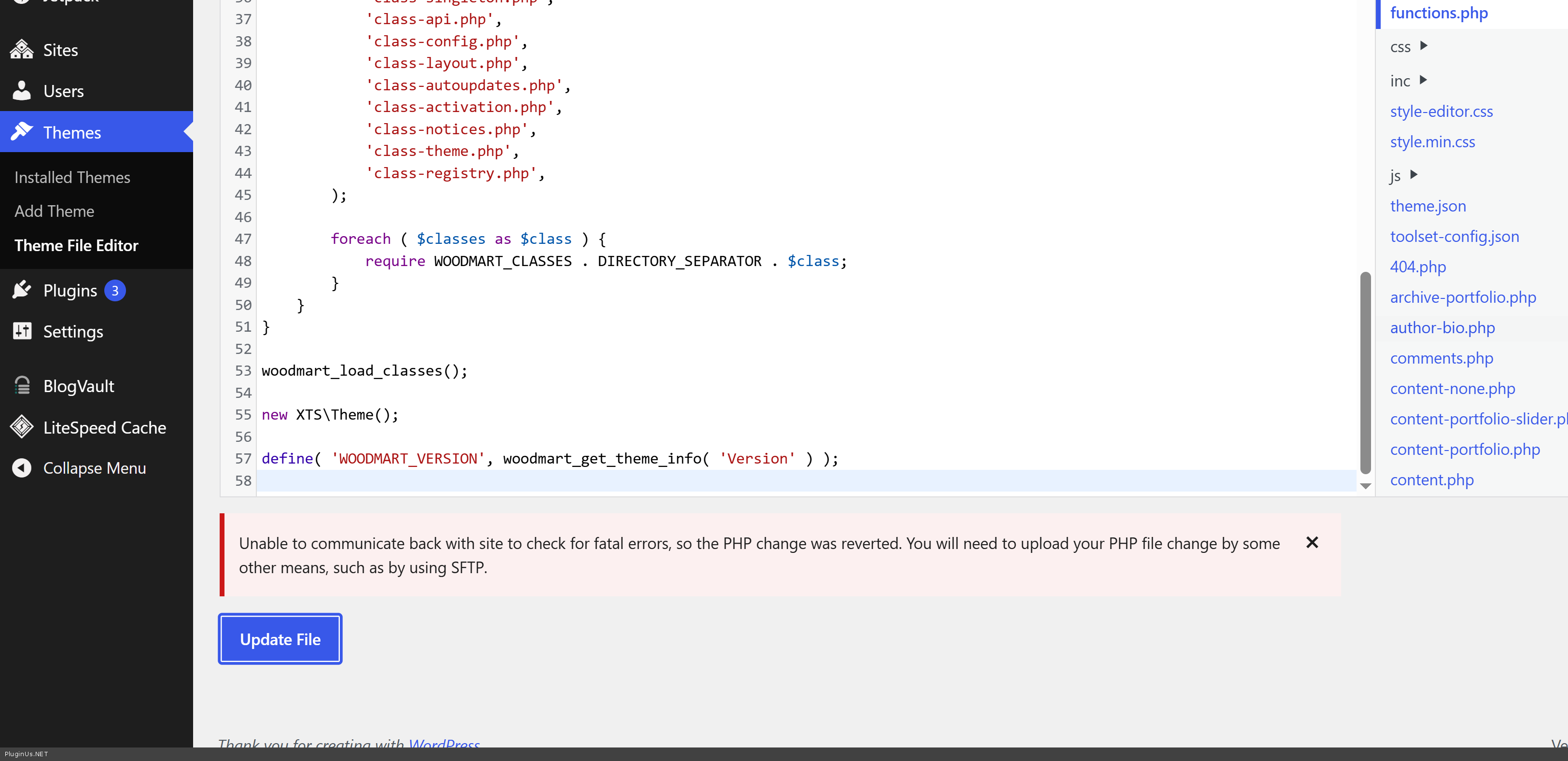
Code savong is failed and now file functions.php is empty, I cannot revert it, code is
<?php
/**
 *
 * The framework's functions and definitions
 */

define( 'WOODMART_THEME_DIR', get_template_directory_uri() );
define( 'WOODMART_THEMEROOT', get_template_directory() );
define( 'WOODMART_IMAGES', WOODMART_THEME_DIR . '/images' );
define( 'WOODMART_SCRIPTS', WOODMART_THEME_DIR . '/js' );
define( 'WOODMART_STYLES', WOODMART_THEME_DIR . '/css' );
define( 'WOODMART_FRAMEWORK', '/inc' );
define( 'WOODMART_DUMMY', WOODMART_THEME_DIR . '/inc/dummy-content' );
define( 'WOODMART_CLASSES', WOODMART_THEMEROOT . '/inc/classes' );
define( 'WOODMART_CONFIGS', WOODMART_THEMEROOT . '/inc/configs' );
define( 'WOODMART_HEADER_BUILDER', WOODMART_THEME_DIR . '/inc/modules/header-builder' );
define( 'WOODMART_ASSETS', WOODMART_THEME_DIR . '/inc/admin/assets' );
define( 'WOODMART_ASSETS_IMAGES', WOODMART_ASSETS . '/images' );
define( 'WOODMART_API_URL', 'https://xtemos.com/wp-json/xts/v1/' );
define( 'WOODMART_DEMO_URL', 'https://woodmart.xtemos.com/' );
define( 'WOODMART_PLUGINS_URL', WOODMART_DEMO_URL . 'plugins/' );
define( 'WOODMART_DUMMY_URL', WOODMART_DEMO_URL . 'dummy-content-new/' );
define( 'WOODMART_TOOLTIP_URL', WOODMART_DEMO_URL . 'theme-settings-tooltips/' );
define( 'WOODMART_SLUG', 'woodmart' );
define( 'WOODMART_CORE_VERSION', '1.1.6' );
define( 'WOODMART_WPB_CSS_VERSION', '1.0.2' );

if ( ! function_exists( 'woodmart_load_classes' ) ) {
	/**
	 * Load theme PHP classes.
	 *
	 * @return void
	 */
	function woodmart_load_classes() {
		$classes = array(
			'class-singleton.php',
			'class-api.php',
			'class-config.php',
			'class-layout.php',
			'class-autoupdates.php',
			'class-activation.php',
			'class-notices.php',
			'class-theme.php',
			'class-registry.php',
		);

		foreach ( $classes as $class ) {
			require WOODMART_CLASSES . DIRECTORY_SEPARATOR . $class;
		}
	}
}

woodmart_load_classes();

new XTS\Theme();

define( 'WOODMART_VERSION', woodmart_get_theme_info( 'Version' ) );
PLEASE revert as soon as possible
Quote from Alex Dev on May 26, 2026, 13:27Its happened here: theme-editor.php?file=functions.php&theme=woodmart
I tried to place hook:
add_action( 'wp_ajax_woocommerce_refund_line_items', function() {
    if ( isset( $_POST['refund_amount'] ) ) {
        // Normalize decimal separator before WooCommerce processes the refund amount
        $order_id   = isset( $_POST['order_id'] ) ? absint( $_POST['order_id'] ) : 0;
        $order      = $order_id ? wc_get_order( $order_id ) : null;
        $currency   = $order ? $order->get_currency() : '';
        $dec_sep    = WOOCS()->get_decimal_sep( $currency );

        if ( $dec_sep === ',' ) {
            $_POST['refund_amount'] = str_replace( ',', '.', sanitize_text_field( $_POST['refund_amount'] ) );
        }
    }
}, 1 );
Sorry, but its dangerous work trought wp file editor, please provide tmp FTP in the secret area, looks like I found the reason
Its happened here: theme-editor.php?file=functions.php&theme=woodmart
I tried to place hook:
add_action( 'wp_ajax_woocommerce_refund_line_items', function() {
    if ( isset( $_POST['refund_amount'] ) ) {
        // Normalize decimal separator before WooCommerce processes the refund amount
        $order_id   = isset( $_POST['order_id'] ) ? absint( $_POST['order_id'] ) : 0;
        $order      = $order_id ? wc_get_order( $order_id ) : null;
        $currency   = $order ? $order->get_currency() : '';
        $dec_sep    = WOOCS()->get_decimal_sep( $currency );

        if ( $dec_sep === ',' ) {
            $_POST['refund_amount'] = str_replace( ',', '.', sanitize_text_field( $_POST['refund_amount'] ) );
        }
    }
}, 1 );
Sorry, but its dangerous work trought wp file editor, please provide tmp FTP in the secret area, looks like I found the reason
Quote from Alex Dev on May 26, 2026, 13:28You can also take code on the stage site: wp-admin/network/theme-editor.php?file=functions.php&theme=woodmart and place to wp-admin/network/theme-editor.php?file=functions.php&theme=woodmart
You can also take code on the stage site: wp-admin/network/theme-editor.php?file=functions.php&theme=woodmart and place to wp-admin/network/theme-editor.php?file=functions.php&theme=woodmart
Quote from littlepanda on May 26, 2026, 13:32Hi,
FTP access is saved in the private area for the live site.
Let me know if you need us to do anything.
LP
Hi,
FTP access is saved in the private area for the live site.
Let me know if you need us to do anything.
LP
Quote from Alex Dev on May 26, 2026, 13:37Thank you! Code is reverted, I am continue ...
Thank you! Code is reverted, I am continue ...
Quote from Alex Dev on May 26, 2026, 14:29Thank you for your patience while we investigated this issue.
We spent some time digging into why the refund was failing on your EU subsite but working correctly on the UK subsite. The root cause turned out to be the decimal separator used for each currency. When the refund was submitted, the amount was being sent with a comma, and payment processors such as Stripe require the decimal separator to be a dot. As a result, the refund amount was being rejected as invalid.
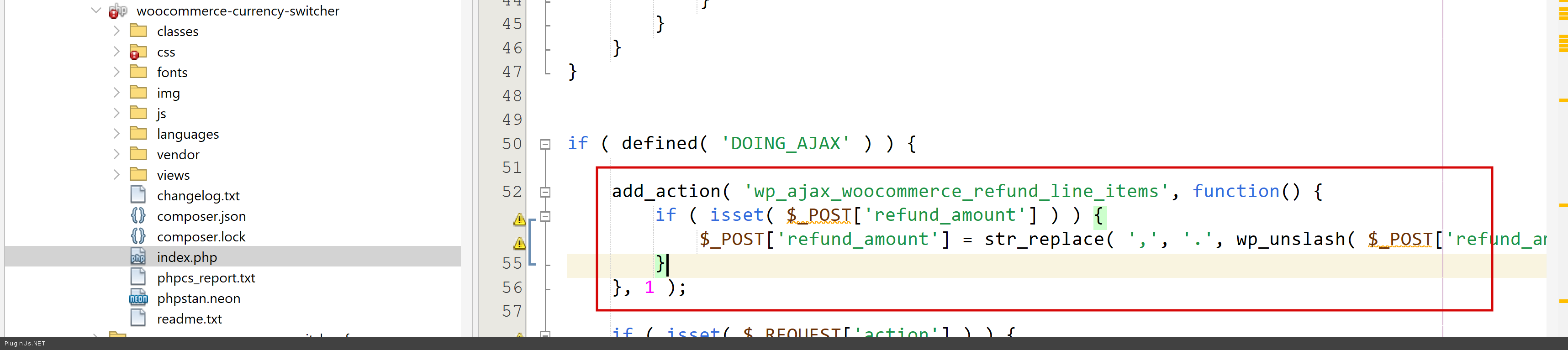
After a series of tests we identified exactly where the mismatch was occurring and developed a universal fix that normalizes the decimal separator before the refund is processed, regardless of which currency is active:
	add_action( 'wp_ajax_woocommerce_refund_line_items', function() {
		if ( isset( $_POST['refund_amount'] ) ) {
			$_POST['refund_amount'] = str_replace( ',', '.', wp_unslash( $_POST['refund_amount'] ) );
		}
	}, 1 );
This fix will be included in the next plugin update. In the meantime, your refunds should now be processing correctly. Test it here please: eu/wp-admin/admin.php?page=wc-orders&action=edit&id=83678
Please let us know if you experience any further issues.
Thank you for your patience while we investigated this issue.
We spent some time digging into why the refund was failing on your EU subsite but working correctly on the UK subsite. The root cause turned out to be the decimal separator used for each currency. When the refund was submitted, the amount was being sent with a comma, and payment processors such as Stripe require the decimal separator to be a dot. As a result, the refund amount was being rejected as invalid.
After a series of tests we identified exactly where the mismatch was occurring and developed a universal fix that normalizes the decimal separator before the refund is processed, regardless of which currency is active:
	add_action( 'wp_ajax_woocommerce_refund_line_items', function() {
		if ( isset( $_POST['refund_amount'] ) ) {
			$_POST['refund_amount'] = str_replace( ',', '.', wp_unslash( $_POST['refund_amount'] ) );
		}
	}, 1 );
This fix will be included in the next plugin update. In the meantime, your refunds should now be processing correctly. Test it here please: eu/wp-admin/admin.php?page=wc-orders&action=edit&id=83678
Please let us know if you experience any further issues.
Quote from littlepanda on May 26, 2026, 14:44Hello,
Thank you for your investigation into this and for providing a quick solution.
Great job!
Regards
LP*
Hello,
Thank you for your investigation into this and for providing a quick solution.
Great job!
Regards
LP*
Quote from Alex Dev on May 27, 2026, 12:37You are welcome, and thank you for your cooperation!
P.S. If you ever need a sales channel through Telegram, we can recommend our system Botoscope. You can find more information here: https://botoscope.com/
Installation is free, we provide a personal approach for every client, and if you have any questions, feel free to ask them in this forum thread:
https://pluginus.net/support/forum/botoscope/
You are welcome, and thank you for your cooperation!
P.S. If you ever need a sales channel through Telegram, we can recommend our system Botoscope. You can find more information here: https://botoscope.com/
Installation is free, we provide a personal approach for every client, and if you have any questions, feel free to ask them in this forum thread:
https://pluginus.net/support/forum/botoscope/