
Sale Times Not working
The support doesn work on Saturdays and Sundays, so some Friday requests can be answered on Monday. If you have problems with registration ask help on contact us page pleaseIf you not got email within 24~36 business hours, firstly check your spam box, and if no any email from the support there - back to the forum and read answer here. DO NOT ANSWER ON EMAILS [noreply@pluginus.net] FROM THE FORUM!! Emails are just for your info, all answers should be published only here.
The support doesn work on Saturdays and Sundays, so some Friday requests can be answered on Monday.

Quote from lionheart on July 16, 2020, 00:18I'm using this plugin to schedule sales and when I enter a date, the date actually changes to something else. I'm wondering if this is a time zone issue. The time entered doesn't seem to align with the settings within Wordpress. I'm in Hawaii.
Thank you
I'm using this plugin to schedule sales and when I enter a date, the date actually changes to something else. I'm wondering if this is a time zone issue. The time entered doesn't seem to align with the settings within Wordpress. I'm in Hawaii.
Thank you

Quote from Pablo Borysenco on July 16, 2020, 12:39Hello
I passed it to the developers, he will check it. I will write to you as soon as we get the result
Hello
I passed it to the developers, he will check it. I will write to you as soon as we get the result
Quote from lionheart on July 16, 2020, 23:16Thank you. I also wanted to mention that there is no way to 'clear' the sales price. You can only enter zero. When you do a bulk edit, and change the first item to zero, it works on all the items except the first one. The first item will show on the front end as being ON SALE for $0. If I edit the other items, it shows that the sale price field is blank.
Thank you. I also wanted to mention that there is no way to 'clear' the sales price. You can only enter zero. When you do a bulk edit, and change the first item to zero, it works on all the items except the first one. The first item will show on the front end as being ON SALE for $0. If I edit the other items, it shows that the sale price field is blank.
Quote from Pablo Borysenco on July 17, 2020, 11:38Hello
Please read this - https://bulk-editor.com/howto/how-to-remove-sale-prices-by-bulk-operation/
Hello
Please read this - https://bulk-editor.com/howto/how-to-remove-sale-prices-by-bulk-operation/
Quote from Pablo Borysenco on July 20, 2020, 17:44Hello
I'm wondering if this is a time zone issue. - The developer said that the code takes into account time zones. please add FTP access I will check your case
Hello
I'm wondering if this is a time zone issue. - The developer said that the code takes into account time zones. please add FTP access I will check your case
Quote from lionheart on July 21, 2020, 02:35Ok, I've added the FTP access to the private data.
Ok, I've added the FTP access to the private data.
Quote from Pablo Borysenco on July 21, 2020, 15:57Hello
Please do test
Hello
Please do test
Quote from lionheart on July 21, 2020, 21:37Ok, I think it is working now but I'll be sure at the end of the month when our sales change. Then I'll know if it is following the correct time zone.
Thank you for the bulk editor link for sale prices. Is there way to edit just one product's sale price to set it back to empty or do you always have to use the bulk editor?
Thank you!
Ok, I think it is working now but I'll be sure at the end of the month when our sales change. Then I'll know if it is following the correct time zone.
Thank you for the bulk editor link for sale prices. Is there way to edit just one product's sale price to set it back to empty or do you always have to use the bulk editor?
Thank you!
Quote from Pablo Borysenco on July 22, 2020, 10:31Hello
Yes set it as -1 ( https://c2n.me/48u5xYu.png )
Welcome;)
Hello
Yes set it as -1 ( https://c2n.me/48u5xYu.png )
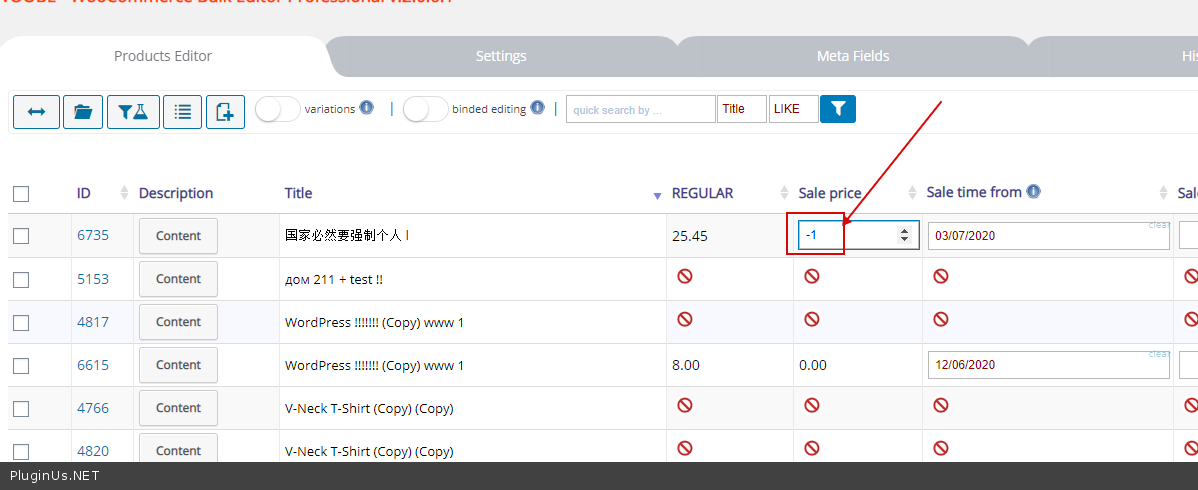
Welcome;)
Quote from lionheart on July 29, 2020, 02:51Hi, The sale times are still now working. I just used the bulk editor to schedule a bunch of sales to start Aug 1st-Aug 15th. But when you edit an individual product it shows the scheduled dates as July 31-Aug 14th. It is still one day off.
Please let me know when you can fix this. Thank you.
Hi, The sale times are still now working. I just used the bulk editor to schedule a bunch of sales to start Aug 1st-Aug 15th. But when you edit an individual product it shows the scheduled dates as July 31-Aug 14th. It is still one day off.
Please let me know when you can fix this. Thank you.
Quote from Pablo Borysenco on July 29, 2020, 10:35Hello
Very strange! I cannot repeat this error.( Before my fix I saw this error ) - https://c2n.me/48zzASY
Try in file -\plugins\woocommerce-bulk-editor\classes\models\products.php add this code - https://c2n.me/48zCMgI.png and do test If no luck delete this code
$value += 36000;
Hello
Very strange! I cannot repeat this error.( Before my fix I saw this error ) - https://c2n.me/48zzASY
Try in file -\plugins\woocommerce-bulk-editor\classes\models\products.php add this code - https://c2n.me/48zCMgI.png and do test If no luck delete this code

$value += 36000;
Quote from lionheart on July 30, 2020, 00:08Pablo,
First of all, if you make ANY changes to the website you MUST change it back. You put a product on sale and then didn't remove it. That's not ok!
Second, I don't know php so why are you having me do YOUR work of fixing YOUR plugin? I changed the php and it did nothing so I changed it back.
Lastly, your video doesn't show me anything so I have no idea what you are talking about.
Here are some screenshots so you can see the problem.... This image shows the sale date August 1-15th:
But when you edit the individual products it shows different dates (1 day off)...
Pablo,
First of all, if you make ANY changes to the website you MUST change it back. You put a product on sale and then didn't remove it. That's not ok!
Second, I don't know php so why are you having me do YOUR work of fixing YOUR plugin? I changed the php and it did nothing so I changed it back.
Lastly, your video doesn't show me anything so I have no idea what you are talking about.
Here are some screenshots so you can see the problem.... This image shows the sale date August 1-15th:

But when you edit the individual products it shows different dates (1 day off)...

Quote from Pablo Borysenco on July 30, 2020, 10:11Hello
You put a product on sale and then didn't remove it. - I changed the data that was already there !!! I haven't added anything new! https://c2n.me/48AxwEB.png I changed the date from 31.07 -14.08 to 1.08 -15.08 to test. After that I returned this data on the video to show you that the date changes correctly - https://c2n.me/48zzASY
so why are you having me do YOUR work of fixing YOUR plugin? -??? Wordpress may not be configured correctly. And I asked you to do this to hard-code the time zone correction! On my side, everything works correctly, so I asked to insert one line of text and if it does not help you quickly delete it.
As I understand it now, I see the correct data here - https://c2n.me/48AyMJX.png
Hello
You put a product on sale and then didn't remove it. - I changed the data that was already there !!! I haven't added anything new! https://c2n.me/48AxwEB.png I changed the date from 31.07 -14.08 to 1.08 -15.08 to test. After that I returned this data on the video to show you that the date changes correctly - https://c2n.me/48zzASY

so why are you having me do YOUR work of fixing YOUR plugin? -??? Wordpress may not be configured correctly. And I asked you to do this to hard-code the time zone correction! On my side, everything works correctly, so I asked to insert one line of text and if it does not help you quickly delete it.
As I understand it now, I see the correct data here - https://c2n.me/48AyMJX.png

Quote from lionheart on July 30, 2020, 10:20'As I understand it now, I see the correct data here - https://c2n.me/48AyMJX.png'
This makes no sense. The dates are not the same.
'I changed the date from 31.07 -14.08 to 1.08 -15.08'
This also doesn't make sense because I set the dates from Aug 1-15, not July 31-Aug 14. That is what I keep telling you.
'As I understand it now, I see the correct data here - https://c2n.me/48AyMJX.png'
This makes no sense. The dates are not the same.
'I changed the date from 31.07 -14.08 to 1.08 -15.08'
This also doesn't make sense because I set the dates from Aug 1-15, not July 31-Aug 14. That is what I keep telling you.
Quote from lionheart on July 30, 2020, 10:46Just so we are clear... in this picture: https://c2n.me/48AyMJX.png' the two dates are NOT the same and they should be the same if it was working correctly.
You probably can't see the issue because you are in a different time zone.
Just so we are clear... in this picture: https://c2n.me/48AyMJX.png' the two dates are NOT the same and they should be the same if it was working correctly.
You probably can't see the issue because you are in a different time zone.
Quote from Pablo Borysenco on July 30, 2020, 16:59Hello
Please do not edit the date. I work on your site
Hello
Please do not edit the date. I work on your site
Quote from Pablo Borysenco on July 30, 2020, 17:55Hello
Please do test . My video - https://c2n.me/48B8wEG
Hello
Please do test . My video - https://c2n.me/48B8wEG
Quote from lionheart on August 1, 2020, 23:02No, It is still not working correctly. Yes, the dates are the same in both places now, but I waited until the sale was live to confirm everything. This morning (August 1st) I checked on all the sales and this is what I saw.... It shows on sale but the amounts are NOT on sale (Originally $12 - On Sale for $12).
I double-checked information in your plugin and it shows the correct information so it SHOULD be working but it is NOT:
ONLY when I changed the Date from Aug 1st, BACK to July 31st, did it work...
So as you can see the DATE function is STILL not working. It is 1 DAY OFF. I had to spend over an hour of my client's time & money today fixing all of the dates for the sale that is now live.
No, It is still not working correctly. Yes, the dates are the same in both places now, but I waited until the sale was live to confirm everything. This morning (August 1st) I checked on all the sales and this is what I saw.... It shows on sale but the amounts are NOT on sale (Originally $12 - On Sale for $12).

I double-checked information in your plugin and it shows the correct information so it SHOULD be working but it is NOT:

ONLY when I changed the Date from Aug 1st, BACK to July 31st, did it work...


So as you can see the DATE function is STILL not working. It is 1 DAY OFF. I had to spend over an hour of my client's time & money today fixing all of the dates for the sale that is now live.
Quote from Pablo Borysenco on August 3, 2020, 09:59Hello
My plugin is editing fields and cannot affect functionality.
If this data is changed on the product side, enabling the discount is already woocommerce functionality.
You can disable my plugin and do a test . My video - https://c2n.me/48DjmjV
Hello
My plugin is editing fields and cannot affect functionality.
If this data is changed on the product side, enabling the discount is already woocommerce functionality.
You can disable my plugin and do a test . My video - https://c2n.me/48DjmjV
Quote from lionheart on August 11, 2020, 23:26There isn't anything wrong with woocommerce. Everything works correctly when I manually schedule sales directly within each individual product page. The only error happens when YOUR plugin connects to woocommerce. When I schedule sales using your plugin, ONLY THEN does it trigger the wrong dates within woocommerce.
There isn't anything wrong with woocommerce. Everything works correctly when I manually schedule sales directly within each individual product page. The only error happens when YOUR plugin connects to woocommerce. When I schedule sales using your plugin, ONLY THEN does it trigger the wrong dates within woocommerce.