
Pre-Sales Inquiry: Staging Domain License Usage and Checkout Currency Issue with FOX Professional
The support doesn work on Saturdays and Sundays, so some Friday requests can be answered on Monday. If you have problems with registration ask help on contact us page pleaseIf you not got email within 24~36 business hours, firstly check your spam box, and if no any email from the support there - back to the forum and read answer here. DO NOT ANSWER ON EMAILS [noreply@pluginus.net] FROM THE FORUM!! Emails are just for your info, all answers should be published only here.
The support doesn work on Saturdays and Sundays, so some Friday requests can be answered on Monday.

Quote from ABT on June 19, 2026, 12:52Dear FOX Support Team,
I am currently evaluating FOX – WooCommerce Currency Switcher Professional for my WooCommerce store and would like to clarify a few points before purchasing the license.
My website details are as follows:
Production Website:
https://tanviherbals.com/Staging Website:
https://globalsite.tanviherbals.com/At present, I am using the FREE version of FOX on my staging website for testing purposes.
I have encountered an issue with the free version where currency switching works correctly on Product Pages, Category Pages, Home Page and Cart Page, but the Checkout Page always resets back to my store base currency (INR).
For example:
Cart URL:
https://globalsite.tanviherbals.com/cart/?currency=USDSession Output:
woocs_current_currency => USDCheckout URL:
https://globalsite.tanviherbals.com/checkout/?currency=USDSession Output:
woocs_current_currency => INRAs a result, WooCommerce checkout always displays INR, even when USD is selected.
I would appreciate confirmation on the following questions:
- Does FOX Professional resolve this issue and allow the checkout page to retain the selected currency (USD, GBP, EUR, etc.) throughout the complete checkout process?
- Does FOX Professional support displaying different payment gateways based on the selected currency? My requirement is:
• INR → Razorpay only
• USD → PayPal only
• GBP → PayPal only
• EUR → PayPal only
• AED → PayPal only
- I have approximately 92 WooCommerce products, including Variable Products. Does FOX Professional fully support variable product pricing conversion during checkout?
- I use LiteSpeed Cache. Is FOX Professional fully compatible with LiteSpeed Cache?
- Regarding licensing:
Can I purchase a single FOX Professional license, install and activate it on my staging domain (globalsite.tanviherbals.com) for testing, and once testing is completed, deactivate it from the staging site and activate the same license on my production domain (tanviherbals.com)?- Is there any official staging/development domain policy for FOX Professional licenses?
- Does FOX Professional support payment rules based on selected currency without requiring additional third-party plugins?
I am planning to purchase FOX Professional if it can fulfill the above requirements, so your confirmation would be highly appreciated.
Thank you for your assistance.
Best Regards,
Tanvi Herbals Team
https://tanviherbals.com/
Dear FOX Support Team,
I am currently evaluating FOX – WooCommerce Currency Switcher Professional for my WooCommerce store and would like to clarify a few points before purchasing the license.
My website details are as follows:
Production Website:
https://tanviherbals.com/
Staging Website:
https://globalsite.tanviherbals.com/
At present, I am using the FREE version of FOX on my staging website for testing purposes.
I have encountered an issue with the free version where currency switching works correctly on Product Pages, Category Pages, Home Page and Cart Page, but the Checkout Page always resets back to my store base currency (INR).
For example:
Cart URL:
https://globalsite.tanviherbals.com/cart/?currency=USD
Session Output:
woocs_current_currency => USD
Checkout URL:
https://globalsite.tanviherbals.com/checkout/?currency=USD
Session Output:
woocs_current_currency => INR
As a result, WooCommerce checkout always displays INR, even when USD is selected.
I would appreciate confirmation on the following questions:
- Does FOX Professional resolve this issue and allow the checkout page to retain the selected currency (USD, GBP, EUR, etc.) throughout the complete checkout process?
- Does FOX Professional support displaying different payment gateways based on the selected currency? My requirement is:
• INR → Razorpay only
• USD → PayPal only
• GBP → PayPal only
• EUR → PayPal only
• AED → PayPal only
- I have approximately 92 WooCommerce products, including Variable Products. Does FOX Professional fully support variable product pricing conversion during checkout?
- I use LiteSpeed Cache. Is FOX Professional fully compatible with LiteSpeed Cache?
- Regarding licensing:
Can I purchase a single FOX Professional license, install and activate it on my staging domain (globalsite.tanviherbals.com) for testing, and once testing is completed, deactivate it from the staging site and activate the same license on my production domain (tanviherbals.com)? - Is there any official staging/development domain policy for FOX Professional licenses?
- Does FOX Professional support payment rules based on selected currency without requiring additional third-party plugins?
I am planning to purchase FOX Professional if it can fulfill the above requirements, so your confirmation would be highly appreciated.
Thank you for your assistance.
Best Regards,
Tanvi Herbals Team
https://tanviherbals.com/

Quote from Alex Dev on June 19, 2026, 15:23Hello Tanvi
Thank you for these detailed questions, happy to go through each point.
- Checkout currency reset to base currency
This is controlled by a setting called Is multiple allowed in the plugin tab Options. By default it is set to No, which means the plugin always charges in your store base currency at checkout, even if a different currency was selected earlier. This is exactly why you see USD on the cart but INR again at checkout.
This option is available in the version you are already testing, so please go to the plugin settings and set Is multiple allowed to Yes. After that, the currency selected by the customer should be kept all the way through checkout instead of resetting to INR.
- Payment gateways per currency
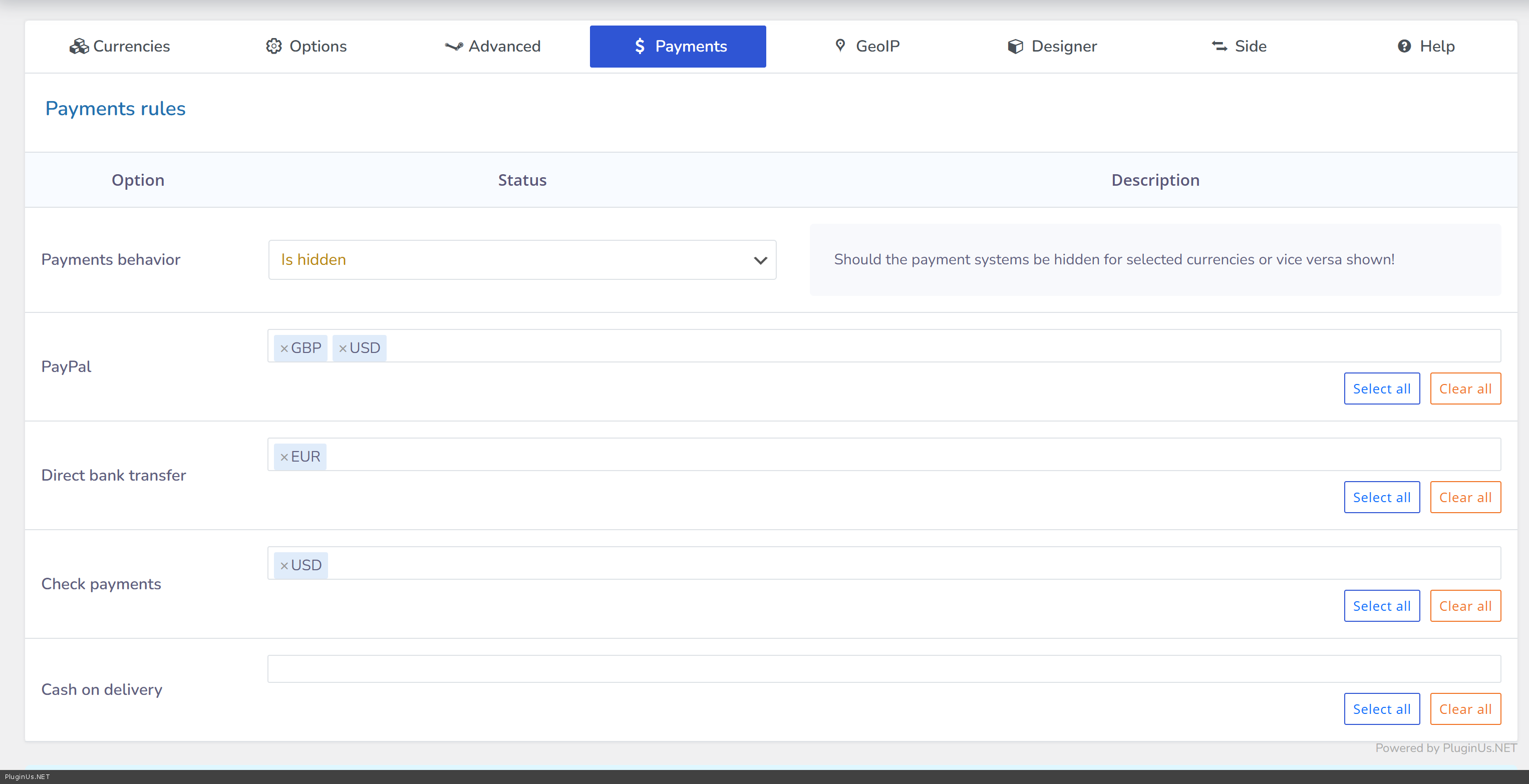
Yes, this is fully supported natively, no third party plugin needed. In the plugin settings there is a Payments behavior option (Is hidden or Is shown), and for each of your active WooCommerce payment gateways you get a multi select list of currencies. For your case you would set it so Razorpay is only shown for INR, and PayPal is shown for USD, GBP, EUR and AED. This is a built in feature.
- Variable products
Yes, variable products and their variations are fully supported for currency conversion, including price display, sale price, and price ranges shown on the shop and product pages. With 92 products including variable ones, this is a normal use case for the plugin and is handled out of the box.
- LiteSpeed Cache compatibility
Yes, it is compatible with LiteSpeed Cache and other caching plugins in general. You need to enable the option called I am using cache plugin on my site in the plugin settings (tab Options), and set a Custom price format value (for example PRICE (CODE)). After enabling it, please clear all caches on your site once so the change takes effect. This makes the plugin redraw prices in the selected currency through AJAX even when the page itself is served from cache.
- Licensing for staging and production domains
There is no domain locking mechanism on our license keys, so this is not a problem at all. You can purchase a single license, use it on your staging domain while testing, and later use the very same license on your production domain once you are ready to go live. You can also keep the plugin active on both the staging and production site using the same license at the same time if you want to keep your staging environment around for future testing, that is fine as well.
- Staging or development domain policy
Since there is no domain restriction enforced on the license at all, there is no separate staging or development domain policy needed, the license simply is not tied to a specific domain.
One more suggestion: the free version and FOX Professional share exactly the same functionality, the only difference between them is the number of currencies you can use at the same time. Since you already have the free version installed on your staging site together with your real plugins and theme, we would recommend testing all of the points above (multiple currency checkout, payment gateway rules, variable products, LiteSpeed Cache) directly there first. If everything works well in your environment with the free version, it will continue working exactly the same way after you purchase FOX Professional, the only change you will get is the ability to add more currencies.
Please let us know if you have any other questions before purchasing.
Hello Tanvi
Thank you for these detailed questions, happy to go through each point.
- Checkout currency reset to base currency
This is controlled by a setting called Is multiple allowed in the plugin tab Options. By default it is set to No, which means the plugin always charges in your store base currency at checkout, even if a different currency was selected earlier. This is exactly why you see USD on the cart but INR again at checkout.
This option is available in the version you are already testing, so please go to the plugin settings and set Is multiple allowed to Yes. After that, the currency selected by the customer should be kept all the way through checkout instead of resetting to INR.
- Payment gateways per currency
Yes, this is fully supported natively, no third party plugin needed. In the plugin settings there is a Payments behavior option (Is hidden or Is shown), and for each of your active WooCommerce payment gateways you get a multi select list of currencies. For your case you would set it so Razorpay is only shown for INR, and PayPal is shown for USD, GBP, EUR and AED. This is a built in feature.
- Variable products
Yes, variable products and their variations are fully supported for currency conversion, including price display, sale price, and price ranges shown on the shop and product pages. With 92 products including variable ones, this is a normal use case for the plugin and is handled out of the box.
- LiteSpeed Cache compatibility
Yes, it is compatible with LiteSpeed Cache and other caching plugins in general. You need to enable the option called I am using cache plugin on my site in the plugin settings (tab Options), and set a Custom price format value (for example PRICE (CODE)). After enabling it, please clear all caches on your site once so the change takes effect. This makes the plugin redraw prices in the selected currency through AJAX even when the page itself is served from cache.
- Licensing for staging and production domains
There is no domain locking mechanism on our license keys, so this is not a problem at all. You can purchase a single license, use it on your staging domain while testing, and later use the very same license on your production domain once you are ready to go live. You can also keep the plugin active on both the staging and production site using the same license at the same time if you want to keep your staging environment around for future testing, that is fine as well.
- Staging or development domain policy
Since there is no domain restriction enforced on the license at all, there is no separate staging or development domain policy needed, the license simply is not tied to a specific domain.
One more suggestion: the free version and FOX Professional share exactly the same functionality, the only difference between them is the number of currencies you can use at the same time. Since you already have the free version installed on your staging site together with your real plugins and theme, we would recommend testing all of the points above (multiple currency checkout, payment gateway rules, variable products, LiteSpeed Cache) directly there first. If everything works well in your environment with the free version, it will continue working exactly the same way after you purchase FOX Professional, the only change you will get is the ability to add more currencies.
Please let us know if you have any other questions before purchasing.
Quote from ABT on June 22, 2026, 15:52Dear Support Team,
I am experiencing an issue with FOX Currency Switcher (Version 1.4.9) on my WooCommerce website.
Website URL:
https://globalsite.tanviherbals.com/WooCommerce Version:
10.8.1FOX Version:
1.4.9Issue Description
My store's base currency is INR, and all products are configured with prices in INR. I have variable products where the variation prices are correctly stored in WooCommerce.
For example, the product:
https://globalsite.tanviherbals.com/product/tanvishataa-tablets/
has the following actual variation prices configured in WooCommerce:
- Variation ID: 145654963 → ₹216.00
- Variation ID: XXXXXXX → ₹864.00
- Variation ID: XXXXXXX → ₹1080.00
However, when FOX Currency Switcher is enabled, the prices displayed on the frontend are automatically reduced to:
- 205.71 instead of 216.00
- 822.86 instead of 864.00
- 1028.57 instead of 1080.00
Investigation Performed
I have performed extensive troubleshooting and found the following:
Currency Configuration
- INR is the default (etalon) currency.
- INR exchange rate = 1.0
- INR rate_plus = empty
- Fixed Prices = Disabled
- Fixed Shipping = Disabled
- Fixed Coupons = Disabled
- GeoIP = Disabled
- Approximate Prices = Disabled
- Payment Rules appear normal.
- Product prices in WooCommerce Admin are correct.
The FOX option data retrieved from the database shows:
'INR' => array(
'name' => 'INR',
'rate' => 1.0,
'is_etalon' => 1,
'rate_plus' => '',
)
Additional Findings
When I completely disable FOX Currency Switcher, all prices are displayed correctly.
Furthermore, I discovered that disabling the option:
"Is Multiple Allowed"
immediately fixes the incorrect product prices.
After disabling this option:
The product page correctly displays:
216.00 – 1080.00
instead of
205.71 – 1028.57
However, after disabling "Is Multiple Allowed", some variation price functionality no longer behaves correctly, indicating that the issue is related to FOX's handling of variable products when Multiple Allowed mode is enabled.
Technical Findings
I investigated the plugin code and found that FOX registers the following hook:
add_filter(
'woocommerce_product_variation_get_price',
array($this, 'raw_woocommerce_price'),
9999,
2
);
located in:
wp-content/plugins/woocommerce-currency-switcher/classes/woocs.php
The function responsible appears to be:
public function raw_woocommerce_price( $price, $product = null, $min_max = null, $display = null )Based on testing, it seems that when "Is Multiple Allowed" is enabled, FOX modifies variable product prices even though INR has a rate of 1.0 and no additional adjustments are configured.
Assistance Requested
Could you please confirm:
- Is FOX Currency Switcher v1.4.9 fully compatible with WooCommerce 10.8.1 for variable products?
- Is this a known issue related to the "Is Multiple Allowed" setting?
- Is there a recommended configuration that allows Multiple Allowed mode to remain enabled without modifying the original INR prices?
- Is there a patch, filter, or updated version available to resolve this issue?
I would appreciate your guidance, as my store is intended for international sales and I need to maintain the original INR pricing accurately while still supporting multiple currencies.
Thank you for your assistance.
Dear Support Team,
I am experiencing an issue with FOX Currency Switcher (Version 1.4.9) on my WooCommerce website.
Website URL:
https://globalsite.tanviherbals.com/
WooCommerce Version:
10.8.1
FOX Version:
1.4.9
Issue Description
My store's base currency is INR, and all products are configured with prices in INR. I have variable products where the variation prices are correctly stored in WooCommerce.
For example, the product:
https://globalsite.tanviherbals.com/product/tanvishataa-tablets/
has the following actual variation prices configured in WooCommerce:
- Variation ID: 145654963 → ₹216.00
- Variation ID: XXXXXXX → ₹864.00
- Variation ID: XXXXXXX → ₹1080.00
However, when FOX Currency Switcher is enabled, the prices displayed on the frontend are automatically reduced to:
- 205.71 instead of 216.00
- 822.86 instead of 864.00
- 1028.57 instead of 1080.00
Investigation Performed
I have performed extensive troubleshooting and found the following:
Currency Configuration
- INR is the default (etalon) currency.
- INR exchange rate = 1.0
- INR rate_plus = empty
- Fixed Prices = Disabled
- Fixed Shipping = Disabled
- Fixed Coupons = Disabled
- GeoIP = Disabled
- Approximate Prices = Disabled
- Payment Rules appear normal.
- Product prices in WooCommerce Admin are correct.
The FOX option data retrieved from the database shows:
'INR' => array(
'name' => 'INR',
'rate' => 1.0,
'is_etalon' => 1,
'rate_plus' => '',
)
Additional Findings
When I completely disable FOX Currency Switcher, all prices are displayed correctly.
Furthermore, I discovered that disabling the option:
"Is Multiple Allowed"
immediately fixes the incorrect product prices.
After disabling this option:
The product page correctly displays:
216.00 – 1080.00
instead of
205.71 – 1028.57
However, after disabling"Is Multiple Allowed", some variation price functionality no longer behaves correctly, indicating that the issue is related to FOX's handling of variable products when Multiple Allowed mode is enabled.
Technical Findings
I investigated the plugin code and found that FOX registers the following hook:
add_filter(
'woocommerce_product_variation_get_price',
array($this, 'raw_woocommerce_price'),
9999,
2
);
located in:
wp-content/plugins/woocommerce-currency-switcher/classes/woocs.php
The function responsible appears to be:
public function raw_woocommerce_price( $price, $product = null, $min_max = null, $display = null )
Based on testing, it seems that when"Is Multiple Allowed" is enabled, FOX modifies variable product prices even though INR has a rate of 1.0 and no additional adjustments are configured.
Assistance Requested
Could you please confirm:
- Is FOX Currency Switcher v1.4.9 fully compatible with WooCommerce 10.8.1 for variable products?
- Is this a known issue related to the"Is Multiple Allowed" setting?
- Is there a recommended configuration that allows Multiple Allowed mode to remain enabled without modifying the original INR prices?
- Is there a patch, filter, or updated version available to resolve this issue?
I would appreciate your guidance, as my store is intended for international sales and I need to maintain the original INR pricing accurately while still supporting multiple currencies.
Thank you for your assistance.
Quote from Alex Dev on June 24, 2026, 12:14Hello
Thank you for the detailed technical investigation, this is helpful.
You are right that FOX hooks into woocommerce_product_variation_get_price via raw_woocommerce_price, that part of your finding is correct and expected, this is exactly how the plugin applies currency conversion to variation prices, so seeing that hook registered is normal and by itself is not the issue.
Looking at the actual code of raw_woocommerce_price, the conversion math only runs when the currently selected currency is different from your default currency. Since your default currency is INR with rate 1.0 and no Fixed Prices, no GeoIP and no user role pricing enabled, this function should not change the price at all while INR is selected, there is no calculation path in the code that would reduce a price by around 4.76 percent under those conditions.
So the price drop you are seeing does not come from FOX currency conversion math itself. The Is Multiple Allowed setting only controls whether the customer can pay at checkout in the currency they selected, it does not perform any price calculation on its own, so we don't yet have a clear explanation for why toggling it changes the displayed price. This points to something else on your site interacting with it, but to find the actual source we need to look directly at your setup rather than guess.
Could you please set up a separate test copy of your site (not your production site) with the same plugins, theme and the same product, and share FTP access to that test copy in the private fields of this ticket, not by email. Please do not share access to your production site, we will be testing fairly aggressively there, including disabling plugins and modifying files directly, and we don't want any risk to your live store.
It would also help a lot if you could record a short screen video showing the same variation product page, once with Is Multiple Allowed enabled and once with it disabled, showing the price before and after toggling the setting. That will let us see exactly where the number changes and narrow down what is responsible.
Once we have access we will go through it directly and let you know what we find.
Hello
Thank you for the detailed technical investigation, this is helpful.
You are right that FOX hooks into woocommerce_product_variation_get_price via raw_woocommerce_price, that part of your finding is correct and expected, this is exactly how the plugin applies currency conversion to variation prices, so seeing that hook registered is normal and by itself is not the issue.
Looking at the actual code of raw_woocommerce_price, the conversion math only runs when the currently selected currency is different from your default currency. Since your default currency is INR with rate 1.0 and no Fixed Prices, no GeoIP and no user role pricing enabled, this function should not change the price at all while INR is selected, there is no calculation path in the code that would reduce a price by around 4.76 percent under those conditions.
So the price drop you are seeing does not come from FOX currency conversion math itself. The Is Multiple Allowed setting only controls whether the customer can pay at checkout in the currency they selected, it does not perform any price calculation on its own, so we don't yet have a clear explanation for why toggling it changes the displayed price. This points to something else on your site interacting with it, but to find the actual source we need to look directly at your setup rather than guess.
Could you please set up a separate test copy of your site (not your production site) with the same plugins, theme and the same product, and share FTP access to that test copy in the private fields of this ticket, not by email. Please do not share access to your production site, we will be testing fairly aggressively there, including disabling plugins and modifying files directly, and we don't want any risk to your live store.
It would also help a lot if you could record a short screen video showing the same variation product page, once with Is Multiple Allowed enabled and once with it disabled, showing the price before and after toggling the setting. That will let us see exactly where the number changes and narrow down what is responsible.
Once we have access we will go through it directly and let you know what we find.
Quote from ABT on June 26, 2026, 17:40Hello FOX Support Team,
We have purchased and installed the FOX Currency Plugin on our WooCommerce website:
Website:
https://globalsite.tanviherbals.com/License Purchase Screenshot:
https://globalsite.tanviherbals.com/screenshot/Licence%20purchased.pngWe are from India and have developed this WooCommerce website specifically for international customers. We do not intend to sell products within India.
Store Configuration:
• WooCommerce Store
• Default Store Currency : USD
• Shipping Zone : International
• Shipping Method : Flat Rate
• Shipping Cost : $5
• Shipping Method Instance ID : 23
• FOX Currency Plugin Installed and ActivatedIssue Description
The shipping charges are correctly added internally by WooCommerce but are not displayed in the Cart Totals section.
Example:
Product Subtotal:
$6.19Flat Rate Shipping:
$5.00Expected Grand Total:
$11.19Current Behaviour:
Subtotal:
$6.19Total:
$11.19Shipping Row:
NOT DISPLAYEDAs you can see, WooCommerce is calculating shipping correctly because the final total includes the $5 shipping amount, but the shipping line item itself is missing.
Cart Screenshot:
https://globalsite.tanviherbals.com/screenshot/cart.pngTechnical Investigation Performed
We have already investigated WooCommerce and confirmed the following:
Shipping Zone
International
Flat Rate
Instance ID : 23
Cost : 5
Enabled : Yes
Products are physical products and require shipping.
Product->needs_shipping()
returns TRUE
Cart Debug
WC()->cart->needs_shipping()
TRUE
WC()->cart->show_shipping()
TRUE
Chosen Shipping Method
flat_rate:23
The theme cart-totals.php template contains the standard WooCommerce code:
if ( WC()->cart->needs_shipping() && WC()->cart->show_shipping() ) {
wc_cart_totals_shipping_html();
}
The Total amount includes shipping correctly, but wc_cart_totals_shipping_html() does not output the shipping row.
We also noticed FOX-related modifications in our theme:
remove_filter(
'woocommerce_package_rates',
['WOOMULTI_CURRENCY_F_Frontend_Shipping',
'woocommerce_package_rates']
);We suspect FOX Currency may be affecting WooCommerce shipping rendering or shipping package handling in a multi-currency environment.
We would appreciate your assistance in identifying whether FOX Currency is responsible for this behavior and how to configure it correctly.
Thank you.
Regards,
Tanvi Herbals Development Team


Hello FOX Support Team,
We have purchased and installed the FOX Currency Plugin on our WooCommerce website:
Website:
https://globalsite.tanviherbals.com/
License Purchase Screenshot:
https://globalsite.tanviherbals.com/screenshot/Licence%20purchased.png
We are from India and have developed this WooCommerce website specifically for international customers. We do not intend to sell products within India.
Store Configuration:
• WooCommerce Store
• Default Store Currency : USD
• Shipping Zone : International
• Shipping Method : Flat Rate
• Shipping Cost : $5
• Shipping Method Instance ID : 23
• FOX Currency Plugin Installed and Activated
Issue Description
The shipping charges are correctly added internally by WooCommerce but are not displayed in the Cart Totals section.
Example:
Product Subtotal:
$6.19
Flat Rate Shipping:
$5.00
Expected Grand Total:
$11.19
Current Behaviour:
Subtotal:
$6.19
Total:
$11.19
Shipping Row:
NOT DISPLAYED
As you can see, WooCommerce is calculating shipping correctly because the final total includes the $5 shipping amount, but the shipping line item itself is missing.
Cart Screenshot:
https://globalsite.tanviherbals.com/screenshot/cart.png
Technical Investigation Performed
We have already investigated WooCommerce and confirmed the following:
Shipping Zone
International
Flat Rate
Instance ID : 23
Cost : 5
Enabled : Yes
Products are physical products and require shipping.
Product->needs_shipping()
returns TRUE
Cart Debug
WC()->cart->needs_shipping()
TRUE
WC()->cart->show_shipping()
TRUE
Chosen Shipping Method
flat_rate:23
The theme cart-totals.php template contains the standard WooCommerce code:
if ( WC()->cart->needs_shipping() && WC()->cart->show_shipping() ) {
wc_cart_totals_shipping_html();
}
The Total amount includes shipping correctly, but wc_cart_totals_shipping_html() does not output the shipping row.
We also noticed FOX-related modifications in our theme:
remove_filter(
'woocommerce_package_rates',
['WOOMULTI_CURRENCY_F_Frontend_Shipping',
'woocommerce_package_rates']
);
We suspect FOX Currency may be affecting WooCommerce shipping rendering or shipping package handling in a multi-currency environment.
We would appreciate your assistance in identifying whether FOX Currency is responsible for this behavior and how to configure it correctly.
Thank you.
Regards,
Tanvi Herbals Development Team

Quote from Ross on June 29, 2026, 16:59Hello Tanvi
Thank you for the detailed report. Here is what we found so far.
woocommerce_package_rates is a native WooCommerce core hook, it belongs to WooCommerce itself, not to any plugin. Any plugin or theme can attach a callback to it to modify or filter the list of available shipping rates before it gets rendered. Since your shipping total is being calculated correctly but the row itself is not displayed, this hook is actually a very likely place where the problem is happening, something attached to it could be altering or removing the rate object before the cart template tries to draw it. That fits exactly with what you are seeing: the total includes shipping, but the rate entry itself is not making it to the row that renders it.
The remove_filter call you found in your theme is calling this on a callback named WOOMULTI_CURRENCY_F_Frontend_Shipping, which belongs to a completely different multi currency plugin, not FOX. This looks like leftover code in your theme from a previous multi currency plugin you may have used before switching to FOX. Since that class does not exist in your current setup, this specific remove_filter call does nothing, so this exact line is not the cause, but it does confirm that your site has had custom code touching this same hook before, which is exactly the area to keep investigating.
Could you first record a short video showing exactly where in the cart this row is expected and where it is missing, just so we are looking at the same thing.
If you want us to take a direct look, the fastest way would be a staging clone of the site with FTP and wp-admin access, as Alex mentioned before. But you do not have to wait for us, you can actually narrow this down yourself much faster:
1. Make a clone of the site on a test domain.
2. On the clone, deactivate every plugin except WooCommerce and FOX, and check if the shipping row comes back.
3. Also try switching to a default WordPress theme (like Storefront or twenty twenty four) on that same clone, keeping your normal set of plugins active, and see if the row appears there.
4. If switching the theme alone brings the row back, the issue is in your theme's cart template, not in any plugin.
5. If the row stays missing with everything else off and only WooCommerce and FOX active, then reactivate your other plugins one at a time on top of that until the row disappears again, that will point to the exact plugin causing the conflict.This kind of isolation test usually finds the real cause much faster than us guessing from the outside, and you do not need to wait on us to get started. If you do narrow it down to FOX through this process, let us know exactly which step it disappeared at and we will treat it as a bug to fix.
Hello Tanvi
Thank you for the detailed report. Here is what we found so far.
woocommerce_package_rates is a native WooCommerce core hook, it belongs to WooCommerce itself, not to any plugin. Any plugin or theme can attach a callback to it to modify or filter the list of available shipping rates before it gets rendered. Since your shipping total is being calculated correctly but the row itself is not displayed, this hook is actually a very likely place where the problem is happening, something attached to it could be altering or removing the rate object before the cart template tries to draw it. That fits exactly with what you are seeing: the total includes shipping, but the rate entry itself is not making it to the row that renders it.
The remove_filter call you found in your theme is calling this on a callback named WOOMULTI_CURRENCY_F_Frontend_Shipping, which belongs to a completely different multi currency plugin, not FOX. This looks like leftover code in your theme from a previous multi currency plugin you may have used before switching to FOX. Since that class does not exist in your current setup, this specific remove_filter call does nothing, so this exact line is not the cause, but it does confirm that your site has had custom code touching this same hook before, which is exactly the area to keep investigating.
Could you first record a short video showing exactly where in the cart this row is expected and where it is missing, just so we are looking at the same thing.
If you want us to take a direct look, the fastest way would be a staging clone of the site with FTP and wp-admin access, as Alex mentioned before. But you do not have to wait for us, you can actually narrow this down yourself much faster:
1. Make a clone of the site on a test domain.
2. On the clone, deactivate every plugin except WooCommerce and FOX, and check if the shipping row comes back.
3. Also try switching to a default WordPress theme (like Storefront or twenty twenty four) on that same clone, keeping your normal set of plugins active, and see if the row appears there.
4. If switching the theme alone brings the row back, the issue is in your theme's cart template, not in any plugin.
5. If the row stays missing with everything else off and only WooCommerce and FOX active, then reactivate your other plugins one at a time on top of that until the row disappears again, that will point to the exact plugin causing the conflict.
This kind of isolation test usually finds the real cause much faster than us guessing from the outside, and you do not need to wait on us to get started. If you do narrow it down to FOX through this process, let us know exactly which step it disappeared at and we will treat it as a bug to fix.