
multisite compatible
The support doesn work on Saturdays and Sundays, so some Friday requests can be answered on Monday. If you have problems with registration ask help on contact us page pleaseIf you not got email within 24~36 business hours, firstly check your spam box, and if no any email from the support there - back to the forum and read answer here. DO NOT ANSWER ON EMAILS [noreply@pluginus.net] FROM THE FORUM!! Emails are just for your info, all answers should be published only here.
The support doesn work on Saturdays and Sundays, so some Friday requests can be answered on Monday.

Quote from ALEXHOJER on December 15, 2021, 13:38Hello
I have two online stores: one menswear (site 1) and one womenswear (site 2). These hold different stock.alexandrahojer.com and metrohandmade.co.zaWe have WOOCS (multi currency plugin) installed on site 1 and 2 with the main currency being ZAR (south african rand), but also selling in EUR , GBP and USD.I have created a third site (site 3) 156breestreet.co.za which I want to use to hold ALL the stock from site 1 and 2, and connect to VEND point of sale to use in our actual headquarters and physical store in Cape Town where we sell both mens and womenswear, ie all the stock from site 1 and 2. This site is password protected and is only for connecting to the point of sale / hold all the stock.The purpose of this is to sync the stock from the two online stores to the main store, which we currently have to do manually on all platforms after every day’s sales.On site 3 multi currency is not required as we only sell in ZAR (set as main currency).Basically the prices do not need to sync across the stores if we can set them individually on each site and they stay that way when stock gets updated across the sites.I tried woo multistore, but couldn't make it work with the WOOCS plugin, despite disabling the price sync.Is WOOCS compatible with a multisite network and can it achieve the above?
Kind regards
Alex
Hello
Is WOOCS compatible with a multisite network and can it achieve the above?
Kind regards
Alex

Quote from Pablo Borysenco on December 16, 2021, 11:53Hello Alex
Please paste your license key here - https://share.pluginus.net/image/i20210618130558.png -> https://share.pluginus.net/image/i20210618130614.png
Describe in more detail what exactly does not work?
Hello Alex
Please paste your license key here - https://share.pluginus.net/image/i20210618130558.png -> https://share.pluginus.net/image/i20210618130614.png


Describe in more detail what exactly does not work?
Quote from ALEXHOJER on December 16, 2021, 12:02Hello Pablo
Thank you for getting back to me.
With Woo multistore the currencies get imported to the main inventory/site in strange ways, mixing the different currencies into a range of default currency.
I contacted them and they have said they do not support Woocs and don't have time to code something, and gave me a refund. If you were able to provide us with a code that imports only the default currency into the main inventory store it would potentially work..
Alternatively we are considering setting up a multisite network of three stores, two of which we want to have multi currency on and on one which we will only have main currency, that will sync to our point of sale.
I am wondering if your plugin can do this?
Kind regards
Alex
Hello Pablo
Thank you for getting back to me.
With Woo multistore the currencies get imported to the main inventory/site in strange ways, mixing the different currencies into a range of default currency.
I contacted them and they have said they do not support Woocs and don't have time to code something, and gave me a refund. If you were able to provide us with a code that imports only the default currency into the main inventory store it would potentially work..
Alternatively we are considering setting up a multisite network of three stores, two of which we want to have multi currency on and on one which we will only have main currency, that will sync to our point of sale.
I am wondering if your plugin can do this?
Kind regards
Alex
Quote from Pablo Borysenco on December 16, 2021, 13:15Just before a third-party plugin( Woo multistore ) makes a request to get products, you need to call this function - https://currency-switcher.com/function/woocs-reset_currency
Just before a third-party plugin( Woo multistore ) makes a request to get products, you need to call this function - https://currency-switcher.com/function/woocs-reset_currency
Quote from ALEXHOJER on December 16, 2021, 14:02Thank you so much!
Is there any chance you would you be able to help me adding the code? I simply wouldn't know where to start!
Kind regards
Alex
Thank you so much!
Is there any chance you would you be able to help me adding the code? I simply wouldn't know where to start!
Kind regards
Alex
Quote from Pablo Borysenco on December 17, 2021, 12:24Hello Alex
In third party plugin support ask how and where they get products.
And when they tell you the file and the function, I will show you where and what code to insert.
Hello Alex
In third party plugin support ask how and where they get products.
And when they tell you the file and the function, I will show you where and what code to insert.
Quote from ALEXHOJER on January 18, 2022, 20:23Hello
Hoping you can help me
I have a developer (tide connect) assisting with setting up Woocommerce with VEND point of sale.
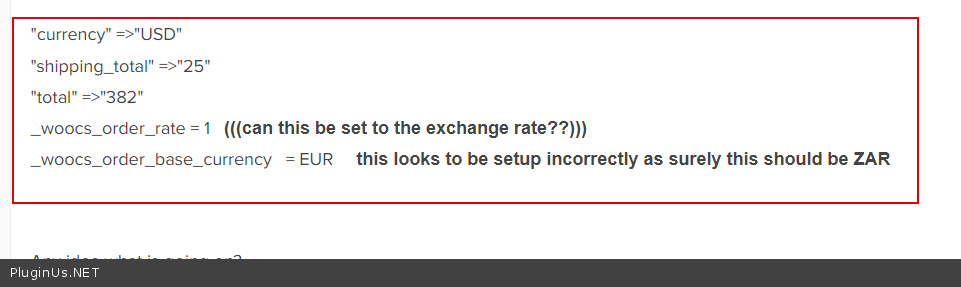
I have default currency set to ZAR but when the sale goes through they get this code:
"currency" => "USD"
"shipping_total" => "25"
"total" => "382"
_woocs_order_rate = 1 (((can this be set to the exchange rate??)))
_woocs_order_base_currency = EUR this looks to be setup incorrectly as surely this should be ZAR
Any idea what is going on?
Thanks
Alex
Hello
Hoping you can help me
I have a developer (tide connect) assisting with setting up Woocommerce with VEND point of sale.
I have default currency set to ZAR but when the sale goes through they get this code:
"currency" =>"USD"
"shipping_total" =>"25"
"total" =>"382"
_woocs_order_rate = 1 (((can this be set to the exchange rate??)))
_woocs_order_base_currency = EUR this looks to be setup incorrectly as surely this should be ZAR
Any idea what is going on?
Thanks
Alex
Quote from Pablo Borysenco on January 19, 2022, 12:02Hello Alex
this data is generated here -\wp-content\plugins\woocommerce-currency-switcher\classes\woocs.php - https://share.pluginus.net/image/i20220119100133.png
this can happen if the plugin is configured incorrectly
Hello Alex
this data is generated here -\wp-content\plugins\woocommerce-currency-switcher\classes\woocs.php - https://share.pluginus.net/image/i20220119100133.png

this can happen if the plugin is configured incorrectly
Quote from ALEXHOJER on January 19, 2022, 15:39Hello
Thank you for getting back to me. I do not know how I would have configured incorrectly, are you able to take a look for me?
Kind regards
Alex
Hello
Thank you for getting back to me. I do not know how I would have configured incorrectly, are you able to take a look for me?
Kind regards
Alex
Quote from ALEXHOJER on January 19, 2022, 15:41I have sent you the login details in the hidden data section.
Kind regards
Alex
I have sent you the login details in the hidden data section.
Kind regards
Alex
Quote from Pablo Borysenco on January 20, 2022, 11:36Hello Alex
Settings are ok
describe in more detail under what conditions you received this data - https://c2n.me/4eFbUEJ.png
Hello Alex
Settings are ok
describe in more detail under what conditions you received this data - https://c2n.me/4eFbUEJ.png
Quote from ALEXHOJER on January 28, 2022, 08:06Good Morning
I have been having some issues on my site and got a programmer to help me, who has established that your plugin is conflicting with wordpress.
See his comments below:
"I have created a staging environment of your website using WP Staging to test and debug, which can be found here https://alexandrahojer.com/staging/ (please note some front end links might not work correctly and will show a 404 as the links are hardcoded into the menus) and I have discovered that the plugin "WOOCS - WooCommerce Currency Switcher" is conflicting with WordPress and therefore causing the variations not to work properly, when I disable it, the variations work :) I'm not sure if you are using it? It looks like a paid plugin so you might have to contact support or download an updated version of the plugin.
Please could you assist to solve this?
I will send you the logins in the private section.
Kind regards
Alex
Good Morning
I have been having some issues on my site and got a programmer to help me, who has established that your plugin is conflicting with wordpress.
See his comments below:
"I have created a staging environment of your website using WP Staging to test and debug, which can be found here https://alexandrahojer.com/staging/ (please note some front end links might not work correctly and will show a 404 as the links are hardcoded into the menus) and I have discovered that the plugin"WOOCS - WooCommerce Currency Switcher" is conflicting with WordPress and therefore causing the variations not to work properly, when I disable it, the variations work :) I'm not sure if you are using it? It looks like a paid plugin so you might have to contact support or download an updated version of the plugin.
Please could you assist to solve this?
I will send you the logins in the private section.
Kind regards
Alex
Quote from Pablo Borysenco on January 28, 2022, 11:59Hello Alex
I have discovered that the plugin"WOOCS - WooCommerce Currency Switcher" is conflicting with WordPress - This is a super weird guess.
Please add a link to the product with the issue/ and describe in more detail what is wrong with variable products.
Hello Alex
I have discovered that the plugin"WOOCS - WooCommerce Currency Switcher" is conflicting with WordPress - This is a super weird guess.
Please add a link to the product with the issue/ and describe in more detail what is wrong with variable products.
Quote from ALEXHOJER on January 28, 2022, 12:18Hello Pablo
Tank you for the prompt reply.
See reply from the coder:
The plugin WOOCS - WooCommerce Currency Switcher is conflicting with WooCommerce and the variations. Whenever this plugin is enabled, the variations tab under a woocommerce product in the backend does not load and gives a 500 ajax error message. When the plugin is disabled, the variations work as per normal. Please advise.
Kind reagrds
Alex
Hello Pablo
Tank you for the prompt reply.
See reply from the coder:
The plugin WOOCS - WooCommerce Currency Switcher is conflicting with WooCommerce and the variations. Whenever this plugin is enabled, the variations tab under a woocommerce product in the backend does not load and gives a 500 ajax error message. When the plugin is disabled, the variations work as per normal. Please advise.
Kind reagrds
Alex
Quote from Pablo Borysenco on January 28, 2022, 14:03Ok!
the variations tab under a woocommerce product in the backend does not load and gives a 500 ajax error message - Woocommerce doesn't have variations loading in ajax mode(this is a third party functionality)
please drop me exact link to the issue
Ok!
the variations tab under a woocommerce product in the backend does not load and gives a 500 ajax error message - Woocommerce doesn't have variations loading in ajax mode(this is a third party functionality)
please drop me exact link to the issue
Quote from ALEXHOJER on January 28, 2022, 15:53Hi Pablo, please log in to our staging here: `https://alexandrahojer.com/staging/wp-admin/
I have put the login details in the private data for this ticket.Then go to this product: https://alexandrahojer.com/staging/wp-admin/post.php?post=5144&action=editClick on variations and you will see it just spins and spins.but when I disable WOOCS - WooCommerce Currency Switcher it works
Hi Pablo, please log in to our staging here: `https://alexandrahojer.com/staging/wp-admin/
Quote from Pablo Borysenco on January 31, 2022, 11:58Hello
Please add FTP access - https://share.pluginus.net/image/i20210618130558.png -> https://share.pluginus.net/image/i20210618130637.png
Hello
Please add FTP access - https://share.pluginus.net/image/i20210618130558.png -> https://share.pluginus.net/image/i20210618130637.png

Quote from ALEXHOJER on February 3, 2022, 18:47Hello
I have shared the FTP access in the private section.
Hope that is what you need.
Kind regards
Alex
Hello
I have shared the FTP access in the private section.
Hope that is what you need.
Kind regards
Alex
Quote from Pablo Borysenco on February 4, 2022, 14:45Hello Alex
Please add ftp host link
Hello Alex
Please add ftp host link
Quote from ALEXHOJER on February 4, 2022, 15:14