
Multicurrency and prices not updating on Schema.org
The support doesn work on Saturdays and Sundays, so some Friday requests can be answered on Monday. If you have problems with registration ask help on contact us page pleaseIf you not got email within 24~36 business hours, firstly check your spam box, and if no any email from the support there - back to the forum and read answer here. DO NOT ANSWER ON EMAILS [noreply@pluginus.net] FROM THE FORUM!! Emails are just for your info, all answers should be published only here.
The support doesn work on Saturdays and Sundays, so some Friday requests can be answered on Monday.

Quote from saadshah on February 18, 2022, 18:53I observed another issue. Please go to the link I provided in private data and you will see that the price is showing in GBP but the right-sided currency switcher shows NZD and at the bottom of the page of RELATED PRODUCTS prices are showing in NZD. Please resolve both issues at your earliest.
I observed another issue. Please go to the link I provided in private data and you will see that the price is showing in GBP but the right-sided currency switcher shows NZD and at the bottom of the page of RELATED PRODUCTS prices are showing in NZD. Please resolve both issues at your earliest.

Quote from Pablo Borysenco on February 21, 2022, 11:04Hello
Yes. I am using a plugin for quantity discounts. - Please disable this plugin and do a test!
I observed another issue. - some link
Hello
Yes. I am using a plugin for quantity discounts. - Please disable this plugin and do a test!
I observed another issue. - some link
Quote from saadshah on February 21, 2022, 17:25Hi,
Please disable this plugin and do a test! ------> I will test and update you at this.
First of all, please confirm me, have you resolved the issue as shown in your last video shared? Further please remove the video to maintain privacy.
Secondly, now I can observe another issue after resolving the last mentioned issue, some product prices are showing appropriately after selecting a colour or other attribute and some are showing inappropriately, I have provided links and pictures of the issues in private data.
Please check and resolve these issues and kindly ensure the other things does not affect.
Hi,
Please disable this plugin and do a test! ------> I will test and update you at this.
First of all, please confirm me, have you resolved the issue as shown in your last video shared? Further please remove the video to maintain privacy.
Secondly, now I can observe another issue after resolving the last mentioned issue, some product prices are showing appropriately after selecting a colour or other attribute and some are showing inappropriately, I have provided links and pictures of the issues in private data.
Please check and resolve these issues and kindly ensure the other things does not affect.
Quote from Pablo Borysenco on February 22, 2022, 10:48Hello
I did a test - https://c2n.me/4f0Xph6.jpg - Conversion is correct
120 * 0.7584 = 91,008
59.99 * 0.7584 = 45,496416
Hello
I did a test - https://c2n.me/4f0Xph6.jpg - Conversion is correct
120 * 0.7584 = 91,008
59.99 * 0.7584 = 45,496416
Quote from saadshah on February 22, 2022, 10:50Hi,
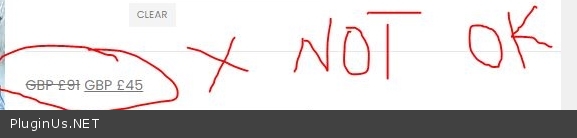
Please recheck, I am not complaining about conversion, I am complaining about the font of the prices, Please check again the private data other pictures (Without error Product) and respond to me.
Further, please confirm me, did you resolved the issue or not? because CTX feed plugin was also informed about this issue, I am not sure how to resolve this issue (the currency sign was incorrectly showing at the right currency switcher and at the bottom of RELATED PRODUCT)?
Hi,
Please recheck, I am not complaining about conversion, I am complaining about the font of the prices, Please check again the private data other pictures (Without error Product) and respond to me.
Further, please confirm me, did you resolved the issue or not? because CTX feed plugin was also informed about this issue, I am not sure how to resolve this issue (the currency sign was incorrectly showing at the right currency switcher and at the bottom of RELATED PRODUCT)?
Quote from Pablo Borysenco on February 22, 2022, 11:47I am complaining about the font of the prices, - My plugin does not affect price styles. Please try to disable my plugin and do a test
did you resolved the issue or not? - Yes, I showed this video! I enabled this setting - https://c2n.me/4f119CE.png - Are you using server side caching?
I am complaining about the font of the prices, - My plugin does not affect price styles. Please try to disable my plugin and do a test
did you resolved the issue or not? - Yes, I showed this video! I enabled this setting - https://c2n.me/4f119CE.png - Are you using server side caching?

Quote from saadshah on February 22, 2022, 12:30My plugin does not affect price styles. Please try to disable my plugin and do a test ----- > Your plugin affected this dear, I just turn off the setting https://postimg.cc/ZWCJ4WRw which you turned on and now the issue with the fonts resolved but the previous issue which I complained about earlier(the NZD sign is showing at the right currency switcher and at the bottom of RELATED PRODUCT) is showing now. Please check and resolve it and make sure other things does not get effect.
My plugin does not affect price styles. Please try to disable my plugin and do a test ----- > Your plugin affected this dear, I just turn off the setting https://postimg.cc/ZWCJ4WRw which you turned on and now the issue with the fonts resolved but the previous issue which I complained about earlier(the NZD sign is showing at the right currency switcher and at the bottom of RELATED PRODUCT) is showing now. Please check and resolve it and make sure other things does not get effect.
Quote from saadshah on February 22, 2022, 14:48Please also note, I am not using any caching plugin on my site.
Please also note, I am not using any caching plugin on my site.
Quote from saadshah on February 22, 2022, 16:17I just checked and expected this recent issue is due to the CTX feed plugin so please hold and let me talk to them first to resolve the current issue.
Furthermore, I will disable the quantity discount plugin and share the results of the price mismatch with you.
I just checked and expected this recent issue is due to the CTX feed plugin so please hold and let me talk to them first to resolve the current issue.
Furthermore, I will disable the quantity discount plugin and share the results of the price mismatch with you.
Quote from Pablo Borysenco on February 23, 2022, 11:51Hello
Please add CSS
.single-product .product-summary-wrap .woocs_price_code {
font-size: 1.5rem;
line-height: 1;
font-weight: 600;
letter-spacing: -0.02em;
}
Hello
Please add CSS
.single-product .product-summary-wrap .woocs_price_code {
font-size: 1.5rem;
line-height: 1;
font-weight: 600;
letter-spacing: -0.02em;
}
Quote from saadshah on February 23, 2022, 12:05What is the purpose of this code? what function will it perform?
CTX feed plugin team has resolved the issue of the font. now after you tuned on the setting option which I have turned off now, I am observing the mismatch values errors in GCM again and coordinating with the CTX feed team to resolve this.
What is the purpose of this code? what function will it perform?
CTX feed plugin team has resolved the issue of the font. now after you tuned on the setting option which I have turned off now, I am observing the mismatch values errors in GCM again and coordinating with the CTX feed team to resolve this.
Quote from Pablo Borysenco on February 23, 2022, 12:18This code will add the necessary styles (font) for the price
This code will add the necessary styles (font) for the price
Quote from saadshah on February 23, 2022, 12:24Ok, I observed in past that when I used Nito, this issue happened so If I again face same issue while using nitro , can I use this code to resolve the issue?
Ok, I observed in past that when I used Nito, this issue happened so If I again face same issue while using nitro , can I use this code to resolve the issue?
Quote from Pablo Borysenco on February 23, 2022, 13:25These are the styles of the current theme and they are different for each theme. I don't know what styles your new theme will use and I doubt the code will be useful
These are the styles of the current theme and they are different for each theme. I don't know what styles your new theme will use and I doubt the code will be useful