
Limitation for quick search
The support doesn work on Saturdays and Sundays, so some Friday requests can be answered on Monday. If you have problems with registration ask help on contact us page pleaseIf you not got email within 24~36 business hours, firstly check your spam box, and if no any email from the support there - back to the forum and read answer here. DO NOT ANSWER ON EMAILS [noreply@pluginus.net] FROM THE FORUM!! Emails are just for your info, all answers should be published only here.
The support doesn work on Saturdays and Sundays, so some Friday requests can be answered on Monday.

Quote from ochime on September 21, 2021, 16:55Hi pablo
it worked..
I deleted the js file (on main domain) and re-uploaded the js file I got from the subdomain (is this action correct?)What if there is an update?
"js file" means \wp-content\plugins\woocommerce-products-filter\ext\quick_search\js\quick_search.js
======xxx======
For Points 5
(Sorry Pablo if this story is too long).Customers here often use sub-district, district and city as one of the keys when searching (buy-sell-rent) property. For that reason i put these sub-districts, districts and cities in the attribute product.
The current product data has reached 9820. When i uploading, I divide it into 20 parts.
Then I did a test by entering the keywords I memorized (district and city sub-districts) on a random quick search, especially in big cities and it worked.
However, I just realized when I entered keywords from other regions, it didn't work (data not showing on quick search)
And if I look at it at a glance, some of the sub-districts that were found in a quick search are the sub-districts that are in sections 1-5 when uploading.
While sections 6-20 are mostly nowhere to be found on a quick search.(that just estimation - but the fact that 9820 products have been successfully uploaded)
I can't possibly check one by one in this case (because I'm importing products in bulk for testing purposes).
I have also performed the actions I described earlier, but so far it hasn't worked.
Please help me again..
I have explained the checking guide above and this is just an a additional.
Most of the product data uploaded in sections 1-5 you can find if you sort the products from the highest price.
As for sections 6-20, sort products based on the latest list.
Please try entering the keywords you see on the archive page on a quick search.(see previous image)
I hope this can helps you,
Thank you
Hi pablo
it worked..
I deleted the js file (on main domain) and re-uploaded the js file I got from the subdomain (is this action correct?)
What if there is an update?
"js file" means \wp-content\plugins\woocommerce-products-filter\ext\quick_search\js\quick_search.js
======xxx======
For Points 5
(Sorry Pablo if this story is too long).
Customers here often use sub-district, district and city as one of the keys when searching (buy-sell-rent) property. For that reason i put these sub-districts, districts and cities in the attribute product.
The current product data has reached 9820. When i uploading, I divide it into 20 parts.
Then I did a test by entering the keywords I memorized (district and city sub-districts) on a random quick search, especially in big cities and it worked.
However, I just realized when I entered keywords from other regions, it didn't work (data not showing on quick search)
And if I look at it at a glance, some of the sub-districts that were found in a quick search are the sub-districts that are in sections 1-5 when uploading.
While sections 6-20 are mostly nowhere to be found on a quick search.
(that just estimation - but the fact that 9820 products have been successfully uploaded)
I can't possibly check one by one in this case (because I'm importing products in bulk for testing purposes).
I have also performed the actions I described earlier, but so far it hasn't worked.
Please help me again..
I have explained the checking guide above and this is just an a additional.
Most of the product data uploaded in sections 1-5 you can find if you sort the products from the highest price.
As for sections 6-20, sort products based on the latest list.
Please try entering the keywords you see on the archive page on a quick search.(see previous image)
I hope this can helps you,
Thank you

Quote from Pablo Borysenco on September 22, 2021, 11:44Hello
I deleted the js file (on main domain) and re-uploaded the js file I got from the subdomain (is this action correct?) - Yes.
What if there is an update? - this fix will be included in the new version of the plugin
======xxx======
Ok! Give me specific words for which I should search. And a link to a product that should appear but does not appear in the search result
Hello
I deleted the js file (on main domain) and re-uploaded the js file I got from the subdomain (is this action correct?) - Yes.
What if there is an update? - this fix will be included in the new version of the plugin
======xxx======
Ok! Give me specific words for which I should search. And a link to a product that should appear but does not appear in the search result
Quote from ochime on September 22, 2021, 19:39What if there is an update? - this fix will be included in the new version of the plugin - Thanks.
=====xxx======
Okay! Give me the specific words I should look for.
Quick search right under the word "Ringkasan"
Below are the specific words for the search and you can enter more than one. Specifically for sub-districts, it is not displayed on the front end (additional information tab/product specifications) but can be found/can be a keyword on a quick search. If you need district/zip code data, you can check it at this link by entering the name of the sub-district. See the district and city directions on the front.
District has the label "Location" and City has the label "Area" .
Part 1 > All words that can be found on a quick search.
No Title districts District (Hidden) city Postal code 1 XJC95 Today's Millennial Residential Senayan New Kebayoran South Jakarta 12190 2 UOG24 A place of business sure to prosper Tomang Grogol Petamburan West Jakarta 11440 3 BTX64 Townhouse near Hospital Bajulmati Wongsorejo Banyuwangi 68453 4 GEY17 Cool, peaceful and beautiful house Rawa Asri Kualacenaku Indragiri Hulu 29335 5 CKP98 Beautiful 2-Story House Sei/Rungun River Kahayan Kuala Home Knife 74872 6 CKP31 Ready to build a house Karang Asem Paliya Gunung Kidul 55871 7 CCG96 NEW HOUSE with WORKS Point Cement Kediri Kab 64161 8 AAL44 Money-printing shop Sidokumpul Connect Lamongan 62284
Part 2 > All words (product data) not found at all on a quick search.
No Title districts District (Hidden) city Postal code 1 VUP30 Ready to build a house Dead Allergies Dead Crossing Allergy partner 26382 2 THZ74 NEW HOUSE with WORKS Kinali Kinali Pasaman Barat 26567 3 UUB96 Multipurpose Warehouse Kapar Luhak Nan Duo Pasaman Barat 26568 4 UTT68 Cheap Housing Miangas Miangas Talaud Islands 95889 5 UFB90 House near Train Station Tiku Limo Jorong Pearl Cape religion 26473 6 SVK98 New Unit Area near highway Yongsu Sapari Raveni Rara Jayapura Kab 99530 7 SQQ74 Vineyard ready to harvest Marobo Marobo first 93666 8 PYB68 Housing close to public facilities Sangrawyang Share Sukabumi Kab 43361
Section 3 > All words (product data) which have strange behavior on quick search.
No Title districts District (Hidden) city Postal code 1 SVC72 Beautiful House 2 Floor Koto High Kuranji Downstream Sungai Limau Padang Pariaman 25561 2 TXJ75 Residential near MRT Ivory Edge Transverse Valley Pasaman Barat 26570 3 QQM49 House close to Train Station Siriwo (Dadou) Siriwo Paniai 98724 4 QLA68 Minimalist House in Exclusive Cluster Tanjung Sengkuang Ampar stone Batam 29453 5 AMF25 Strategic house Many Island Tanjung Pura Langkat 20853 6 AUP99 House close to Train Station Lataq / Lotaq Muara Lawa West Kutai 75775 7 AUP67 Millennial Premium Townhouse Purbowono Kaligesing Purworejo 54175 8 AUQ11 Housing close to public facilities Minggen We guarantee Tolikara 99561
Notes (Part 3 Only):
Item 1 > Product not found.
But if you truncate the word and only "high koto" is entered, it will show products that don't belong to it. (Results > Puhun door of kabun, Bukittinggi)Item 2 > Product not found.
However, if you enter the word "Ujung Gading" it will display a product that does not belong to it. (Results > Bulogading, Makassar)Points 3 & 4 > Product not found
Let's say we are customers, enter the keyword district.
It produces products from different cities. ( 3 > Siriwo, Papua) & (4 > Batuampar-East Jakarta, Batuampar-Seruyan, Batu ampar- Tapin, Batu Ampar Tanah Laut, Batu Hampar-Rokan Hilir, Batu Ampar-East Kutai)Item 5 > The product is found to be perfect if it uses the title.
But if you search by sub-district "Pulau Banyak" will return many products. (This is the right course of action)
Points 6, 7, 8 > Product found but duplicate
I don't think this has anything to do with the woof. (For your information) All products are in the same part, namely part 11.
The process/time of uploading product data for part 11 was not completed due to internet interference, so I uploaded it again and unchecked "skip product with same information".But what I want to convey here is that guk only loads data from woocommerce products without seeing the product as duplicate or not. (Please correct me if I'm wrong)
Attention:
If you pay close attention to points 1 - 5, why is there a different behavior when loading results?
Like "koto Tinggi" which only produces "hills of height".
Or "ivory tip" which only produces "bulo ivory".Why don't Kelapa Gading, Tanah Tinggi, Tanjong Tinggi show up in quick search results? (
He says the same, eg "High") In contrast with the keyword "island lot" or "stone ampar", which has resulted in some relevant.Another way to find products that can't be found on a quick search is to enter the city name in "settings" with the area label . (side bar woof)
This is proof that something is wrong here.
It could be that I made a mistake that I wasn't aware of, or that something needs to be fixed in the settings in the quick search feature.
(Not sure about this)#I know you will succeed, fight!
What if there is an update? - this fix will be included in the new version of the plugin - Thanks.
=====xxx======
Okay! Give me the specific words I should look for.
Quick search right under the word"Ringkasan"
Below are the specific words for the search and you can enter more than one. Specifically for sub-districts, it is not displayed on the front end (additional information tab/product specifications) but can be found/can be a keyword on a quick search. If you need district/zip code data, you can check it at this link by entering the name of the sub-district. See the district and city directions on the front.
District has the label"Location" and City has the label"Area" .
Part 1 > All words that can be found on a quick search.
| No | Title | districts | District (Hidden) | city | Postal code |
| 1 | XJC95 Today's Millennial Residential | Senayan | New Kebayoran | South Jakarta | 12190 |
| 2 | UOG24 A place of business sure to prosper | Tomang | Grogol Petamburan | West Jakarta | 11440 |
| 3 | BTX64 Townhouse near Hospital | Bajulmati | Wongsorejo | Banyuwangi | 68453 |
| 4 | GEY17 Cool, peaceful and beautiful house | Rawa Asri | Kualacenaku | Indragiri Hulu | 29335 |
| 5 | CKP98 Beautiful 2-Story House | Sei/Rungun River | Kahayan Kuala | Home Knife | 74872 |
| 6 | CKP31 Ready to build a house | Karang Asem | Paliya | Gunung Kidul | 55871 |
| 7 | CCG96 NEW HOUSE with WORKS | Point | Cement | Kediri Kab | 64161 |
| 8 | AAL44 Money-printing shop | Sidokumpul | Connect | Lamongan | 62284 |
Part 2 > All words (product data) not found at all on a quick search.
| No | Title | districts | District (Hidden) | city | Postal code |
| 1 | VUP30 Ready to build a house | Dead Allergies | Dead Crossing Allergy | partner | 26382 |
| 2 | THZ74 NEW HOUSE with WORKS | Kinali | Kinali | Pasaman Barat | 26567 |
| 3 | UUB96 Multipurpose Warehouse | Kapar | Luhak Nan Duo | Pasaman Barat | 26568 |
| 4 | UTT68 Cheap Housing | Miangas | Miangas | Talaud Islands | 95889 |
| 5 | UFB90 House near Train Station | Tiku Limo Jorong | Pearl Cape | religion | 26473 |
| 6 | SVK98 New Unit Area near highway | Yongsu Sapari | Raveni Rara | Jayapura Kab | 99530 |
| 7 | SQQ74 Vineyard ready to harvest | Marobo | Marobo | first | 93666 |
| 8 | PYB68 Housing close to public facilities | Sangrawyang | Share | Sukabumi Kab | 43361 |
Section 3 > All words (product data) which have strange behavior on quick search.
| No | Title | districts | District (Hidden) | city | Postal code |
| 1 | SVC72 Beautiful House 2 Floor | Koto High Kuranji Downstream | Sungai Limau | Padang Pariaman | 25561 |
| 2 | TXJ75 Residential near MRT | Ivory Edge | Transverse Valley | Pasaman Barat | 26570 |
| 3 | QQM49 House close to Train Station | Siriwo (Dadou) | Siriwo | Paniai | 98724 |
| 4 | QLA68 Minimalist House in Exclusive Cluster | Tanjung Sengkuang | Ampar stone | Batam | 29453 |
| 5 | AMF25 Strategic house | Many Island | Tanjung Pura | Langkat | 20853 |
| 6 | AUP99 House close to Train Station | Lataq / Lotaq | Muara Lawa | West Kutai | 75775 |
| 7 | AUP67 Millennial Premium Townhouse | Purbowono | Kaligesing | Purworejo | 54175 |
| 8 | AUQ11 Housing close to public facilities | Minggen | We guarantee | Tolikara | 99561 |
Notes (Part 3 Only):
Item 1 > Product not found.
But if you truncate the word and only"high koto" is entered, it will show products that don't belong to it. (Results > Puhun door of kabun, Bukittinggi)
Item 2 > Product not found.
However, if you enter the word"Ujung Gading" it will display a product that does not belong to it. (Results > Bulogading, Makassar)
Points 3 & 4 > Product not found
Let's say we are customers, enter the keyword district.
It produces products from different cities. ( 3 > Siriwo, Papua) & (4 > Batuampar-East Jakarta, Batuampar-Seruyan, Batu ampar- Tapin, Batu Ampar Tanah Laut, Batu Hampar-Rokan Hilir, Batu Ampar-East Kutai)
Item 5 > The product is found to be perfect if it uses the title.
But if you search by sub-district"Pulau Banyak" will return many products. (This is the right course of action)
Points 6, 7, 8 > Product found but duplicate
I don't think this has anything to do with the woof. (For your information) All products are in the same part, namely part 11.
The process/time of uploading product data for part 11 was not completed due to internet interference, so I uploaded it again and unchecked"skip product with same information".
But what I want to convey here is that guk only loads data from woocommerce products without seeing the product as duplicate or not. (Please correct me if I'm wrong)
Attention:
If you pay close attention to points 1 - 5, why is there a different behavior when loading results?
Like"koto Tinggi" which only produces"hills of height".
Or"ivory tip" which only produces"bulo ivory".
Why don't Kelapa Gading, Tanah Tinggi, Tanjong Tinggi show up in quick search results? (
He says the same, eg"High") In contrast with the keyword"island lot" or"stone ampar", which has resulted in some relevant.
Another way to find products that can't be found on a quick search is to enter the city name in"settings" with the area label . (side bar woof)
This is proof that something is wrong here.
It could be that I made a mistake that I wasn't aware of, or that something needs to be fixed in the settings in the quick search feature.
(Not sure about this)
#I know you will succeed, fight!
Quote from ochime on September 22, 2021, 20:40Sorry I revised
What if there is an update? - this fix will be included in the new version of the plugin - Thank you.
=====xxx======
Ok! Give me specific words for which I should search
Quick search right under the word "Ringkasan"
Below are the specific words for the search and you can enter more than one. Specifically for sub-districts, it is not displayed on the front end (additional information tab/product specifications) but can be found/can be a keyword on a quick search. If you need district/zip code data, you can check it at this link by entering the name of the sub-district. See sub-district and cities hint on the front.
Sub-district has the label "Lokasi" and Cities has the label "Area" .
Part 1 > All words that can be found on a quick search
No Title Sub-district District (Hidden) Cities Zipcode 1 XJC95 Hunian Milenial Masa Kini Senayan Kebayoran Baru Jakarta Selatan 12190 2 UOG24 Tempat usaha yakin makmur Tomang Grogol Petamburan Jakarta Barat 11440 3 BTX64 Townhouse dekat dengan Rumah Sakit Bajulmati Wongsorejo Banyuwangi 68453 4 GEY17 Rumah Sejuk damai dan asri Rawa Asri Kualacenaku Indragiri Hulu 29335 5 CKP98 Rumah Cantik 2 Lantai Sei/Sungai Rungun Kahayan Kuala Pulang Pisau 74872 6 CKP31 Siap di bangun rumah Karang Asem Paliyan Gunung Kidul 55871 7 CCG96 NEW HOME with WORKING SPACE Titik Semen Kediri Kab 64161 8 AAL44 Ruko pencetak uang Sidokumpul Sambeng Lamongan 62284
Part 2 > All words (product data) not found at all on a quick search.
No Title Sub-district District (Hidden) Cities Zipcode 1 VUP30 Siap di bangun rumah Alahan Mati Simpang Alahan Mati Pasaman 26382 2 THZ74 NEW HOME with WORKING SPACE Kinali Kinali Pasaman Barat 26567 3 UUB96 Gudang Serbaguna Kapar Luhak Nan Duo Pasaman Barat 26568 4 UTT68 Perumahan Murah Miangas Miangas Kepulauan Talaud 95889 5 UFB90 Rumah dekat dengan Stasiun Kereta Tiku Limo Jorong Tanjung Mutiara Agam 26473 6 SVK98 Unit Baru Kawasan dekat jalan raya Yongsu Sapari Raveni Rara Jayapura Kab 99530 7 SQQ74 Kebun anggur siap panen Marobo Marobo Muna 93666 8 PYB68 Perumahan dekat dengan Fasilitas Umum Sangrawayang Simpenan Sukabumi Kab 43361
Part 3 > All words (product data) which have strange behavior on quick search.
No Title Sub-district District (Hidden) Cities Zipcode 1 SVC72 Rumah Cantik 2 Lantai Koto Tinggi Kuranji Hilir Sungai Limau Padang Pariaman 25561 2 TXJ75 Hunian dekat MRT Ujung Gading Lembah Melintang Pasaman Barat 26570 3 QQM49 Rumah dekat dengan Stasiun Kereta Siriwo (Dadou) Siriwo Paniai 98724 4 QLA68 Rumah Minimalis dalam Cluster Ekslusif Tanjung Sengkuang Batu Ampar Batam 29453 5 AMF25 Rumah strategis Pulau Banyak Tanjung Pura Langkat 20853 6 AUP99 Rumah dekat dengan Stasiun Kereta Lataq/Lotaq Muara Lawa Kutai Barat 75775 7 AUP67 Townhouse Premium Kaum Milenial Purbowono Kaligesing Purworejo 54175 8 AUQ11 Perumahan dekat dengan Fasilitas Umum Minggen Tagime Tolikara 99561
Notes (Part 3 Only):
Point 1 > Product not found.
But if you truncate the word and only "Koto tinggi" is entered, it will show products that don't belong to it. (Results > Puhun pintu kabun, Bukittinggi)Point 2 > Product not found.
But if you enter the word "Ujung Gading" it will display a product that does not belong to it. (Results > Bulogading, Makassar)Point 3 & 4 > Product not found
Let's say we are customers, enter the keyword district.
It produces products from different cities. ( 3 > Siriwo, Papua) & (4 > Batuampar-Jakarta Timur, Batuampar-Seruyan, Batu ampar- Tapin, Batu Ampar Tanah Laut, Batu Hampar-Rokan Hilir, Batu Ampar-Kutai Timur)Point 5 > Product is found perfectly if it uses the title.
But if you search by sub-district "Pulau Banyak" will return many products. (This is the right course of action)Point 6, 7, 8 > Product found but duplicate
I think this has not anything to do with the woof. (For your information) All products are in the same part, namely part 11.
The process/time of uploading product data for part 11 was not completed due to internet interference, so I re-upload and skip product with same information.But what I want to convey here is that guk only loads data from woocommerce products without seeing the product as duplicate or not. (Please correct me if I'm wrong)
Attention:
If you pay close attention to points 1 - 5, why is there a different behavior when loading results?
Like "koto Tinggi" which only produces "bukittinggi".
Or "ujung gading" which only produces "bulo gading".
Why don't Kelapa Gading, Tanah Tinggi, Tanjong Tinggi show up in quick search results?They have words the same, eg "Tinggi".In contrast with the keyword "Pulau Banyak" or "Batu Ampar", which produces a product that is quite relevant.
Another way to find products that can't be found on a quick search is to enter the city name in "Pengaturan" with the "area" label . (sidebar woof)
This is proof that something is wrong here.
It could be that I made a mistake that I wasn't aware of, or that something needs to be fixed in the settings in the quick search feature.
(Not sure about this)
#I know you will succeed, fight!
Sorry I revised
What if there is an update? - this fix will be included in the new version of the plugin - Thank you.
=====xxx======
Ok! Give me specific words for which I should search
Quick search right under the word"Ringkasan"
Below are the specific words for the search and you can enter more than one. Specifically for sub-districts, it is not displayed on the front end (additional information tab/product specifications) but can be found/can be a keyword on a quick search. If you need district/zip code data, you can check it at this link by entering the name of the sub-district. See sub-district and cities hint on the front.
Sub-district has the label"Lokasi" and Cities has the label"Area" .
Part 1 > All words that can be found on a quick search
| No | Title | Sub-district | District (Hidden) | Cities | Zipcode |
| 1 | XJC95 Hunian Milenial Masa Kini | Senayan | Kebayoran Baru | Jakarta Selatan | 12190 |
| 2 | UOG24 Tempat usaha yakin makmur | Tomang | Grogol Petamburan | Jakarta Barat | 11440 |
| 3 | BTX64 Townhouse dekat dengan Rumah Sakit | Bajulmati | Wongsorejo | Banyuwangi | 68453 |
| 4 | GEY17 Rumah Sejuk damai dan asri | Rawa Asri | Kualacenaku | Indragiri Hulu | 29335 |
| 5 | CKP98 Rumah Cantik 2 Lantai | Sei/Sungai Rungun | Kahayan Kuala | Pulang Pisau | 74872 |
| 6 | CKP31 Siap di bangun rumah | Karang Asem | Paliyan | Gunung Kidul | 55871 |
| 7 | CCG96 NEW HOME with WORKING SPACE | Titik | Semen | Kediri Kab | 64161 |
| 8 | AAL44 Ruko pencetak uang | Sidokumpul | Sambeng | Lamongan | 62284 |
Part 2 > All words (product data) not found at all on a quick search.
| No | Title | Sub-district | District (Hidden) | Cities | Zipcode |
| 1 | VUP30 Siap di bangun rumah | Alahan Mati | Simpang Alahan Mati | Pasaman | 26382 |
| 2 | THZ74 NEW HOME with WORKING SPACE | Kinali | Kinali | Pasaman Barat | 26567 |
| 3 | UUB96 Gudang Serbaguna | Kapar | Luhak Nan Duo | Pasaman Barat | 26568 |
| 4 | UTT68 Perumahan Murah | Miangas | Miangas | Kepulauan Talaud | 95889 |
| 5 | UFB90 Rumah dekat dengan Stasiun Kereta | Tiku Limo Jorong | Tanjung Mutiara | Agam | 26473 |
| 6 | SVK98 Unit Baru Kawasan dekat jalan raya | Yongsu Sapari | Raveni Rara | Jayapura Kab | 99530 |
| 7 | SQQ74 Kebun anggur siap panen | Marobo | Marobo | Muna | 93666 |
| 8 | PYB68 Perumahan dekat dengan Fasilitas Umum | Sangrawayang | Simpenan | Sukabumi Kab | 43361 |
Part 3 > All words (product data) which have strange behavior on quick search.
| No | Title | Sub-district | District (Hidden) | Cities | Zipcode |
| 1 | SVC72 Rumah Cantik 2 Lantai | Koto Tinggi Kuranji Hilir | Sungai Limau | Padang Pariaman | 25561 |
| 2 | TXJ75 Hunian dekat MRT | Ujung Gading | Lembah Melintang | Pasaman Barat | 26570 |
| 3 | QQM49 Rumah dekat dengan Stasiun Kereta | Siriwo (Dadou) | Siriwo | Paniai | 98724 |
| 4 | QLA68 Rumah Minimalis dalam Cluster Ekslusif | Tanjung Sengkuang | Batu Ampar | Batam | 29453 |
| 5 | AMF25 Rumah strategis | Pulau Banyak | Tanjung Pura | Langkat | 20853 |
| 6 | AUP99 Rumah dekat dengan Stasiun Kereta | Lataq/Lotaq | Muara Lawa | Kutai Barat | 75775 |
| 7 | AUP67 Townhouse Premium Kaum Milenial | Purbowono | Kaligesing | Purworejo | 54175 |
| 8 | AUQ11 Perumahan dekat dengan Fasilitas Umum | Minggen | Tagime | Tolikara | 99561 |
Notes (Part 3 Only):
Point 1 > Product not found.
But if you truncate the word and only"Koto tinggi" is entered, it will show products that don't belong to it. (Results > Puhun pintu kabun, Bukittinggi)
Point 2 > Product not found.
But if you enter the word"Ujung Gading" it will display a product that does not belong to it. (Results > Bulogading, Makassar)
Point 3 & 4 > Product not found
Let's say we are customers, enter the keyword district.
It produces products from different cities. ( 3 > Siriwo, Papua) & (4 > Batuampar-Jakarta Timur, Batuampar-Seruyan, Batu ampar- Tapin, Batu Ampar Tanah Laut, Batu Hampar-Rokan Hilir, Batu Ampar-Kutai Timur)
Point 5 > Product is found perfectly if it uses the title.
But if you search by sub-district"Pulau Banyak" will return many products. (This is the right course of action)
Point 6, 7, 8 > Product found but duplicate
I think this has not anything to do with the woof. (For your information) All products are in the same part, namely part 11.
The process/time of uploading product data for part 11 was not completed due to internet interference, so I re-upload and skip product with same information.
But what I want to convey here is that guk only loads data from woocommerce products without seeing the product as duplicate or not. (Please correct me if I'm wrong)
Attention:
If you pay close attention to points 1 - 5, why is there a different behavior when loading results?
Like"koto Tinggi" which only produces"bukittinggi".
Or"ujung gading" which only produces"bulo gading".
Why don't Kelapa Gading, Tanah Tinggi, Tanjong Tinggi show up in quick search results?They have words the same, eg"Tinggi".
In contrast with the keyword"Pulau Banyak" or"Batu Ampar", which produces a product that is quite relevant.
Another way to find products that can't be found on a quick search is to enter the city name in"Pengaturan" with the"area" label . (sidebar woof)
This is proof that something is wrong here.
It could be that I made a mistake that I wasn't aware of, or that something needs to be fixed in the settings in the quick search feature.
(Not sure about this)
#I know you will succeed, fight!
Quote from Pablo Borysenco on September 23, 2021, 12:35Hello
All I understand is that you have all the attributes confused
An example Lokasi on - https://contoh.wajaraja.com/p/fnh40-dijual-cepat-rumah-dekat-mall/ and https://contoh.wajaraja.com/p/uub96-gudang-serbaguna/ - these are different attributes
When you create a search file, you must specify all the taxonomies that you want to filter by
pa_sumatera-barat( https://c2n.me/4dqFzGc.png ) - It looks like this attribute has not been added
Hello
All I understand is that you have all the attributes confused
An example Lokasi on - https://contoh.wajaraja.com/p/fnh40-dijual-cepat-rumah-dekat-mall/ and https://contoh.wajaraja.com/p/uub96-gudang-serbaguna/ - these are different attributes
When you create a search file, you must specify all the taxonomies that you want to filter by
pa_sumatera-barat( https://c2n.me/4dqFzGc.png ) - It looks like this attribute has not been added
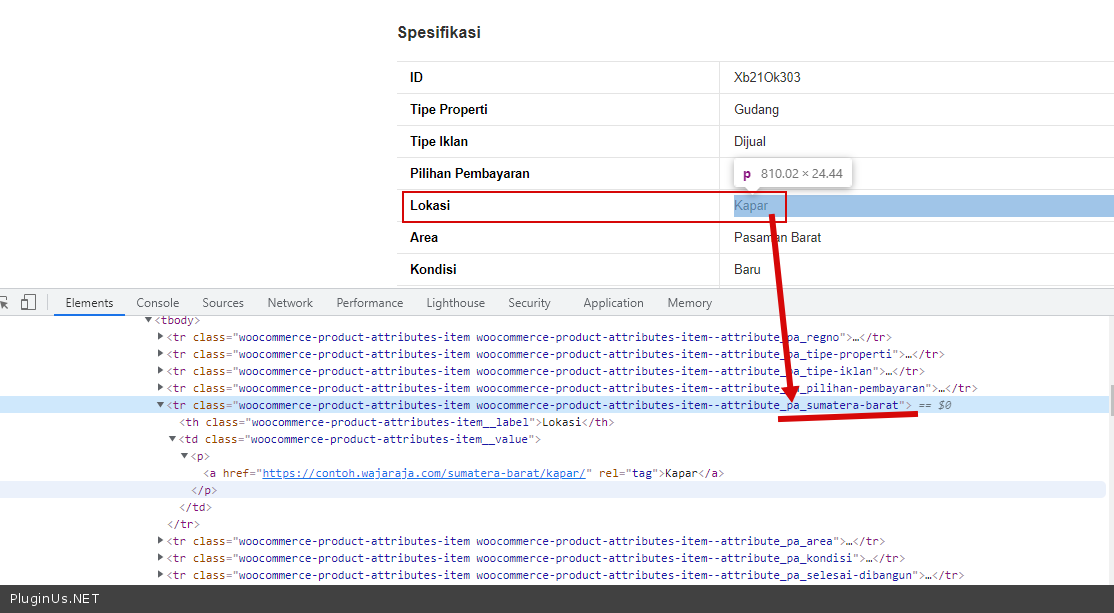
Quote from ochime on September 23, 2021, 14:02Hi pablo, thanks for the reply.
I ask for time to understand and improve regarding taxonomy.
It's true what you say that pa_sumatera_barat has not been added.
But why?
After the product reached 9820, I have done 2 times to reassemble the data and the product can't be found on a quick search.Then the last action, I delete all json quick search data and reassemble again.
In what way should I add this pa_sumatera_barat?
While in the search field, this pa_sumatera_barat gives results.
Notes :
If https://contoh.wajaraja.com/p/uub96-gudang-serbaguna/ can't be found because pa_sumatera_barat has not been added.How about https://contoh.wajaraja.com/p/vti22-rumah-sejuk-damai-dan-asri/ which has been successfully added but still cannot be found on a quick search.
Explanation please.
Thank you
Hi pablo, thanks for the reply.
I ask for time to understand and improve regarding taxonomy.
It's true what you say that pa_sumatera_barat has not been added.
But why?
After the product reached 9820, I have done 2 times to reassemble the data and the product can't be found on a quick search.
Then the last action, I delete all json quick search data and reassemble again.
In what way should I add this pa_sumatera_barat?
While in the search field, this pa_sumatera_barat gives results.
Notes :
If https://contoh.wajaraja.com/p/uub96-gudang-serbaguna/ can't be found because pa_sumatera_barat has not been added.
How about https://contoh.wajaraja.com/p/vti22-rumah-sejuk-damai-dan-asri/ which has been successfully added but still cannot be found on a quick search.
Explanation please.
Thank you
Quote from Pablo Borysenco on September 24, 2021, 13:05Hello
You don't seem to understand what I mean
In what way should I add this pa_sumatera_barat? - https://c2n.me/4drvylD.png - the file does not contain text data about this attribute - pa_sumatera_barat
Hello
You don't seem to understand what I mean
In what way should I add this pa_sumatera_barat? - https://c2n.me/4drvylD.png - the file does not contain text data about this attribute - pa_sumatera_barat
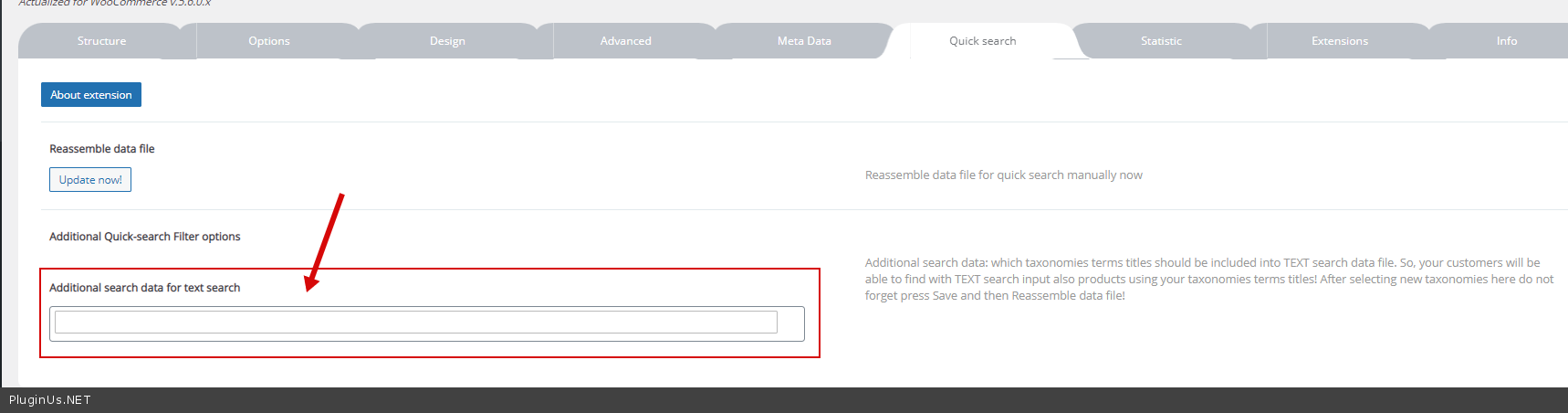
Quote from ochime on September 24, 2021, 15:38I'm sorry Pablo, but the action was done in the beginning - http://prnt.sc/1tgotyp
I have added all product attributes.
That's why I ask in what way should I add these attributes?I'm also currently working on fixing the taxonomy.
Hopefully this will be a fair share for both of us.
I'm sorry Pablo, but the action was done in the beginning - http://prnt.sc/1tgotyp
I have added all product attributes.
That's why I ask in what way should I add these attributes?
I'm also currently working on fixing the taxonomy.
Hopefully this will be a fair share for both of us.
Quote from ochime on September 24, 2021, 16:04The following products are pa_sumatera_barat that can appear in a quick search.
I'm really confused:(
The following products are pa_sumatera_barat that can appear in a quick search.
I'm really confused:(
Quote from Pablo Borysenco on September 27, 2021, 13:07Hello
Do you update files after changing products?
Hello
Do you update files after changing products?
Quote from ochime on September 27, 2021, 15:13Hi Pablo,
Until now I have not done that (reassemble data).
My reason is because I didn't change anything.
The information regarding pa_sumatera_barat was updated long before I asked about this (exactly when you asked me to recreate the product. >
Hello...I cannot check now. For some reason the search file is not loaded. Try to re-create it )
If there's anything I can help with, please let me know.
I'm currently reordering the taxonomy.
It will probably be finished in 1 or 2 days from now.Hopefully this action can help you.
Thank you
Hi Pablo,
Until now I have not done that (reassemble data).
My reason is because I didn't change anything.
The information regarding pa_sumatera_barat was updated long before I asked about this (exactly when you asked me to recreate the product. >
Hello...I cannot check now. For some reason the search file is not loaded. Try to re-create it )
If there's anything I can help with, please let me know.
I'm currently reordering the taxonomy.
It will probably be finished in 1 or 2 days from now.
Hopefully this action can help you.
Thank you
Quote from Pablo Borysenco on September 28, 2021, 11:46Hello
Ok! Can I re-create the search file.
If yes - drop me wp-admin access - https://share.pluginus.net/image/i20210618130558.png -> https://share.pluginus.net/image/i20210618130637.png
Hello
Ok! Can I re-create the search file.
If yes - drop me wp-admin access - https://share.pluginus.net/image/i20210618130558.png -> https://share.pluginus.net/image/i20210618130637.png


Quote from ochime on September 30, 2021, 05:19Hi Pablo,
Can you wait a moment.
I'm fixing the taxonomy.
I mean, with the new taxonomy does the same problem persist.If so, I don't mind giving you what you ask for.
(Yesterday my father died, and there is a tradition to do. Sorry I didn't finish on time).
Hi Pablo,
Can you wait a moment.
I'm fixing the taxonomy.
I mean, with the new taxonomy does the same problem persist.
If so, I don't mind giving you what you ask for.
(Yesterday my father died, and there is a tradition to do. Sorry I didn't finish on time).
Quote from Pablo Borysenco on September 30, 2021, 11:37Hello
First of all, can I offer my deepest condolences.
there is no rush, you will always find me here.
Write here when it is convenient for you
Hello
First of all, can I offer my deepest condolences.
there is no rush, you will always find me here.
Write here when it is convenient for you
Quote from ochime on October 22, 2021, 04:21Hi @pablo..
Sorry for just replying to this message
and
thank you for your attention.
==========================================
I have concentrated on this again.
(Repaired the taxonomy and made more variations).
I think the end of this month the work is done.
I'll tell you and let's see together.On the other hand, when I saw the demo site things changed.
(Though I did nothing).I checked the settings on woof, the previously installed extensions suddenly became uninstalled and I couldn't add them.
I've done to deactivate the plugin and activated again, then uninstall and installed it again but the result is still the same.
Is there anything I missed?
Can you please help check this problem?
Thank you very much
Hi @pablo..
Sorry for just replying to this message
and
thank you for your attention.
==========================================
I have concentrated on this again.
(Repaired the taxonomy and made more variations).
I think the end of this month the work is done.
I'll tell you and let's see together.
On the other hand, when I saw the demo site things changed.
(Though I did nothing).
I checked the settings on woof, the previously installed extensions suddenly became uninstalled and I couldn't add them.
I've done to deactivate the plugin and activated again, then uninstall and installed it again but the result is still the same.
Is there anything I missed?
Can you please help check this problem?
Thank you very much
Quote from Pablo Borysenco on October 22, 2021, 12:32Hello
Please read this - https://products-filter.com/lot-taxonomies-settings-page-save-options-doesn-works
Hello
Please read this - https://products-filter.com/lot-taxonomies-settings-page-save-options-doesn-works
Quote from ochime on October 22, 2021, 15:38I've asked the hosting provider for help adding max_input_vars and now it's working.
Thank you for the help.
I've asked the hosting provider for help adding max_input_vars and now it's working.
Thank you for the help.
Quote from Pablo Borysenco on October 25, 2021, 12:46Hello
Welcome;)
Hello
Welcome;)