
Incorrect currency symbol in Subscription table causing Proration calculation errors
The support doesn work on Saturdays and Sundays, so some Friday requests can be answered on Monday. If you have problems with registration ask help on contact us page pleaseIf you not got email within 24~36 business hours, firstly check your spam box, and if no any email from the support there - back to the forum and read answer here. DO NOT ANSWER ON EMAILS [noreply@pluginus.net] FROM THE FORUM!! Emails are just for your info, all answers should be published only here.
The support doesn work on Saturdays and Sundays, so some Friday requests can be answered on Monday.

Quote from info@lumion.pl on March 24, 2026, 22:30Hello,
I am using FOX – Currency Switcher Professional along with WooCommerce Subscriptions and I've encountered a critical issue regarding the subscription switch (upgrade) process.
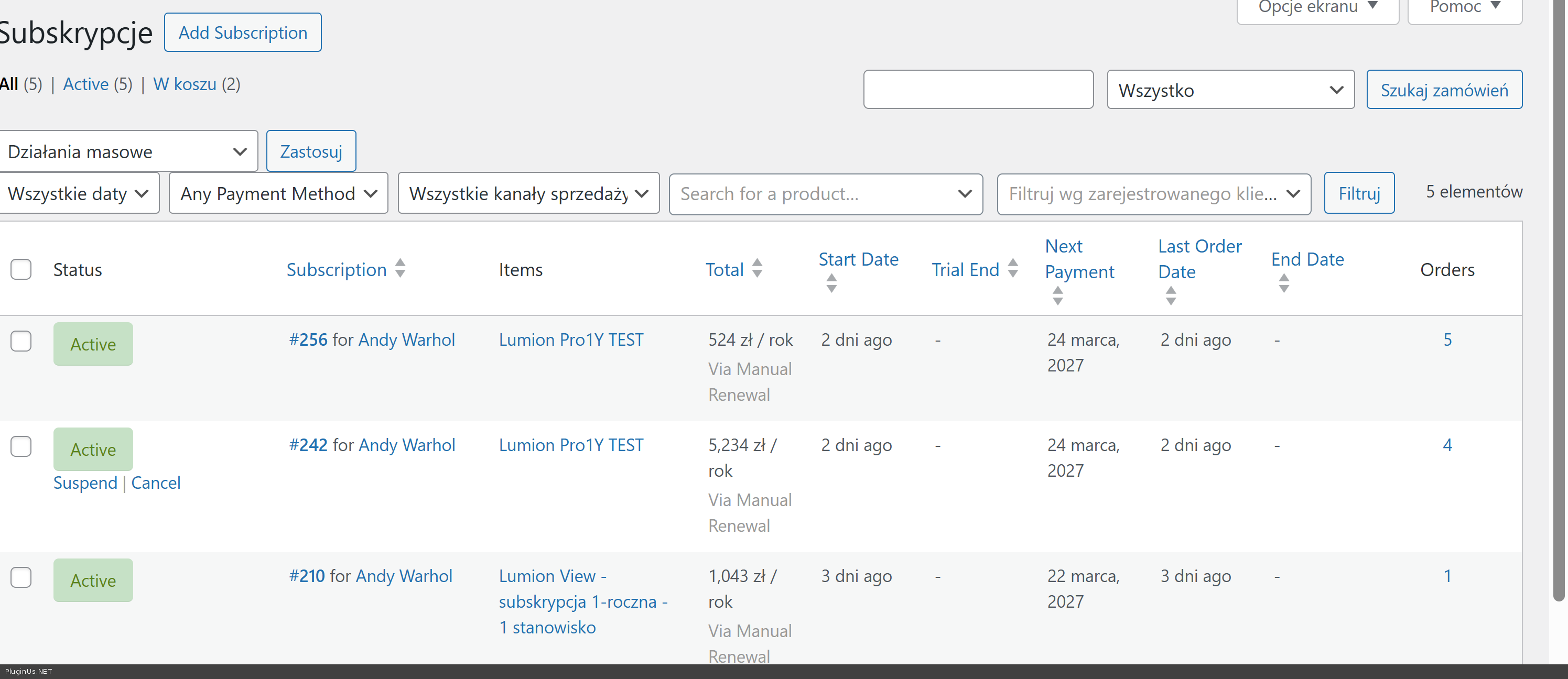
The issue: In the "Subscriptions" admin table, the total amounts are displayed using the customer's paid currency value (e.g., 524 PLN which includes VAT), but the currency symbol is forced to the store's base currency (e.g., 524 €).
Impact on Proration: Because the symbol is EUR but the value is actually PLN, the WooCommerce Subscriptions proration engine calculates the difference incorrectly. It tries to subtract the PLN value (thinking it's EUR) from the new plan's EUR price. This results in completely broken "Due Today" amounts in the cart during a subscription switch.
Example:
Store Base: EUR
Customer Paid: 426 PLN + VAT = 524 PLN
Subscriptions Table displays: 524 € (Wrong symbol!)
New Plan: 1000 €
Calculation: System thinks the customer already paid 524 € instead of 100 €, so it charges the wrong difference.
It seems FOX is overriding the currency symbol in the admin table filters without converting the numeric value back to the base currency, which "pollutes" the metadata used by the Subscriptions proration engine.
Is there a snippet or a setting to ensure that the Subscriptions table and background proration logic always use the correct Base Currency values?
Environment:
- WordPress Version: 6.9.4
- WooCommerce Version: 10.6.1
- WooCommerce Subscriptions Version: 8.5.0
- FOX – Currency Switcher Version: 1.4.6
Thank you!
Hello,
I am using FOX – Currency Switcher Professional along with WooCommerce Subscriptions and I've encountered a critical issue regarding the subscription switch (upgrade) process.
The issue: In the"Subscriptions" admin table, the total amounts are displayed using the customer's paid currency value (e.g., 524 PLN which includes VAT), but the currency symbol is forced to the store's base currency (e.g., 524 €).
Impact on Proration: Because the symbol is EUR but the value is actually PLN, the WooCommerce Subscriptions proration engine calculates the difference incorrectly. It tries to subtract the PLN value (thinking it's EUR) from the new plan's EUR price. This results in completely broken"Due Today" amounts in the cart during a subscription switch.
Example:
Store Base: EUR
Customer Paid: 426 PLN + VAT = 524 PLN
Subscriptions Table displays: 524 € (Wrong symbol!)
New Plan: 1000 €
Calculation: System thinks the customer already paid 524 € instead of 100 €, so it charges the wrong difference.
It seems FOX is overriding the currency symbol in the admin table filters without converting the numeric value back to the base currency, which"pollutes" the metadata used by the Subscriptions proration engine.
Is there a snippet or a setting to ensure that the Subscriptions table and background proration logic always use the correct Base Currency values?
Environment:
- WordPress Version: 6.9.4
- WooCommerce Version: 10.6.1
- WooCommerce Subscriptions Version: 8.5.0
- FOX – Currency Switcher Version: 1.4.6
Thank you!



Quote from Alex Dev on March 25, 2026, 13:22Hello
You can try adding this snippet to your functions.php as a first step:
add_filter( 'woocommerce_is_rest_api_request', function( $is_rest ) {
    if ( is_admin() AND ! wp_doing_ajax() ) {
        remove_all_filters( 'woocommerce_currency' );
    }
    return $is_rest;
} );
However I want to be honest with you — this is an experimental fix and may not fully resolve the issue, as the conflict likely goes deeper into how FOX hooks into the subscription metadata at the time of order creation.
To properly investigate and fix this without risk to your live store, I would need you to create a staging site using Duplicator: https://wordpress.org/plugins/duplicator/
Once the staging site is ready, please share the following in the private data section of this ticket:
For the staging site: FTP credentials and WordPress admin access.
If your production site is still in development and not yet live, you can also share production credentials. If it is a live store with real customers, please share staging only — I do not want to risk breaking anything on a live environment.
https://share.pluginus.net/image/i20230222134241.png
https://share.pluginus.net/image/i20230222134615.png
Hello
You can try adding this snippet to your functions.php as a first step:
add_filter( 'woocommerce_is_rest_api_request', function( $is_rest ) {
    if ( is_admin() AND ! wp_doing_ajax() ) {
        remove_all_filters( 'woocommerce_currency' );
    }
    return $is_rest;
} );
However I want to be honest with you — this is an experimental fix and may not fully resolve the issue, as the conflict likely goes deeper into how FOX hooks into the subscription metadata at the time of order creation.
To properly investigate and fix this without risk to your live store, I would need you to create a staging site using Duplicator: https://wordpress.org/plugins/duplicator/
Once the staging site is ready, please share the following in the private data section of this ticket:
For the staging site: FTP credentials and WordPress admin access.
If your production site is still in development and not yet live, you can also share production credentials. If it is a live store with real customers, please share staging only — I do not want to risk breaking anything on a live environment.
https://share.pluginus.net/image/i20230222134241.png
https://share.pluginus.net/image/i20230222134615.png


Quote from Alex Dev on March 26, 2026, 12:39Hello
I've looked into this issue and here are a couple of hooks:
add_filter( 'woocommerce_currency_symbol', function( $symbol, $currency ) {
    if ( empty( $currency ) ) {
        return $symbol;
    }

    global $WOOCS;
    if ( ! isset( $WOOCS ) ) {
        return $symbol;
    }

    $currencies = $WOOCS->get_currencies();

    // If the requested currency differs from what FOX currently has set,
    // return the correct symbol for the explicitly requested currency.
    if ( $currency !== $WOOCS->current_currency && isset( $currencies[ $currency ]['symbol'] ) ) {
        return $currencies[ $currency ]['symbol'];
    }

    return $symbol;
}, 10000, 2 ); // Priority 10000 > FOX's 9999 — runs after FOX and corrects it

/**
 * Fix: Ensure the subscription's total paid for the current period
 * is always returned in the store base currency for proration math.
 * FOX may have set current_currency to something else during cart processing.
 */
add_filter( 'wcs_switch_total_paid_for_current_period', function( $total_paid, $subscription ) {
    global $WOOCS;
    if ( ! isset( $WOOCS ) || ! $WOOCS->is_multiple_allowed ) {
        return $total_paid;
    }

    $order_currency = $subscription->get_currency(); // e.g. 'PLN'
    $default_currency = $WOOCS->default_currency;    // e.g. 'EUR'

    if ( $order_currency === $default_currency ) {
        return $total_paid;
    }

    $currencies = $WOOCS->get_currencies();
    if ( ! isset( $currencies[ $order_currency ]['rate'] ) || $currencies[ $order_currency ]['rate'] == 0 ) {
        return $total_paid;
    }

    // Convert from order currency (PLN) to base currency (EUR) for proration math
    return $total_paid / $currencies[ $order_currency ]['rate'];
}, 10, 2 );
I placed them into file functions.php of the current wp theme and now its looks good:
Test it please
Hello
I've looked into this issue and here are a couple of hooks:
add_filter( 'woocommerce_currency_symbol', function( $symbol, $currency ) {
    if ( empty( $currency ) ) {
        return $symbol;
    }

    global $WOOCS;
    if ( ! isset( $WOOCS ) ) {
        return $symbol;
    }

    $currencies = $WOOCS->get_currencies();

    // If the requested currency differs from what FOX currently has set,
    // return the correct symbol for the explicitly requested currency.
    if ( $currency !== $WOOCS->current_currency && isset( $currencies[ $currency ]['symbol'] ) ) {
        return $currencies[ $currency ]['symbol'];
    }

    return $symbol;
}, 10000, 2 ); // Priority 10000 > FOX's 9999 — runs after FOX and corrects it

/**
 * Fix: Ensure the subscription's total paid for the current period
 * is always returned in the store base currency for proration math.
 * FOX may have set current_currency to something else during cart processing.
 */
add_filter( 'wcs_switch_total_paid_for_current_period', function( $total_paid, $subscription ) {
    global $WOOCS;
    if ( ! isset( $WOOCS ) || ! $WOOCS->is_multiple_allowed ) {
        return $total_paid;
    }

    $order_currency = $subscription->get_currency(); // e.g. 'PLN'
    $default_currency = $WOOCS->default_currency;    // e.g. 'EUR'

    if ( $order_currency === $default_currency ) {
        return $total_paid;
    }

    $currencies = $WOOCS->get_currencies();
    if ( ! isset( $currencies[ $order_currency ]['rate'] ) || $currencies[ $order_currency ]['rate'] == 0 ) {
        return $total_paid;
    }

    // Convert from order currency (PLN) to base currency (EUR) for proration math
    return $total_paid / $currencies[ $order_currency ]['rate'];
}, 10, 2 );
I placed them into file functions.php of the current wp theme and now its looks good:
Test it please
Quote from info@lumion.pl on March 26, 2026, 23:15Wow, that was fast. Looks like working fine now :) Thank you!
Will a theme update wipe out that
functions.phpcode? Should I migrate it to a child theme or Code Snippets to keep it safe?
Wow, that was fast. Looks like working fine now :) Thank you!
Will a theme update wipe out that functions.php code? Should I migrate it to a child theme or Code Snippets to keep it safe?
Quote from Alex Dev on March 27, 2026, 13:41Hello
Welcome! :)
To keep your custom code safe from theme updates, the best approach is to create a child theme. Here is how to do it:
- In /wp-content/themes/ create a new folder, for example: blocksy-child
- Inside that folder create a file style.css with this content:
/*
Theme Name:   My Child Theme
Template:     blocksy
*/
Template must match exactly the folder name of the parent theme.
- Create file functions.php with the code I provided in the previous answer
Also, you can use a code snippets plugin like Code Snippets or WPCode — they let you add custom PHP hooks directly from the admin without touching any files, and the code survives both theme and plugin updates.
Both approaches work fine, it really comes down to personal preference. Personally I prefer keeping everything in the child theme's functions.php — it keeps all customizations in one place and does not add an extra plugin dependency.
Hello
Welcome! :)
To keep your custom code safe from theme updates, the best approach is to create a child theme. Here is how to do it:
- In /wp-content/themes/ create a new folder, for example: blocksy-child
- Inside that folder create a file style.css with this content:
/*
Theme Name:   My Child Theme
Template:     blocksy
*/
Template must match exactly the folder name of the parent theme.
- Create file functions.php with the code I provided in the previous answer
Also, you can use a code snippets plugin like Code Snippets or WPCode — they let you add custom PHP hooks directly from the admin without touching any files, and the code survives both theme and plugin updates.
Both approaches work fine, it really comes down to personal preference. Personally I prefer keeping everything in the child theme's functions.php — it keeps all customizations in one place and does not add an extra plugin dependency.
Quote from info@lumion.pl on March 27, 2026, 17:42Unfortunately, I found another issue.
Currently, the upgrade price is valid only if you purchase it on the same day.The reason may be that, on the basket and the checkout page the sign-up fee value is displayed in euro, but it’s labeled as Polish zł.
This is probably messing up the calculations, which I don’t fully understand.
From what I can see, if we subtract the incorrect amount from the correct “Due Today” amount and divide it by the euro exchange rate, we get the difference in euros between the correct sign-up fee and the incorrect one. Which doesn’t tell me anything.In a specific case (upgrade 6 months from the order date) , the “Due Today” amount becomes less than or equal to zero, and the transaction is marked as a downgrade. In the same case the Renewal date displays wrong day.
I tested two groups of products:
test products – Pro for €100 and Studio for €1,100
actual products – Pro for €999 and Studio for €1,299
Test prices:
Actual prices:
Unfortunately, I found another issue.
Currently, the upgrade price is valid only if you purchase it on the same day.
The reason may be that, on the basket and the checkout page the sign-up fee value is displayed in euro, but it’s labeled as Polish zł.
This is probably messing up the calculations, which I don’t fully understand.
From what I can see, if we subtract the incorrect amount from the correct “Due Today” amount and divide it by the euro exchange rate, we get the difference in euros between the correct sign-up fee and the incorrect one. Which doesn’t tell me anything.
In a specific case (upgrade 6 months from the order date) , the “Due Today” amount becomes less than or equal to zero, and the transaction is marked as a downgrade. In the same case the Renewal date displays wrong day.
I tested two groups of products:
test products – Pro for €100 and Studio for €1,100
actual products – Pro for €999 and Studio for €1,299
Test prices:

Actual prices:

Quote from Alex Dev on March 30, 2026, 13:58Hello
In this case I can suggest you: https://currency-switcher.com/woocs-labs - I can register task and within 3 weeks resultts will be BUT without warranty. You need keep access to this ticket opened and make please short video about issues you found
Hello
In this case I can suggest you: https://currency-switcher.com/woocs-labs - I can register task and within 3 weeks resultts will be BUT without warranty. You need keep access to this ticket opened and make please short video about issues you found
Quote from info@lumion.pl on April 1, 2026, 21:59I think I've figured it out.
For the purposes of this test, a week ago I changed the order and subscription renewal dates by a few weeks and months, but I didn’t realise that there is also a ‘start date’, which cannot be edited.I’m now monitoring the prices on a day-by-day basis, and although it’s only been a few days, it looks as though the prorated prices are correct.
I think you can delete my previous post, as it’s no longer relevant.
I think I've figured it out.
For the purposes of this test, a week ago I changed the order and subscription renewal dates by a few weeks and months, but I didn’t realise that there is also a ‘start date’, which cannot be edited.
I’m now monitoring the prices on a day-by-day basis, and although it’s only been a few days, it looks as though the prorated prices are correct.
I think you can delete my previous post, as it’s no longer relevant.
Quote from Alex Dev on April 2, 2026, 12:11Hello
Glad to hear it turned out to be a test setup issue rather than a real bug. No worries about the previous post, happens to everyone when tweaking dates manually.
Feel free to reopen the ticket if anything comes up after more monitoring.
Have a great day!
Hello
Glad to hear it turned out to be a test setup issue rather than a real bug. No worries about the previous post, happens to everyone when tweaking dates manually.
Feel free to reopen the ticket if anything comes up after more monitoring.
Have a great day!