
I can’t get it to work
The support doesn work on Saturdays and Sundays, so some Friday requests can be answered on Monday. If you have problems with registration ask help on contact us page pleaseIf you not got email within 24~36 business hours, firstly check your spam box, and if no any email from the support there - back to the forum and read answer here. DO NOT ANSWER ON EMAILS [noreply@pluginus.net] FROM THE FORUM!! Emails are just for your info, all answers should be published only here.
The support doesn work on Saturdays and Sundays, so some Friday requests can be answered on Monday.

Quote from c.negri@gear.it on March 20, 2024, 20:09Hi,
i followed the guide i also added the php string to the function.php file but the filter does not work i’m trying a test site er propose it to the customer
https://faustop20.sg-host.com/
thanks for your help
Cris
Hi,
i followed the guide i also added the php string to the function.php file but the filter does not work i’m trying a test site er propose it to the customer
https://faustop20.sg-host.com/
thanks for your help
Cris

Quote from Pablo Borysenco on March 21, 2024, 10:41Hello Cris
What plugin version number are you using?
Please drop me screenshots of the mdtf shortcode settings
Hello Cris
What plugin version number are you using?
Please drop me screenshots of the mdtf shortcode settings
Quote from c.negri@gear.it on March 21, 2024, 11:35Hello Pablo,
I'm using 1.3.3.2
Hello Pablo,
I'm using 1.3.3.2

Quote from c.negri@gear.it on March 21, 2024, 13:25Within messages, the meta data filter option will not remain after closing, it will always clear. thaks
Within messages, the meta data filter option will not remain after closing, it will always clear. thaks
Quote from Pablo Borysenco on March 21, 2024, 13:35Try to display posts on this page - https://wp-filter.com/features/shortcode-mdf_custom/
check options - https://share.pluginus.net/image/i20240321133541.png
Try to display posts on this page - https://wp-filter.com/features/shortcode-mdf_custom/
check options - https://share.pluginus.net/image/i20240321133541.png

Quote from c.negri@gear.it on March 21, 2024, 16:46thanks i did but not print messages
maybe I’m wrong to categorize messages
thanks i did but not print messages
maybe I’m wrong to categorize messages
Quote from c.negri@gear.it on March 21, 2024, 22:48I tried to install a new wordpress in a subdomain and redo the whole clean process using the pages created by the MDTF plugin.
On the MDTF results page is [meta_data_filter_results] but prints all posts as if they were an archive page.
I don’t know what to do
I tried to install a new wordpress in a subdomain and redo the whole clean process using the pages created by the MDTF plugin.
On the MDTF results page is [meta_data_filter_results] but prints all posts as if they were an archive page.
I don’t know what to do
Quote from Pablo Borysenco on March 22, 2024, 10:28Hello
Please try this - https://wp-filter.com/howto/options-well-result-page-shows-results/
and try playing with the storage settings - https://share.pluginus.net/image/i20240322102809.png
Hello
Please try this - https://wp-filter.com/howto/options-well-result-page-shows-results/
and try playing with the storage settings - https://share.pluginus.net/image/i20240322102809.png

Quote from c.negri@gear.it on March 25, 2024, 18:18Thank you I succeeded.
One last thing, I need to line up the search boxes and unlock the typical sidebar display block.Thanks again for the help
Thank you I succeeded.
One last thing, I need to line up the search boxes and unlock the typical sidebar display block.
Thanks again for the help

Quote from Pablo Borysenco on March 26, 2024, 10:24Hello
You can check another skin - https://c2n.me/4kzEijJ.png
Please read this - https://wp-filter.com/howto/create-custom-skin-search-shortcode/
Hello
You can check another skin - https://c2n.me/4kzEijJ.png
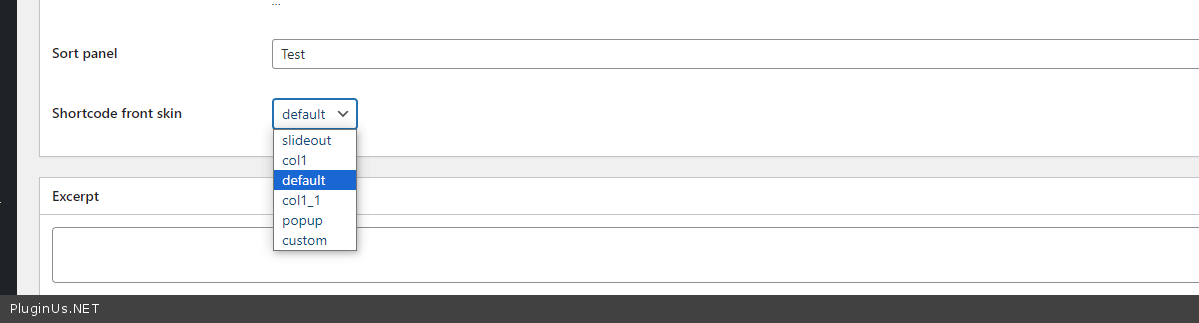
Please read this - https://wp-filter.com/howto/create-custom-skin-search-shortcode/
Quote from c.negri@gear.it on March 26, 2024, 12:58Hello
I am sorry to be so helpless. I would like to have a search module like the example Ajaxed search 3, inline and consequential.
After I purchased the plug-in can you enter the site and set it better?
I can do the skin.Thank you
http://test.faustop20.sg-host.com/wp-content/uploads/2024/03/Schermata-2024-03-26-alle-11.53.54.png
http://test.faustop20.sg-host.com/wp-content/uploads/2024/03/Schermata-2024-03-26-alle-11.53.54.png

Hello
I am sorry to be so helpless. I would like to have a search module like the example Ajaxed search 3, inline and consequential.
After I purchased the plug-in can you enter the site and set it better?
I can do the skin.
Thank you
http://test.faustop20.sg-host.com/wp-content/uploads/2024/03/Schermata-2024-03-26-alle-11.53.54.png
http://test.faustop20.sg-host.com/wp-content/uploads/2024/03/Schermata-2024-03-26-alle-11.53.54.png
Quote from Pablo Borysenco on March 26, 2024, 13:17Hello
Plugin configuration is not included in support
for this type of filtering you need a hierarchical taxonomy. an example - https://share.pluginus.net/image/i20240326130707.png
check this options for this taxonomy - https://share.pluginus.net/image/i20240326131248.png
Please read this - https://wp-filter.com/step-by-step/
Hello
Plugin configuration is not included in support
for this type of filtering you need a hierarchical taxonomy. an example - https://share.pluginus.net/image/i20240326130707.png

check this options for this taxonomy - https://share.pluginus.net/image/i20240326131248.png

Please read this - https://wp-filter.com/step-by-step/