
Hiding Categories with no products at all
The support doesn work on Saturdays and Sundays, so some Friday requests can be answered on Monday. If you have problems with registration ask help on contact us page pleaseIf you not got email within 24~36 business hours, firstly check your spam box, and if no any email from the support there - back to the forum and read answer here. DO NOT ANSWER ON EMAILS [noreply@pluginus.net] FROM THE FORUM!! Emails are just for your info, all answers should be published only here.
The support doesn work on Saturdays and Sundays, so some Friday requests can be answered on Monday.

Quote from NateWon on June 24, 2020, 10:25Hello, I'd like to hide categories that have no products at all? Rather than just those with 0 counts for the current filter.
Is there a hook available to remove these items from the list?
Thank you
Hello, I'd like to hide categories that have no products at all? Rather than just those with 0 counts for the current filter.
Is there a hook available to remove these items from the list?
Thank you

Quote from Pablo Borysenco on June 24, 2020, 11:07Hello
Use these options - https://c2n.me/487RsIV.png
Hello
Use these options - https://c2n.me/487RsIV.png
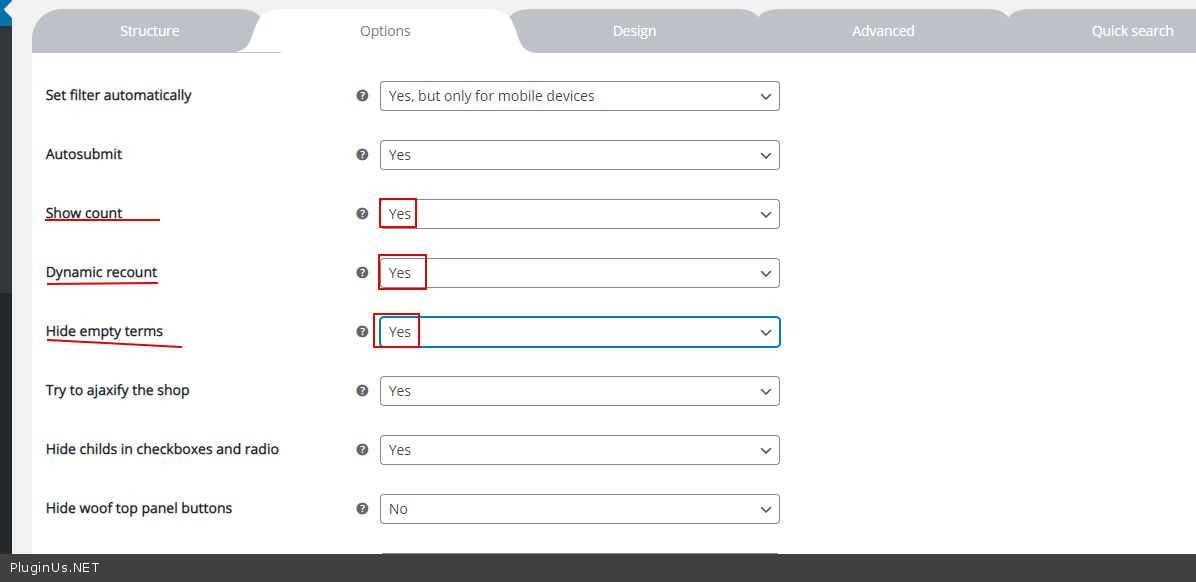
Quote from NateWon on June 24, 2020, 23:02Hello,
Thank you for your response, I'd already tried that. That may work but currently doesn't work very well.
It will hide the empty categories, but on all tiers of filtering. So If I combine filters the list becomes very small and at times nothing.I think I can use the filter "woof_sort_terms_before_out" to do whats needed.
In addition - I have a series of Products across different Brands. Currently all categories will show when viewing a Brand, which isn't ideal - I would like them to be ONLY the categories related to the Brand. Is there an option for this, or will I need to manage this via the filter?
At the top level my empty categories are showing - hiding empty categories hides these, which is expected. But it would be nice to not include items that can never have any results, even when "Hide empty terms" is not selected. I assume Ill need to add in some logic for this?
Regards
Hello,
Thank you for your response, I'd already tried that. That may work but currently doesn't work very well.
It will hide the empty categories, but on all tiers of filtering. So If I combine filters the list becomes very small and at times nothing.
I think I can use the filter"woof_sort_terms_before_out" to do whats needed.
In addition - I have a series of Products across different Brands. Currently all categories will show when viewing a Brand, which isn't ideal - I would like them to be ONLY the categories related to the Brand. Is there an option for this, or will I need to manage this via the filter?
At the top level my empty categories are showing - hiding empty categories hides these, which is expected. But it would be nice to not include items that can never have any results, even when"Hide empty terms" is not selected. I assume Ill need to add in some logic for this?
Regards
Quote from Pablo Borysenco on June 25, 2020, 10:49Hello
Paste your license key here - https://c2n.me/43SC6rb.png -> https://c2n.me/42HBIt7.png and and exact link to the issue
Hello
Paste your license key here - https://c2n.me/43SC6rb.png -> https://c2n.me/42HBIt7.png and and exact link to the issue


Quote from NateWon on June 27, 2020, 01:16I've added the requested data.
I've spoken with the client and the requirements have now changed. I believe if we can solve this issue then all is well.
The client would like selected Categories to expand when selected. I have "Hide childs in checkboxes and radio " selected which unless previously checked will close the child categories. If I disable the option, all the categories (to many) show and it isn't very useable.It would be great if I loaded the page and saw:
- Accessories
- Bikes
- Parts
- etc.
Then when I select Bikes I see
- Accessories
- Bikes
- Kids Bikes
Road Bikes- Mtb Bikes
- eBikes
- Parts
- etc
Currently the above will filter the products, but not show the sub categories for the selected list unless I click on the "+"
Thank you.
I've added the requested data.
I've spoken with the client and the requirements have now changed. I believe if we can solve this issue then all is well.
The client would like selected Categories to expand when selected. I have"Hide childs in checkboxes and radio" selected which unless previously checked will close the child categories. If I disable the option, all the categories (to many) show and it isn't very useable.
It would be great if I loaded the page and saw:
- Accessories
- Bikes
- Parts
- etc.
Then when I select Bikes I see
- Accessories
- Bikes
- Kids Bikes
Road Bikes - Mtb Bikes
- eBikes
- Kids Bikes
- Parts
- etc
Currently the above will filter the products, but not show the sub categories for the selected list unless I click on the"+"
Thank you.
Quote from Pablo Borysenco on June 29, 2020, 11:41Hello
Unfortunately, the plugin does not have such a feature.
You need customization of the code. Use this filter - woof_sort_terms_before_out
Check the parent terms of the category and if this term is not in the current request, delete this category from the list
Get current request :
global $WOOF;
$WOOF->get_request_data();
Hello
Unfortunately, the plugin does not have such a feature.
You need customization of the code. Use this filter - woof_sort_terms_before_out
Check the parent terms of the category and if this term is not in the current request, delete this category from the list
Get current request :
global $WOOF;
$WOOF->get_request_data();