
Compatibility Problem With Advanced Product Fields for WooCommerce
The support doesn work on Saturdays and Sundays, so some Friday requests can be answered on Monday. If you have problems with registration ask help on contact us page pleaseIf you not got email within 24~36 business hours, firstly check your spam box, and if no any email from the support there - back to the forum and read answer here. DO NOT ANSWER ON EMAILS [noreply@pluginus.net] FROM THE FORUM!! Emails are just for your info, all answers should be published only here.
The support doesn work on Saturdays and Sundays, so some Friday requests can be answered on Monday.

Quote from lvlp1314 on August 30, 2026, 10:49Hi, I'm encountering a compatibility issue with the Advanced Product Fields for WooCommerce plugin. I've modified it according to
https://currency-switcher.com/advanced-product-fields-for-woocommerce,
but in the product attributes on the shopping cart page, the percentage-based amount added is calculated in the default currency (USD), not the currency selected by the customer.
Please see the screenshot.
My site is https://www.dermalatex.com/
Hi, I'm encountering a compatibility issue with the Advanced Product Fields for WooCommerce plugin. I've modified it according to
https://currency-switcher.com/advanced-product-fields-for-woocommerce,
but in the product attributes on the shopping cart page, the percentage-based amount added is calculated in the default currency (USD), not the currency selected by the customer.
Please see the screenshot.
My site is https://www.dermalatex.com/


Quote from Alex Dev on August 31, 2026, 11:31Hello
Place please actual purchase code of the plugin into the private area of the ticket:
https://share.pluginus.net/image/i20230222134241.png
https://share.pluginus.net/image/i20230222134615.png
https://share.pluginus.net/image/i20230222134511.pngIf support expired you can buy new lisense here: https://currency-switcher.com/downloads
On the site installed version 2.4.2.3 - please update to the latest version of the plugin
Do you mean this plugin https://wordpress.org/plugins/advanced-product-fields-for-woocommerce/ ? If not please provide link to it
Hello
Place please actual purchase code of the plugin into the private area of the ticket:
https://share.pluginus.net/image/i20230222134241.png
https://share.pluginus.net/image/i20230222134615.png
https://share.pluginus.net/image/i20230222134511.png


If support expired you can buy new lisense here: https://currency-switcher.com/downloads
On the site installed version 2.4.2.3 - please update to the latest version of the plugin
Do you mean this plugin https://wordpress.org/plugins/advanced-product-fields-for-woocommerce/ ? If not please provide link to it
Quote from lvlp1314 on September 5, 2026, 06:00Hi, Thanks for your reply, I have updated the private data, Please check
Hi, Thanks for your reply, I have updated the private data, Please check
Quote from lvlp1314 on September 5, 2026, 06:01If you need any other message, Please tell me, thanks
If you need any other message, Please tell me, thanks
Quote from Alex Dev on September 7, 2026, 14:30Hello
Thank you for the access and for the private data.
One thing before we continue. Your site is a live store, and this issue can only be investigated by editing plugin files and re-testing the cart over and over. We do not do that on a production site. Even a small mistake can take the shop down, and the built-in WordPress file editor sometimes fails to save a file completely and leaves it truncated, which we have seen damage sites before. So we will not experiment on dermalatex.com.
Please prepare a staging copy and we will work there instead. The easiest way is the Duplicator plugin: https://wordpress.org/plugins/duplicator/. Make a full copy of the site on a subdomain, then put the staging admin login and the staging FTP details into the private area of this ticket (orders with customers data can be erased after installation).
We also need the exact copy of Advanced Product Fields for WooCommerce that you are running. We do not have that plugin, and the free and PRO builds handle option pricing differently, so without the same files we would only be guessing. Please upload the ZIP you have installed to Google Drive and put the share link in the private area of this ticket.
Once we have the staging site and that ZIP, we will reproduce the percentage calculation there, find where the base currency amount is being used instead of the selected one, and give you a tested change to apply on the live site.
Best regards
Alex
Hello
Thank you for the access and for the private data.
One thing before we continue. Your site is a live store, and this issue can only be investigated by editing plugin files and re-testing the cart over and over. We do not do that on a production site. Even a small mistake can take the shop down, and the built-in WordPress file editor sometimes fails to save a file completely and leaves it truncated, which we have seen damage sites before. So we will not experiment on dermalatex.com.
Please prepare a staging copy and we will work there instead. The easiest way is the Duplicator plugin: https://wordpress.org/plugins/duplicator/. Make a full copy of the site on a subdomain, then put the staging admin login and the staging FTP details into the private area of this ticket (orders with customers data can be erased after installation).
We also need the exact copy of Advanced Product Fields for WooCommerce that you are running. We do not have that plugin, and the free and PRO builds handle option pricing differently, so without the same files we would only be guessing. Please upload the ZIP you have installed to Google Drive and put the share link in the private area of this ticket.
Once we have the staging site and that ZIP, we will reproduce the percentage calculation there, find where the base currency amount is being used instead of the selected one, and give you a tested change to apply on the live site.
Best regards
Alex
Quote from lvlp1314 on September 8, 2026, 10:47Thank you for your reply. I tried to copy dermalatex.com using the plugin you recommended, but the copying failed. I created a new website using a test domain and the same plugin, but I cannot activate FOX - Currency Switcher Professional for WooCommerce Professional1 because my activation code has already been used on dermalatex.com. If possible, please help me activate it on the test website. After testing, you can delete the activation code.
Thank you for your reply. I tried to copy dermalatex.com using the plugin you recommended, but the copying failed. I created a new website using a test domain and the same plugin, but I cannot activate FOX - Currency Switcher Professional for WooCommerce Professional1 because my activation code has already been used on dermalatex.com. If possible, please help me activate it on the test website. After testing, you can delete the activation code.
Quote from lvlp1314 on September 8, 2026, 10:49The test website is only visible after logging in as an administrator because the template's authorization code has already been used on dermalatex.com.
The test website is only visible after logging in as an administrator because the template's authorization code has already been used on dermalatex.com.
Quote from Alex Dev on September 9, 2026, 19:43Hello
Thank you, I logged into the test site and activated FOX there, so the license side is handled. Nothing more is needed from you regarding activation.
Now I need you to set up the exact failing case on that test site and record it, so I can work on the calculation code without guessing.
Please do the following.
- Create one product on the test site that shows the problem, and give me the direct link to it here.
- Configure the Advanced Product Fields option on that product exactly as you have it on the live store: same field type, same percentage value, same setting for what the percentage is applied to. Post a screenshot of that field configuration.
- Confirm that the test site has the same build and version of Advanced Product Fields as the live store, free or PRO. If the versions differ, the test is not valid.
- In FOX, set the currency you are testing with to a fixed rate instead of an automatic one, and tell me the rate value. With an automatic rate the numbers change while I debug and I cannot compare results.
- Record a screen video where you switch the currency, open that product, select the option, add it to the cart, and open the cart and the checkout. Please keep the currency switcher and the prices visible during the recording.
- In the video, or in a message here, state the numbers: the base price in USD, the percentage of the option, the exchange rate, the amount the plugin shows now, and the amount that should be shown instead, with the calculation. For example: base price 100 USD, option +10 percent, rate 0.9, expected 99, shown 110.
Upload the video to Google Drive and put the share link in the private area of this ticket.
Once I can see the exact expected result and reproduce it on the test site, I will locate where the base currency amount is used instead of the selected one and prepare a tested fix.
Best regards
Alex
Hello
Thank you, I logged into the test site and activated FOX there, so the license side is handled. Nothing more is needed from you regarding activation.
Now I need you to set up the exact failing case on that test site and record it, so I can work on the calculation code without guessing.
Please do the following.
- Create one product on the test site that shows the problem, and give me the direct link to it here.
- Configure the Advanced Product Fields option on that product exactly as you have it on the live store: same field type, same percentage value, same setting for what the percentage is applied to. Post a screenshot of that field configuration.
- Confirm that the test site has the same build and version of Advanced Product Fields as the live store, free or PRO. If the versions differ, the test is not valid.
- In FOX, set the currency you are testing with to a fixed rate instead of an automatic one, and tell me the rate value. With an automatic rate the numbers change while I debug and I cannot compare results.
- Record a screen video where you switch the currency, open that product, select the option, add it to the cart, and open the cart and the checkout. Please keep the currency switcher and the prices visible during the recording.
- In the video, or in a message here, state the numbers: the base price in USD, the percentage of the option, the exchange rate, the amount the plugin shows now, and the amount that should be shown instead, with the calculation. For example: base price 100 USD, option +10 percent, rate 0.9, expected 99, shown 110.
Upload the video to Google Drive and put the share link in the private area of this ticket.
Once I can see the exact expected result and reproduce it on the test site, I will locate where the base currency amount is used instead of the selected one and prepare a tested fix.
Best regards
Alex
Quote from lvlp1314 on September 13, 2026, 14:14Hi
Product link, The default currency is US dollars, and the amount for this product is 100 USD.
https://www.gdtest.xyz/product/latex-shorts-swish-black/
The product has two attributes: "Garment Finishes" and "Size" (please refer to the attached screenshot of the attribute settings). When a customer selects "Dry inside & Silicone outside" under "Garment Finishes," the price should increase by $10. When a customer selects "Made To Measure" under "Size," the price should increase by 20% of the original price. This is the logic I need to implement. The calculation works correctly with the default currency; however, when I switch to a different currency, the 20% figure in the "Size" dropdown menu changes to a different number. I apologize—I don't know how to record my screen, as I haven't used Google Drive before.
https://gdtest.xyz/wp-content/uploads/1.png
https://gdtest.xyz/wp-content/uploads/2.png
https://gdtest.xyz/wp-content/uploads/3.png


Hi
Product link, The default currency is US dollars, and the amount for this product is 100 USD.
https://www.gdtest.xyz/product/latex-shorts-swish-black/
The product has two attributes:"Garment Finishes" and"Size" (please refer to the attached screenshot of the attribute settings). When a customer selects"Dry inside & Silicone outside" under"Garment Finishes," the price should increase by $10. When a customer selects"Made To Measure" under"Size," the price should increase by 20% of the original price. This is the logic I need to implement. The calculation works correctly with the default currency; however, when I switch to a different currency, the 20% figure in the"Size" dropdown menu changes to a different number. I apologize—I don't know how to record my screen, as I haven't used Google Drive before.
https://gdtest.xyz/wp-content/uploads/1.png
https://gdtest.xyz/wp-content/uploads/2.png
https://gdtest.xyz/wp-content/uploads/3.png
Quote from Alex Dev on September 15, 2026, 22:44Hello
We reproduced the problem on the test site and prepared a fix. It does not require any changes inside Advanced Product Fields, so it will survive updates of that plugin.
Please do not apply the code changes described in our old compatibility article for this plugin. Cutting the conversion off for percentage options fixes the product page but breaks the cart, which is exactly the effect you reported. We are rewriting that article.
What was happening. The WooCS integration inside Advanced Product Fields multiplies every price hint by the currency rate, and it does that for two values that are completely different in nature. On the product page the value of a percentage option is the percent itself, so 20 was turned into 417.32 and printed as a percentage. In the cart the value is real money, calculated from the product price that the integration had converted back to your default currency, so there the multiplication is correct and necessary. One rule was applied to both cases.
The fix tells the two cases apart by the page instead of by the option type. Next code aded to the functions.php of your child theme:
add_filter( 'wapf/html/pricing_hint/amount', 'dl_wapf_percent_hint_fix', 20, 4 );

/**
 * The APF WooCS integration multiplies every pricing hint by the currency rate.
 * For percentage options that is correct on the cart, where the value is a real
 * money amount calculated from the base price converted back to the default
 * currency, and wrong on the product page, where the value is the percent itself.
 */
function dl_wapf_percent_hint_fix( $amount, $product, $type, $for_page ) {

	if ( 'percent' !== $type && 'p' !== $type ) {
		return $amount;
	}

	// On the cart the amount is money and must stay converted.
	if ( 'cart' === $for_page ) {
		return $amount;
	}

	global $WOOCS;

	if ( ! is_object( $WOOCS ) || ! is_object( $product ) ) {
		return $amount;
	}

	$current = $WOOCS->current_currency;

	if ( strtolower( $current ) === strtolower( $WOOCS->default_currency ) ) {
		return $amount;
	}

	if ( 1 == get_option( 'woocs_is_fixed_enabled' ) ) {

		$fixed_regular = get_post_meta( $product->get_id(), '_woocs_regular_price_' . $current, true );
		$fixed_sale    = get_post_meta( $product->get_id(), '_woocs_sale_price_' . $current, true );

		if ( ( ! empty( $fixed_regular ) && floatval( $fixed_regular ) > 0 )
			|| ( ! empty( $fixed_sale ) && floatval( $fixed_sale ) > 0 ) ) {
			return $amount;
		}
	}

	$currencies = $WOOCS->get_currencies();
	$rate       = isset( $currencies[ $current ]['rate'] ) ? floatval( $currencies[ $current ]['rate'] ) : 0;

	if ( $rate <= 0 ) {
		return $amount;
	}

	return (float) $amount / $rate;
}
The code is already installed and tested on gdtest.xyz. Results there, with the product at 100 USD and CZK at rate 20.866:
Product page in CZK: price Kč2,086.60, Made to measure shows +20%, Dry inside & Silicone outside shows +Kč208.66
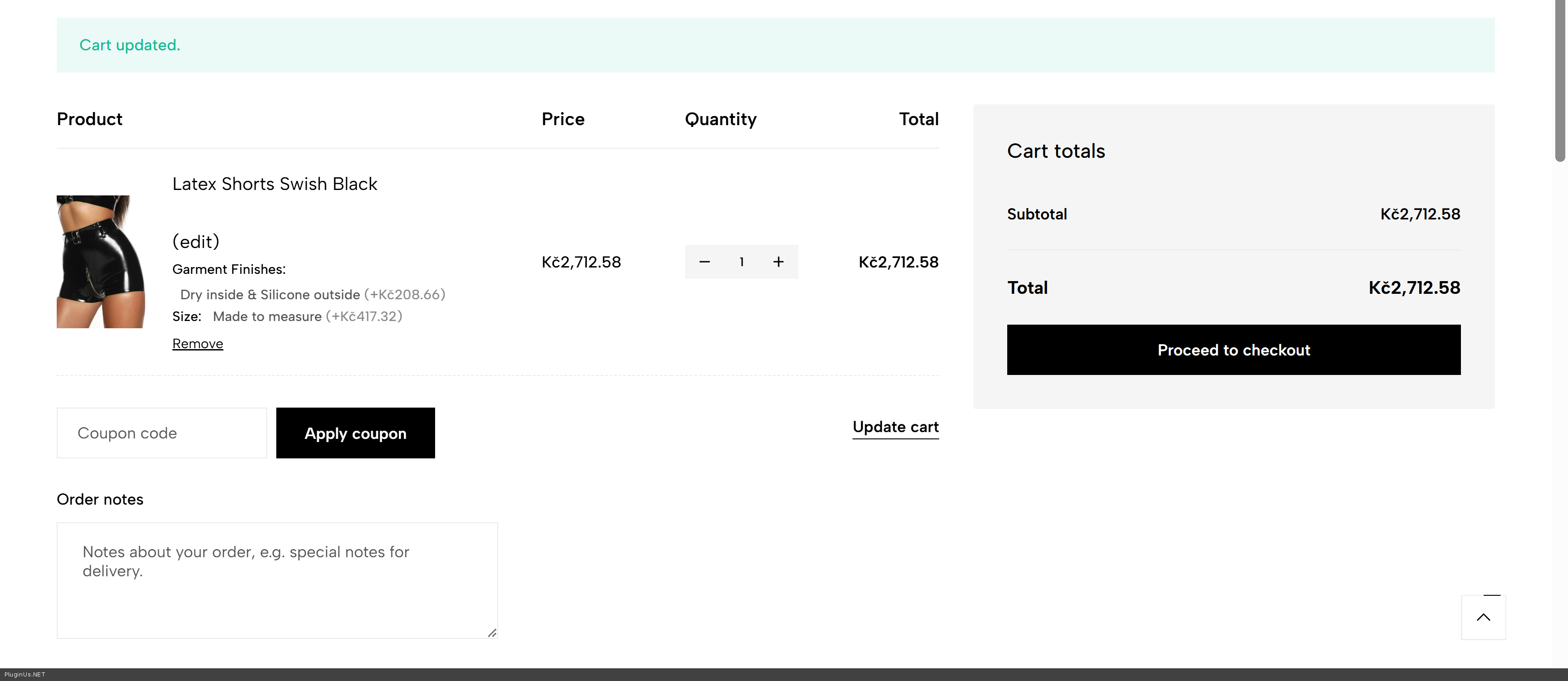
Cart in CZK: Made to measure +Kč417.32, Dry inside & Silicone outside +Kč208.66, line total Kč2,712.58
Product page and cart in USD: +20%, +$10.00, +$20.00, total $130.00Please check it yourself on the test site, and when you are satisfied, copy the same code into the functions.php of the child theme on dermalatex.com.
Best regards
Alex
Hello
We reproduced the problem on the test site and prepared a fix. It does not require any changes inside Advanced Product Fields, so it will survive updates of that plugin.
Please do not apply the code changes described in our old compatibility article for this plugin. Cutting the conversion off for percentage options fixes the product page but breaks the cart, which is exactly the effect you reported. We are rewriting that article.
What was happening. The WooCS integration inside Advanced Product Fields multiplies every price hint by the currency rate, and it does that for two values that are completely different in nature. On the product page the value of a percentage option is the percent itself, so 20 was turned into 417.32 and printed as a percentage. In the cart the value is real money, calculated from the product price that the integration had converted back to your default currency, so there the multiplication is correct and necessary. One rule was applied to both cases.
The fix tells the two cases apart by the page instead of by the option type. Next code aded to the functions.php of your child theme:
add_filter( 'wapf/html/pricing_hint/amount', 'dl_wapf_percent_hint_fix', 20, 4 );

/**
 * The APF WooCS integration multiplies every pricing hint by the currency rate.
 * For percentage options that is correct on the cart, where the value is a real
 * money amount calculated from the base price converted back to the default
 * currency, and wrong on the product page, where the value is the percent itself.
 */
function dl_wapf_percent_hint_fix( $amount, $product, $type, $for_page ) {

	if ( 'percent' !== $type && 'p' !== $type ) {
		return $amount;
	}

	// On the cart the amount is money and must stay converted.
	if ( 'cart' === $for_page ) {
		return $amount;
	}

	global $WOOCS;

	if ( ! is_object( $WOOCS ) || ! is_object( $product ) ) {
		return $amount;
	}

	$current = $WOOCS->current_currency;

	if ( strtolower( $current ) === strtolower( $WOOCS->default_currency ) ) {
		return $amount;
	}

	if ( 1 == get_option( 'woocs_is_fixed_enabled' ) ) {

		$fixed_regular = get_post_meta( $product->get_id(), '_woocs_regular_price_' . $current, true );
		$fixed_sale    = get_post_meta( $product->get_id(), '_woocs_sale_price_' . $current, true );

		if ( ( ! empty( $fixed_regular ) && floatval( $fixed_regular ) > 0 )
			|| ( ! empty( $fixed_sale ) && floatval( $fixed_sale ) > 0 ) ) {
			return $amount;
		}
	}

	$currencies = $WOOCS->get_currencies();
	$rate       = isset( $currencies[ $current ]['rate'] ) ? floatval( $currencies[ $current ]['rate'] ) : 0;

	if ( $rate <= 0 ) {
		return $amount;
	}

	return (float) $amount / $rate;
}
The code is already installed and tested on gdtest.xyz. Results there, with the product at 100 USD and CZK at rate 20.866:
Product page in CZK: price Kč2,086.60, Made to measure shows +20%, Dry inside & Silicone outside shows +Kč208.66
Cart in CZK: Made to measure +Kč417.32, Dry inside & Silicone outside +Kč208.66, line total Kč2,712.58
Product page and cart in USD: +20%, +$10.00, +$20.00, total $130.00
Please check it yourself on the test site, and when you are satisfied, copy the same code into the functions.php of the child theme on dermalatex.com.
Best regards
Alex
Quote from lvlp1314 on September 20, 2026, 03:41Hi
Sorry for the delay reply, Very good, It works perfect now, many many thanks
Hi
Sorry for the delay reply, Very good, It works perfect now, many many thanks
Quote from Alex Dev on September 21, 2026, 11:30You are Welcome :)
You are Welcome :)