
Cant make it work with fallback regions on a multilingual website (WPML)
The support doesn work on Saturdays and Sundays, so some Friday requests can be answered on Monday. If you have problems with registration ask help on contact us page pleaseIf you not got email within 24~36 business hours, firstly check your spam box, and if no any email from the support there - back to the forum and read answer here. DO NOT ANSWER ON EMAILS [noreply@pluginus.net] FROM THE FORUM!! Emails are just for your info, all answers should be published only here.
The support doesn work on Saturdays and Sundays, so some Friday requests can be answered on Monday.

Quote from Pablo Borysenco on July 9, 2020, 13:00Hello
I communicate directly with the developer. This is not the first time we have solved incompatibility together.
Hello
I communicate directly with the developer. This is not the first time we have solved incompatibility together.
Quote from Pablo Borysenco on July 15, 2020, 12:03Hello
Can I transfer your accesses to the WPML developer?. He said that nothing would change on the site.
Hello
Can I transfer your accesses to the WPML developer?. He said that nothing would change on the site.

Quote from i.neumann@bezares.com on July 15, 2020, 12:06Yes, no problems, I trust them and gave them access to this same website in more than 1 occasion.
Feel free to share it with WPML.
Yes, no problems, I trust them and gave them access to this same website in more than 1 occasion.
Feel free to share it with WPML.
Quote from Pablo Borysenco on July 16, 2020, 14:30Hello
Ok! Thank you!
Hello
Ok! Thank you!
Quote from Pablo Borysenco on July 20, 2020, 16:54Hello
Here is the answer from the WPML developer
I think I know the reason of the issue.I have checked example proruct in En which has associated gearboxes, for example this one:Please see its edit screen in Spanish:as you can see (look into Attributes) it does not have set anything in Gearboxes (Caja de cambios).If you go to translation screen for this product:you will be able to translate Gearboxes (somewhere in the bottom of the screen) and I believe it would start be listed in the select box on the screen you provided.The other way is to go to https://desarrollo.bezares.com/wp-admin/admin.php?page= wpml-wcml&tab=product- attributes, select Gearboxes and translate them here. In principle, I wrote this earlier
Hello
Here is the answer from the WPML developer
Quote from i.neumann@bezares.com on July 21, 2020, 08:18Thats exactly what we want to avoid, we need to use fallback.
We have 1158 terms for this attribute and we also have 10 languages.
Having 11580 terms (1158 x 10) will slow down our store by a lot just for reaplicating a non translateable term.We need to use the fallback option built in WPML, this attribute is set as "translatable" (use translation when available OR FALLBACK TO DEFAULT LANGUAGE).
Ps.: I changed it to "not translateable" to see if fallback would work that way and it didn't.
PS2.: Those attributes were subcategories, the change to attributes were specific to avoid the slowdown generated by 10k categories on our database, we could also change it to tags if necessary, we just need to use this classification without having to multiply it by 10.
Thats exactly what we want to avoid, we need to use fallback.
We have 1158 terms for this attribute and we also have 10 languages.
Having 11580 terms (1158 x 10) will slow down our store by a lot just for reaplicating a non translateable term.
We need to use the fallback option built in WPML, this attribute is set as"translatable" (use translation when available OR FALLBACK TO DEFAULT LANGUAGE).
Ps.: I changed it to"not translateable" to see if fallback would work that way and it didn't.
PS2.: Those attributes were subcategories, the change to attributes were specific to avoid the slowdown generated by 10k categories on our database, we could also change it to tags if necessary, we just need to use this classification without having to multiply it by 10.
Quote from Pablo Borysenco on July 21, 2020, 12:34Hello
What the developer meant. That there are no taxonomies in the database for these products. And for this reason, such a result. I'm not sure if it is possible to get around, and filter what does not exist
I continue to correspond with this developer. In any case, I will insist that they change the description of this functionality in the documentation.
Hello
What the developer meant. That there are no taxonomies in the database for these products. And for this reason, such a result. I'm not sure if it is possible to get around, and filter what does not exist
I continue to correspond with this developer. In any case, I will insist that they change the description of this functionality in the documentation.
Quote from i.neumann@bezares.com on July 21, 2020, 12:41Well, Im replicating some of the taxonomies to the other regions in the test environment... but just replicating them choke the VPS.
Just started replicating them on /wp-admin/admin.php?page=sitepress-multilingual-cms%2Fmenu%2Ftaxonomy-translation.php and we already grew from 1,1k to 3k terms.
Alternative solutions could be:
- Set those terms as NOT TRANSLATABLE (didnt work for now, yet)
- Convert them to TAGS.Would tags have the same behaviour?
Or can we use fallback with them?What we want is to filter those products while avoiding replicating 1000s of DB entries as the gearbox models are exact the same in every single language.
Best Regards,
Igor
Well, Im replicating some of the taxonomies to the other regions in the test environment... but just replicating them choke the VPS.
Just started replicating them on /wp-admin/admin.php?page=sitepress-multilingual-cms%2Fmenu%2Ftaxonomy-translation.php and we already grew from 1,1k to 3k terms.
Alternative solutions could be:
- Set those terms as NOT TRANSLATABLE (didnt work for now, yet)
- Convert them to TAGS.
Would tags have the same behaviour?
Or can we use fallback with them?
What we want is to filter those products while avoiding replicating 1000s of DB entries as the gearbox models are exact the same in every single language.
Best Regards,
Igor
Quote from i.neumann@bezares.com on July 21, 2020, 12:43Ps.: Also, gearboxes models are useful JUST FOR PTO.
If there was a way to use OTHER fields in other categories would be a nice addition to the plugin. (offtopic feature request)
Ps.: Also, gearboxes models are useful JUST FOR PTO.
If there was a way to use OTHER fields in other categories would be a nice addition to the plugin. (offtopic feature request)
Quote from Pablo Borysenco on July 22, 2020, 12:17Hello Igor
- Convert them to TAGS. - These are the same taxonomies. The filter(any filter) will not work if the database contains
no data available about this taxonomy in the translated productIf there was a way to use OTHER fields in other categories would be a nice addition to the plugin. - Describe it in more detail please
Hello Igor
- Convert them to TAGS. - These are the same taxonomies. The filter(any filter) will not work if the database contains
no data available about this taxonomy in the translated product
If there was a way to use OTHER fields in other categories would be a nice addition to the plugin. - Describe it in more detail please
Quote from i.neumann@bezares.com on July 22, 2020, 12:36We have a structure with search by text, product gearbox (with 1000s of terms) and mounting position.
The problem is: Just PTOs (one category) is specific for each gearbox... as the other products are mounted in the PTO output.
So the perfect filter for us would be something like this:
All of them: Search by text
Pumps and Motors: Maximun pressure / Flow / Size / Speed
PTOs: Gearbox / Mounting position
Oil Tanks: Capacity / Material
Valves: Type / Flow / WaysAnd so on... basically each category uses different taxonomies... sure we could add all of them as it hides the ones without no entry but having many many entries the Gearbox term slow down the other categories (that have just a dozen or so terms)
Planned workaround we had: Use a different plugin for the other categories OR try to rename the plugin to have 2 instances installed.
THAT SAID... the main function for our page is to filter the PTOs with reasonable speed, we dont care if we cant use it for other categories.
We have a structure with search by text, product gearbox (with 1000s of terms) and mounting position.
The problem is: Just PTOs (one category) is specific for each gearbox... as the other products are mounted in the PTO output.
So the perfect filter for us would be something like this:
All of them: Search by text
Pumps and Motors: Maximun pressure / Flow / Size / Speed
PTOs: Gearbox / Mounting position
Oil Tanks: Capacity / Material
Valves: Type / Flow / Ways
And so on... basically each category uses different taxonomies... sure we could add all of them as it hides the ones without no entry but having many many entries the Gearbox term slow down the other categories (that have just a dozen or so terms)
Planned workaround we had: Use a different plugin for the other categories OR try to rename the plugin to have 2 instances installed.
THAT SAID... the main function for our page is to filter the PTOs with reasonable speed, we dont care if we cant use it for other categories.
Quote from Pablo Borysenco on July 23, 2020, 11:07Hello
To show exact filters use shortcode [woof] - https://products-filter.com/shortcode/woof/ and this attributes - https://c2n.me/48v6LSL.png
Hello
To show exact filters use shortcode [woof] - https://products-filter.com/shortcode/woof/ and this attributes - https://c2n.me/48v6LSL.png
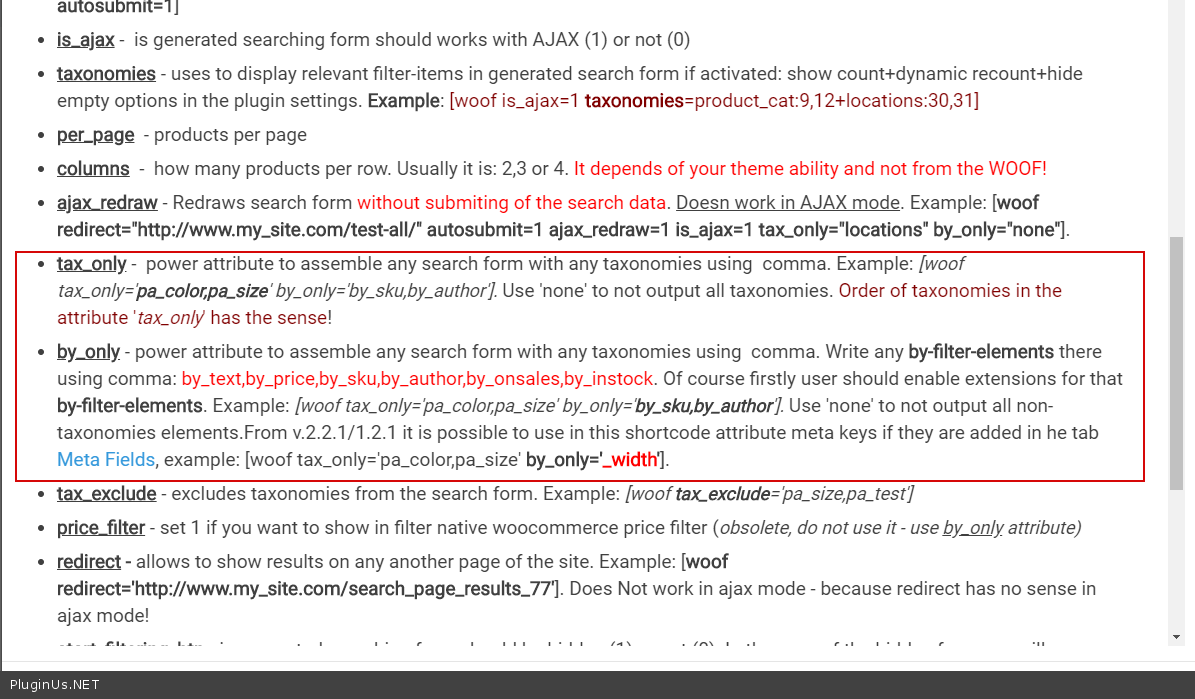
Quote from i.neumann@bezares.com on July 23, 2020, 11:24THATS AWESOME... many thanks for pointing it out!
PS.: Maybe a link to that page on the structure settings page would make it more clear... but no idea if its a common doubt or if its just me.
THATS AWESOME... many thanks for pointing it out!
PS.: Maybe a link to that page on the structure settings page would make it more clear... but no idea if its a common doubt or if its just me.
Quote from Pablo Borysenco on July 23, 2020, 12:28Try to read here - https://products-filter.com/documentation/#section_3_2
Try to read here - https://products-filter.com/documentation/#section_3_2
Quote from i.neumann@bezares.com on September 7, 2020, 11:50Hi there... I hope you got a nice vacations in a nice place. :-)
Any news on this compatibility changes?Best Regards,
Igor
Hi there... I hope you got a nice vacations in a nice place. :-)
Any news on this compatibility changes?
Best Regards,
Igor
Quote from Pablo Borysenco on September 7, 2020, 19:00Hello Igor
If you mean "translatable fallback" - Unfortunately no. A developer from the WPML team asked to redirect clients with this question to their forum - https://wpml.org/forums/
Hello Igor
If you mean"translatable fallback" - Unfortunately no. A developer from the WPML team asked to redirect clients with this question to their forum - https://wpml.org/forums/
Quote from Pablo Borysenco on September 8, 2020, 20:55Hello
Unfortunately, we cannot give you a refund because this problem does not depend on us.
This WPML function will not work with any filter
Hello
Unfortunately, we cannot give you a refund because this problem does not depend on us.
This WPML function will not work with any filter
Quote from i.neumann@bezares.com on September 9, 2020, 09:07I see you ended up approving it, as said before we would had accepted a different plugin that is useful for us instead.
I would suggest adding this limitation on the item description, thanks for your attention.
I see you ended up approving it, as said before we would had accepted a different plugin that is useful for us instead.
I would suggest adding this limitation on the item description, thanks for your attention.

Quote from Ross on September 9, 2020, 13:20Hello
Yes, I as the admin approved it, sorry for misunderstanding!
Hello
Yes, I as the admin approved it, sorry for misunderstanding!