
Can't Input Comma In Woo Price Fields
The support doesn work on Saturdays and Sundays, so some Friday requests can be answered on Monday. If you have problems with registration ask help on contact us page pleaseIf you not got email within 24~36 business hours, firstly check your spam box, and if no any email from the support there - back to the forum and read answer here. DO NOT ANSWER ON EMAILS [noreply@pluginus.net] FROM THE FORUM!! Emails are just for your info, all answers should be published only here.
The support doesn work on Saturdays and Sundays, so some Friday requests can be answered on Monday.

Quote from littlepanda on July 28, 2026, 20:04Hi,
I have noticed that I can no longer input a comma into the price fields of Woocommerce on my EU subsite.
For example, when I input the price 17,90 the comma is stripped out and it becomes 1790 without even clicking save.
The separators are set correctly with decimal set as comma and thousands set as period
When I deactivate the FOX plugin the issue goes away.
Please advise
Hi,
I have noticed that I can no longer input a comma into the price fields of Woocommerce on my EU subsite.
For example, when I input the price 17,90 the comma is stripped out and it becomes 1790 without even clicking save.
The separators are set correctly with decimal set as comma and thousands set as period
When I deactivate the FOX plugin the issue goes away.
Please advise

Quote from Alex Dev on July 29, 2026, 20:24Hello
Can you geve please screens where you doing, I see that woocommerce sho me notice if I place prices using comma:
Could you please try an earlier version of the plugin on that subsite, so we can see whether this started with a recent release. Previous versions ship inside the CodeCanyon download: folder archive. Install one of those over the current one, then try entering the price with a comma again and tell me the version number you tested and the result. Also you can place prices as 48.00 and display them on the front using price format selected in the tab Options of the FOX plugin
Hello
Can you geve please screens where you doing, I see that woocommerce sho me notice if I place prices using comma:
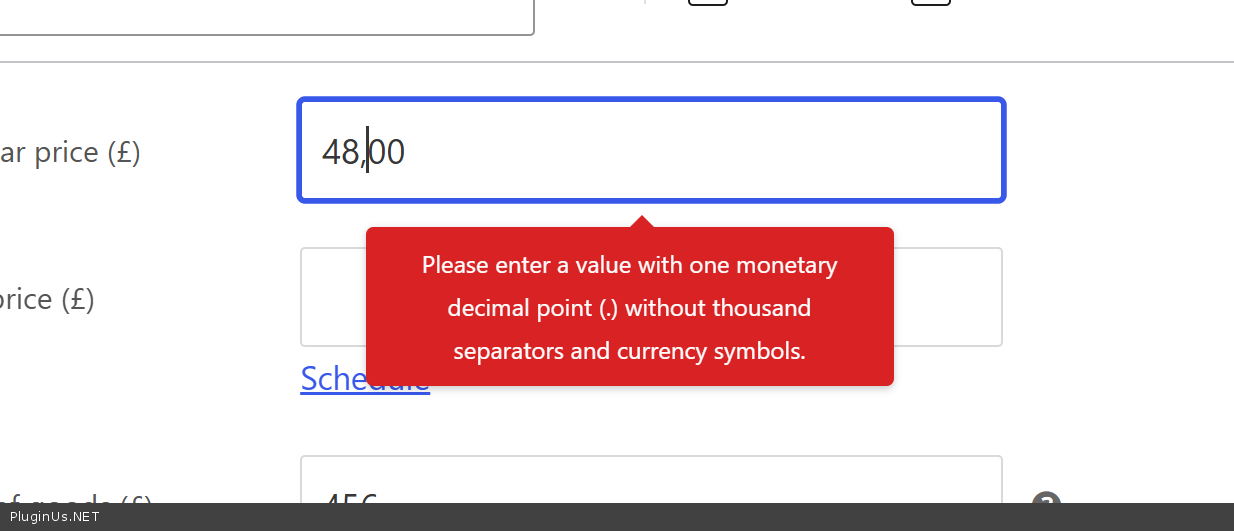
Could you please try an earlier version of the plugin on that subsite, so we can see whether this started with a recent release. Previous versions ship inside the CodeCanyon download: folder archive. Install one of those over the current one, then try entering the price with a comma again and tell me the version number you tested and the result. Also you can place prices as 48.00 and display them on the front using price format selected in the tab Options of the FOX plugin
Quote from littlepanda on July 29, 2026, 21:06Hi,
I tried older versions 2.4.9 and 2.4.7 and the proble still occurs
A price of 17,90 becomes 1790
A price of 17.90 becomes 1790
I can however edit the price of a product using the bulk edit feature of woocommerce.
Hi,
I tried older versions 2.4.9 and 2.4.7 and the proble still occurs
A price of 17,90 becomes 1790
A price of 17.90 becomes 1790
I can however edit the price of a product using the bulk edit feature of woocommerce.
Quote from Alex Dev on July 30, 2026, 18:31Hello
Thank you for testing the older versions, that information helped a lot.
I have found the possible cause (maybe)
Attached is a test build with the fix (see private section of this ticket). Please deactivate FOX, delete it, install this build and activate it again, then try entering 17,90 on a product page.
Please also check the same in Quick Edit from the products list and on a variation, and let me know the result in each case.
If you prefer not to install a test build, there is a setting level workaround: in FOX, tab Currencies, set the Separators column for your currency to 10.000,00. That makes FOX match your store settings and the comma will work.
Please write me your feddback how it works on your side ...
Hello
Thank you for testing the older versions, that information helped a lot.
I have found the possible cause (maybe)
Attached is a test build with the fix (see private section of this ticket). Please deactivate FOX, delete it, install this build and activate it again, then try entering 17,90 on a product page.
Please also check the same in Quick Edit from the products list and on a variation, and let me know the result in each case.
If you prefer not to install a test build, there is a setting level workaround: in FOX, tab Currencies, set the Separators column for your currency to 10.000,00. That makes FOX match your store settings and the comma will work.
Please write me your feddback how it works on your side ...
Quote from littlepanda on July 30, 2026, 19:22Hi,
We tested this on our staging site (blogvault). Yes the build fixed the issue for single product but updating the variation products price field there is an issue. The price field edits correctly but when clicking save the save doesn't complete and hangs. Also when we try to adjust the price using bulk edit we get the following error '400 Bad Request - Request Header or Cookie Too Large'. We are not sure if this is caused by the plugin or our staging site limitations.
The workaround of setting the Separator column for the currency to 10.000,00 worked.
Regards
LP*
Hi,
We tested this on our staging site (blogvault). Yes the build fixed the issue for single product but updating the variation products price field there is an issue. The price field edits correctly but when clicking save the save doesn't complete and hangs. Also when we try to adjust the price using bulk edit we get the following error '400 Bad Request - Request Header or Cookie Too Large'. We are not sure if this is caused by the plugin or our staging site limitations.
The workaround of setting the Separator column for the currency to 10.000,00 worked.
Regards
LP*
Quote from Alex Dev on July 31, 2026, 12:21Hello
Thank you for the detailed feedback, that was useful. Let me answer each part.
ABOUT THE 400 BAD REQUEST ERROR
This one is not coming from the plugin. "Request Header or Cookie Too Large" is produced by the web server, not by PHP. The request is rejected because the total size of the cookies and headers your browser sends exceeds the server buffer, and it is rejected before WordPress even starts, so no plugin has run at that point.
This is a known limitation of some staging environments, which add their own cookies on top of the ones WordPress and WooCommerce already set. Two things usually clear it:
- Clear the cookies for the staging domain in your browser and log in again.
- Ask your staging provider to raise the header buffer limit. On nginx the setting is large_client_header_buffers.
ABOUT THE VARIATION SAVE THAT HANGS
I suspect this is the same problem rather than a separate one. Variations are saved through a background request, and that request is large. If the web server rejects it with the same 400, the WooCommerce variations panel has no error handler for that case, so the spinner keeps spinning and the save never completes. From the outside it looks exactly like a hang.
Please check this directly, it takes a minute:
- Open the product and go to the Variations tab.
- Press F12 to open the browser developer tools and select the Network tab.
- Change a variation price and click Save changes.
- Look for the request to admin-ajax.php in the list and tell me the status code next to it.
If it is 400, this is the server limit above and not the plugin. If it is 200 or 500, it is something on our side and I will keep digging.
NEW BUILD
Attached in the private section of this ticket is build 2.5.1.2. The version number is bumped so you can confirm which build you are running, in Plugins the version must read 2.5.1.2.
What it adds compared to the build you tested: the previous one protected the price fields while you type and while the variations panel saves through its own button, but it did not cover the case where the product is saved with the main Update button. Variation prices submitted that way went through the old path and could still be corrupted. That path is now covered, along with Quick Edit, bulk edit from the products list and the coupon screen.
HOW TO TEST IT
- In FOX, tab Currencies, set the Separators column for your currency back to 10,000.00, the value it had before. This is important. While the 10.000,00 workaround is active it hides the problem, so we cannot tell whether the new build actually fixes it.
- Deactivate FOX, delete it, upload and activate the attached build.
- On a simple product, enter 17,90 in the price field and click Update. Reopen the product and confirm the value is still 17,90.
- On a variable product, open the Variations tab, enter 17,90 in a variation price and click Save changes inside the panel. Confirm the value survives.
- On the same variable product, change another variation price and this time click the main Update button instead. Confirm the value survives. This is the case the new build addresses.
- Try Quick Edit from the products list with a comma price.
Please tell me the result of each of those six steps separately, and the status code from the Network tab check above.
If everything works, you can then set the Separators column to whatever display format you prefer, and it will no longer affect what you type in the admin.
One note: if your staging environment keeps rejecting requests with the 400 error, please run this test somewhere else, either on a local copy or on a different staging host. Otherwise we cannot tell our behaviour apart from the server limit.
p.s. updated test-version please see in the private area of thit ticket
Hello
Thank you for the detailed feedback, that was useful. Let me answer each part.
ABOUT THE 400 BAD REQUEST ERROR
This one is not coming from the plugin."Request Header or Cookie Too Large" is produced by the web server, not by PHP. The request is rejected because the total size of the cookies and headers your browser sends exceeds the server buffer, and it is rejected before WordPress even starts, so no plugin has run at that point.
This is a known limitation of some staging environments, which add their own cookies on top of the ones WordPress and WooCommerce already set. Two things usually clear it:
- Clear the cookies for the staging domain in your browser and log in again.
- Ask your staging provider to raise the header buffer limit. On nginx the setting is large_client_header_buffers.
ABOUT THE VARIATION SAVE THAT HANGS
I suspect this is the same problem rather than a separate one. Variations are saved through a background request, and that request is large. If the web server rejects it with the same 400, the WooCommerce variations panel has no error handler for that case, so the spinner keeps spinning and the save never completes. From the outside it looks exactly like a hang.
Please check this directly, it takes a minute:
- Open the product and go to the Variations tab.
- Press F12 to open the browser developer tools and select the Network tab.
- Change a variation price and click Save changes.
- Look for the request to admin-ajax.php in the list and tell me the status code next to it.
If it is 400, this is the server limit above and not the plugin. If it is 200 or 500, it is something on our side and I will keep digging.
NEW BUILD
Attached in the private section of this ticket is build 2.5.1.2. The version number is bumped so you can confirm which build you are running, in Plugins the version must read 2.5.1.2.
What it adds compared to the build you tested: the previous one protected the price fields while you type and while the variations panel saves through its own button, but it did not cover the case where the product is saved with the main Update button. Variation prices submitted that way went through the old path and could still be corrupted. That path is now covered, along with Quick Edit, bulk edit from the products list and the coupon screen.
HOW TO TEST IT
- In FOX, tab Currencies, set the Separators column for your currency back to 10,000.00, the value it had before. This is important. While the 10.000,00 workaround is active it hides the problem, so we cannot tell whether the new build actually fixes it.
- Deactivate FOX, delete it, upload and activate the attached build.
- On a simple product, enter 17,90 in the price field and click Update. Reopen the product and confirm the value is still 17,90.
- On a variable product, open the Variations tab, enter 17,90 in a variation price and click Save changes inside the panel. Confirm the value survives.
- On the same variable product, change another variation price and this time click the main Update button instead. Confirm the value survives. This is the case the new build addresses.
- Try Quick Edit from the products list with a comma price.
Please tell me the result of each of those six steps separately, and the status code from the Network tab check above.
If everything works, you can then set the Separators column to whatever display format you prefer, and it will no longer affect what you type in the admin.
One note: if your staging environment keeps rejecting requests with the 400 error, please run this test somewhere else, either on a local copy or on a different staging host. Otherwise we cannot tell our behaviour apart from the server limit.
p.s. updated test-version please see in the private area of thit ticket