
Ajax cart update on checkout page shows wrong currency
The support doesn work on Saturdays and Sundays, so some Friday requests can be answered on Monday. If you have problems with registration ask help on contact us page pleaseIf you not got email within 24~36 business hours, firstly check your spam box, and if no any email from the support there - back to the forum and read answer here. DO NOT ANSWER ON EMAILS [noreply@pluginus.net] FROM THE FORUM!! Emails are just for your info, all answers should be published only here.
The support doesn work on Saturdays and Sundays, so some Friday requests can be answered on Monday.

Quote from frankebailey@gmail.com on December 22, 2020, 11:43Hello there,
My currencies are South African Rand, US Dollar, British Pound and Euro. My base currency is South African Rand.
I've used a custom function to ensure that the currency on the checkout page is always Rand (ZAR) because my payment gateway only transacts in ZAR. However when the checkout page loads, an Ajax call to the function update_order_review() happens which refreshes the cart and shows the currency in Euro or whatever else the detected country's currency is.
Can you help me to make sure that the currency output by the update_order_review() WooCommerce function correctly shows the price in ZAR and not the country currency, please?
Hello there,
My currencies are South African Rand, US Dollar, British Pound and Euro. My base currency is South African Rand.
I've used a custom function to ensure that the currency on the checkout page is always Rand (ZAR) because my payment gateway only transacts in ZAR. However when the checkout page loads, an Ajax call to the function update_order_review() happens which refreshes the cart and shows the currency in Euro or whatever else the detected country's currency is.
Can you help me to make sure that the currency output by the update_order_review() WooCommerce function correctly shows the price in ZAR and not the country currency, please?

Quote from Pablo Borysenco on December 22, 2020, 13:28Hello
Please update plugin to latest version - https://currency-switcher.com/how-to-make-auto-update-for-wordpress-plugins-and-themes-bought-on-envato/
I've used a custom function to ensure that the currency on the checkout page - where and what code do you use
the cart and shows the currency in Euro or whatever else the detected country's currency is. - This is impossible, GeoIP rules only work the first time a user visits
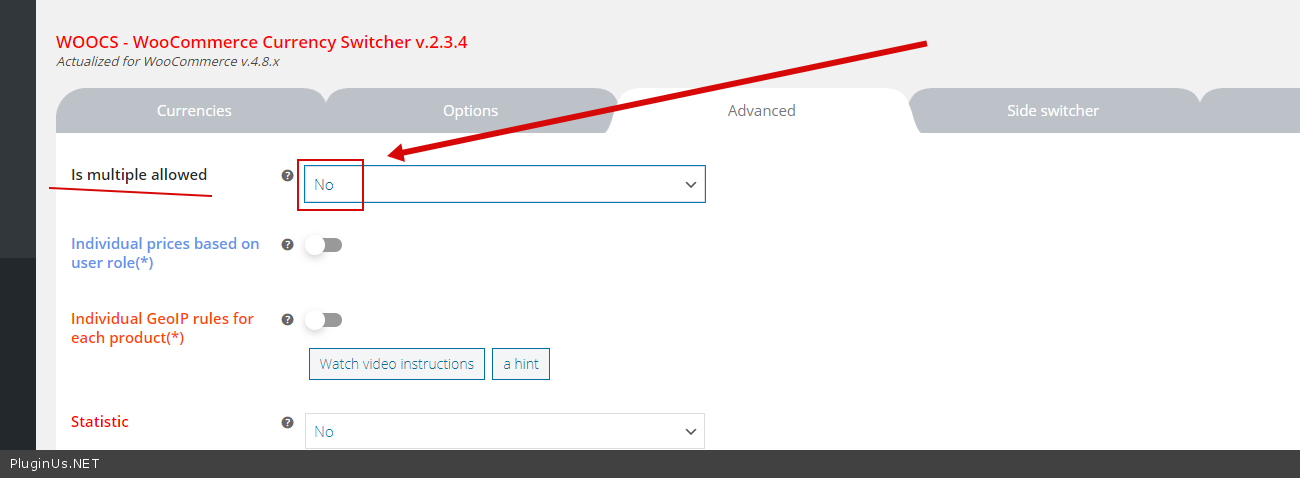
Can you help me to make sure that the currency output - use this option - https://c2n.me/4akbtUH.png
Hello
Please update plugin to latest version - https://currency-switcher.com/how-to-make-auto-update-for-wordpress-plugins-and-themes-bought-on-envato/
I've used a custom function to ensure that the currency on the checkout page - where and what code do you use
the cart and shows the currency in Euro or whatever else the detected country's currency is. - This is impossible, GeoIP rules only work the first time a user visits
Can you help me to make sure that the currency output - use this option - https://c2n.me/4akbtUH.png
Quote from frankebailey@gmail.com on December 22, 2020, 13:41Hi,
The plugin is updated to the latest version - 2.3.4
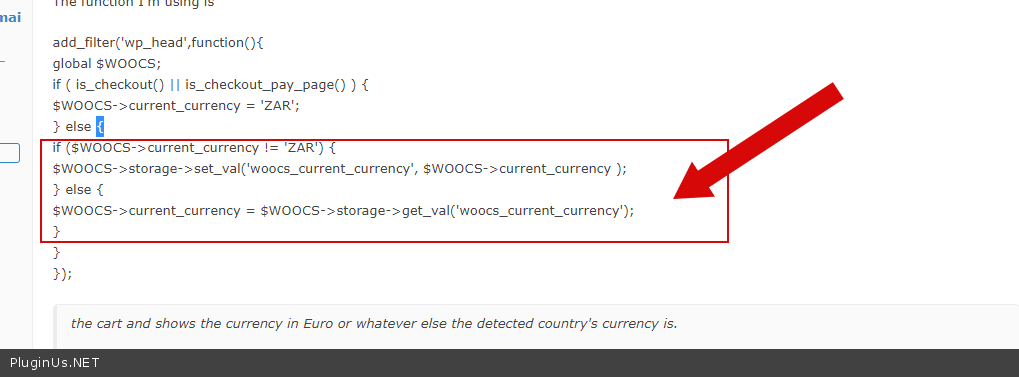
The function I'm using is
add_filter('wp_head',function(){
global $WOOCS;
if ( is_checkout() || is_checkout_pay_page() ) {
$WOOCS->current_currency = 'ZAR';
} else {
if ($WOOCS->current_currency != 'ZAR') {
$WOOCS->storage->set_val('woocs_current_currency', $WOOCS->current_currency );
} else {
$WOOCS->current_currency = $WOOCS->storage->get_val('woocs_current_currency');
}
}
});the cart and shows the currency in Euro or whatever else the detected country's currency is.
- This is impossible, GeoIP rules only work the first time a user visits
So does this mean that I'm stuck with the currency always changing to Euro / Dollars / Pounds when the cart on the checkout page refreshes?
Hi,
The plugin is updated to the latest version - 2.3.4
The function I'm using is
add_filter('wp_head',function(){
global $WOOCS;
if ( is_checkout() || is_checkout_pay_page() ) {
$WOOCS->current_currency = 'ZAR';
} else {
if ($WOOCS->current_currency != 'ZAR') {
$WOOCS->storage->set_val('woocs_current_currency', $WOOCS->current_currency );
} else {
$WOOCS->current_currency = $WOOCS->storage->get_val('woocs_current_currency');
}
}
});
the cart and shows the currency in Euro or whatever else the detected country's currency is.
- This is impossible, GeoIP rules only work the first time a user visits
So does this mean that I'm stuck with the currency always changing to Euro / Dollars / Pounds when the cart on the checkout page refreshes?
Quote from Pablo Borysenco on December 23, 2020, 11:35Hello
https://c2n.me/4akZIGW.png - this code doesn't make any sense/ Please delete it
So does this mean that I'm stuck with the currency always changing to Euro - I mean it(this issue) has nothing to do with the current country and GeoIP function.
Hello
https://c2n.me/4akZIGW.png - this code doesn't make any sense/ Please delete it
So does this mean that I'm stuck with the currency always changing to Euro - I mean it(this issue) has nothing to do with the current country and GeoIP function.
Quote from frankebailey@gmail.com on December 23, 2020, 11:59Can you please explain what you mean by "this code doesn't make any sense"?
Can you please explain what you mean by"this code doesn't make any sense"?
Quote from Pablo Borysenco on December 23, 2020, 13:51Unfortunately I was teacher of programming.
this code does something like that
x=y
if(x!="ZAR"){
x=y
}else{
y=x
}
Please try to read - https://currency-switcher.com/force-currency-on-checkout-page/
Unfortunately I was teacher of programming.
this code does something like that
x=y
if(x!="ZAR"){
x=y
}else{
y=x
}
Please try to read - https://currency-switcher.com/force-currency-on-checkout-page/