
WPML problems
The support doesn work on Saturdays and Sundays, so some Friday requests can be answered on Monday. If you have problems with registration ask help on contact us page pleaseIf you not got email within 24~36 business hours, firstly check your spam box, and if no any email from the support there - back to the forum and read answer here. DO NOT ANSWER ON EMAILS [noreply@pluginus.net] FROM THE FORUM!! Emails are just for your info, all answers should be published only here.
The support doesn work on Saturdays and Sundays, so some Friday requests can be answered on Monday.

Quote from patH on April 20, 2026, 09:23Hi there.
I am using your plugin which is really great.
I am working an a WooCommerce website with Divi Theme.
It allowed me to created Filters bloc on Shop page for Global Woocommerce Attributes.
Now that I have installed WPML for translation and set it right, Husky filters fail to work.
Notably my Range Slider, in French (default language) it doesn’t do any thing when I use the Range Slider, on other language, it redirects to the right url (…en/shop/swoof/niveau-2-to-9/), but no result are shown…
Here is the first answer from your support team on wordpress.org.We tested your site directly. Running jQuery(‘#woof_meta_slider_niveau’).data() in the browser console confirmed that the slider is initializing correctly with the right min/max values and is registering movement (to: 8 was captured). However the filter is not triggering a redirect after the slider is released, which means the issue is happening after initialization, most likely a conflict between WPML’s JavaScript handling on the default language page and the HUSKY onChange callback that builds and fires the filter URL.
Thanks for any help.
Hi there.
I am using your plugin which is really great.
I am working an a WooCommerce website with Divi Theme.
It allowed me to created Filters bloc on Shop page for Global Woocommerce Attributes.
Now that I have installed WPML for translation and set it right, Husky filters fail to work.
Notably my Range Slider, in French (default language) it doesn’t do any thing when I use the Range Slider, on other language, it redirects to the right url (…en/shop/swoof/niveau-2-to-9/), but no result are shown…
Here is the first answer from your support team on wordpress.org.
We tested your site directly. Running jQuery(‘#woof_meta_slider_niveau’).data() in the browser console confirmed that the slider is initializing correctly with the right min/max values and is registering movement (to: 8 was captured). However the filter is not triggering a redirect after the slider is released, which means the issue is happening after initialization, most likely a conflict between WPML’s JavaScript handling on the default language page and the HUSKY onChange callback that builds and fires the filter URL.
Thanks for any help.

Quote from Alex Dev on April 20, 2026, 12:24Hello
Thank you for the detailed report.
To investigate this properly we need access to the site. Please create a staging copy using Duplicator (https://wordpress.org/plugins/duplicator/) and share wp-admin and FTP credentials in the private area of this ticket.
https://share.pluginus.net/image/i20230222134241.png
https://share.pluginus.net/image/i20230222134615.png
https://share.pluginus.net/image/i20230222134511.pngThere are several things we want to check directly in the code and database:
- Whether the active theme is adding hooks or scripts that interfere with the HUSKY onChange callback under WPML
- Conflicts with other installed plugins in the WPML + WooCommerce environment
- Whether there are any database inconsistencies, for example from a previous import or export, that could cause the filter URLs to resolve incorrectlyOnce we have access we can debug this properly. Looking forward to your credentials.
Thank you!
Hello
Thank you for the detailed report.
To investigate this properly we need access to the site. Please create a staging copy using Duplicator (https://wordpress.org/plugins/duplicator/) and share wp-admin and FTP credentials in the private area of this ticket.
https://share.pluginus.net/image/i20230222134241.png
https://share.pluginus.net/image/i20230222134615.png
https://share.pluginus.net/image/i20230222134511.png


There are several things we want to check directly in the code and database:
- Whether the active theme is adding hooks or scripts that interfere with the HUSKY onChange callback under WPML
- Conflicts with other installed plugins in the WPML + WooCommerce environment
- Whether there are any database inconsistencies, for example from a previous import or export, that could cause the filter URLs to resolve incorrectly
Once we have access we can debug this properly. Looking forward to your credentials.
Thank you!
Quote from patH on April 20, 2026, 18:45Thank you for your help.
I posted the credentials on the Private data area.
Thank you for your help.
I posted the credentials on the Private data area.
Quote from patH on April 21, 2026, 09:44By the way, apart from the range slider filter, all other filters failed to work in language that is not default language (French).
By the way, apart from the range slider filter, all other filters failed to work in language that is not default language (French).
Quote from Alex Dev on April 21, 2026, 13:03Hello
Thank you for credentials sharing, wp-admin works fine, but ftp not, please check it:
Response: 331 User [hidden] OK. Password required
Command: PASS ***********
Response: 530 Login authentication failedAnd after some time looks like I was blocked by security system:
Error: Connection timed out after 20 seconds of inactivity
Error: Could not connect to server
Hello
Thank you for credentials sharing, wp-admin works fine, but ftp not, please check it:
Response: 331 User [hidden] OK. Password required
Command: PASS ***********
Response: 530 Login authentication failed
And after some time looks like I was blocked by security system:
Error: Connection timed out after 20 seconds of inactivity
Error: Could not connect to server
Quote from Alex Dev on April 21, 2026, 13:50Hello
After investigation I found the cause of the issue.
Your meta field key "niveau" conflicts with a WooCommerce attribute that has the same slug "pa_niveau". When HUSKY builds the SEO URL data, both keys end up in the same lookup table and one overwrites the other. As a result the meta slider key never makes it into the JS routing data and the slider redirect silently fails on the default language.
This is not a HUSKY bug — it is a naming conflict on your site. The proof is that disabling SEO URLs makes the slider work fine, because in that mode HUSKY uses simple query string parameters where the conflict does not matter.
I also confirmed this directly on your staging site. I created a new numeric slider meta key called "tester" in HUSKY settings, and it works perfectly with SEO URLs enabled — you can see the result here: (redirection works) https://SITE_NAME/boutique/swoof/tester-76-to-100/
The fix is straightforward: rename your meta field key to something unique that does not match any WooCommerce attribute slug. For example instead of "niveau" use something like "niveau_meta" or "score_niveau". After renaming the meta key you will also need to update any existing product meta data in the database to use the new key name.
Hello
After investigation I found the cause of the issue.
Your meta field key"niveau" conflicts with a WooCommerce attribute that has the same slug"pa_niveau". When HUSKY builds the SEO URL data, both keys end up in the same lookup table and one overwrites the other. As a result the meta slider key never makes it into the JS routing data and the slider redirect silently fails on the default language.
This is not a HUSKY bug — it is a naming conflict on your site. The proof is that disabling SEO URLs makes the slider work fine, because in that mode HUSKY uses simple query string parameters where the conflict does not matter.
I also confirmed this directly on your staging site. I created a new numeric slider meta key called"tester" in HUSKY settings, and it works perfectly with SEO URLs enabled — you can see the result here: (redirection works) https://SITE_NAME/boutique/swoof/tester-76-to-100/
The fix is straightforward: rename your meta field key to something unique that does not match any WooCommerce attribute slug. For example instead of"niveau" use something like"niveau_meta" or"score_niveau". After renaming the meta key you will also need to update any existing product meta data in the database to use the new key name.
Quote from patH on April 21, 2026, 15:00Thanks a lot for your help!
I didn't perfectly understand, but I created a global WooCommerce attribute "niveau" which appears in Husky backend as Radio for exemple. But I absolutely need it to be shown as range slider, that is why I created a new meta fields in Husky / Meta Data.
I should not do it this way ?But I didn't find any other way to have a range slider.
What is the right way to show my global WooC attribut as range slider ?Thanks a lot.
Thanks a lot for your help!
I didn't perfectly understand, but I created a global WooCommerce attribute"niveau" which appears in Husky backend as Radio for exemple. But I absolutely need it to be shown as range slider, that is why I created a new meta fields in Husky / Meta Data.
I should not do it this way ?
But I didn't find any other way to have a range slider.
What is the right way to show my global WooC attribut as range slider ?
Thanks a lot.
Quote from patH on April 21, 2026, 15:46To be a bit more clear, I created a WooCommerce attribute "pa_niveau" and I want a Range Slider for it, but it seems I didn't understand how to do it, right?
To be a bit more clear, I created a WooCommerce attribute"pa_niveau" and I want a Range Slider for it, but it seems I didn't understand how to do it, right?
Quote from Alex Dev on April 22, 2026, 12:04Hello
No problem, let me clarify how this works.
You actually have two options depending on what you need:
Option 1 — Range slider directly on your WooCommerce attribute use type slider (premium version)
Option 2 — If you specifically need a custom meta field for some reason, you can keep it, but you must rename the meta key to something that does not match your WooCommerce attribute slug. So instead of "niveau" use something like "niveau_meta" or "niveau_score". The conflict only happens because both names resolve to the same identifier when HUSKY builds its SEO URL table.
In your situation Option 1 is most likely what you need. Give it a try and let us know how it goes.
Hello
No problem, let me clarify how this works.
You actually have two options depending on what you need:
Option 1 — Range slider directly on your WooCommerce attribute use type slider (premium version) 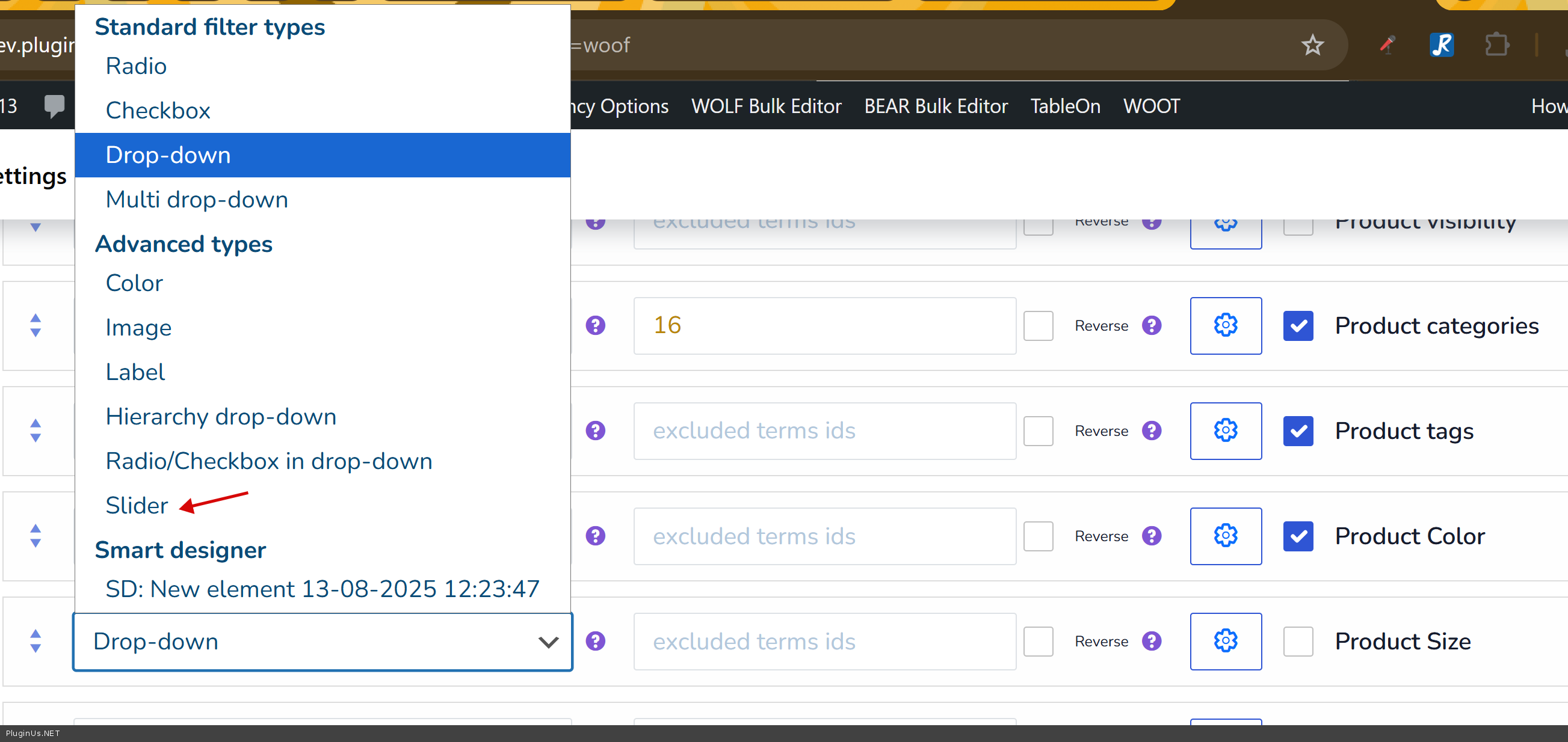
Option 2 — If you specifically need a custom meta field for some reason, you can keep it, but you must rename the meta key to something that does not match your WooCommerce attribute slug. So instead of"niveau" use something like"niveau_meta" or"niveau_score". The conflict only happens because both names resolve to the same identifier when HUSKY builds its SEO URL table.
In your situation Option 1 is most likely what you need. Give it a try and let us know how it goes.
Quote from patH on April 22, 2026, 15:15Thanks a lot Alex for your help.
With Option 2, I can not use my first WooCommerce attribute, which has been created for that range slider filter, right ? So that means I need to manage another meta filed for the Range slider?
That would mean it is no help in my situation, right?
I have no premium version so far, I was waiting to be sure it could work on my website.
The premium version is for one website ? and for one year updates ?Thanks again.
Thanks a lot Alex for your help.
With Option 2, I can not use my first WooCommerce attribute, which has been created for that range slider filter, right ? So that means I need to manage another meta filed for the Range slider?
That would mean it is no help in my situation, right?
I have no premium version so far, I was waiting to be sure it could work on my website.
The premium version is for one website ? and for one year updates ?
Thanks again.
Quote from Alex Dev on April 23, 2026, 11:59Hello
Yes, exactly right — Option 2 is not relevant for your situation. You already have the correct WooCommerce attribute, you just need to display it as a range slider in HUSKY, and for that you need the premium version.
With premium you do not need any custom meta field at all. Just go to HUSKY filter settings, find your pa_niveau attribute in the filter list, and change its display type to Slider. That is it — no renaming, no extra meta, no workarounds. It will work directly with your existing WooCommerce attribute.
Regarding the license — plugin updates are lifetime, you get them forever. What you pay for upfront is support access, either 6 months or 1 year depending on the plan you choose. Support can be renewed later if needed. You can find the details and purchase here: https://products-filter.com/downloads
Once you have premium installed, give it a try and let us know if anything comes up.
Welcome!
Hello
Yes, exactly right — Option 2 is not relevant for your situation. You already have the correct WooCommerce attribute, you just need to display it as a range slider in HUSKY, and for that you need the premium version.
With premium you do not need any custom meta field at all. Just go to HUSKY filter settings, find your pa_niveau attribute in the filter list, and change its display type to Slider. That is it — no renaming, no extra meta, no workarounds. It will work directly with your existing WooCommerce attribute.
Regarding the license — plugin updates are lifetime, you get them forever. What you pay for upfront is support access, either 6 months or 1 year depending on the plan you choose. Support can be renewed later if needed. You can find the details and purchase here: https://products-filter.com/downloads
Once you have premium installed, give it a try and let us know if anything comes up.
Welcome!