
Woof with brand filter doesn't work
The support doesn work on Saturdays and Sundays, so some Friday requests can be answered on Monday. If you have problems with registration ask help on contact us page pleaseIf you not got email within 24~36 business hours, firstly check your spam box, and if no any email from the support there - back to the forum and read answer here. DO NOT ANSWER ON EMAILS [noreply@pluginus.net] FROM THE FORUM!! Emails are just for your info, all answers should be published only here.
The support doesn work on Saturdays and Sundays, so some Friday requests can be answered on Monday.

Quote from www.dealyouz.com on July 14, 2021, 17:07Hello,
I am glad to buy your plugin.
I have a problem :
I want to filter products with “brand” filter.
Currently when I activate the brand filter and clic on a brand I dont't get redult. Exemple :
please check see this links :
https://dealyouz.com/?swoof=1&store=fr-aliexpress-com (no result)
if I change manually “store” to “brand” it works :
https://dealyouz.com/?swoof=1&brand=fr-aliexpress-com (it’s ok)
I need to replace the word “store=” with “brand=” to get the filter work.
can you show me how to do this?
thanks
Hello,
I am glad to buy your plugin.
I have a problem :
I want to filter products with “brand” filter.
Currently when I activate the brand filter and clic on a brand I dont't get redult. Exemple :
please check see this links :
https://dealyouz.com/?swoof=1&store=fr-aliexpress-com (no result)
if I change manually “store” to “brand” it works :
https://dealyouz.com/?swoof=1&brand=fr-aliexpress-com (it’s ok)
I need to replace the word “store=” with “brand=” to get the filter work.
can you show me how to do this?
thanks

Quote from Pablo Borysenco on July 15, 2021, 12:48Hello
Your site - https://share.pluginus.net/image/i20210715134705.png
Hello
Your site - https://share.pluginus.net/image/i20210715134705.png

Quote from www.dealyouz.com on July 15, 2021, 15:58Hello,
Please you can see my site now.
Thank you
Hello,
Please you can see my site now.
Thank you
Quote from Pablo Borysenco on July 16, 2021, 12:31Hello
The same error - https://share.pluginus.net/image/i20210716133045.png
Hello
The same error - https://share.pluginus.net/image/i20210716133045.png

Quote from www.dealyouz.com on July 19, 2021, 09:03Sorry my website had a problem.
You can check now it's accessible.
Sorry my website had a problem.
You can check now it's accessible.
Quote from Pablo Borysenco on July 19, 2021, 13:22Hello
Paste your license key here - https://share.pluginus.net/image/i20210618130558.png -> https://share.pluginus.net/image/i20210618130614.png and wp-admin access - https://share.pluginus.net/image/i20210618130637.png I will check it
Hello
Paste your license key here - https://share.pluginus.net/image/i20210618130558.png -> https://share.pluginus.net/image/i20210618130614.png and wp-admin access - https://share.pluginus.net/image/i20210618130637.png I will check it


Quote from www.dealyouz.com on July 19, 2021, 20:08Hello,
I bought woof from this link:
https://codecanyon.net/item/woof-woocommerce-products-filter/11498469/support. I don't know where I can find the licence. In the Zip file I can't find it.
Can you guide me please.
Thanks
Hello,
I bought woof from this link:
https://codecanyon.net/item/woof-woocommerce-products-filter/11498469/support. I don't know where I can find the licence. In the Zip file I can't find it.
Can you guide me please.
Thanks
Quote from Pablo Borysenco on July 20, 2021, 12:22Hello
To get license key - https://codecanyon.net/downloads -> https://c2n.me/49ZXJv0.png
And please add FTP access
Hello
To get license key - https://codecanyon.net/downloads -> https://c2n.me/49ZXJv0.png
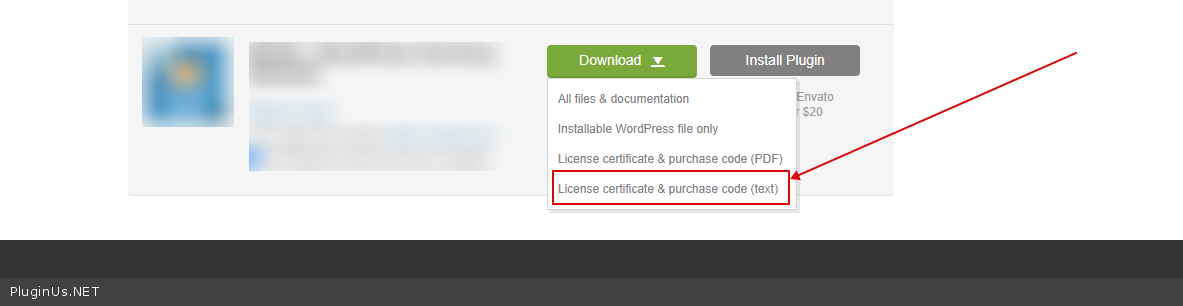
And please add FTP access
Quote from www.dealyouz.com on July 20, 2021, 14:04Hello,
I sent everything via private data.
thanks
Hello,
I sent everything via private data.
thanks
Quote from Pablo Borysenco on July 21, 2021, 11:15Hello
I checked it - https://c2n.me/4cLdNOK - it looks like this custom taxonomy is not created correctly
Hello
I checked it - https://c2n.me/4cLdNOK - it looks like this custom taxonomy is not created correctly
Quote from www.dealyouz.com on July 21, 2021, 12:24The theme that I use, use this taxonomy : "brand".
I can't change it. Is there a solution to modify word "store" by "brand" when I use brand filter?
The theme that I use, use this taxonomy :"brand".
I can't change it. Is there a solution to modify word"store" by"brand" when I use brand filter?
Quote from www.dealyouz.com on July 21, 2021, 17:50A field in setting parameters to change the text of brand taxonomy in the url after for brand would be great
A field in setting parameters to change the text of brand taxonomy in the url after for brand would be great
Quote from Pablo Borysenco on July 22, 2021, 10:54Hello
Unfortunately, this is not as easy as it seems.
Need customization of the plugin code
If you have experience in programming, I can help you
Hello
Unfortunately, this is not as easy as it seems.
Need customization of the plugin code
If you have experience in programming, I can help you
Quote from www.dealyouz.com on July 22, 2021, 12:35Hello,
Yes I can custom code If you show me where I can do it.
Thanks
Hello,
Yes I can custom code If you show me where I can do it.
Thanks
Quote from Pablo Borysenco on July 23, 2021, 12:30Hello
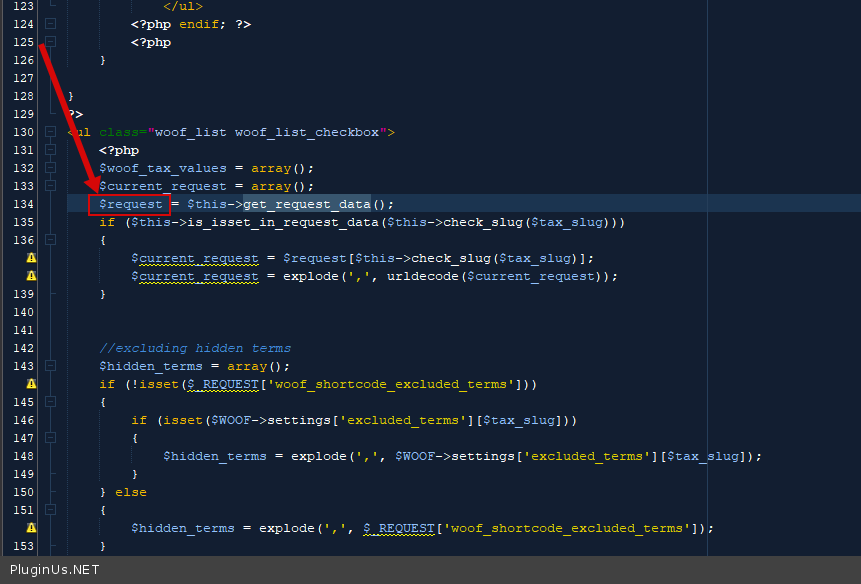
Ok! In file -\wp-content\plugins\woocommerce-products-filter\views\html_types\checkbox.php
write a condition if the taxonomy is equal to stock change to brand - https://share.pluginus.net/image/i20210723132635.png
and on the contrary chand brand to stock in this array - https://c2n.me/4cMQDKb.png
Hello
Ok! In file -\wp-content\plugins\woocommerce-products-filter\views\html_types\checkbox.php
write a condition if the taxonomy is equal to stock change to brand - https://share.pluginus.net/image/i20210723132635.png

and on the contrary chand brand to stock in this array - https://c2n.me/4cMQDKb.png
Quote from www.dealyouz.com on July 27, 2021, 18:12Hello,
I fixed my problem. no need for custom code. I changed my taxonomy to 'store' and everything is working.
thanks for help.
Hello,
I fixed my problem. no need for custom code. I changed my taxonomy to 'store' and everything is working.
thanks for help.
Quote from Pablo Borysenco on July 28, 2021, 11:35Hello
Ok! Great!
Hello
Ok! Great!