
Woof shows results not only from it's category, but also from others
The support doesn work on Saturdays and Sundays, so some Friday requests can be answered on Monday. If you have problems with registration ask help on contact us page pleaseIf you not got email within 24~36 business hours, firstly check your spam box, and if no any email from the support there - back to the forum and read answer here. DO NOT ANSWER ON EMAILS [noreply@pluginus.net] FROM THE FORUM!! Emails are just for your info, all answers should be published only here.
The support doesn work on Saturdays and Sundays, so some Friday requests can be answered on Monday.

Quote from mav1 on April 30, 2021, 09:53Another little problem - i have a some categories on my shop, when - visit some category, i can see a filter shown and products of this category - everything is ok. But when i apply some parameters in filter - it shows me results not only from this category, but also from others (that have this searching attribute). But i want to see search results only of this category. I can also mention, that when filtering woof redirects me from category to shop page, so i have put woof shortcode to both of them to make it work. It works, but with this problem. I use divi theme. Any advice will be helpful, thanks
Another little problem - i have a some categories on my shop, when - visit some category, i can see a filter shown and products of this category - everything is ok. But when i apply some parameters in filter - it shows me results not only from this category, but also from others (that have this searching attribute). But i want to see search results only of this category. I can also mention, that when filtering woof redirects me from category to shop page, so i have put woof shortcode to both of them to make it work. It works, but with this problem. I use divi theme. Any advice will be helpful, thanks

Quote from Pablo Borysenco on April 30, 2021, 12:54Hello
Please paste your license key here - https://c2n.me/43SC6rb.png -> https://c2n.me/42HBIt7.png
Drop me exact link to the issue
Hello
Please paste your license key here - https://c2n.me/43SC6rb.png -> https://c2n.me/42HBIt7.png


Drop me exact link to the issue
Quote from mav1 on April 30, 2021, 13:11I have put this information, ok
I have put this information, ok
Quote from mav1 on April 30, 2021, 13:22(there is [woof] shortcode for a filter and [woof_products per_page=12 columns=3] for results in both pages layout - category page and shop page)
(there is [woof] shortcode for a filter and [woof_products per_page=12 columns=3] for results in both pages layout - category page and shop page)
Quote from mav1 on May 2, 2021, 00:05This is a really wonderful forum - i have some bug - > go to this forum -> write about my problem - > after that i solve it by myself, but only after writing here) I hope this will help someday someone, who also will have this problem. So, i don't know how it happens - but using [woof] and [woof_products] shortcode in different versions of wp, woo (and also php versions are different too) have not similar behavior. In newer version of wp+woo and php7 this shortcodes generates me filter and results with a problem described in this theme title, while using them on older wp+woo+ php5.6 everything is ok =)
So, what steps were done...i need to put something like this and to my categories pages and shop pages layouts. But how can i can generate the products category id automatically? So i need to implement functionality that allows me to use a shortcode like [woof taxonomies=product_cat:auto], which will automatically determine the current category using a some function, for example, like this (the function is tested and works):
function show_product_category_id() {
$cat = get_queried_object();
$catID = $cat->term_id;
if (empty($catID)) {
//
if (strpos($_GET['really_curr_tax'], 'product_cat')) {
$catID=str_replace('-product_cat', '', $_GET['really_curr_tax']);
}
else {}
}
else {}
echo $catID;
}I can, of course, create a shortcode for this function, and add it to the theme's functions.php:
add_shortcode( 'show_product_category_id', 'show_product_category_id' );
and it will work. But i can't use a nested construction like:
[woof taxonomies=product_cat:[show_product_category_id]]
So, the way is to embed a shortcode in a another shortcode as it is here:
function woof_current_product_category_id() {
$term = get_queried_object();
$term_id = 0;if ( isset($_GET['really_curr_tax']) && false !== strpos( $_GET['really_curr_tax'], 'product_cat' ) ) {
$term_id = (int) str_replace('-product_cat', '', $_GET['really_curr_tax']);
} elseif ( is_a($term, 'WP_Term') ) {
$term_id = (int) $term->term_id;
}
return do_shortcode("[woof taxonomies=product_cat:$term_id]"); // Always use return for a shortcode
}function woof_products_current_product_category_id() {
$term = get_queried_object();
$term_id = 0; // Initializingif ( isset($_GET['really_curr_tax']) && false !== strpos( $_GET['really_curr_tax'], 'product_cat' ) ) {
$term_id = (int) str_replace('-product_cat', '', $_GET['really_curr_tax']);
} elseif ( is_a($term, 'WP_Term') ) {
$term_id = (int) $term->term_id;
}
return do_shortcode("[woof_products per_page=12 columns=3 taxonomies=product_cat:$term_id]"); // Always use return for a shortcode
}add_shortcode( 'woof_auto_category', 'woof_current_product_category_id' );
add_shortcode( 'woof_products_auto_category', 'woof_products_current_product_category_id' );
And i can use [woof_auto_category] and [woof_products_auto_category] shortcodes instead of [woof taxonomies=…] and [woof_products taxonomies=…], now the results shown after filtering are correct. Maybe it is not a good way but at least it is working. All i have to do more is to solve the counter of searched results problem ("Showing ... of .... results") - it shows, for example, 7 value, but only 3 products are really shown cause 4 is out-of-stock and i have a setting in woo "do not show out-of-stock products". Some day i will fix this too and write the solution here. Thanks to author for this plugin anyway, it is the best solution now, i think, though maybe it has some little bugs
This is a really wonderful forum - i have some bug - > go to this forum -> write about my problem - > after that i solve it by myself, but only after writing here) I hope this will help someday someone, who also will have this problem. So, i don't know how it happens - but using [woof] and [woof_products] shortcode in different versions of wp, woo (and also php versions are different too) have not similar behavior. In newer version of wp+woo and php7 this shortcodes generates me filter and results with a problem described in this theme title, while using them on older wp+woo+ php5.6 everything is ok =)
So, what steps were done...i need to put something like this and to my categories pages and shop pages layouts. But how can i can generate the products category id automatically? So i need to implement functionality that allows me to use a shortcode like [woof taxonomies=product_cat:auto], which will automatically determine the current category using a some function, for example, like this (the function is tested and works):
function show_product_category_id() {
$cat = get_queried_object();
$catID = $cat->term_id;
if (empty($catID)) {
//
if (strpos($_GET['really_curr_tax'], 'product_cat')) {
$catID=str_replace('-product_cat', '', $_GET['really_curr_tax']);
}
else {}
}
else {}
echo $catID;
}
I can, of course, create a shortcode for this function, and add it to the theme's functions.php:
add_shortcode( 'show_product_category_id', 'show_product_category_id' );
and it will work. But i can't use a nested construction like:
[woof taxonomies=product_cat:[show_product_category_id]]
So, the way is to embed a shortcode in a another shortcode as it is here:
function woof_current_product_category_id() {
$term = get_queried_object();
$term_id = 0;if ( isset($_GET['really_curr_tax']) && false !== strpos( $_GET['really_curr_tax'], 'product_cat' ) ) {
$term_id = (int) str_replace('-product_cat', '', $_GET['really_curr_tax']);
} elseif ( is_a($term, 'WP_Term') ) {
$term_id = (int) $term->term_id;
}
return do_shortcode("[woof taxonomies=product_cat:$term_id]"); // Always use return for a shortcode
}function woof_products_current_product_category_id() {
$term = get_queried_object();
$term_id = 0; // Initializingif ( isset($_GET['really_curr_tax']) && false !== strpos( $_GET['really_curr_tax'], 'product_cat' ) ) {
$term_id = (int) str_replace('-product_cat', '', $_GET['really_curr_tax']);
} elseif ( is_a($term, 'WP_Term') ) {
$term_id = (int) $term->term_id;
}
return do_shortcode("[woof_products per_page=12 columns=3 taxonomies=product_cat:$term_id]"); // Always use return for a shortcode
}add_shortcode( 'woof_auto_category', 'woof_current_product_category_id' );
add_shortcode( 'woof_products_auto_category', 'woof_products_current_product_category_id' );
And i can use [woof_auto_category] and [woof_products_auto_category] shortcodes instead of [woof taxonomies=…] and [woof_products taxonomies=…], now the results shown after filtering are correct. Maybe it is not a good way but at least it is working. All i have to do more is to solve the counter of searched results problem ("Showing ... of .... results") - it shows, for example, 7 value, but only 3 products are really shown cause 4 is out-of-stock and i have a setting in woo"do not show out-of-stock products". Some day i will fix this too and write the solution here. Thanks to author for this plugin anyway, it is the best solution now, i think, though maybe it has some little bugs
Quote from Pablo Borysenco on May 3, 2021, 11:36Hello
Please watch a video - https://products-filter.com/video-tutorials/#video_beGT6p_look
this is absolutely correct behavior for the shortcode. Use the hook to customize the shortcode - https://products-filter.com/hook/woof_products_query/ to get current cutegory - get_queried_object()
All i have to do more is to solve the counter of searched results problem - Advanced->Options- https://c2n.me/4bUhY4j.png
Hello
Please watch a video - https://products-filter.com/video-tutorials/#video_beGT6p_look
this is absolutely correct behavior for the shortcode. Use the hook to customize the shortcode - https://products-filter.com/hook/woof_products_query/ to get current cutegory - get_queried_object()
All i have to do more is to solve the counter of searched results problem - Advanced->Options- https://c2n.me/4bUhY4j.png
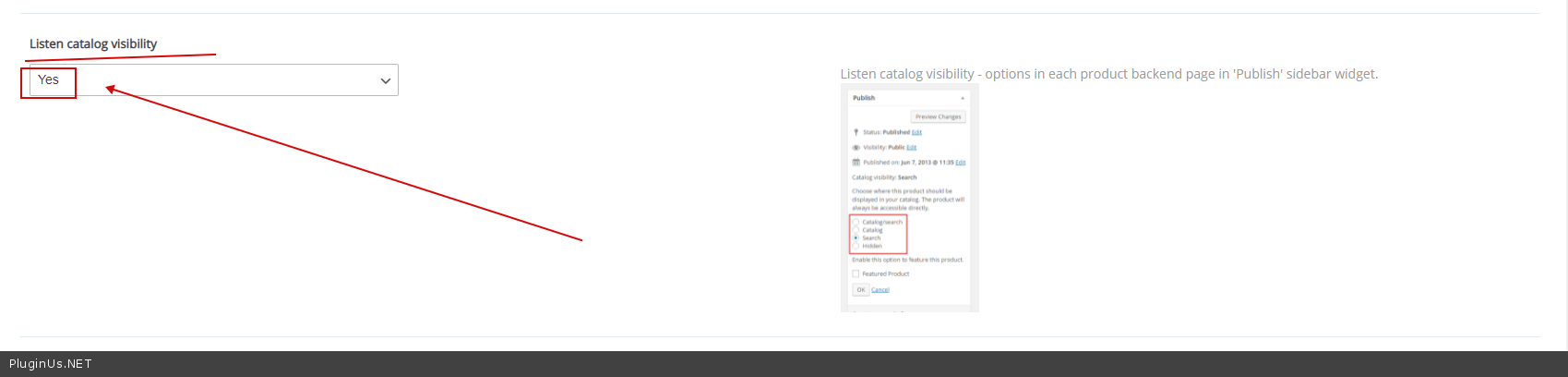
Quote from mav1 on May 3, 2021, 14:32I have turned on this option "Listen catalog visibility" and it changed nothing, i think "catalog/search/hidden" visibility and "hide out-of-stock products" in woocommerce settings - are not the same things. A product can be hidden in catalog visibility in the widget settings, but at the same time it can be in stock (or it can be visible in widget settings but be out-of-stock). If i am not right in this, please, tell me why)
So there must be some filter like one from this topic - https://pluginus.net/support/topic/wrong-count-of-filtered-products-when-some-of-them-are-out-of-stock-but-they-are-hidden-with-woocommerce-settings/
I have turned on this option"Listen catalog visibility" and it changed nothing, i think"catalog/search/hidden" visibility and"hide out-of-stock products" in woocommerce settings - are not the same things. A product can be hidden in catalog visibility in the widget settings, but at the same time it can be in stock (or it can be visible in widget settings but be out-of-stock). If i am not right in this, please, tell me why)
So there must be some filter like one from this topic - https://pluginus.net/support/topic/wrong-count-of-filtered-products-when-some-of-them-are-out-of-stock-but-they-are-hidden-with-woocommerce-settings/
Quote from Pablo Borysenco on May 4, 2021, 11:45Hello
i think "catalog/search/hidden" visibility and "hide out-of-stock products" in woocommerce settings - are not the same things. - you're wrong! Please try to read docs - https://github.com/woocommerce/woocommerce/blob/a55ae325306fc2179149ba9b97e66f32f84fdd9c/includes/data-stores/class-wc-product-data-store-cpt.php#L671
Hello
i think"catalog/search/hidden" visibility and"hide out-of-stock products" in woocommerce settings - are not the same things. - you're wrong! Please try to read docs - https://github.com/woocommerce/woocommerce/blob/a55ae325306fc2179149ba9b97e66f32f84fdd9c/includes/data-stores/class-wc-product-data-store-cpt.php#L671
Quote from mav1 on May 4, 2021, 13:03Dear Pablo, many thanks for this link. Yes, you are 100% right. So, i have just solved the problem with wrong count / pagination - i have installed the "in stock checkbox" extension in woof, and put this code into functions.php to make always filtering with in-stock checked:
// "in stock" checkbox is checked by default in woof with this code:
add_filter('woof_get_request_data', 'my_woof_get_request_data');
function my_woof_get_request_data($data){
$data['stock']='instock';
return $data;
}Yes, the option "Listen catalog visibility" must be enambled. Also, i have added some css to hide the "reset all" and "in stock X" in filter's breadcrumbs (showing only another apllied filters) with:
a[data-slug="instock"] {
display: none;
}button[class="woof_reset_button_2"] {
display: none;
}
Dear Pablo, many thanks for this link. Yes, you are 100% right. So, i have just solved the problem with wrong count / pagination - i have installed the"in stock checkbox" extension in woof, and put this code into functions.php to make always filtering with in-stock checked:
//"in stock" checkbox is checked by default in woof with this code:
add_filter('woof_get_request_data', 'my_woof_get_request_data');
function my_woof_get_request_data($data){
$data['stock']='instock';
return $data;
}
Yes, the option"Listen catalog visibility" must be enambled. Also, i have added some css to hide the"reset all" and"in stock X" in filter's breadcrumbs (showing only another apllied filters) with:
a[data-slug="instock"] {
display: none;
}button[class="woof_reset_button_2"] {
display: none;
}
Quote from Pablo Borysenco on May 5, 2021, 11:59Hello
Ok! Great!
Hello
Ok! Great!