Pablo Borysenco(@pavlo_borysenco)
34,196 Posts
Quote from Pablo Borysenco on October 7, 2021, 11:08
Hello
Please drop me exact link to the issue
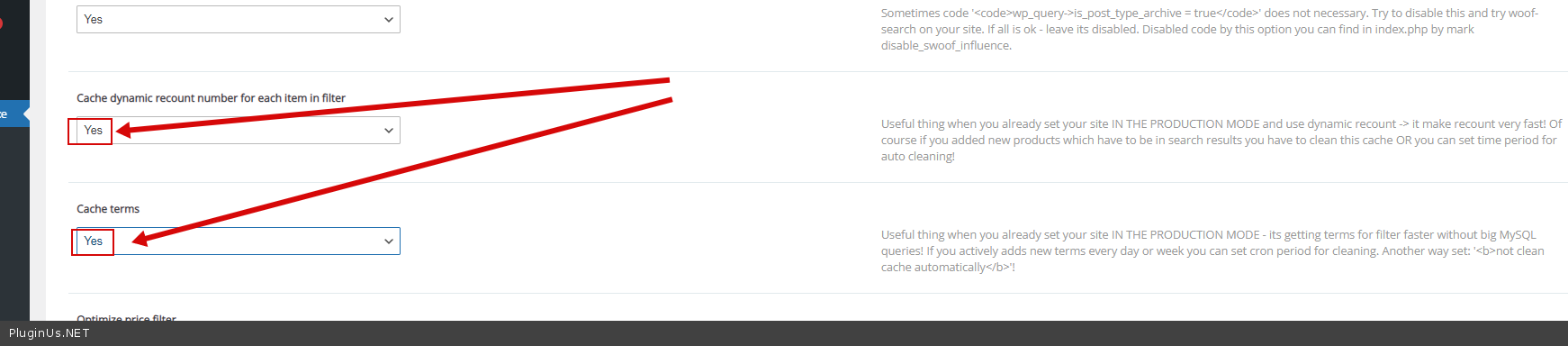
Please read this - https://products-filter.com/searching-is-slow
and use this cache - https://c2n.me/4dA33cQ.png
Hello
Please drop me exact link to the issue
Please read this - https://products-filter.com/searching-is-slow
and use this cache - https://c2n.me/4dA33cQ.png
Pablo Borysenco(@pavlo_borysenco)
34,196 Posts
Quote from Pablo Borysenco on October 7, 2021, 12:03
Hello
Please paste your license key here - https://share.pluginus.net/image/i20210618130558.png -> https://share.pluginus.net/image/i20210618130614.png
Update the plugin to latest version - https://products-filter.com/how-to-make-auto-update-for-wordpress-plugins-and-themes-bought-on-envato
Hello
Please paste your license key here - https://share.pluginus.net/image/i20210618130558.png -> https://share.pluginus.net/image/i20210618130614.png
Update the plugin to latest version - https://products-filter.com/how-to-make-auto-update-for-wordpress-plugins-and-themes-bought-on-envato
Pablo Borysenco(@pavlo_borysenco)
34,196 Posts
Quote from Pablo Borysenco on October 8, 2021, 12:07
Hello
It looks like the problem is that you have over 27,000 terms( https://share.pluginus.net/image/i20211008130426.png ).
To do the count, the plugin makes a request for each term. And any filter will run slowly
My test without this taxonomy - https://c2n.me/4dAWwri
Hello
It looks like the problem is that you have over 27,000 terms( https://share.pluginus.net/image/i20211008130426.png ).
To do the count, the plugin makes a request for each term. And any filter will run slowly
My test without this taxonomy - https://c2n.me/4dAWwri
Pablo Borysenco(@pavlo_borysenco)
34,196 Posts
Quote from Pablo Borysenco on October 11, 2021, 11:39
Hello
There is no magic here. To calculate the number of terms, you need to make a request to the database for each term. And unfortunately this cannot be avoided
In your case:
Disable dynamic recount
OR
increase server resources
Hello
There is no magic here. To calculate the number of terms, you need to make a request to the database for each term. And unfortunately this cannot be avoided
In your case:
Disable dynamic recount
OR
increase server resources