
WOOF filters not working correctly with WoodMart theme
The support doesn work on Saturdays and Sundays, so some Friday requests can be answered on Monday. If you have problems with registration ask help on contact us page pleaseIf you not got email within 24~36 business hours, firstly check your spam box, and if no any email from the support there - back to the forum and read answer here. DO NOT ANSWER ON EMAILS [noreply@pluginus.net] FROM THE FORUM!! Emails are just for your info, all answers should be published only here.
The support doesn work on Saturdays and Sundays, so some Friday requests can be answered on Monday.

Quote from Katarina on July 8, 2026, 10:07Hello,
I need support with the WOOF – WooCommerce Products Filter plugin.
I am using WooCommerce with the WoodMart theme.
The issue is that the filters are not working/displaying correctly in combination with the WoodMart theme. The filters should work properly on the WooCommerce shop/category pages, but currently they are not behaving as expected.
Could you please advise how to correctly set up WOOF filters with the WoodMart theme?
Also, are there any specific settings, shortcodes, compatibility options, or known conflicts that I should check when using WOOF together with WoodMart?
Thank you in advance.
Best regards,
Katarina
Hello,
I need support with the WOOF – WooCommerce Products Filter plugin.
I am using WooCommerce with the WoodMart theme.
The issue is that the filters are not working/displaying correctly in combination with the WoodMart theme. The filters should work properly on the WooCommerce shop/category pages, but currently they are not behaving as expected.
Could you please advise how to correctly set up WOOF filters with the WoodMart theme?
Also, are there any specific settings, shortcodes, compatibility options, or known conflicts that I should check when using WOOF together with WoodMart?
Thank you in advance.
Best regards,
Katarina

Quote from Alex Dev on July 8, 2026, 11:24Hello Katarina
Thank you for reaching out.
There are no known compatibility obstacles between HUSKY (WOOF) and the WoodMart theme - the plugin works with WoodMart on many sites without issues.
To help you, we need specifics, because "filters are not working/displaying correctly" is too general to diagnose. Please provide:
- A link to the page on your site where the filters are placed, so we can see the issue live.
- A description of what exactly is wrong: filters do not appear at all, they appear but filtering returns wrong products, styling is broken, AJAX does not refresh the products, etc.
- What behavior you expect instead, and why you consider the current behavior incorrect (a screenshot or short screen recording would help a lot if the problem is visual).
- How the filters are inserted: widget, shortcode, or the WoodMart off-canvas/sidebar area.
Once we can see the page and understand the exact symptom, we will be able to point you to the right settings or fix.
Hello Katarina
Thank you for reaching out.
There are no known compatibility obstacles between HUSKY (WOOF) and the WoodMart theme - the plugin works with WoodMart on many sites without issues.
To help you, we need specifics, because"filters are not working/displaying correctly" is too general to diagnose. Please provide:
- A link to the page on your site where the filters are placed, so we can see the issue live.
- A description of what exactly is wrong: filters do not appear at all, they appear but filtering returns wrong products, styling is broken, AJAX does not refresh the products, etc.
- What behavior you expect instead, and why you consider the current behavior incorrect (a screenshot or short screen recording would help a lot if the problem is visual).
- How the filters are inserted: widget, shortcode, or the WoodMart off-canvas/sidebar area.
Once we can see the page and understand the exact symptom, we will be able to point you to the right settings or fix.
Quote from Katarina on July 8, 2026, 11:55Hello,
Thank you for your reply.
I would like to explain the issue in more detail.
The main problem is related to the loading speed and the HUSKY/WOOF JavaScript files.
When the option “Optimize loading of HUSKY JavaScript files” is set to NO, the whole website becomes slower, but the biggest issue is visible on the shop page. The shop page takes several seconds to load properly, especially on mobile resolution. Products and filters appear with a delay, and the filters are loaded only after a few seconds.
When I set this option to YES, the website and the shop page load much faster, but then the filters do not work correctly.
We tested the filters in different ways:
- using the shortcode
- using the widget
- using the WoodMart shop/sidebar areaThe shortcodes we tested are:
[woof]
[woof_products]
[woof sid='auto_shortcode' autohide=0]
[woof_products per_page=12 columns=4]
[woof is_ajax=1]
[woof_products is_ajax=1]
The issue mostly happens on the live site with the WoodMart theme. On other themes and in the local environment, the filters work much better.
The live site is currently accessible only to us because the website is still in development, but it should go live soon, so we need to solve this before launch.
Plugin version:
HUSKY - Products Filter Professional for WooCommerce
Version 3.3.8I will attach:
1. a screen recording from the mobile version
2. a screen recording from the desktop version
3. screenshots of the plugin settings and plugin versionThe biggest problem is on mobile: the whole site feels slow, but the shop page is the slowest because the products and filters need a few seconds to appear.
Could you please advise what settings we should use so that:
- the website loads faster
- the shop page loads faster
- the filters still work correctly
- AJAX filtering works properly with the WoodMart theme
- the HUSKY/WOOF JavaScript files do not block or slow down page loadingThank you in advance.
Best regards,
Katarina
Hello,
Thank you for your reply.
I would like to explain the issue in more detail.
The main problem is related to the loading speed and the HUSKY/WOOF JavaScript files.
When the option “Optimize loading of HUSKY JavaScript files” is set to NO, the whole website becomes slower, but the biggest issue is visible on the shop page. The shop page takes several seconds to load properly, especially on mobile resolution. Products and filters appear with a delay, and the filters are loaded only after a few seconds.
When I set this option to YES, the website and the shop page load much faster, but then the filters do not work correctly.
We tested the filters in different ways:
- using the shortcode
- using the widget
- using the WoodMart shop/sidebar area
The shortcodes we tested are:
[woof]
[woof_products]
[woof sid='auto_shortcode' autohide=0]
[woof_products per_page=12 columns=4]
[woof is_ajax=1]
[woof_products is_ajax=1]
The issue mostly happens on the live site with the WoodMart theme. On other themes and in the local environment, the filters work much better.
The live site is currently accessible only to us because the website is still in development, but it should go live soon, so we need to solve this before launch.
Plugin version:
HUSKY - Products Filter Professional for WooCommerce
Version 3.3.8
I will attach:
1. a screen recording from the mobile version
2. a screen recording from the desktop version
3. screenshots of the plugin settings and plugin version
The biggest problem is on mobile: the whole site feels slow, but the shop page is the slowest because the products and filters need a few seconds to appear.
Could you please advise what settings we should use so that:
- the website loads faster
- the shop page loads faster
- the filters still work correctly
- AJAX filtering works properly with the WoodMart theme
- the HUSKY/WOOF JavaScript files do not block or slow down page loading
Thank you in advance.
Best regards,
Katarina
Quote from Alex Dev on July 8, 2026, 12:12Hello Katarina
Before we continue please update to the latest version
Place please actual purchase code of the plugin into the private area of this ticket:
https://share.pluginus.net/image/i20230222134241.png
https://share.pluginus.net/image/i20230222134615.png
https://share.pluginus.net/image/i20230222134511.png
Hello Katarina
Before we continue please update to the latest version
Place please actual purchase code of the plugin into the private area of this ticket:
https://share.pluginus.net/image/i20230222134241.png
https://share.pluginus.net/image/i20230222134615.png
https://share.pluginus.net/image/i20230222134511.png


Quote from Katarina on July 8, 2026, 13:04Hello,
I have added the purchase code in the private area of this ticket.
We are currently using HUSKY - Products Filter Professional for WooCommerce version 3.3.8, but we cannot update it from the WordPress dashboard.
Could you please confirm how we can download or update to the latest version?
Thank you.
Best regards,
Katarina
Hello,
I have added the purchase code in the private area of this ticket.
We are currently using HUSKY - Products Filter Professional for WooCommerce version 3.3.8, but we cannot update it from the WordPress dashboard.
Could you please confirm how we can download or update to the latest version?
Thank you.
Best regards,
Katarina
Quote from Katarina on July 9, 2026, 08:47Hello,
I have updated the HUSKY - Products Filter Professional for WooCommerce plugin to the latest version 3.4.0.
The purchase code has already been added in the private area of this ticket.
We are waiting for your further instructions.
Thank you.
Best regards,
Katarina
Hello,
I have updated the HUSKY - Products Filter Professional for WooCommerce plugin to the latest version 3.4.0.
The purchase code has already been added in the private area of this ticket.
We are waiting for your further instructions.
Thank you.
Best regards,
Katarina
Quote from Alex Dev on July 9, 2026, 12:27Hello Katarina
Thanks for updating and for adding your purchase code.
The first step is to make sure you are running the latest version cleanly and then clear all caches. Version 3.3.8 (the one you started from) had a known issue related exactly to the optimized JavaScript loading, and that has since been addressed, so this step alone may already resolve it.
How to update to the latest version
Option 1 (recommended) - reinstall the plugin
1. Log in to your CodeCanyon account and open your Downloads.
2. For HUSKY - Products Filter Professional, choose "Installable WordPress file only" to download the plugin ZIP directly. If you download "All files and documentation" instead, unzip that bundle first - the plugin ZIP is inside it.
3. In your site go to Plugins, deactivate HUSKY, then delete it. This does not remove your settings - they are stored in the database and are kept. Only the plugin's internal cache is removed, which is fine and actually helpful here.
4. Go to Plugins, Add New, Upload Plugin, select the plugin ZIP, then install and activate.If you accidentally try to install the full bundle ZIP, you will get an installation error. This article explains it:
https://products-filter.com/i-just-bought-the-plugin-and-cant-install-it-errorOption 2 - update via FTP
Unzip the plugin and upload its folder over the existing one in wp-content/plugins, replacing the old files. Your settings are preserved.After updating
Clear every cache on the site: your caching plugin (WP Rocket, LiteSpeed, etc.), any server or host-level cache, and your CDN if you use one. Then reload the shop page and test the filters with the "Optimize loading of HUSKY JavaScript files" option kept ON.
If it still does not work
1. Please share, in the private area of this ticket, access to the site (or to a staging copy) and the exact URL of the page where the problem happens, so we can reproduce it directly.
2. A likely cause, if the issue remains, is a separate script-optimization plugin on your side (JS defer, combine, or reorder). If it loads HUSKY's optimized script before the scripts it depends on, the filter script breaks. In that case, exclude HUSKY's JavaScript from your optimizer's combine/defer/delay rules. As an alternative you can switch the "Optimize loading of HUSKY JavaScript files" option to NO, although we do not see a real problem with keeping it ON once the load order is correct.
Please start with the update and a full cache reset, and let us know the result.
Hello Katarina
Thanks for updating and for adding your purchase code.
The first step is to make sure you are running the latest version cleanly and then clear all caches. Version 3.3.8 (the one you started from) had a known issue related exactly to the optimized JavaScript loading, and that has since been addressed, so this step alone may already resolve it.
How to update to the latest version
Option 1 (recommended) - reinstall the plugin
1. Log in to your CodeCanyon account and open your Downloads.
2. For HUSKY - Products Filter Professional, choose"Installable WordPress file only" to download the plugin ZIP directly. If you download"All files and documentation" instead, unzip that bundle first - the plugin ZIP is inside it.
3. In your site go to Plugins, deactivate HUSKY, then delete it. This does not remove your settings - they are stored in the database and are kept. Only the plugin's internal cache is removed, which is fine and actually helpful here.
4. Go to Plugins, Add New, Upload Plugin, select the plugin ZIP, then install and activate.
If you accidentally try to install the full bundle ZIP, you will get an installation error. This article explains it:
https://products-filter.com/i-just-bought-the-plugin-and-cant-install-it-error
Option 2 - update via FTP
Unzip the plugin and upload its folder over the existing one in wp-content/plugins, replacing the old files. Your settings are preserved.
After updating
Clear every cache on the site: your caching plugin (WP Rocket, LiteSpeed, etc.), any server or host-level cache, and your CDN if you use one. Then reload the shop page and test the filters with the"Optimize loading of HUSKY JavaScript files" option kept ON.
If it still does not work
1. Please share, in the private area of this ticket, access to the site (or to a staging copy) and the exact URL of the page where the problem happens, so we can reproduce it directly.
2. A likely cause, if the issue remains, is a separate script-optimization plugin on your side (JS defer, combine, or reorder). If it loads HUSKY's optimized script before the scripts it depends on, the filter script breaks. In that case, exclude HUSKY's JavaScript from your optimizer's combine/defer/delay rules. As an alternative you can switch the"Optimize loading of HUSKY JavaScript files" option to NO, although we do not see a real problem with keeping it ON once the load order is correct.
Please start with the update and a full cache reset, and let us know the result.
Quote from Katarina on July 9, 2026, 13:04Hello,
I have added the wp-admin access details in the private area of this ticket.
The purchase code is also added there.
Please check the issue when possible and let me know if you need any additional information from my side.
Thank you.
Best regards,
Katarina
Hello,
I have added the wp-admin access details in the private area of this ticket.
The purchase code is also added there.
Please check the issue when possible and let me know if you need any additional information from my side.
Thank you.
Best regards,
Katarina
Quote from Katarina on July 10, 2026, 12:02Hello,
I just wanted to kindly follow up on this ticket.
I have added the purchase code and wp-admin access details in the private area, as requested.
Could you please let me know if you had a chance to check the issue, or if you need any additional information from my side?
Thank you.
Best regards,
Katarina
Hello,
I just wanted to kindly follow up on this ticket.
I have added the purchase code and wp-admin access details in the private area, as requested.
Could you please let me know if you had a chance to check the issue, or if you need any additional information from my side?
Thank you.
Best regards,
Katarina
Quote from Alex Dev on July 10, 2026, 18:30Hi Katarina
Thank you for the access and for your patience. I captured and analyzed the loading of your shop page in detail, and I want to share what I found, because the picture points away from the filter plugin and toward your hosting and the way the site's scripts are delivered.
What I see
Across my capture (I reloaded the shop page several times) there were around 1,800 requests in total, and on every single page load the site pulls roughly 300 separate files. Almost all of them, about 98 percent, are served over HTTP/1.1 and not HTTP/2, all from the same domain. Over HTTP/1.1 the browser can only open about 6 connections to one domain at a time, so those ~300 files line up in a long queue and each one waits several seconds just for its turn. That waiting is the problem, not downloading: the files themselves are tiny and your server answers them instantly, the time is lost purely in the queue.
The result matches exactly what you described. The page content is actually ready at about 7 seconds, but the browser tab keeps spinning until around 26 seconds, because the full load event only fires once the whole queue finishes. It is also why the filters and checkboxes appear plain at first and then suddenly redraw: the small scripts that style them are simply stuck near the end of that same queue and run late.
My opinion on what is happening
This is a server and delivery level issue, not the filter plugin. To be clear about the proportions, HUSKY's files are only about a quarter of that queue. Your theme (WoodMart) is the single largest part, and WordPress core plus the other plugins make up the rest. Turning HUSKY off does not change the ~26 second load, which is what confirms the plugin is not the cause. In fact the "Optimize loading of HUSKY JavaScript files" option bundles our scripts into fewer files, so it should stay ON here, it helps in this situation rather than hurting.
What I would like to do to prove it
With your permission, I will take a full copy of your site using the Duplicator plugin and deploy it on our own hosting, completely unchanged. Then:
1. If it loads correctly and quickly there straight away, with no changes or intervention at all, the problem is on your current hosting. That is then a separate, host level matter to raise with your provider.
2. If the same slowness still appears on our server, then I will look further into whether the theme or something else in the site is responsible, and we continue from there.
Could you please confirm you are OK with me creating and moving a Duplicator copy of the site for this test?
One more thing I found
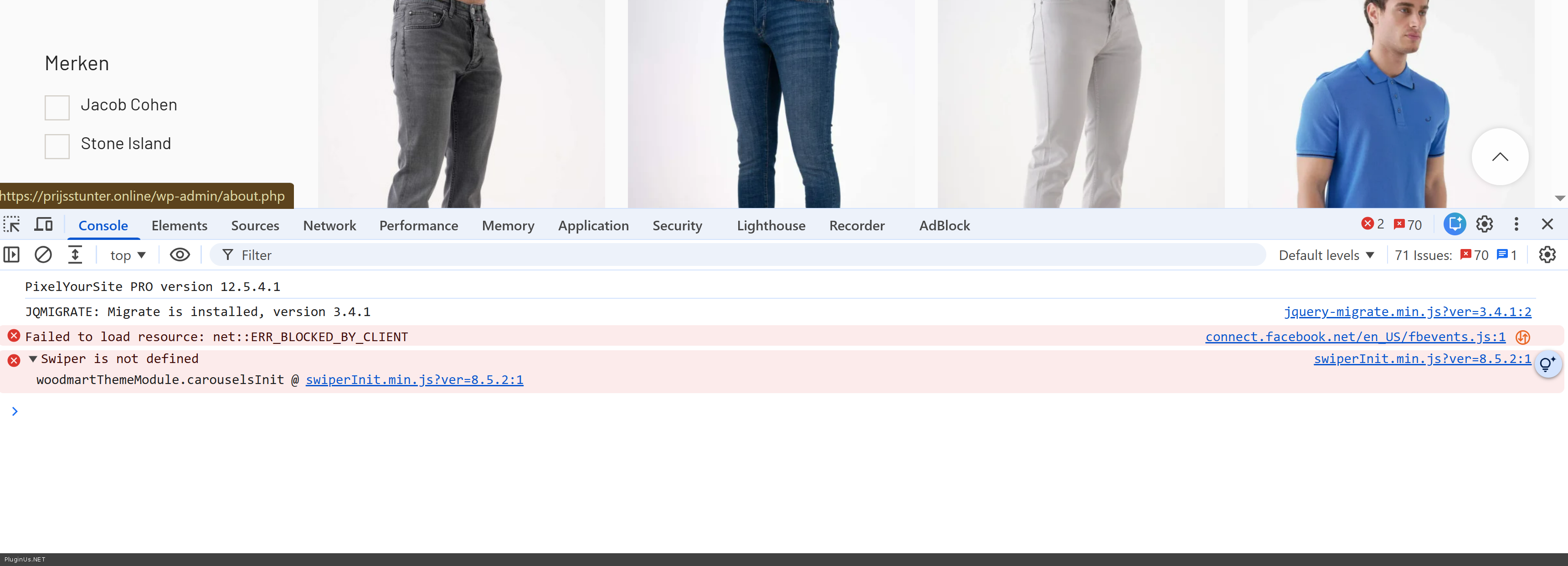
I also noticed a JavaScript error on your shop page (screenshot attached).
What you can already check in the meantime
1. Ask your host whether HTTP/2 (or HTTP/3) can be enabled on your server. This is the single biggest improvement: it lets all those files load over one connection instead of queueing one by one, and on its own it should bring the load time down from around 26 seconds to a few seconds.
2. Add a combine and minify step for CSS and JavaScript (for example the Autoptimize plugin, or the combine option in your existing cache plugin), which reduces the number of separate files. If you use it, please exclude HUSKY's scripts (the woocommerce-products-filter path) and jQuery from the combine and defer rules, so the filter's load order stays intact.
p.s. support gives answerrs within 24~36 business hours
Hi Katarina
Thank you for the access and for your patience. I captured and analyzed the loading of your shop page in detail, and I want to share what I found, because the picture points away from the filter plugin and toward your hosting and the way the site's scripts are delivered.
What I see
Across my capture (I reloaded the shop page several times) there were around 1,800 requests in total, and on every single page load the site pulls roughly 300 separate files. Almost all of them, about 98 percent, are served over HTTP/1.1 and not HTTP/2, all from the same domain. Over HTTP/1.1 the browser can only open about 6 connections to one domain at a time, so those ~300 files line up in a long queue and each one waits several seconds just for its turn. That waiting is the problem, not downloading: the files themselves are tiny and your server answers them instantly, the time is lost purely in the queue.
The result matches exactly what you described. The page content is actually ready at about 7 seconds, but the browser tab keeps spinning until around 26 seconds, because the full load event only fires once the whole queue finishes. It is also why the filters and checkboxes appear plain at first and then suddenly redraw: the small scripts that style them are simply stuck near the end of that same queue and run late.
My opinion on what is happening
This is a server and delivery level issue, not the filter plugin. To be clear about the proportions, HUSKY's files are only about a quarter of that queue. Your theme (WoodMart) is the single largest part, and WordPress core plus the other plugins make up the rest. Turning HUSKY off does not change the ~26 second load, which is what confirms the plugin is not the cause. In fact the"Optimize loading of HUSKY JavaScript files" option bundles our scripts into fewer files, so it should stay ON here, it helps in this situation rather than hurting.
What I would like to do to prove it
With your permission, I will take a full copy of your site using the Duplicator plugin and deploy it on our own hosting, completely unchanged. Then:
1. If it loads correctly and quickly there straight away, with no changes or intervention at all, the problem is on your current hosting. That is then a separate, host level matter to raise with your provider.
2. If the same slowness still appears on our server, then I will look further into whether the theme or something else in the site is responsible, and we continue from there.
Could you please confirm you are OK with me creating and moving a Duplicator copy of the site for this test?
One more thing I found
I also noticed a JavaScript error on your shop page (screenshot attached).
What you can already check in the meantime
1. Ask your host whether HTTP/2 (or HTTP/3) can be enabled on your server. This is the single biggest improvement: it lets all those files load over one connection instead of queueing one by one, and on its own it should bring the load time down from around 26 seconds to a few seconds.
2. Add a combine and minify step for CSS and JavaScript (for example the Autoptimize plugin, or the combine option in your existing cache plugin), which reduces the number of separate files. If you use it, please exclude HUSKY's scripts (the woocommerce-products-filter path) and jQuery from the combine and defer rules, so the filter's load order stays intact.
p.s. support gives answerrs within 24~36 business hours
Quote from Katarina on July 13, 2026, 11:28Hello,
Thank you for your detailed analysis.
I understand what you are saying about the hosting and HTTP/1.1 requests, but from our testing it does not look like the server is the main cause.
When the HUSKY/WOOF plugin is deactivated, the website loads and works much faster.
As soon as we activate the HUSKY/WOOF plugin again, the whole website becomes noticeably slower, and the biggest delay is visible on the shop page, especially on mobile.
So the performance issue appears directly when the plugin is active.
Could you please check this again from that perspective?
The “Optimize loading of HUSKY JavaScript files” option helps with speed when it is ON, but then the filters do not work correctly. When it is OFF, the filters work better, but the website becomes very slow.
Thank you.
Best regards,
Katarina
Hello,
Thank you for your detailed analysis.
I understand what you are saying about the hosting and HTTP/1.1 requests, but from our testing it does not look like the server is the main cause.
When the HUSKY/WOOF plugin is deactivated, the website loads and works much faster.
As soon as we activate the HUSKY/WOOF plugin again, the whole website becomes noticeably slower, and the biggest delay is visible on the shop page, especially on mobile.
So the performance issue appears directly when the plugin is active.
Could you please check this again from that perspective?
The “Optimize loading of HUSKY JavaScript files” option helps with speed when it is ON, but then the filters do not work correctly. When it is OFF, the filters work better, but the website becomes very slow.
Thank you.
Best regards,
Katarina
Quote from Alex Dev on July 13, 2026, 13:53Hello Katarina
Thank you for testing it again and for telling us what you see.
Let me be precise about one thing first, because I think this is where our views differ. When HUSKY is deactivated, the site becomes faster, but it does not become fast. It is still slow, just less so. That difference matters: it means removing HUSKY removes a share of the load, but it does not remove the cause.
The reason I keep pointing away from the plugin is something specific I found in the capture, and I would like to record a short video of it for you. The same script and stylesheet files are being requested several times on a single page load. Not different files, the same ones, loaded over and over. That is not normal, and no plugin does that by itself, it is the sign of something in the site's delivery duplicating them.
I also want to be clear that this is not about filtering. I did not even run a filter. Simply having the filter widget present on the page, with no interaction at all, the page could take up to 26 seconds to finish loading, on a site that does not have that much content.
For comparison, here is our own demo of the same plugin, with the same filters active:
https://demo.products-filter.com/shop/
It loads about ten times faster, and there are no duplicated file requests. Same plugin, same filters, different hosting and different theme. That is why I do not believe the plugin is the cause here.
So here is what I am asking for, and it is a small thing.
Please allow me to package your site with the Duplicator plugin and deploy that copy on our own hosting, completely unchanged. I have already seen the content, nothing new would be exposed. Then we will know, with no more debating:
If the copy loads quickly on our server with no changes at all, the cause is on your current hosting, and that is something to raise with your provider.
If it is still slow on our server, then the plugin or the theme is responsible, and I will keep digging until we find exactly what. The theme is also a real candidate here, and on our copy I would be able to test it directly by swapping it out.
Once we know that, the next step is the same in either case: find out why the same CSS and JavaScript files are being loaded multiple times, eliminate that cause, and then apply a proper optimization plugin across the whole site, as I suggested earlier.
Please just confirm that you are OK with me making the Duplicator copy, and I will do the rest.
p.s. by the way, access to the site now doesn work
Hello Katarina
Thank you for testing it again and for telling us what you see.
Let me be precise about one thing first, because I think this is where our views differ. When HUSKY is deactivated, the site becomes faster, but it does not become fast. It is still slow, just less so. That difference matters: it means removing HUSKY removes a share of the load, but it does not remove the cause.
The reason I keep pointing away from the plugin is something specific I found in the capture, and I would like to record a short video of it for you. The same script and stylesheet files are being requested several times on a single page load. Not different files, the same ones, loaded over and over. That is not normal, and no plugin does that by itself, it is the sign of something in the site's delivery duplicating them.
I also want to be clear that this is not about filtering. I did not even run a filter. Simply having the filter widget present on the page, with no interaction at all, the page could take up to 26 seconds to finish loading, on a site that does not have that much content.
For comparison, here is our own demo of the same plugin, with the same filters active:
https://demo.products-filter.com/shop/
It loads about ten times faster, and there are no duplicated file requests. Same plugin, same filters, different hosting and different theme. That is why I do not believe the plugin is the cause here.
So here is what I am asking for, and it is a small thing.
Please allow me to package your site with the Duplicator plugin and deploy that copy on our own hosting, completely unchanged. I have already seen the content, nothing new would be exposed. Then we will know, with no more debating:
If the copy loads quickly on our server with no changes at all, the cause is on your current hosting, and that is something to raise with your provider.
If it is still slow on our server, then the plugin or the theme is responsible, and I will keep digging until we find exactly what. The theme is also a real candidate here, and on our copy I would be able to test it directly by swapping it out.
Once we know that, the next step is the same in either case: find out why the same CSS and JavaScript files are being loaded multiple times, eliminate that cause, and then apply a proper optimization plugin across the whole site, as I suggested earlier.
Please just confirm that you are OK with me making the Duplicator copy, and I will do the rest.
p.s. by the way, access to the site now doesn work