

Woocommerce Currency switcher compatibility whit Appointment for woocommerce
The support doesn work on Saturdays and Sundays, so some Friday requests can be answered on Monday. If you have problems with registration ask help on contact us page pleaseIf you not got email within 24~36 business hours, firstly check your spam box, and if no any email from the support there - back to the forum and read answer here. DO NOT ANSWER ON EMAILS [noreply@pluginus.net] FROM THE FORUM!! Emails are just for your info, all answers should be published only here.
The support doesn work on Saturdays and Sundays, so some Friday requests can be answered on Monday.

Quote from rubscast on March 3, 2021, 16:15Hello guys,
I would like to know if there's a way to make the Currenchy Switcher and the Appointments for woocommerce plugin work together. In the product page there's no problem, but in the cart and the checkout page the price is being converted again. For example: the price is $1 = S/ 3.5, in the product page the correct price is displayed. When adding the product to the cart the prices now is S/ 12.25 (3.5 x 3.5) (It's converted an additional time).
I saw you have a solution for the Woocommerce Booking plugin, so I guess it might be similar. Thank you in advance.
Hello guys,
I would like to know if there's a way to make the Currenchy Switcher and the Appointments for woocommerce plugin work together. In the product page there's no problem, but in the cart and the checkout page the price is being converted again. For example: the price is $1 = S/ 3.5, in the product page the correct price is displayed. When adding the product to the cart the prices now is S/ 12.25 (3.5 x 3.5) (It's converted an additional time).
I saw you have a solution for the Woocommerce Booking plugin, so I guess it might be similar. Thank you in advance.

Quote from Pablo Borysenco on March 4, 2021, 11:16Hello
Please read this - https://currency-switcher.com/woocs-labs/
Hello
Please read this - https://currency-switcher.com/woocs-labs/
Quote from rubscast on March 5, 2021, 18:13Hello Pablo,
Thanks for the reply. I couldn't find the plugin Appointment for Woocommerce listed as compatible with WOOCS. Do you think is possible to make it compatible? I guess it might be similar to Woocommerce Booking plugin (which is compatible and works in a similar way).
Please let me know if you need any additional information to make this possible.
Hello Pablo,
Thanks for the reply. I couldn't find the plugin Appointment for Woocommerce listed as compatible with WOOCS. Do you think is possible to make it compatible? I guess it might be similar to Woocommerce Booking plugin (which is compatible and works in a similar way).
Please let me know if you need any additional information to make this possible.
Quote from Pablo Borysenco on March 8, 2021, 10:49Hello
Please drop me wp-admin+FTP access to your test site
I will add this plugin to the adaptation queue
Hello
Please drop me wp-admin+FTP access to your test site
I will add this plugin to the adaptation queue
Quote from rubscast on March 11, 2021, 22:41Hello Pablo:
Thanks for the reply. I've just added the private data (access credentials).
I also added in the private data field the urls of the site and the booking product used for the example. I configured the main currency as USD and the currency for the rest of the world as PEN (peruvian currency). As I mentioned before, if you add the product to the cart it will convert it again. Please let me know if you need an additional information.
Regards,
Hello Pablo:
Thanks for the reply. I've just added the private data (access credentials).
I also added in the private data field the urls of the site and the booking product used for the example. I configured the main currency as USD and the currency for the rest of the world as PEN (peruvian currency). As I mentioned before, if you add the product to the cart it will convert it again. Please let me know if you need an additional information.
Regards,
Quote from Pablo Borysenco on March 12, 2021, 13:13Hello
Ok! I will write to you as soon as we get the result
Hello
Ok! I will write to you as soon as we get the result
Quote from rubscast on March 18, 2021, 22:12Thank you very much, I'll be waiting for any news
Thank you very much, I'll be waiting for any news
Quote from Pablo Borysenco on March 19, 2021, 19:22Hello
Please check your ftp access (init folder)
Hello
Please check your ftp access (init folder)
Quote from rubscast on March 19, 2021, 22:54Hello Pablo,
You couldn't access?
Hello Pablo,
You couldn't access?
Quote from Pablo Borysenco on March 22, 2021, 12:15Hello
I can connect, but your site is not in this folder
Hello
I can connect, but your site is not in this folder
Quote from rubscast on March 25, 2021, 07:21Hello Pablo:
You can now access to the folder. Sorry for the delay.
Regards,
Ruben
Hello Pablo:
You can now access to the folder. Sorry for the delay.
Regards,
Ruben
Quote from Pablo Borysenco on March 26, 2021, 11:38Hello Ruben
I will write to you as soon as we get the result
Hello Ruben
I will write to you as soon as we get the result
Quote from Pablo Borysenco on March 26, 2021, 18:44Hello Ruben
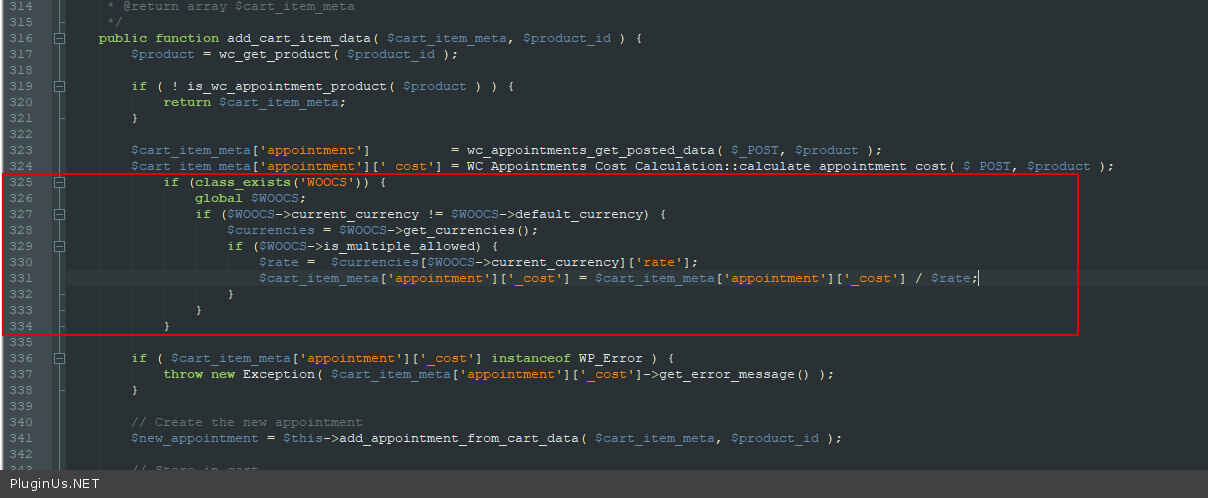
In file - \wp-content\plugins\woocommerce-appointments\includes\class-wc-appointment-cart-manager.php - I added code - https://c2n.me/4bsBqqk.png
if (class_exists('WOOCS')) {
global $WOOCS;
if ($WOOCS->current_currency != $WOOCS->default_currency) {
$currencies = $WOOCS->get_currencies();
if ($WOOCS->is_multiple_allowed) {
$rate = $currencies[$WOOCS->current_currency]['rate'];
$cart_item_meta['appointment']['_cost'] = $cart_item_meta['appointment']['_cost'] / $rate;
}
}
}Please do a test
Hello Ruben
In file - \wp-content\plugins\woocommerce-appointments\includes\class-wc-appointment-cart-manager.php - I added code - https://c2n.me/4bsBqqk.png
if (class_exists('WOOCS')) {
global $WOOCS;
if ($WOOCS->current_currency != $WOOCS->default_currency) {
$currencies = $WOOCS->get_currencies();
if ($WOOCS->is_multiple_allowed) {
$rate = $currencies[$WOOCS->current_currency]['rate'];
$cart_item_meta['appointment']['_cost'] = $cart_item_meta['appointment']['_cost'] / $rate;
}
}
}
Please do a test
Quote from rubscast on March 27, 2021, 00:17Hello Pablo:
Thank you! It worked great!!
Excellent support.
Regards,
Ruben
Hello Pablo:
Thank you! It worked great!!
Excellent support.
Regards,
Ruben
Quote from Pablo Borysenco on March 29, 2021, 10:40Hello Ruben
Welcome;)
Hello Ruben
Welcome;)