

Variant Product Price Wrong
The support doesn work on Saturdays and Sundays, so some Friday requests can be answered on Monday. If you have problems with registration ask help on contact us page pleaseIf you not got email within 24~36 business hours, firstly check your spam box, and if no any email from the support there - back to the forum and read answer here. DO NOT ANSWER ON EMAILS [noreply@pluginus.net] FROM THE FORUM!! Emails are just for your info, all answers should be published only here.
The support doesn work on Saturdays and Sundays, so some Friday requests can be answered on Monday.

Quote from Alexyz on May 11, 2021, 12:57Issue:
Variant product price is wrong. Disabling the currency switcher plugin resolves the issue.
Example:
Set product variant A & B both as £10 but shows both as £14.40
Background:
WP: 5.7.1
Currency Plugin: v2.3.4.3
Cache plugins: none
Woocommerce default customer location: geolocation
WordPress cache and WooCommerce transients all purged.
Staging site login details in private data. Thank!
Issue:
Variant product price is wrong. Disabling the currency switcher plugin resolves the issue.
Example:
Set product variant A & B both as £10 but shows both as £14.40
Background:
WP: 5.7.1
Currency Plugin: v2.3.4.3
Cache plugins: none
Woocommerce default customer location: geolocation
WordPress cache and WooCommerce transients all purged.
Staging site login details in private data. Thank!
Quote from Alexyz on May 12, 2021, 11:03PS:
We are not using cache plugin (all disabled) and if we enable currency switcher plugin's option "I am using cache plugin on my site" then the variant price will be displayed correctly when selected. However, the display price is still wrong if no variant is selected on the product page and the products category page. You can try things on our staging site and make any changes you like. Thanks.
PS:
We are not using cache plugin (all disabled) and if we enable currency switcher plugin's option "I am using cache plugin on my site" then the variant price will be displayed correctly when selected. However, the display price is still wrong if no variant is selected on the product page and the products category page. You can try things on our staging site and make any changes you like. Thanks.

Quote from Pablo Borysenco on May 12, 2021, 11:48Hello
Ok! I got it
Please add FTP access to your test site
Hello
Ok! I got it
Please add FTP access to your test site
Quote from Alexyz on May 12, 2021, 12:35Can I email you the FTP details? Thanks.
Please check the email in private data area.
Can I email you the FTP details? Thanks.
Please check the email in private data area.
Quote from Alexyz on May 12, 2021, 13:05Okay. Please see private data area for details.
Okay. Please see private data area for details.
Quote from Alexyz on May 12, 2021, 14:49Also noticed a weird issue on live site:
We're in the UK (£GBP) but the currency geolocation is not stable. Sometimes it will suddenly switch to dollars!
More info in private data area.
Also noticed a weird issue on live site:
We're in the UK (£GBP) but the currency geolocation is not stable. Sometimes it will suddenly switch to dollars!
More info in private data area.
Quote from Alexyz on May 13, 2021, 14:12Hey thank you for looking into this issue for us. :)
Looks like the issue is fixed on our staging site. Please can you share the fix via private data area so we can apply the fix to our live site?
Thank you very much for your speedy help on this!
Hey thank you for looking into this issue for us. :)
Looks like the issue is fixed on our staging site. Please can you share the fix via private data area so we can apply the fix to our live site?
Thank you very much for your speedy help on this!
Quote from Pablo Borysenco on May 13, 2021, 15:05Hello
Please do a test
Hello
Please do a test
Quote from Alexyz on May 13, 2021, 15:34Just tested and all working fine. :)
Please can you share the fix in the private data area? Thank you!
Just tested and all working fine. :)
Please can you share the fix in the private data area? Thank you!
Quote from Pablo Borysenco on May 14, 2021, 10:53Hello
Sometimes it will suddenly switch to dollars! - Read this please - https://currency-switcher.com/using-geolocation-causes-problems-doesnt-seem-to-work-for-me/
the currency geolocation is not stable - Geo IP works only for the first visit
Please can you share the fix - in file - wp-content\plugins\woocommerce-currency-switcher\classes\woocs_after_33.php comment/delete this code - https://c2n.me/4c1uGwQ.png
Hello
Sometimes it will suddenly switch to dollars! - Read this please - https://currency-switcher.com/using-geolocation-causes-problems-doesnt-seem-to-work-for-me/
the currency geolocation is not stable - Geo IP works only for the first visit
Please can you share the fix - in file - wp-content\plugins\woocommerce-currency-switcher\classes\woocs_after_33.php comment/delete this code - https://c2n.me/4c1uGwQ.png
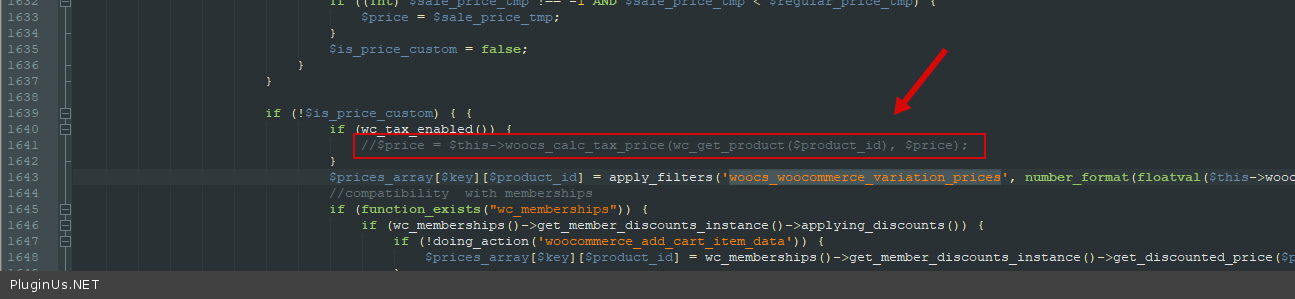
Quote from Alexyz on May 14, 2021, 18:26Thank you Pablo!
Re: wp-content\plugins\woocommerce-currency-switcher\classes\woocs_after_33.php comment/delete this code
Do we need to re-apply this change when the next release is out? Or is the next release going to include this fix?
Thank you Pablo!
Re: wp-content\plugins\woocommerce-currency-switcher\classes\woocs_after_33.php comment/delete this code
Do we need to re-apply this change when the next release is out? Or is the next release going to include this fix?
Quote from Pablo Borysenco on May 17, 2021, 09:56Hello
yes we will fix it in the next version
Welcome;)
Hello
yes we will fix it in the next version
Welcome;)
Quote from Alexyz on May 25, 2021, 11:49Hi Pablo,
Just downloaded v2.3.5 and woocs_after_33.php still has the same line there.
Do we need to comment that out again?

Thanks.
Hi Pablo,
Just downloaded v2.3.5 and woocs_after_33.php still has the same line there.
Do we need to comment that out again?

Thanks.
Quote from Pablo Borysenco on May 25, 2021, 12:38Hello
Sorry, this is an interim update that only deals with the front end
This task is on the list "to do"
Hello
Sorry, this is an interim update that only deals with the front end
This task is on the list"to do"
Quote from Alexyz on May 25, 2021, 12:42Thanks. Will wait for the next major release then. :)
Thanks. Will wait for the next major release then. :)
Quote from Pablo Borysenco on May 26, 2021, 09:39Hello
yes. Welcome;)
Hello
yes. Welcome;)