

Variable products showed on filters even if at 0 q.ty
The support doesn work on Saturdays and Sundays, so some Friday requests can be answered on Monday. If you have problems with registration ask help on contact us page pleaseIf you not got email within 24~36 business hours, firstly check your spam box, and if no any email from the support there - back to the forum and read answer here. DO NOT ANSWER ON EMAILS [noreply@pluginus.net] FROM THE FORUM!! Emails are just for your info, all answers should be published only here.
The support doesn work on Saturdays and Sundays, so some Friday requests can be answered on Monday.

Quote from petrolioshop on June 7, 2022, 10:55Hi,
I have some issues on my website petrolioshop.com:
I have only variable products, shoes with many attributes that are sizes.
When i filter by sizes, the filter plugin print all the shoes with the attribute requested even if at 0 q.ty that is obviusly not a good thing
How can i solve?
Thanks
Hi,
I have some issues on my website petrolioshop.com:
I have only variable products, shoes with many attributes that are sizes.
When i filter by sizes, the filter plugin print all the shoes with the attribute requested even if at 0 q.ty that is obviusly not a good thing
How can i solve?
Thanks

Quote from Pablo Borysenco on June 7, 2022, 12:09Hello
Please paste your license key here - https://share.pluginus.net/image/i20210618130558.png -> https://share.pluginus.net/image/i20210618130614.png
Drop me exact link to the issue and write which products should not be displayed
Do you use filter by "In stock"?
Hello
Please paste your license key here - https://share.pluginus.net/image/i20210618130558.png -> https://share.pluginus.net/image/i20210618130614.png


Drop me exact link to the issue and write which products should not be displayed
Do you use filter by"In stock"?
Quote from petrolioshop on June 7, 2022, 15:52where can i find license key??
where can i find license key??
Quote from petrolioshop on June 7, 2022, 16:00Meanwhile,
I activate "in stock" but the issue still exist
for examplethis is the 2nd page of a simple search by size 14us
https://www.petrolioshop.com/scarpe/?filter=1&stock=instock&pa_taglie-calzature=us-14&paged=2
In this page the item
"SCARPE ADIDAS D.O.N. ISSUE 3 MONSTER & CO. “MIKE WAZOWSKI” GX8621
110,00€"
appears even if inside "https://www.petrolioshop.com/prodotto/scarpe-adidas-d-o-n-issue-3-monster-co-mike-wazowski-gx8621/" you can see 14us is not available
Inside the product you can see here https://ibb.co/1RSDc5j
14 us is at 0 q.ty
Meanwhile,
I activate"in stock" but the issue still exist
for example
this is the 2nd page of a simple search by size 14us
https://www.petrolioshop.com/scarpe/?filter=1&stock=instock&pa_taglie-calzature=us-14&paged=2
In this page the item
"SCARPE ADIDAS D.O.N. ISSUE 3 MONSTER & CO. “MIKE WAZOWSKI” GX8621
110,00€"
appears even if inside"https://www.petrolioshop.com/prodotto/scarpe-adidas-d-o-n-issue-3-monster-co-mike-wazowski-gx8621/" you can see 14us is not available
Inside the product you can see here https://ibb.co/1RSDc5j
14 us is at 0 q.ty
Quote from Pablo Borysenco on June 8, 2022, 13:04To get license key - https://codecanyon.net/downloads -> https://c2n.me/49ZXJv0.png
Please add wp-admin access - https://share.pluginus.net/image/i20210618130558.png ->https://share.pluginus.net/image/i20210618130637.png
To get license key - https://codecanyon.net/downloads -> https://c2n.me/49ZXJv0.png
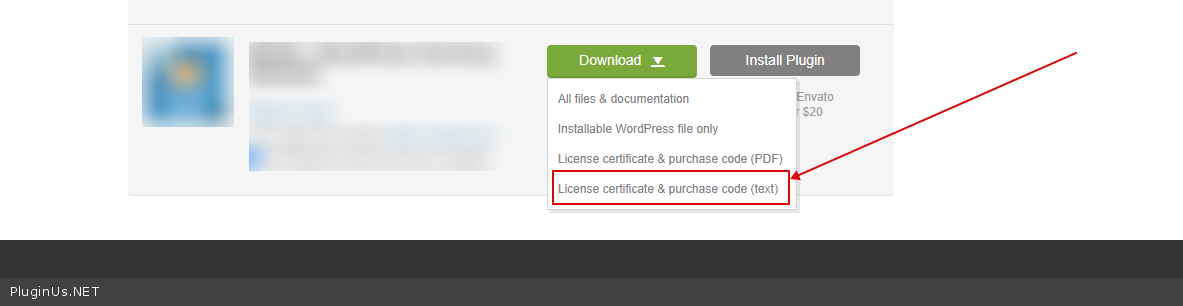
Please add wp-admin access - https://share.pluginus.net/image/i20210618130558.png ->https://share.pluginus.net/image/i20210618130637.png

Quote from Pablo Borysenco on June 9, 2022, 15:42Hello
Please try now
Hello
Please try now
Quote from petrolioshop on June 9, 2022, 17:29Hi,
Seems working, I will test better these days
Thanks a lot
Hi,
Seems working, I will test better these days
Thanks a lot
Quote from petrolioshop on June 10, 2022, 10:26Seems working well.
One question:
Why do you think is so slow to load a page when i put two or more filters together??
For example:
https://www.petrolioshop.com/nba/?filter=1&stock=instock&pa_nba-teams=golden-state-warriors&paged=1&pa_taglie-abbigliamento=s
Thanks
Seems working well.
One question:
Why do you think is so slow to load a page when i put two or more filters together??
For example:
https://www.petrolioshop.com/nba/?filter=1&stock=instock&pa_nba-teams=golden-state-warriors&paged=1&pa_taglie-abbigliamento=s
Thanks
Quote from Pablo Borysenco on June 10, 2022, 17:14Hello
Please read this - https://products-filter.com/searching-is-slow
Searching for stock availability can be slow because I have enabled the use of the old database. The new database is faster but woocommerce doesn't seem to do it well
Hello
Please read this - https://products-filter.com/searching-is-slow
Searching for stock availability can be slow because I have enabled the use of the old database. The new database is faster but woocommerce doesn't seem to do it well
Quote from petrolioshop on June 22, 2022, 11:09Hi,
After an update now filter does not work on this page for examplehttps://www.petrolioshop.com/kids/
And he shows attributes filter that should not show up
Hi,
After an update now filter does not work on this page for example
https://www.petrolioshop.com/kids/
And he shows attributes filter that should not show up
Quote from Pablo Borysenco on June 22, 2022, 12:50Hello
Try to reinstal the plugin (upload the new version from envato) and clear all cache
Hello
Try to reinstal the plugin (upload the new version from envato) and clear all cache
Quote from petrolioshop on June 22, 2022, 12:59sorry can you link it? i don't use envato
sorry can you link it? i don't use envato
Quote from petrolioshop on June 23, 2022, 10:04Ok i just download the last version on Envat, deleted the old one and reinstalled. Still not working -.-''
What can I do??
Ok i just download the last version on Envat, deleted the old one and reinstalled. Still not working -.-''
What can I do??
Quote from Pablo Borysenco on June 23, 2022, 12:51Hello
Ok i just download the last version on Envat - Looks like no. I see code that is only in the old version
To get the new version - https://codecanyon.net/downloads
OR just disable - https://share.pluginus.net/image/i20220623105140.png
Hello
Ok i just download the last version on Envat - Looks like no. I see code that is only in the old version
To get the new version - https://codecanyon.net/downloads
OR just disable - https://share.pluginus.net/image/i20220623105140.png

Quote from petrolioshop on June 23, 2022, 17:22I deactivate for now
on Envato I can only download the 2.2.8 version
How can i Download the last??
Thanks
I deactivate for now
on Envato I can only download the 2.2.8 version
How can i Download the last??
Thanks
Quote from Pablo Borysenco on June 24, 2022, 10:01Hello
OK! Now I see that there are no errors
And he shows attributes filter that should not show up - Attributes are displayed correctly! This is a simple custom page (has nothing to do with the category) and therefore the filter should display all the attributes as on the shop page
Hello
OK! Now I see that there are no errors
And he shows attributes filter that should not show up - Attributes are displayed correctly! This is a simple custom page (has nothing to do with the category) and therefore the filter should display all the attributes as on the shop page
Quote from petrolioshop on June 24, 2022, 10:55yes but i deactivate the woof javascript files. Can i activate again??
Thanks
yes but i deactivate the woof javascript files. Can i activate again??
Thanks
Quote from Pablo Borysenco on June 24, 2022, 11:48Do you mean optimized JS files?
Do you mean optimized JS files?
Quote from petrolioshop on June 24, 2022, 11:50this one
this one