

Urgent help – currency switches to USD when changing language (GTranslate + FOX Currency Switcher)
The support doesn work on Saturdays and Sundays, so some Friday requests can be answered on Monday. If you have problems with registration ask help on contact us page pleaseIf you not got email within 24~36 business hours, firstly check your spam box, and if no any email from the support there - back to the forum and read answer here. DO NOT ANSWER ON EMAILS [noreply@pluginus.net] FROM THE FORUM!! Emails are just for your info, all answers should be published only here.
The support doesn work on Saturdays and Sundays, so some Friday requests can be answered on Monday.

Quote from Tano on January 12, 2026, 19:37Hi,
we need assistance to fix a critical issue with currencies on our shop.
Website:
Platform: WordPress + WooCommerce
Multi‑currency plugin: FOX – Currency Switcher Professional (WOOCS), v. 2.4.3.1
Translation plugin: GTranslate (URL structure like /fr/, /de/, /it/ …)
What we want
Base / default language: English
Base currency: EUR
GeoIP rules in we have try all solution :
All EU countries (including France, Italy, Germany, etc.) → EUR
UK → GBP
Switzerland → CHF
Denmark → DKK
Czech Republic → CZK
Hungary → HUF
Poland → PLN
Sweden → SEK
Customer from France or Italy must see prices in EUR, even if they change the language with GTranslate.
What happens now
When we first open the site, we correctly see prices in EUR.
As soon as we switch the language with GTranslate (for example from English to Italian, German, French, etc.), the shop changes all prices to USD.
GeoIP rules seem to be ignored after the language switch.
We already tried:
Setting “Is multiple allowed = Yes” in FOX → Advanced.
Setting welcome currency to EUR.
Disabling all custom snippets that call
$WOOCS->set_currency().Clearing all caches (plugin + server + Cloudflare + varnish) and testing in incognito..
Our questions
Is there any known conflict between FOX Currency Switcher and GTranslate when changing languages?
How can we force FOX to keep the currency decided by GeoIP (EUR/GBP/CHF/…) when the user only changes language with GTranslate?
Is there a recommended code snippet or setting (for example a hook in FOX) to “lock” the currency for the session and prevent it from being reset to USD on language change?
Could you please indicate exactly which options in FOX (Options, Advanced, GeoIP, Payments) we should use in this scenario?
If needed, we can provide:
Admin access (staging),
Current FOX configuration screenshots,
List of active plugins.
Thank you in advance for your help,
Hi,
we need assistance to fix a critical issue with currencies on our shop.
Website:
Platform: WordPress + WooCommerce
Multi‑currency plugin: FOX – Currency Switcher Professional (WOOCS), v. 2.4.3.1
Translation plugin: GTranslate (URL structure like /fr/, /de/, /it/ …)
What we want
Base / default language: English
Base currency: EUR
GeoIP rules in we have try all solution :
All EU countries (including France, Italy, Germany, etc.) → EUR
UK → GBP
Switzerland → CHF
Denmark → DKK
Czech Republic → CZK
Hungary → HUF
Poland → PLN
Sweden → SEK
Customer from France or Italy must see prices in EUR, even if they change the language with GTranslate.
What happens now
When we first open the site, we correctly see prices in EUR.
As soon as we switch the language with GTranslate (for example from English to Italian, German, French, etc.), the shop changes all prices to USD.
GeoIP rules seem to be ignored after the language switch.
We already tried:
Setting “Is multiple allowed = Yes” in FOX → Advanced.
Setting welcome currency to EUR.
Disabling all custom snippets that call
$WOOCS->set_currency().Clearing all caches (plugin + server + Cloudflare + varnish) and testing in incognito..
Our questions
Is there any known conflict between FOX Currency Switcher and GTranslate when changing languages?
How can we force FOX to keep the currency decided by GeoIP (EUR/GBP/CHF/…) when the user only changes language with GTranslate?
Is there a recommended code snippet or setting (for example a hook in FOX) to “lock” the currency for the session and prevent it from being reset to USD on language change?
Could you please indicate exactly which options in FOX (Options, Advanced, GeoIP, Payments) we should use in this scenario?
If needed, we can provide:
Admin access (staging),
Current FOX configuration screenshots,
List of active plugins.
Thank you in advance for your help,

Quote from Alex Dovlatov on January 13, 2026, 12:28Hello Tano
The issue maybe is that GTranslate resets the PHP session when switching languages, which clears WOOCS stored currency.
Solution:
1. WOOCS → Options: Set "Storage" = transient (not session)
2. WOOCS → Advanced: Enable "Checkout by GeoIP rules" = Yes - this ensures checkout always uses the correct currency from GeoIP rules, regardless of what's displayed
3. WOOCS → GeoIP: Configure your rules and set "Apply GeoIP" = "Once per session" 4. Clear all caches
This way, even if the display currency briefly shows USD after language switch, the checkout will always process in the correct currency (EUR/GBP/CHF) based on customer location.
The "Checkout by GeoIP rules" option is specifically designed for this scenario.
Also read: https://currency-switcher.com/switch-currency-with-language-change + https://currency-switcher.com/using-geolocation-causes-problems-doesnt-seem-to-work-for-me
Hello Tano
The issue maybe is that GTranslate resets the PHP session when switching languages, which clears WOOCS stored currency.
Solution:
1. WOOCS → Options: Set"Storage" = transient (not session)
2. WOOCS → Advanced: Enable "Checkout by GeoIP rules" = Yes - this ensures checkout always uses the correct currency from GeoIP rules, regardless of what's displayed
3. WOOCS → GeoIP: Configure your rules and set"Apply GeoIP" ="Once per session" 4. Clear all caches
This way, even if the display currency briefly shows USD after language switch, the checkout will always process in the correct currency (EUR/GBP/CHF) based on customer location.
The"Checkout by GeoIP rules" option is specifically designed for this scenario.
Also read: https://currency-switcher.com/switch-currency-with-language-change + https://currency-switcher.com/using-geolocation-causes-problems-doesnt-seem-to-work-for-me
Quote from Tano on January 14, 2026, 17:14Hi, thank you for your reply.
I carefully checked my WOOCS plugin settings, but unfortunately some of the options you mentioned are not available in my installation.
Here is my situation:
1) WOOCS → Options
I have already set “Storage” = Transient (not session). ✅ Done2) WOOCS → Advanced
I do NOT see any option called “Checkout by GeoIP rules”.
This option is not present in my Advanced settings.3) WOOCS → GeoIP
I do not see an option called “Apply GeoIP = Once per session”.
This setting is also not available in my GeoIP section.Because of this, I am unable to apply the proposed solution as described.
My setup:
- WooCommerce
- GTranslate (subdirectory URLs, e.g. /it)
- WOOCS currency switcher
- Base currency: EURThe issue is that when switching language (e.g. /it), the displayed currency changes to USD, even though the shop is EU-based and EUR should be used.
Could you please:
- Confirm if “Checkout by GeoIP rules” is available only in a specific WOOCS version or plan
- Indicate the exact menu path where these options should appear
- Suggest an alternative solution compatible with my current WOOCS versionThank you for your support.
Best regards,
Hi, thank you for your reply.
I carefully checked my WOOCS plugin settings, but unfortunately some of the options you mentioned are not available in my installation.
Here is my situation:
1) WOOCS → Options
I have already set “Storage” = Transient (not session). ✅ Done
2) WOOCS → Advanced
I do NOT see any option called “Checkout by GeoIP rules”.
This option is not present in my Advanced settings.
3) WOOCS → GeoIP
I do not see an option called “Apply GeoIP = Once per session”.
This setting is also not available in my GeoIP section.
Because of this, I am unable to apply the proposed solution as described.
My setup:
- WooCommerce
- GTranslate (subdirectory URLs, e.g. /it)
- WOOCS currency switcher
- Base currency: EUR
The issue is that when switching language (e.g. /it), the displayed currency changes to USD, even though the shop is EU-based and EUR should be used.
Could you please:
- Confirm if “Checkout by GeoIP rules” is available only in a specific WOOCS version or plan
- Indicate the exact menu path where these options should appear
- Suggest an alternative solution compatible with my current WOOCS version
Thank you for your support.
Best regards,
Quote from Alex Dovlatov on January 15, 2026, 13:03Hello Tano
Here is the screen of options you need to apply https://share.pluginus.net/image/i20260115125837.png, select firstly please 'Individual fixed prices rules for each product(*)'. Per session its mistype or misunderstanding: https://share.pluginus.net/image/i20260115130040.png - just set geo rules - this functionality gives a similar business effect that you expect
Welcome!
Hello Tano
Here is the screen of options you need to apply https://share.pluginus.net/image/i20260115125837.png, select firstly please 'Individual fixed prices rules for each product(*)'. Per session its mistype or misunderstanding: https://share.pluginus.net/image/i20260115130040.png - just set geo rules - this functionality gives a similar business effect that you expect


Welcome!
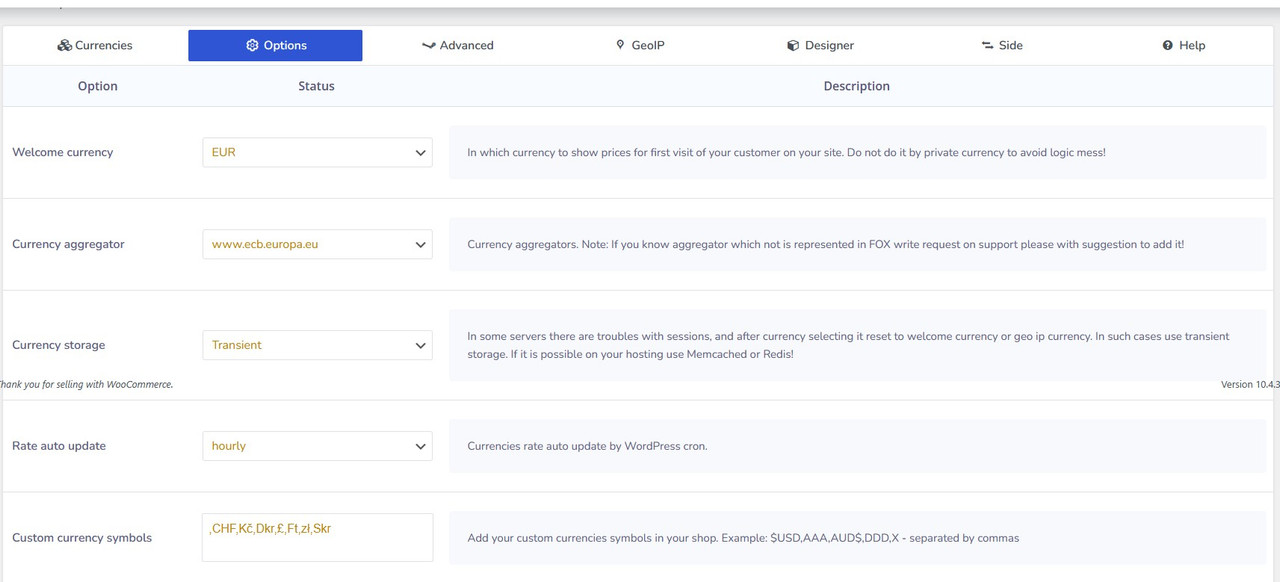
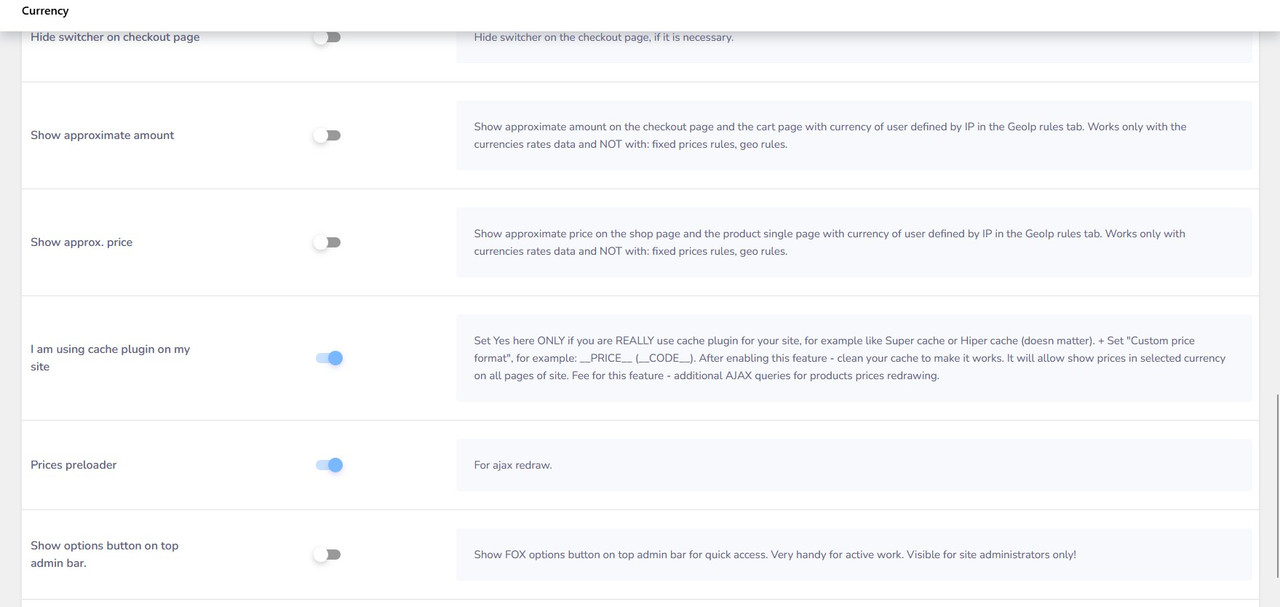
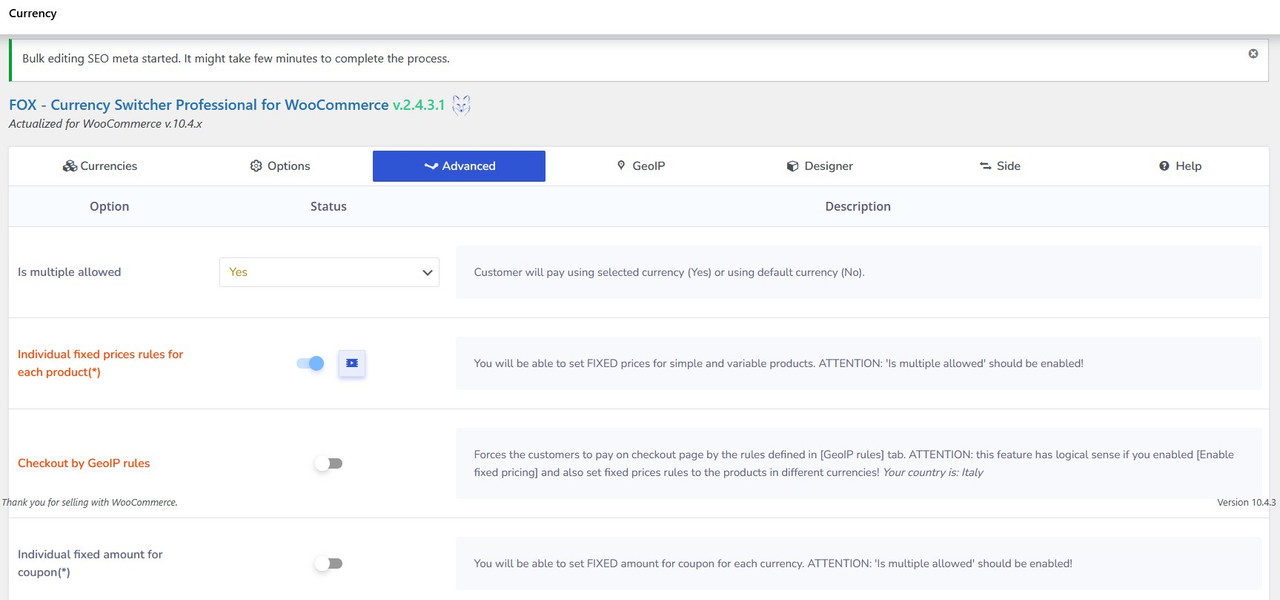
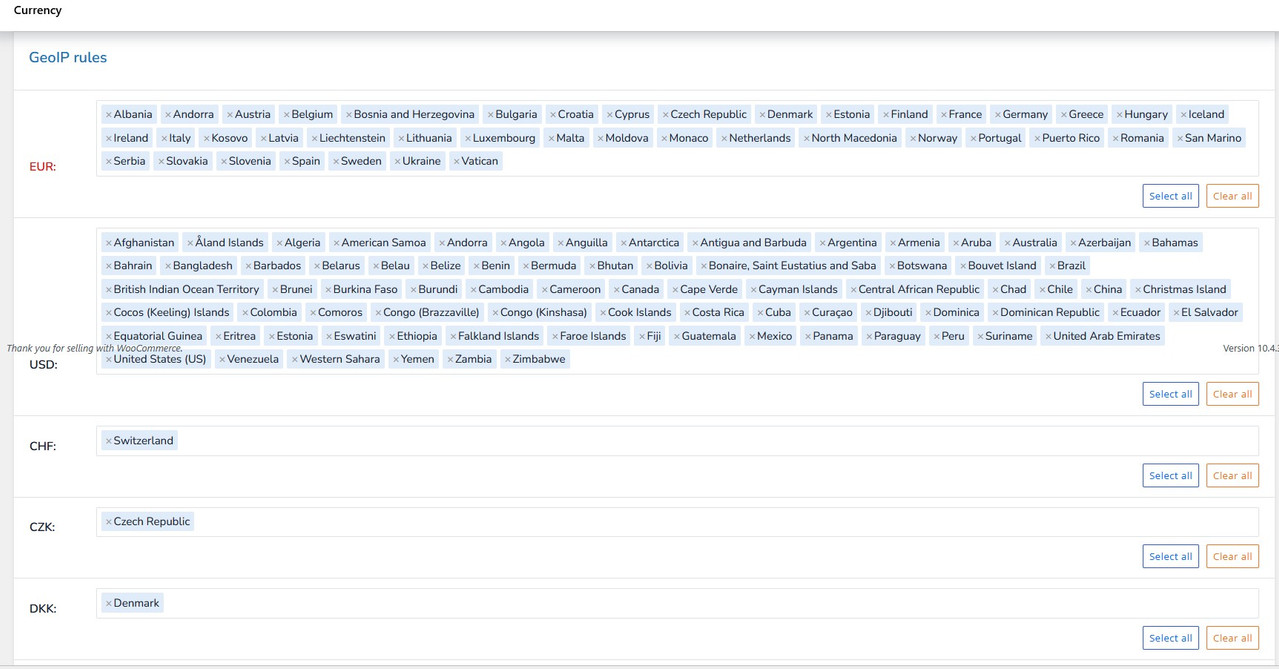
Quote from Tano on January 15, 2026, 22:22hello here how we have
last download today from themeforest (you have 2.4.3.2)
WE HAVE
Plugin name FOX - Currency Switcher Professional for WooCommerce FOX - Currency Switcher Professional for WooCommerce Version 2.4.3.1
_________________________________________________________________________________________________________________________________
THANK YOU FOR YOUR HELP
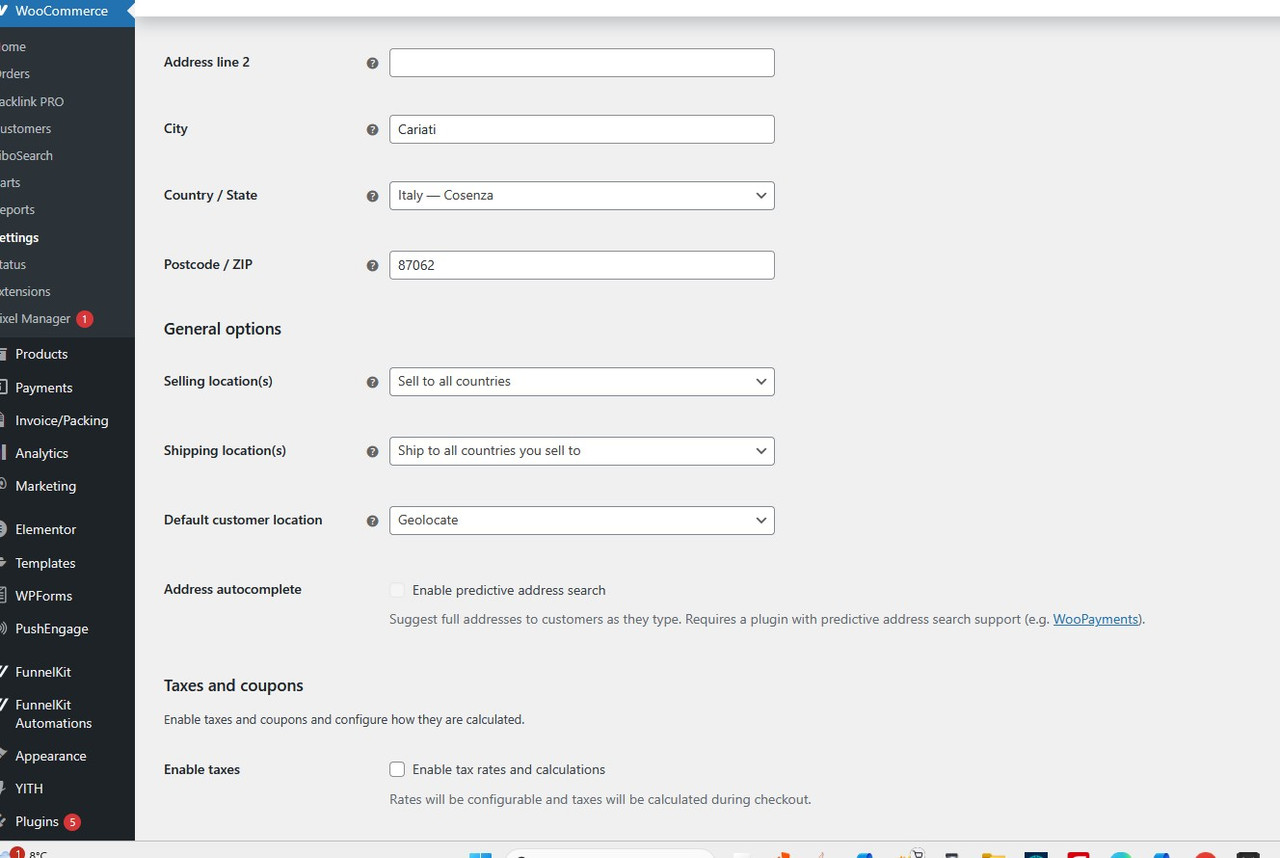
hello here how we have
last download today from themeforest (you have 2.4.3.2)
WE HAVE
| Plugin name | FOX - Currency Switcher Professional for WooCommerce | FOX - Currency Switcher Professional for WooCommerce |
| Version | 2.4.3.1 |
_________________________________________________________________________________________________________________________________
THANK YOU FOR YOUR HELP
Quote from Tano on January 15, 2026, 22:29check pl3ase also this video ( expires in 48h ) also othe rproblem , but gtranslate says not from them
https://streamable.com/46sfha
check pl3ase also this video ( expires in 48h ) also othe rproblem , but gtranslate says not from them
Quote from Alex Dovlatov on January 16, 2026, 13:17Hello Tano
I watched the video and it seems we have some confusion here. We're discussing GeoIP so that at checkout the price is set according to GeoIP rules, but at the same time in the video I see we're talking about language context - that when changing language, the currency should switch accordingly. This takes us out of the GeoIP context, this is a different story.
Let me clarify: as I understand, you want when changing language to display a specific currency, and at checkout it should be set according to GeoIP rules. Do you want one of these two to work, or both rules? Because I don't know exactly what to answer you right now.
If you want it by language, here's the script that solves this:
https://currency-switcher.com/switch-currency-with-language-change
Also will be good if in the secret area of this ticket will be provided wp-admin and ftp access to this or cloned stage site, for case if you applied script we were talking but for some reasons its doesn work (+ actual purchase code)
Please let me know exactly what behavior you need.
https://share.pluginus.net/image/i20230222134241.png
https://share.pluginus.net/image/i20230222134615.png
https://share.pluginus.net/image/i20230222134511.png
Hello Tano
I watched the video and it seems we have some confusion here. We're discussing GeoIP so that at checkout the price is set according to GeoIP rules, but at the same time in the video I see we're talking about language context - that when changing language, the currency should switch accordingly. This takes us out of the GeoIP context, this is a different story.
Let me clarify: as I understand, you want when changing language to display a specific currency, and at checkout it should be set according to GeoIP rules. Do you want one of these two to work, or both rules? Because I don't know exactly what to answer you right now.
If you want it by language, here's the script that solves this:
https://currency-switcher.com/switch-currency-with-language-change
Also will be good if in the secret area of this ticket will be provided wp-admin and ftp access to this or cloned stage site, for case if you applied script we were talking but for some reasons its doesn work (+ actual purchase code)
Please let me know exactly what behavior you need.
https://share.pluginus.net/image/i20230222134241.png
https://share.pluginus.net/image/i20230222134615.png
https://share.pluginus.net/image/i20230222134511.png


Quote from Tano on January 18, 2026, 02:51Hello alex , thank you very much for your support ...!!!
Your topic private data - Saved
Hello,
thank you for the detailed explanation, I understand the confusion now and I’ll clarify exactly what behavior we need.
We need BOTH solutions to work together, not just one:
- Frontend / browsing behavior (Language-based)
When the user changes the site language, the displayed currency should switch accordingly.
This is for UX and price perception while browsing the site.- Checkout behavior (GeoIP-based)
At checkout, the final currency must be set strictly according to GeoIP rules, regardless of the selected language.
This is mandatory for payment providers (especially Klarna) and legal/payment compliance.So to be very clear:
- Language switch → changes displayed currency
- Checkout → currency enforced by GeoIP country detection
Both rules are required. ( we have disable now because is live store )
Klarna issue
In addition to this, we are currently facing multiple Klarna Production errors for several countries:
API error code: 400
Klarna API error message: Bad value: purchase_currencyThis happens for:
CZ, DK, HU, NO, PL, RO, SE, CH, GBSo we definitely need help verifying:
- Currency sent at checkout vs allowed currencies per Klarna country
- GeoIP → country → currency mapping
- WooCommerce / Klarna configuration consistency
This issue is critical, because Klarna is live and currently failing for those markets.
Access (LIVE STORE – please be careful)
⚠️ Please note: this is a live store, so proceed carefully.
If you prefer, we can also provide FTP access or create a staging copy—just let us know.
Thanks in advance for your support.
Best regards,
Tano
Hello alex , thank you very much for your support ...!!!
Your topic private data - Saved
Hello,
thank you for the detailed explanation, I understand the confusion now and I’ll clarify exactly what behavior we need.
We need BOTH solutions to work together, not just one:
- Frontend / browsing behavior (Language-based)
When the user changes the site language, the displayed currency should switch accordingly.
This is for UX and price perception while browsing the site. - Checkout behavior (GeoIP-based)
At checkout, the final currency must be set strictly according to GeoIP rules, regardless of the selected language.
This is mandatory for payment providers (especially Klarna) and legal/payment compliance.
So to be very clear:
- Language switch → changes displayed currency
- Checkout → currency enforced by GeoIP country detection
Both rules are required. ( we have disable now because is live store )
Klarna issue
In addition to this, we are currently facing multiple Klarna Production errors for several countries:
API error code: 400
Klarna API error message: Bad value: purchase_currency
This happens for:
CZ, DK, HU, NO, PL, RO, SE, CH, GB
So we definitely need help verifying:
- Currency sent at checkout vs allowed currencies per Klarna country
- GeoIP → country → currency mapping
- WooCommerce / Klarna configuration consistency
This issue is critical, because Klarna is live and currently failing for those markets.
Access (LIVE STORE – please be careful)
⚠️ Please note: this is a live store, so proceed carefully.
If you prefer, we can also provide FTP access or create a staging copy—just let us know.
Thanks in advance for your support.
Best regards,
Tano
Quote from Alex Dovlatov on January 19, 2026, 13:38Hello Tano
I just entered the site wp-admin and I cann not place code using thene code editor
So, I set options, so I did:
- in FOX options -> tab Advanced -> "Checkout by GeoIP rules" -> Yes
- in tab Options -> Storage -> 'Currency storage' -> Transient
- I looked on wp-admin/admin.php?page=wc-settings&tab=integration and looks like MaxMind is set, ok
As I canno place the code for tests here is the code you should place into file functions.php of the current wp theme:
add_action('init', 'woocs_switch_currency_by_gtranslate_language', 999);

function woocs_switch_currency_by_gtranslate_language() {
    if (!class_exists('WOOCS')) {
        return;
    }

    global $WOOCS;

    // Don't override currency on checkout/cart - let GeoIP handle it
    if (is_checkout() || is_cart()) {
        return;
    }

    // Get current language from GTranslate URL structure (/fr/, /de/, /it/ etc)
    $current_lang = 'en'; // default

    if (isset($_SERVER['REQUEST_URI'])) {
        // Parse language from URL like /it/, /fr/, /de/
        if (preg_match('#^/([a-z]{2})/#', $_SERVER['REQUEST_URI'], $matches)) {
            $current_lang = $matches[1];
        }
    }

    // Map language to display currency
    $lang_to_currency = array(
        'en' => 'EUR',
        'fr' => 'EUR',  // French
        'it' => 'EUR',  // Italian
        'de' => 'EUR',  // German
        'es' => 'EUR',  // Spanish
        'pt' => 'EUR',  // Portuguese
        'nl' => 'EUR',  // Dutch
        'el' => 'EUR',  // Greek
        'pl' => 'PLN',  // Polish → PLN
        'cs' => 'CZK',  // Czech → CZK
        'hu' => 'HUF',  // Hungarian → HUF
        'da' => 'DKK',  // Danish → DKK
        'sv' => 'SEK',  // Swedish → SEK
    );

    // Get display currency for current language
    $display_currency = isset($lang_to_currency[$current_lang]) ? $lang_to_currency[$current_lang] : 'EUR';

    // Set currency for display only (GeoIP will handle checkout based on actual country)
    $WOOCS->set_currency($display_currency);
}
Make please tests, or/and make me access to wp-admin/theme-editor.php
p.s. also make please update to the latest FOX version 2.4.4
Hello Tano
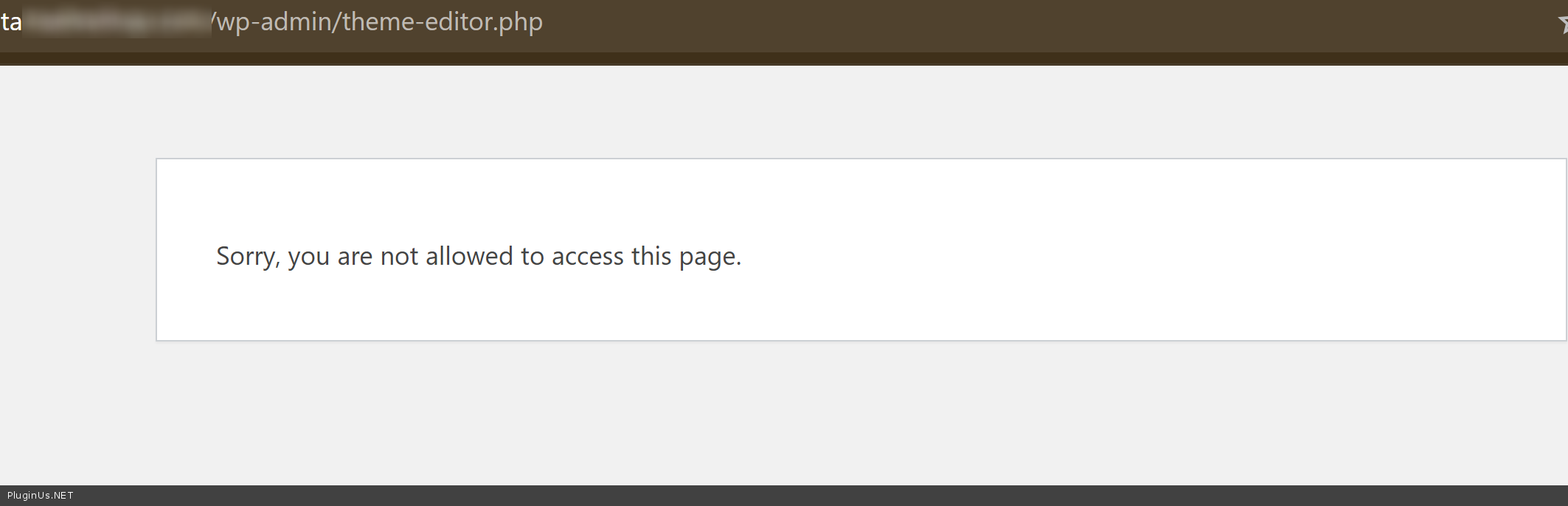
I just entered the site wp-admin and I cann not place code using thene code editor
So, I set options, so I did:
- in FOX options -> tab Advanced ->"Checkout by GeoIP rules" -> Yes
- in tab Options -> Storage -> 'Currency storage' -> Transient
- I looked on wp-admin/admin.php?page=wc-settings&tab=integration and looks like MaxMind is set, ok
As I canno place the code for tests here is the code you should place into file functions.php of the current wp theme:
add_action('init', 'woocs_switch_currency_by_gtranslate_language', 999);

function woocs_switch_currency_by_gtranslate_language() {
    if (!class_exists('WOOCS')) {
        return;
    }

    global $WOOCS;

    // Don't override currency on checkout/cart - let GeoIP handle it
    if (is_checkout() || is_cart()) {
        return;
    }

    // Get current language from GTranslate URL structure (/fr/, /de/, /it/ etc)
    $current_lang = 'en'; // default

    if (isset($_SERVER['REQUEST_URI'])) {
        // Parse language from URL like /it/, /fr/, /de/
        if (preg_match('#^/([a-z]{2})/#', $_SERVER['REQUEST_URI'], $matches)) {
            $current_lang = $matches[1];
        }
    }

    // Map language to display currency
    $lang_to_currency = array(
        'en' => 'EUR',
        'fr' => 'EUR',  // French
        'it' => 'EUR',  // Italian
        'de' => 'EUR',  // German
        'es' => 'EUR',  // Spanish
        'pt' => 'EUR',  // Portuguese
        'nl' => 'EUR',  // Dutch
        'el' => 'EUR',  // Greek
        'pl' => 'PLN',  // Polish → PLN
        'cs' => 'CZK',  // Czech → CZK
        'hu' => 'HUF',  // Hungarian → HUF
        'da' => 'DKK',  // Danish → DKK
        'sv' => 'SEK',  // Swedish → SEK
    );

    // Get display currency for current language
    $display_currency = isset($lang_to_currency[$current_lang]) ? $lang_to_currency[$current_lang] : 'EUR';

    // Set currency for display only (GeoIP will handle checkout based on actual country)
    $WOOCS->set_currency($display_currency);
}
Make please tests, or/and make me access to wp-admin/theme-editor.php
p.s. also make please update to the latest FOX version 2.4.4
Quote from Tano on January 20, 2026, 07:36Hello , ok done , seems that sworks
the problem is that switzerland navigates maybe in french or german , how they can change the currency in chf ?
i have give you administrator acess normal have to work ...the plugin dosnt support klarna ?
BECAUSE WE get this error in klarna API error code: 400, Klarna API error message: Bad value: purchase_currency
thank you always for support.
Hello , ok done , seems that sworks
the problem is that switzerland navigates maybe in french or german , how they can change the currency in chf ?
i have give you administrator acess normal have to work ...
the plugin dosnt support klarna ?
BECAUSE WE get this error in klarna API error code: 400, Klarna API error message: Bad value: purchase_currency
thank you always for support.
Quote from Tano on January 20, 2026, 07:40i have try vbn united kingdom but i see euro ... normal ?
i have try vbn united kingdom but i see euro ... normal ?
Quote from Tano on January 20, 2026, 10:53Hello , please check this https://ibb.co/3YRyq9WN Image
we use funnel kirt art and since we have fox , the price is just loading but not showing
Hello , please check this https://ibb.co/3YRyq9WN Image
we use funnel kirt art and since we have fox , the price is just loading but not showing
Quote from Alex Dovlatov on January 20, 2026, 16:04Hello Tano
Regarding your questions:
1. Switzerland language issue (French/German → CHF)
This is a fundamental conflict between language-based and GeoIP-based logic. You cannot have both working simultaneously for the same user in a consistent way.
Here's what happens:
- Swiss user opens site in French → script shows EUR (because French = EUR in mapping)
- But GeoIP detects Switzerland → should show CHFPossible Solution is: Manual switcher - Enable currency switcher widget so Swiss users can manually select CHF when browsing in French/German.
2. UK VPN showing EUR
Please check with this shortcode what country is detected: https://currency-switcher.com/shortcode/woocs_geo_hello
Place `[woocs_geo_hello]` anywhere on the page and it will show detected country. I created tester/ page for tests
If it shows wrong country:
- Clear browser cookies/cache
- Try different browser (better)
- Check MaxMind GeoIP database is updated (wp-admin → WooCommerce → Settings → Integration)VPN detection depends on GeoIP database accuracy. If MaxMind doesn't recognize VPN IP as UK, there's nothing we can do.
3. Klarna support
WOOCS works with standard WooCommerce payment gateways. Whether Klarna works correctly depends on how Klarna plugin handles multi-currency. We haven't specifically tested WOOCS + Klarna integration. The error "Bad value: purchase_currency" means Klarna received a currency not allowed for that country.
4. Funnel Kit Cart price loading issue
I just checked it: https://c2n.me/4nAMhKR.jpg - works, BUT in the plugin options was disabled option "I am using cache plugin on my site" BUT looks like this option is nessesary and funnel works using iframes:
add_filter('option_woocs_shop_is_cached', function($value) {
    if (isset($_SERVER['REQUEST_URI'])) {
        $uri = $_SERVER['REQUEST_URI'];
        if (strpos($uri, 'wfacp') !== false ||
            strpos($uri, 'cartflows') !== false ||
            strpos($uri, 'funnel-kit') !== false) {
            return 0; // Отключить cache mode
        }
    }

    if (isset($_POST['action']) &&
        (strpos($_POST['action'], 'wfacp') !== false ||
         strpos($_POST['action'], 'cartflow') !== false)) {
        return 0;
    }

    return $value;
}, 10, 1);
Check this script please, I still not has access to /wp-admin/theme-editor.php
Hello Tano
Regarding your questions:
1. Switzerland language issue (French/German → CHF)
This is a fundamental conflict between language-based and GeoIP-based logic. You cannot have both working simultaneously for the same user in a consistent way.
Here's what happens:
- Swiss user opens site in French → script shows EUR (because French = EUR in mapping)
- But GeoIP detects Switzerland → should show CHF
Possible Solution is: Manual switcher - Enable currency switcher widget so Swiss users can manually select CHF when browsing in French/German.
2. UK VPN showing EUR
Please check with this shortcode what country is detected: https://currency-switcher.com/shortcode/woocs_geo_hello
Place `[woocs_geo_hello]` anywhere on the page and it will show detected country. I created tester/ page for tests
If it shows wrong country:
- Clear browser cookies/cache
- Try different browser (better)
- Check MaxMind GeoIP database is updated (wp-admin → WooCommerce → Settings → Integration)
VPN detection depends on GeoIP database accuracy. If MaxMind doesn't recognize VPN IP as UK, there's nothing we can do.
3. Klarna support
WOOCS works with standard WooCommerce payment gateways. Whether Klarna works correctly depends on how Klarna plugin handles multi-currency. We haven't specifically tested WOOCS + Klarna integration. The error"Bad value: purchase_currency" means Klarna received a currency not allowed for that country.
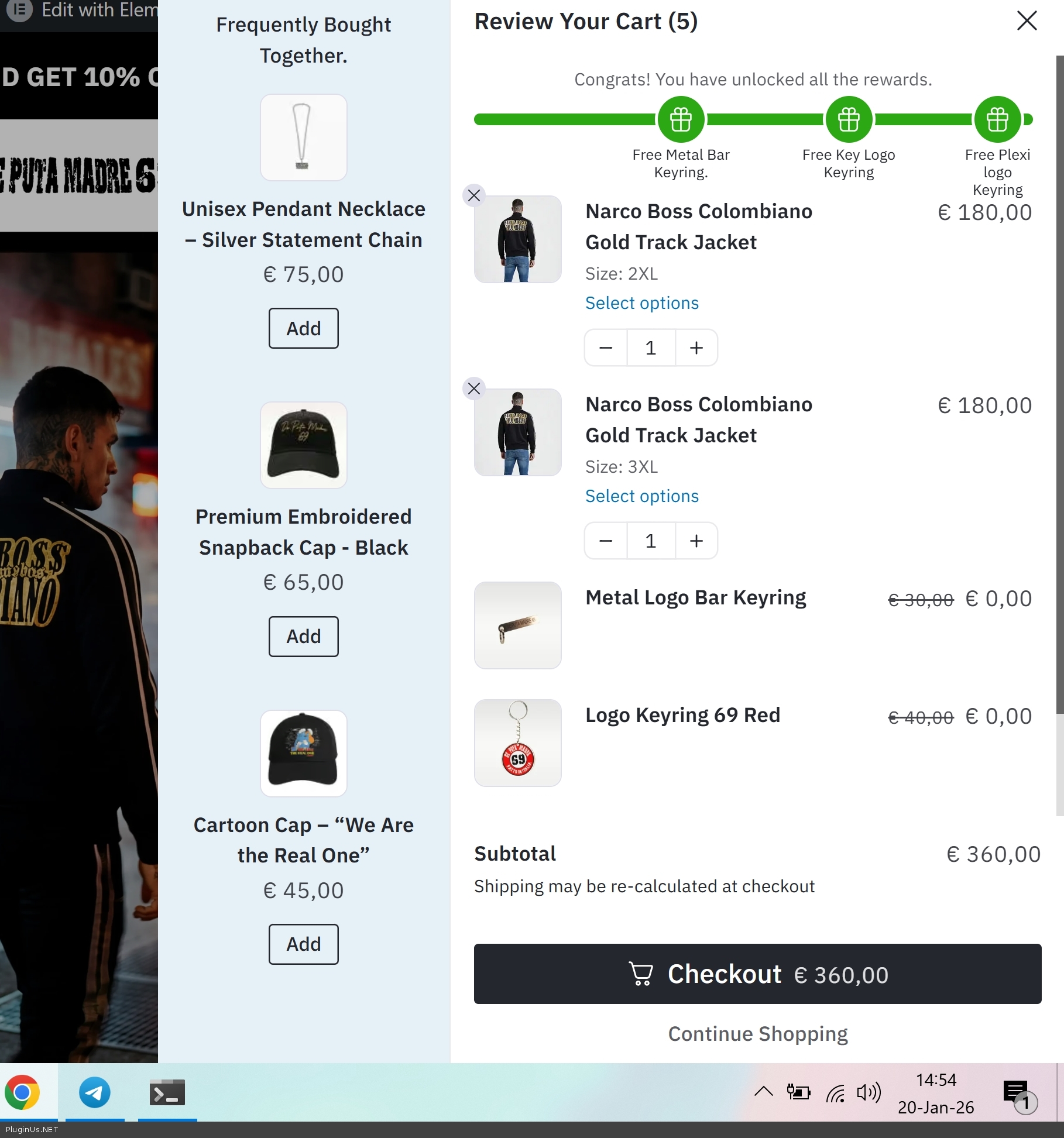
4. Funnel Kit Cart price loading issue
I just checked it: https://c2n.me/4nAMhKR.jpg - works, BUT in the plugin options was disabled option"I am using cache plugin on my site" BUT looks like this option is nessesary and funnel works using iframes:
add_filter('option_woocs_shop_is_cached', function($value) {
    if (isset($_SERVER['REQUEST_URI'])) {
        $uri = $_SERVER['REQUEST_URI'];
        if (strpos($uri, 'wfacp') !== false ||
            strpos($uri, 'cartflows') !== false ||
            strpos($uri, 'funnel-kit') !== false) {
            return 0; // Отключить cache mode
        }
    }

    if (isset($_POST['action']) &&
        (strpos($_POST['action'], 'wfacp') !== false ||
         strpos($_POST['action'], 'cartflow') !== false)) {
        return 0;
    }

    return $value;
}, 10, 1);
Check this script please, I still not has access to /wp-admin/theme-editor.php
Quote from Tano on February 9, 2026, 17:07Hello
I am writing regarding a problem we are experiencing with your currency switcher on our WooCommerce site.
Our payment provider (Klarna) has informed us that the issue with Klarna disappearing at checkout seems to be caused by the currency switcher.
Here is what happens:
- When a user visits the site from countries such as the UK, Sweden, Hungary, etc., the site initially loads in the local currency (e.g., GBP).
- However, when the user tries to switch currency (or even automatically), the site reloads and switches back to EUR.
- As a result, only EUR payment methods appear at checkout and Klarna disappears for those countries.
regarding this i have give you full acess as admin last time please check , otherwise via ftp ?
let me know thank you .
Hello
I am writing regarding a problem we are experiencing with your currency switcher on our WooCommerce site.
Our payment provider (Klarna) has informed us that the issue with Klarna disappearing at checkout seems to be caused by the currency switcher.
Here is what happens:
- When a user visits the site from countries such as the UK, Sweden, Hungary, etc., the site initially loads in the local currency (e.g., GBP).
- However, when the user tries to switch currency (or even automatically), the site reloads and switches back to EUR.
- As a result, only EUR payment methods appear at checkout and Klarna disappears for those countries.
regarding this i have give you full acess as admin last time please check , otherwise via ftp ?
let me know thank you .
Quote from Alex Dovlatov on February 10, 2026, 16:32Hello Tano
we can also provide FTP access or create a staging copy—just let us know - yes, better use stage site, cerate clone please suing duplicator plugin, this should work as real shop. Such things is better to do on stage site only as the your business is alive
Also, maybe next script will help:
add_action('wp', 'force_geoip_currency_on_checkout', 1000);
function force_geoip_currency_on_checkout() {
    if (!is_checkout() || !class_exists('WOOCS')) {
        return;
    }

    global $WOOCS;

    // Force currency based on detected country
    if (!empty($WOOCS->current_user_geo['country'])) {
        $country = $WOOCS->current_user_geo['country'];

        // Map countries to their required currencies
        $country_currency_map = array(
            'GB' => 'GBP',
            'SE' => 'SEK',
            'HU' => 'HUF',
            'PL' => 'PLN',
            'CZ' => 'CZK',
            'DK' => 'DKK',
            'NO' => 'NOK',
            'CH' => 'CHF',
            // EU countries use EUR
        );

        if (isset($country_currency_map[$country])) {
            $required_currency = $country_currency_map[$country];
        } else {
            $required_currency = 'EUR'; // Default for EU countries
        }

        if ($WOOCS->current_currency !== $required_currency) {
            $WOOCS->set_currency($required_currency);
        }
    }
}
Please confirm: does Klarna require customers to checkout in their local currency only? For example, UK customers must use GBP, Hungary customers must use HUF, etc.?
d
Hello Tano
we can also provide FTP access or create a staging copy—just let us know - yes, better use stage site, cerate clone please suing duplicator plugin, this should work as real shop. Such things is better to do on stage site only as the your business is alive
Also, maybe next script will help:
add_action('wp', 'force_geoip_currency_on_checkout', 1000);
function force_geoip_currency_on_checkout() {
    if (!is_checkout() || !class_exists('WOOCS')) {
        return;
    }

    global $WOOCS;

    // Force currency based on detected country
    if (!empty($WOOCS->current_user_geo['country'])) {
        $country = $WOOCS->current_user_geo['country'];

        // Map countries to their required currencies
        $country_currency_map = array(
            'GB' => 'GBP',
            'SE' => 'SEK',
            'HU' => 'HUF',
            'PL' => 'PLN',
            'CZ' => 'CZK',
            'DK' => 'DKK',
            'NO' => 'NOK',
            'CH' => 'CHF',
            // EU countries use EUR
        );

        if (isset($country_currency_map[$country])) {
            $required_currency = $country_currency_map[$country];
        } else {
            $required_currency = 'EUR'; // Default for EU countries
        }

        if ($WOOCS->current_currency !== $required_currency) {
            $WOOCS->set_currency($required_currency);
        }
    }
}
Please confirm: does Klarna require customers to checkout in their local currency only? For example, UK customers must use GBP, Hungary customers must use HUF, etc.?
d