
Redirect from subdomain to root on duplicated site.
The support doesn work on Saturdays and Sundays, so some Friday requests can be answered on Monday. If you have problems with registration ask help on contact us page pleaseIf you not got email within 24~36 business hours, firstly check your spam box, and if no any email from the support there - back to the forum and read answer here. DO NOT ANSWER ON EMAILS [noreply@pluginus.net] FROM THE FORUM!! Emails are just for your info, all answers should be published only here.
The support doesn work on Saturdays and Sundays, so some Friday requests can be answered on Monday.

Quote from AutopsyChicago on March 10, 2021, 07:50Thank you for this wonderful plugin.
I created a duplicate of my site with a subdomain (edu.mysite.online)
The woof shortcode is on the page edu.mysite.online/library.
Woof search redirected to a root page (mysite.online/librarycontent), but should have forwarded to this subdomain page (edu.mysite.online/search); and the root page is one I do not recognize and has an error message ("Oops! That can't page can't be found.")
I removed woof and replaced woof and it works fine now.
But I am working with a EZProxy - a university single-IP access platform -- and the redirect still happens. I will check with them, but do not understand why this happened initially.
Is there a way to download a unique copy of Woof to the subdomain so there's no possibility of redirecting to the root? Or "starting fresh" somehow? Or please advise.
Thank you very much.
Thank you for this wonderful plugin.
I created a duplicate of my site with a subdomain (edu.mysite.online)
The woof shortcode is on the page edu.mysite.online/library.
Woof search redirected to a root page (mysite.online/librarycontent), but should have forwarded to this subdomain page (edu.mysite.online/search); and the root page is one I do not recognize and has an error message ("Oops! That can't page can't be found.")
I removed woof and replaced woof and it works fine now.
But I am working with a EZProxy - a university single-IP access platform -- and the redirect still happens. I will check with them, but do not understand why this happened initially.
Is there a way to download a unique copy of Woof to the subdomain so there's no possibility of redirecting to the root? Or"starting fresh" somehow? Or please advise.
Thank you very much.

Quote from Pablo Borysenco on March 10, 2021, 13:34Hello
The filter redirects only in two cases
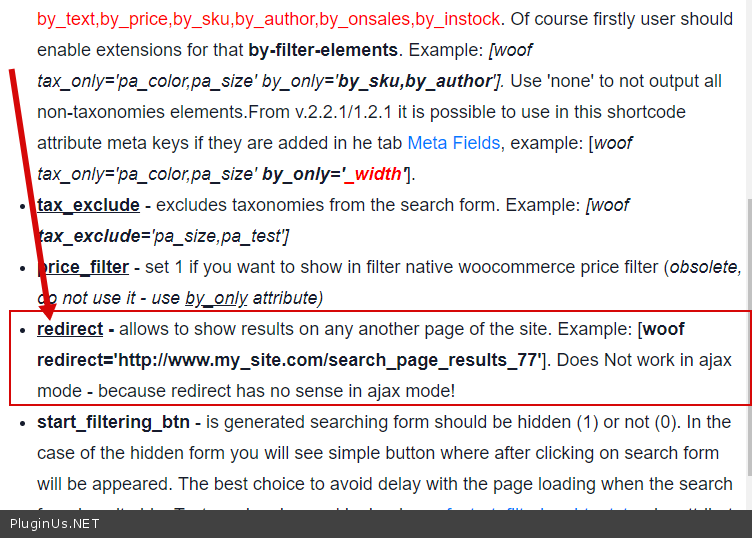
- If you use an attrubute( https://products-filter.com/shortcode/woof/ ) - https://c2n.me/4bfgAN3.png - And in principle, this attribute can fix your problem
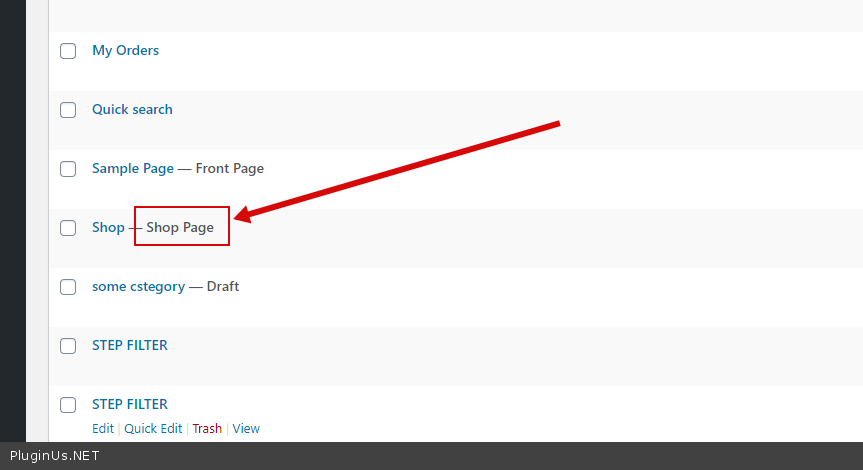
- If there are no suitable templates on the current page that can show the search result. In this case, the plugin redirects to the shop page. Check your site must have a page that is marked as Shop - https://c2n.me/4bfgR1p.png
Hello
The filter redirects only in two cases
- If you use an attrubute( https://products-filter.com/shortcode/woof/ ) - https://c2n.me/4bfgAN3.png - And in principle, this attribute can fix your problem
- If there are no suitable templates on the current page that can show the search result. In this case, the plugin redirects to the shop page. Check your site must have a page that is marked as Shop - https://c2n.me/4bfgR1p.png
Quote from AutopsyChicago on March 10, 2021, 15:42Thank you so much for this.
It's straight [woof] with no redirect.
I added the redirect to the shop page on the subdomain and it works, but only when the user is logged in.
When not logged in, it still redirects to the root domain and with the error message.
I am trying to see if there's some php I can add to make the shop page visible with or with out login, but don't know if that's exactly the issue and thought I'd follow up at this point to keep you posted.
Thank you very much.
Thank you so much for this.
It's straight [woof] with no redirect.
I added the redirect to the shop page on the subdomain and it works, but only when the user is logged in.
When not logged in, it still redirects to the root domain and with the error message.
I am trying to see if there's some php I can add to make the shop page visible with or with out login, but don't know if that's exactly the issue and thought I'd follow up at this point to keep you posted.
Thank you very much.
Quote from AutopsyChicago on March 10, 2021, 16:29Update: It looks like the shop page on the subdomain (edu.mysite.online/search) redirects to the root site with an error message unless the user is logged in. I have made sure the shop page is checked off as "Check this box if you want to force the content to be public regardless of restrictions that may apply..."
Update: It looks like the shop page on the subdomain (edu.mysite.online/search) redirects to the root site with an error message unless the user is logged in. I have made sure the shop page is checked off as"Check this box if you want to force the content to be public regardless of restrictions that may apply..."
Quote from AutopsyChicago on March 10, 2021, 18:28I tried the redirect to a different page than the shop page. The redirect stays in the subdomain edu.mysite.online/redirectpage, but the search results don't appear.
I am trying to look into if I need to add some code to the redirect page to allow the woof search results to appear on that page.
Or please kindly advise. Thank you, again.
I tried the redirect to a different page than the shop page. The redirect stays in the subdomain edu.mysite.online/redirectpage, but the search results don't appear.
I am trying to look into if I need to add some code to the redirect page to allow the woof search results to appear on that page.
Or please kindly advise. Thank you, again.
Quote from AutopsyChicago on March 10, 2021, 18:51I tried the redirect on the root site, mysite.online/redirect and it works with no additional code inside the redirect page.
But a redirect will not work with the subdomain edu.mysite.online/redirect
Please advise.
And thank you.
I tried the redirect on the root site, mysite.online/redirect and it works with no additional code inside the redirect page.
But a redirect will not work with the subdomain edu.mysite.online/redirect
Please advise.
And thank you.
Quote from AutopsyChicago on March 10, 2021, 18:54I'm sorry. I'm just lost now. That was an error on my end. A redirect using the root site is also not showing the search results. I am missing something and will sit tight for a response. Thank you.
I'm sorry. I'm just lost now. That was an error on my end. A redirect using the root site is also not showing the search results. I am missing something and will sit tight for a response. Thank you.
Quote from AutopsyChicago on March 11, 2021, 05:17Please consider the matter resolved.
This was a very old re-direct on my end from very early in development and I am all set now.
Thanks for your patience and apologies for extra work.
I so appreciate your help.
Please consider the matter resolved.
This was a very old re-direct on my end from very early in development and I am all set now.
Thanks for your patience and apologies for extra work.
I so appreciate your help.
Quote from Pablo Borysenco on March 11, 2021, 12:50Hello
Great! Welcome;)
Hello
Great! Welcome;)