Quote from Alex Dovlatov on March 25, 2026, 13:31
Hello Dylan
Glad the previous issue is resolved. Regarding your new question about geo-based currency switching:
FOX supports automatic currency switching by country — you can configure this in FOX Settings under the Geolocation tab. Set ZAR for South Africa and USD as the default for all other countries.
However, please note that in your current setup "Is multiple allowed" is set to No, which was the fix for your payment gateway issue. If you re-enable multiple currencies with geo-switching, the checkout issue may return.
Could you clarify: do you want customers to see prices in their local currency for display purposes only (while still paying in USD), or do you need South African customers to actually pay in ZAR via iKhokha? Or you mean just "show" currency?
If I undertood you right you need settings like:
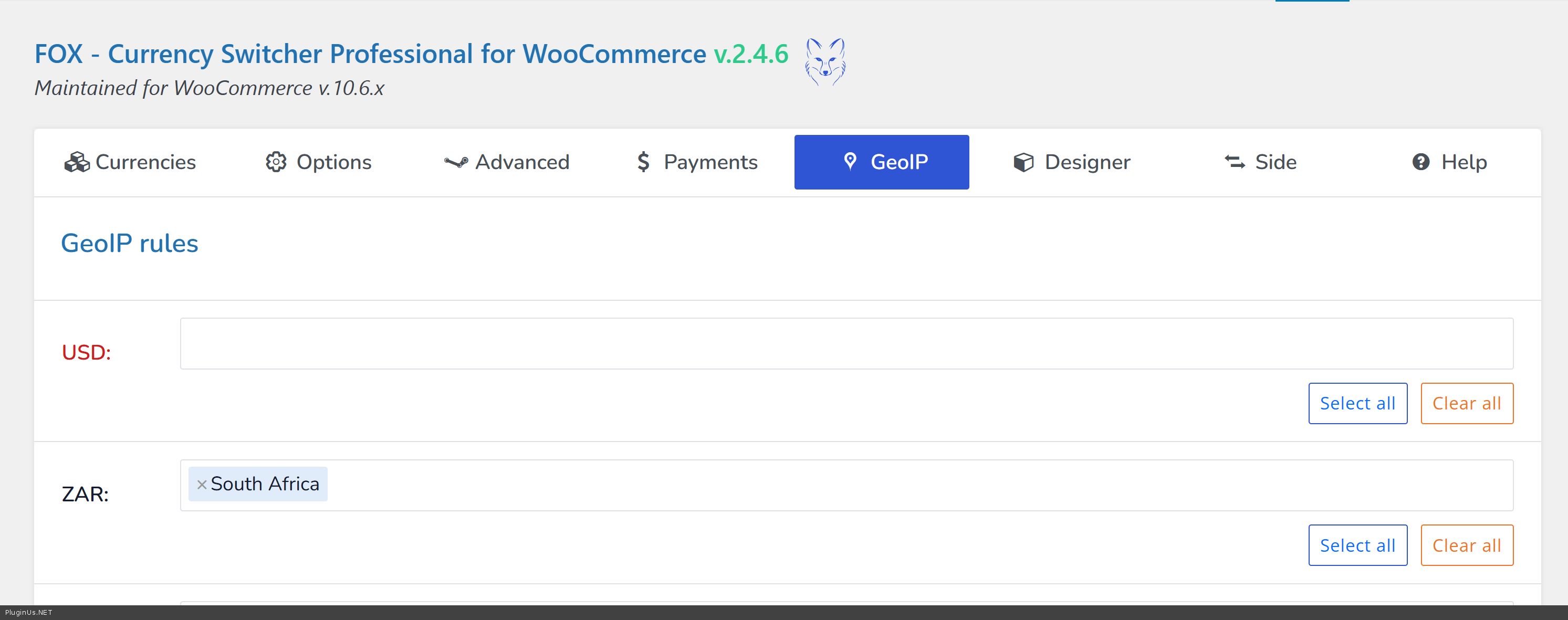
South Africa - ZAR, another world is USD. Also in tab Options of the plugin enable "Show price info icon"
Also read pelase: https://currency-switcher.com/using-geolocation-causes-problems-doesnt-seem-to-work-for-me
Hello Dylan
Glad the previous issue is resolved. Regarding your new question about geo-based currency switching:
FOX supports automatic currency switching by country — you can configure this in FOX Settings under the Geolocation tab. Set ZAR for South Africa and USD as the default for all other countries.
However, please note that in your current setup"Is multiple allowed" is set to No, which was the fix for your payment gateway issue. If you re-enable multiple currencies with geo-switching, the checkout issue may return.
Could you clarify: do you want customers to see prices in their local currency for display purposes only (while still paying in USD), or do you need South African customers to actually pay in ZAR via iKhokha? Or you mean just"show" currency?
If I undertood you right you need settings like:
South Africa - ZAR, another world is USD. Also in tab Options of the plugin enable"Show price info icon"
Also read pelase: https://currency-switcher.com/using-geolocation-causes-problems-doesnt-seem-to-work-for-me



