

Some yes/no pre-purchase questions about the premium WOOF filters
The support doesn work on Saturdays and Sundays, so some Friday requests can be answered on Monday. If you have problems with registration ask help on contact us page pleaseIf you not got email within 24~36 business hours, firstly check your spam box, and if no any email from the support there - back to the forum and read answer here. DO NOT ANSWER ON EMAILS [noreply@pluginus.net] FROM THE FORUM!! Emails are just for your info, all answers should be published only here.
The support doesn work on Saturdays and Sundays, so some Friday requests can be answered on Monday.

Quote from ilyas on July 13, 2020, 16:21The following questions are about the codecanyon.net/item/woof-woocommerce-products-filter
1. I believe there aren’t any compatibility issues Elementor Pro and its Hello theme right?
2. I’d like to have the sticky filters in the sidebar on the desktop version of the site but could you please send some mobile version demos with slide-out or top filters?
3. Is there an option for live filters that won’t refresh the page every time a filter item is selected? Your demos reload the page every time for some reason.
4. Can I indent subcategory checkboxes under the category items like so: http://screencast.com/t/hfEV9K01tP (the 'Look & Feel' filter has ‘Look’ and ‘Feel’ categories in bold with subcategories e.g. All Stone and further Marble and Slate subcategories). I am comfortable with some CSS.
5. Can I create multiple colour filters for whites, greys, beiges etc? With an ability to select all greys (checkbox) or minimise all colour filters under ‘Colour’ like here: http://screencast.com/t/Wq8DamtW50u
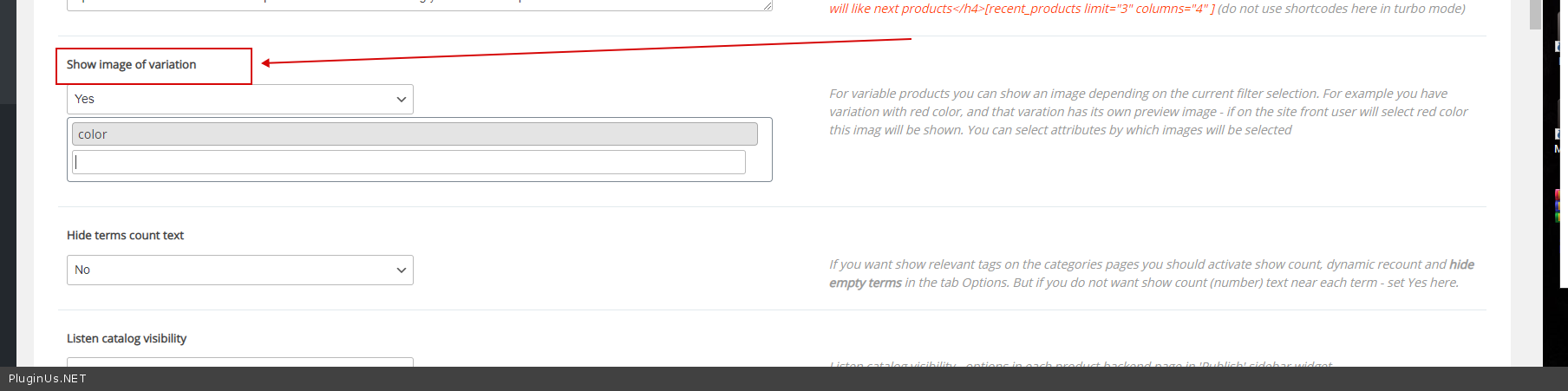
6. When selecting a certain colour, can the shop page products feature product images of the selected colour like on here ("color=red") http://sony.ca/en/electronics/headphones/t/headband-headphones?color=red
7. Can I add images (jpg, png) for categories/attributes to be shown next to them in the filters like here: http://screencast.com/t/wYY2GGwnuhxa
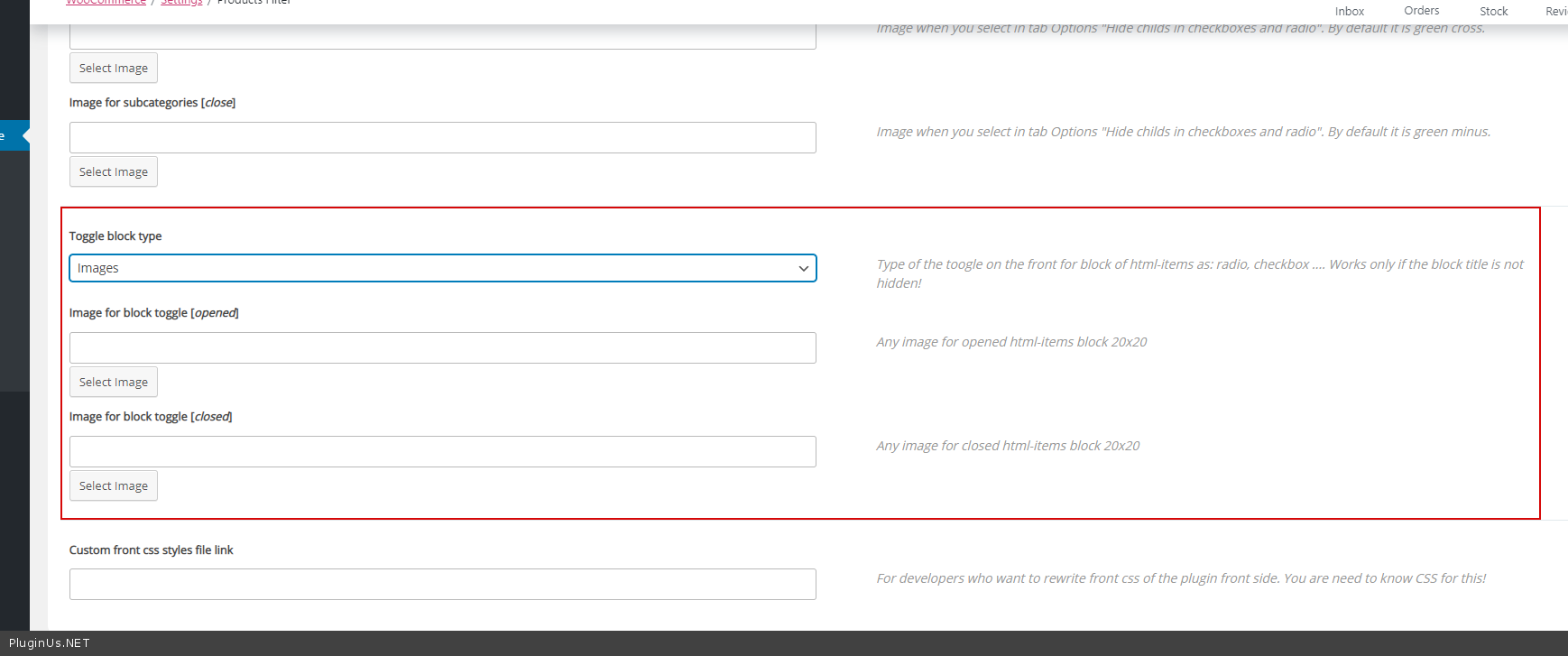
8. Can I add custom svg icons for checkboxes or expand & minimise filters (sort of like your “+” icon or 'Colour ▽’ in the screenshot for question 5)?
The following questions are about the codecanyon.net/item/woof-woocommerce-products-filter
1. I believe there aren’t any compatibility issues Elementor Pro and its Hello theme right?
2. I’d like to have the sticky filters in the sidebar on the desktop version of the site but could you please send some mobile version demos with slide-out or top filters?
3. Is there an option for live filters that won’t refresh the page every time a filter item is selected? Your demos reload the page every time for some reason.
4. Can I indent subcategory checkboxes under the category items like so: http://screencast.com/t/hfEV9K01tP (the 'Look & Feel' filter has ‘Look’ and ‘Feel’ categories in bold with subcategories e.g. All Stone and further Marble and Slate subcategories). I am comfortable with some CSS.
5. Can I create multiple colour filters for whites, greys, beiges etc? With an ability to select all greys (checkbox) or minimise all colour filters under ‘Colour’ like here: http://screencast.com/t/Wq8DamtW50u
6. When selecting a certain colour, can the shop page products feature product images of the selected colour like on here ("color=red") http://sony.ca/en/electronics/headphones/t/headband-headphones?color=red
7. Can I add images (jpg, png) for categories/attributes to be shown next to them in the filters like here: http://screencast.com/t/wYY2GGwnuhxa
8. Can I add custom svg icons for checkboxes or expand & minimise filters (sort of like your “+” icon or 'Colour ▽’ in the screenshot for question 5)?

Quote from Pablo Borysenco on July 14, 2020, 11:56Hello
1) This should work correctly. But this may not work with non-standard product display modules.
2) Please check it here - https://demo.products-filter.com/slideout/
3) Yes. Disable autosubmit
4/5/7) you need code customization
6) Yes - https://c2n.me/48nOVoL.png
8) You can change this image - https://c2n.me/48nPkkJ.png
Try free version - https://wordpress.org/plugins/woocommerce-products-filter/
Hello
1) This should work correctly. But this may not work with non-standard product display modules.
2) Please check it here - https://demo.products-filter.com/slideout/
3) Yes. Disable autosubmit
4/5/7) you need code customization
6) Yes - https://c2n.me/48nOVoL.png
8) You can change this image - https://c2n.me/48nPkkJ.png
Try free version - https://wordpress.org/plugins/woocommerce-products-filter/
Quote from ilyas on July 14, 2020, 17:52Hey Pablo, thanks for such a prompt reply!
- Could you please elaborate a little further on what you mean by a non-standard product display modules? I think I'll only be using only one other plugin for the shop (listing) page to display colour attributes under the product images with the premium version of https://wordpress.org/plugins/woo-variation-swatches/. Any compatibility issues there? But other than that it'll be standard Woocommerce display modules.
- That's lovely!
- I can disable that in the plugin settings? Or my users will have to do change their browser settings somehow?
- Do you do customisation?
- If so, could you please give me a quote on that?
- That's amazing! Thank you!
- Oh well..
- That's great
Hey Pablo, thanks for such a prompt reply!
- Could you please elaborate a little further on what you mean by a non-standard product display modules? I think I'll only be using only one other plugin for the shop (listing) page to display colour attributes under the product images with the premium version of https://wordpress.org/plugins/woo-variation-swatches/. Any compatibility issues there? But other than that it'll be standard Woocommerce display modules.
- That's lovely!
- I can disable that in the plugin settings? Or my users will have to do change their browser settings somehow?
- Do you do customisation?
- If so, could you please give me a quote on that?
- That's amazing! Thank you!
- Oh well..
- That's great
Quote from Pablo Borysenco on July 15, 2020, 11:23Hello
1) standard woocommerce pages (Shop, categories), native woo shortcodes and shortcode [woof_products]
For other templates you should do a test
2) You can disable it on plugin settings
4/5) Unfortunately I do not have time for custom tasks
Please try to watch a video - https://products-filter.com/video-tutorials#video_beGT6p_look
Hello
1) standard woocommerce pages (Shop, categories), native woo shortcodes and shortcode [woof_products]
For other templates you should do a test
2) You can disable it on plugin settings
4/5) Unfortunately I do not have time for custom tasks
Please try to watch a video - https://products-filter.com/video-tutorials#video_beGT6p_look