

Settings not saving
The support doesn work on Saturdays and Sundays, so some Friday requests can be answered on Monday. If you have problems with registration ask help on contact us page pleaseIf you not got email within 24~36 business hours, firstly check your spam box, and if no any email from the support there - back to the forum and read answer here. DO NOT ANSWER ON EMAILS [noreply@pluginus.net] FROM THE FORUM!! Emails are just for your info, all answers should be published only here.
The support doesn work on Saturdays and Sundays, so some Friday requests can be answered on Monday.

Quote from scheepvaartcenter on April 26, 2021, 18:17Hello,
I bought your plugin today but doesnt seem to save some settings.
Example: i have a attribute i want to use but it doesnt save the settings and there for it wont show me the attribute for me to edit.
Is there a limit for the number of attributes to use (not all at the same time)?
Hope to hear from you.
Regards,
Jan
Hello,
I bought your plugin today but doesnt seem to save some settings.
Example: i have a attribute i want to use but it doesnt save the settings and there for it wont show me the attribute for me to edit.
Is there a limit for the number of attributes to use (not all at the same time)?
Hope to hear from you.
Regards,
Jan

Quote from Pablo Borysenco on April 27, 2021, 10:14Hello Jan
please drop me wp-admin access - https://c2n.me/43SC6rb.png -> https://c2n.me/42BAoj4.png I will check it
Hello Jan
please drop me wp-admin access - https://c2n.me/43SC6rb.png -> https://c2n.me/42BAoj4.png I will check it


Quote from scheepvaartcenter on April 27, 2021, 19:33I dropped the info.
Thanks for the reply!
I dropped the info.
Thanks for the reply!
Quote from Pablo Borysenco on April 28, 2021, 09:48Hello
Ok! I got it
Can you add FTP access? I need to investigate this
Hello
Ok! I got it
Can you add FTP access? I need to investigate this
Quote from scheepvaartcenter on April 28, 2021, 22:53Hi,
I dropped it again. (lets hope it didnt break) :)
Hi,
I dropped it again. (lets hope it didnt break) :)
Quote from scheepvaartcenter on April 29, 2021, 17:29Dropped additional information about error i got.
Dropped additional information about error i got.
Quote from Pablo Borysenco on April 29, 2021, 17:49Hello
A very large save request is sent (many values). And it looks like the server is trimming this( I think this is DDoS-Protection )
Therefore, you can save the values that are at the beginning
Unfortunately from our side we cannot fix it
to quickly move around the screen you can use these keys - [home] [end] - https://c2n.me/4bSDgXc.jpg
My test - https://c2n.me/4bSDnGU
Hello
A very large save request is sent (many values). And it looks like the server is trimming this( I think this is DDoS-Protection )
Therefore, you can save the values that are at the beginning
Unfortunately from our side we cannot fix it
to quickly move around the screen you can use these keys - [home] [end] - https://c2n.me/4bSDgXc.jpg
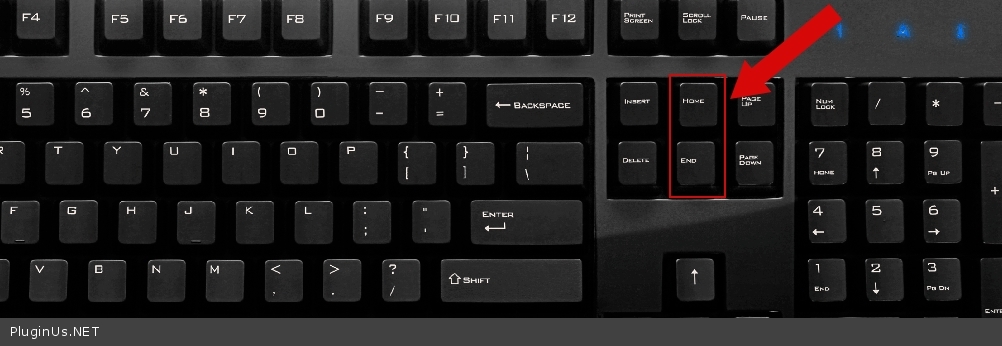
My test - https://c2n.me/4bSDnGU
Quote from scheepvaartcenter on April 29, 2021, 18:27Hi,
i just notice it doesnt save anything now.
i dragged a few in combination with Home/End key but it does not save it.
Also with the regular draggin it doesnt save it anymore.
Hope to hear from you.
Hi,
i just notice it doesnt save anything now.
i dragged a few in combination with Home/End key but it does not save it.
Also with the regular draggin it doesnt save it anymore.
Hope to hear from you.
Quote from scheepvaartcenter on April 30, 2021, 00:16Let me know if you are in my server at this moment, i need to install a backup as my site has error after updating another plugin. NOT yours :)
Let me know if you are in my server at this moment, i need to install a backup as my site has error after updating another plugin. NOT yours :)
Quote from scheepvaartcenter on April 30, 2021, 00:46Done, Fixed! :)
Done, Fixed! :)
Quote from Pablo Borysenco on April 30, 2021, 11:06Hello
Ok! is my plugin saving now?
Hello
Ok! is my plugin saving now?
Quote from scheepvaartcenter on April 30, 2021, 13:05Hi,
Yes its saving settings when i move the attributes to top of page now.
Thank very much for your support!
Great help for a great plugin! Beer for Pablo! :)
Hi,
Yes its saving settings when i move the attributes to top of page now.
Thank very much for your support!
Great help for a great plugin! Beer for Pablo! :)
Quote from scheepvaartcenter on May 7, 2021, 03:52Hi Pablo,
Hope your well.
Can you tell me how i can make the program save the settings on the rightside of the settings page? (default sort, thumbnail preview, beauty switcher etc.)
Thanks in advance!
Hi Pablo,
Hope your well.
Can you tell me how i can make the program save the settings on the rightside of the settings page? (default sort, thumbnail preview, beauty switcher etc.)
Thanks in advance!
Quote from Pablo Borysenco on May 7, 2021, 10:48Hello
these settings are stored in options key: 'woobe_options_' . get_current_user_id();
Hello
these settings are stored in options key: 'woobe_options_' . get_current_user_id();
Quote from scheepvaartcenter on May 7, 2021, 16:36Hi,
So changing something and just click "Save Settings" wont work?
Let me know. (i am not a code guru) :)
Hi,
So changing something and just click"Save Settings" wont work?
Let me know. (i am not a code guru) :)
Quote from scheepvaartcenter on May 7, 2021, 23:21Hi Pablo,
I have an idea that will make your program more user friendly, i think.
When you want to add a new term and click on the "new" button, the cursor is not already in the typing field where you need to put in your "new name".
And i think it should be clear i need that field as i just told the system i want a new item to be made. So why not being ready for typing in that field. :)Is it possible to make the cursor active in the typing field?
less clicking is faster working.
I hope you can use this and/or integrate it in your program.
Let me know what you think and have a good weekend.
Hi Pablo,
I have an idea that will make your program more user friendly, i think.
When you want to add a new term and click on the"new" button, the cursor is not already in the typing field where you need to put in your"new name".
And i think it should be clear i need that field as i just told the system i want a new item to be made. So why not being ready for typing in that field. :)
Is it possible to make the cursor active in the typing field?
less clicking is faster working.
I hope you can use this and/or integrate it in your program.
Let me know what you think and have a good weekend.
Quote from Pablo Borysenco on May 10, 2021, 10:02Hello
I'm not sure if I understood you correctly
Please describe your idea in more detail. You can create screenshots
Hello
I'm not sure if I understood you correctly
Please describe your idea in more detail. You can create screenshots
Quote from scheepvaartcenter on May 10, 2021, 13:03Hi Pablo,
i attache a printscreen of what i mean.
Hi Pablo,
i attache a printscreen of what i mean.

Quote from Pablo Borysenco on May 11, 2021, 09:42Hello
When you want to add a new term and click on the "new" button, the cursor is not already in the typing field where you need to put in your "new name". - I'm not sure if this has anything to do with the screenshot
Hello
When you want to add a new term and click on the"new" button, the cursor is not already in the typing field where you need to put in your"new name". - I'm not sure if this has anything to do with the screenshot