Set filter automatically does not work
The support doesn work on Saturdays and Sundays, so some Friday requests can be answered on Monday. If you have problems with registration ask help on contact us page pleaseIf you not got email within 24~36 business hours, firstly check your spam box, and if no any email from the support there - back to the forum and read answer here. DO NOT ANSWER ON EMAILS [noreply@pluginus.net] FROM THE FORUM!! Emails are just for your info, all answers should be published only here.
The support doesn work on Saturdays and Sundays, so some Friday requests can be answered on Monday.

Quote from motorsportshop1 on September 16, 2026, 15:34Hi,
After upgrading to latest version. Set filter automatically optition does not work. It is set to no for all devices but all filters for all my attributes are showed on every shoppingpage and I have had to unactivate filterplugin.
Hi,
After upgrading to latest version. Set filter automatically optition does not work. It is set to no for all devices but all filters for all my attributes are showed on every shoppingpage and I have had to unactivate filterplugin.

Quote from Alex Dev on September 17, 2026, 20:04Hello
Thank you for the report. Before we can say whether this is a bug, we need to see it on your site, because the option itself cannot behave the way you describe.
When "Set filter automatically" is set to No, the plugin outputs nothing on the shop page. There is no hook or setting that can override this. So if a filter is still visible, it is being printed by something else, most likely the HUSKY widget placed in a sidebar, or a [woof] shortcode sitting in a page or in a theme template. The No option only disables the automatic insertion, it does not remove a filter you placed yourself somewhere.
Please send us the following.
- The exact URL of the page where the filter is visible. Not the shop link in general, the precise address of that page, because the shop page can be named anything on your site and we do not want to guess which one you mean. Please activate the plugin again before sending it, otherwise we see nothing.
- A screenshot of the Options tab showing the "Set filter automatically" value, and a screenshot of the Structure tab showing which taxonomies are enabled for the filter.
- Tell us where the filter is placed on your site: as a widget, as a [woof] shortcode inside a page or a template, or you never placed it anywhere.
- The version you upgraded from, and whether anything else was updated on the same day, plugins or theme.
One more thing to check on your side first, and it is important. Caching can show you the old page long after the setting was saved. Please clear every cache layer you have, not only the WordPress cache plugin: the server side cache of your host, and Cloudflare if you use it, including its page rules, since a cached HTML page will keep serving the filter no matter what the plugin settings say. After clearing everything, open the page in a private browser window and check again.
If the filter is still there after that, send us the items above and we will look into it.
Best regards
Alex
Hello
Thank you for the report. Before we can say whether this is a bug, we need to see it on your site, because the option itself cannot behave the way you describe.
When"Set filter automatically" is set to No, the plugin outputs nothing on the shop page. There is no hook or setting that can override this. So if a filter is still visible, it is being printed by something else, most likely the HUSKY widget placed in a sidebar, or a [woof] shortcode sitting in a page or in a theme template. The No option only disables the automatic insertion, it does not remove a filter you placed yourself somewhere.
Please send us the following.
- The exact URL of the page where the filter is visible. Not the shop link in general, the precise address of that page, because the shop page can be named anything on your site and we do not want to guess which one you mean. Please activate the plugin again before sending it, otherwise we see nothing.
- A screenshot of the Options tab showing the"Set filter automatically" value, and a screenshot of the Structure tab showing which taxonomies are enabled for the filter.
- Tell us where the filter is placed on your site: as a widget, as a [woof] shortcode inside a page or a template, or you never placed it anywhere.
- The version you upgraded from, and whether anything else was updated on the same day, plugins or theme.
One more thing to check on your side first, and it is important. Caching can show you the old page long after the setting was saved. Please clear every cache layer you have, not only the WordPress cache plugin: the server side cache of your host, and Cloudflare if you use it, including its page rules, since a cached HTML page will keep serving the filter no matter what the plugin settings say. After clearing everything, open the page in a private browser window and check again.
If the filter is still there after that, send us the items above and we will look into it.
Best regards
Alex
Quote from motorsportshop1 on September 23, 2026, 15:52Hello,
I did found out by your reply that a [woof] shortcode was placed in the shop sidebar. Therefore all possible filters were shown. So thanks, that did solve that problem. I dont believe this is the correct forum but I used the woof by category plug in to place wanted filter on correct page. That one does not work anymore. Is there any guide how to place a filter on a single category page?
Best regards
Jesper
Hello,
I did found out by your reply that a [woof] shortcode was placed in the shop sidebar. Therefore all possible filters were shown. So thanks, that did solve that problem. I dont believe this is the correct forum but I used the woof by category plug in to place wanted filter on correct page. That one does not work anymore. Is there any guide how to place a filter on a single category page?
Best regards
Jesper
Quote from Alex Dev on September 25, 2026, 12:16Hello Jesper
Great that the first issue is solved.
You can show different filters on different category pages without the WOOF by Category addon. Place several [woof] shortcodes, one per filter set, and let a widget logic plugin decide which one appears on which category.
- Build each filter with the [woof] shortcode attributes, described here: https://products-filter.com/shortcode/woof
The useful ones for this are tax_only (which taxonomies and attributes to show, comma separated, in that order), by_only (which extra filters to show: by_price, by_sku, by_text, by_instock and so on) and tax_exclude (which taxonomies to hide). For example: [woof tax_only='pa_color,pa_size' by_only='by_price']
- Put each shortcode into its own Text widget in the shop sidebar.
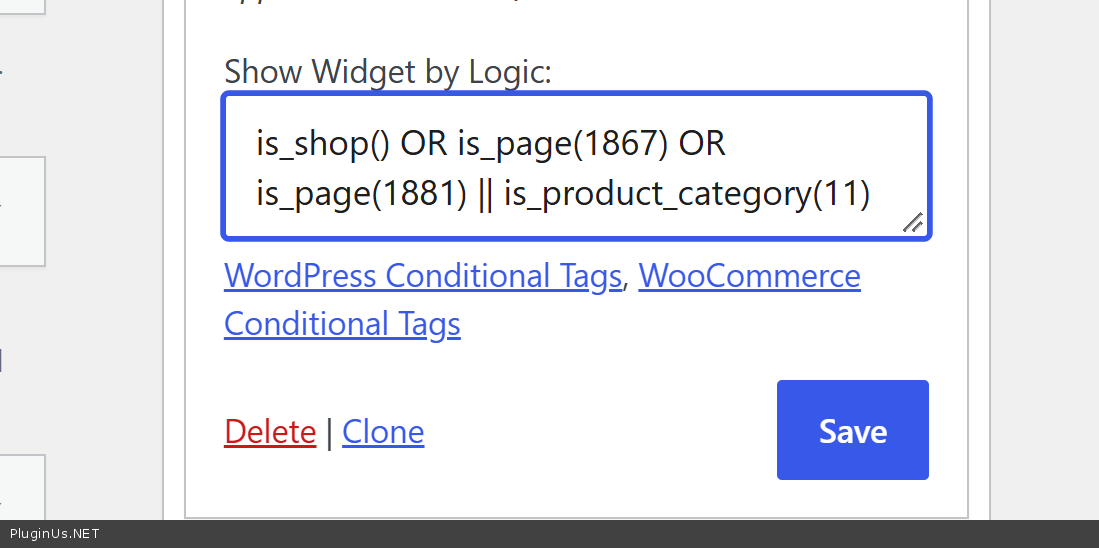
- Install a widget logic plugin. You can use ours, Show Widget by Logic: https://github.com/realmag777/Show-WordPress-Widget-by-Logic
There are also similar plugins on wordpress.org, search for "widget logic". They add a field at the bottom of every widget where you enter a WordPress or WooCommerce conditional tag.- In that field, set the category where the widget should appear. For WooCommerce product categories use is_product_category (not is_category, which only works for blog post categories). You can pass the category ID, the slug, or several of them: is_product_category( 999 ) OR is_product_category( array( 12, 15, 'helmets' ) )
This way each category page gets its own filter, and you decide exactly which one appears where.
Best regards, Alex
Hello Jesper
Great that the first issue is solved.
You can show different filters on different category pages without the WOOF by Category addon. Place several [woof] shortcodes, one per filter set, and let a widget logic plugin decide which one appears on which category.
- Build each filter with the [woof] shortcode attributes, described here: https://products-filter.com/shortcode/woof
The useful ones for this are tax_only (which taxonomies and attributes to show, comma separated, in that order), by_only (which extra filters to show: by_price, by_sku, by_text, by_instock and so on) and tax_exclude (which taxonomies to hide). For example: [woof tax_only='pa_color,pa_size' by_only='by_price']
- Put each shortcode into its own Text widget in the shop sidebar.
- Install a widget logic plugin. You can use ours, Show Widget by Logic: https://github.com/realmag777/Show-WordPress-Widget-by-Logic
There are also similar plugins on wordpress.org, search for"widget logic". They add a field at the bottom of every widget where you enter a WordPress or WooCommerce conditional tag. - In that field, set the category where the widget should appear. For WooCommerce product categories use is_product_category (not is_category, which only works for blog post categories). You can pass the category ID, the slug, or several of them: is_product_category( 999 ) OR is_product_category( array( 12, 15, 'helmets' ) )
This way each category page gets its own filter, and you decide exactly which one appears where.
Best regards, Alex