
Search
The support doesn work on Saturdays and Sundays, so some Friday requests can be answered on Monday. If you have problems with registration ask help on contact us page pleaseIf you not got email within 24~36 business hours, firstly check your spam box, and if no any email from the support there - back to the forum and read answer here. DO NOT ANSWER ON EMAILS [noreply@pluginus.net] FROM THE FORUM!! Emails are just for your info, all answers should be published only here.
The support doesn work on Saturdays and Sundays, so some Friday requests can be answered on Monday.


Quote from Scoopy on July 24, 2020, 23:17Unlocked now for Spain
I am in Spain at the moment small world !!
Unlocked now for Spain
I am in Spain at the moment small world !!
Quote from Pablo Borysenco on July 27, 2020, 10:48Hello
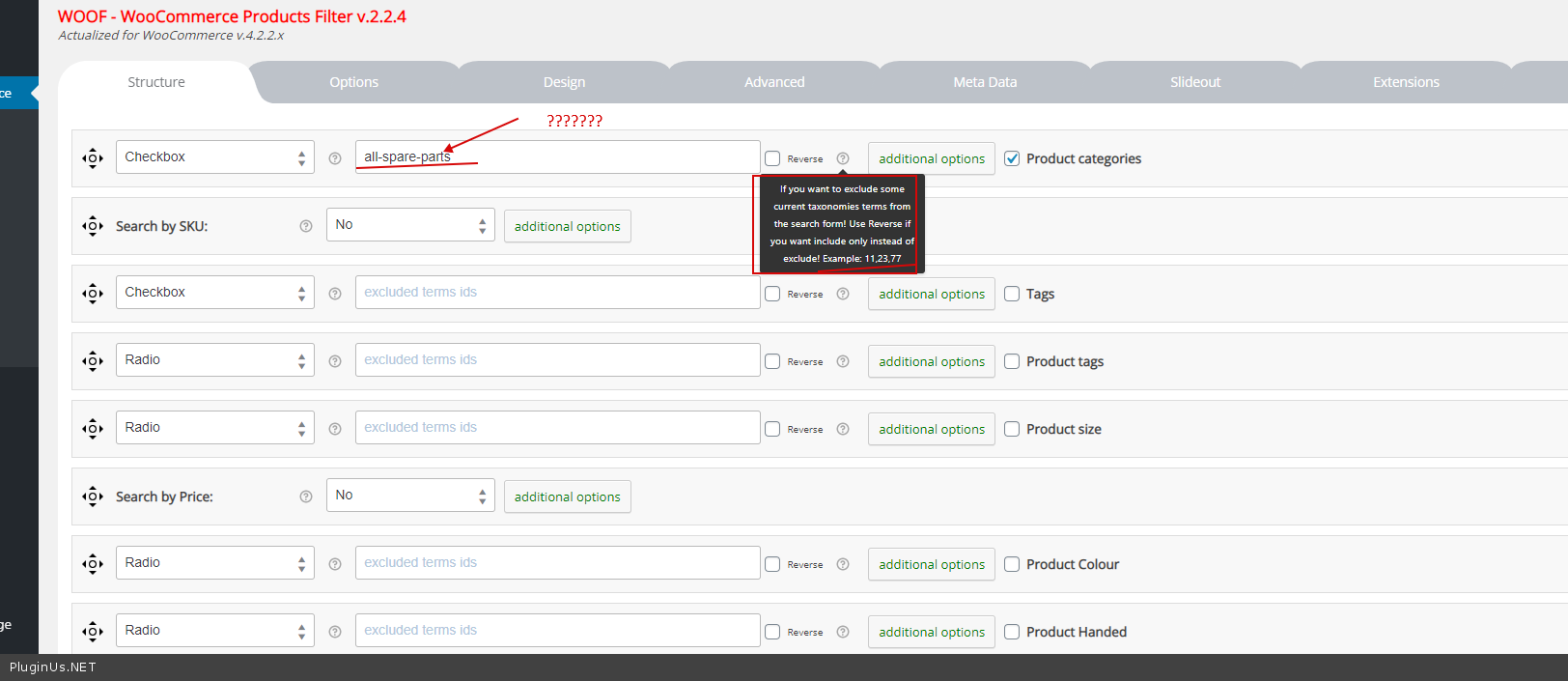
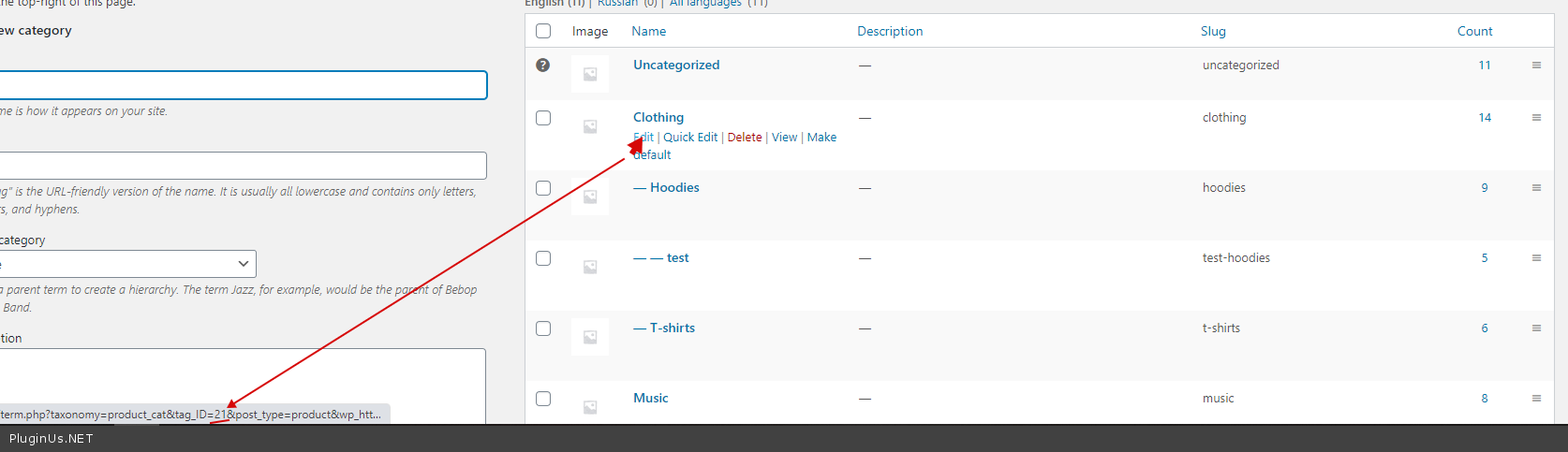
https://c2n.me/48xGahm.png - Please use ID instead of slug - https://c2n.me/48xGl9R.png
Hello
https://c2n.me/48xGahm.png - Please use ID instead of slug - https://c2n.me/48xGl9R.png
Quote from Scoopy on August 3, 2020, 11:44The css you sent removes all the boxes in the search panel - I only need the boxes by the headings .
i.e All Product Ranges, All Collections, All Positions, All Door Types, All Sizes
Regards Dave
The css you sent removes all the boxes in the search panel - I only need the boxes by the headings .
i.e All Product Ranges, All Collections, All Positions, All Door Types, All Sizes
Regards Dave
Quote from Scoopy on August 3, 2020, 11:53I have also added the category ID that I don't want to show in the plugin section and they are still showing?
You have access now can you check I have done this crrect?
Regards Dave
I have also added the category ID that I don't want to show in the plugin section and they are still showing?
You have access now can you check I have done this crrect?
Regards Dave
Quote from Pablo Borysenco on August 4, 2020, 11:58Hello Dave
As I already wrote to you. I'm not a front-end developer. To customize your site, you should hire a CSS developer
I checked your settings - https://c2n.me/48Epcvp.mp4 - everything seems to be working correctly
Hello Dave
As I already wrote to you. I'm not a front-end developer. To customize your site, you should hire a CSS developer
I checked your settings - https://c2n.me/48Epcvp.mp4 - everything seems to be working correctly
Quote from Scoopy on August 4, 2020, 12:37Yes it’s removed From the search side bar but the product category items are still
Yes it’s removed From the search side bar but the product category items are still
Quote from Scoopy on August 4, 2020, 12:42Yes it’s removed From the search side bar but the product category items are still Showing to the rights
see - http://www.kudosspares.co.uk/kudos-spare-parts/
Yes it’s removed From the search side bar but the product category items are still Showing to the rights
Quote from Pablo Borysenco on August 5, 2020, 11:09Hello
items are still Showing to the rights - I do not understand you. Describe the problem in more detail
Hello
items are still Showing to the rights - I do not understand you. Describe the problem in more detail
Quote from Scoopy on August 5, 2020, 12:37The category has gone from the product filter on the side bar which is correct
What’s Wrong
If you go to the site and click the spare parts image it goes to all products which is correct but if you click the reset button all the individual spare parts appear. I don’t, need these to show they need to stay hidden.
The category has gone from the product filter on the side bar which is correct
What’s Wrong
If you go to the site and click the spare parts image it goes to all products which is correct but if you click the reset button all the individual spare parts appear. I don’t, need these to show they need to stay hidden.
Quote from Pablo Borysenco on August 6, 2020, 09:32Hello
Can you make a video with the issue?
Hello
Can you make a video with the issue?
Quote from Scoopy on August 10, 2020, 12:33If you go to the home page
www.kudosspares.co.uk
1. Click the panel/ pic that says spare parts
2. Then reset the search panel
Then all the individual composite spares appear - I don’t want these to show.
I only need theses to show in the main product page
Regards Dave
If you go to the home page
1. Click the panel/ pic that says spare parts
2. Then reset the search panel
Then all the individual composite spares appear - I don’t want these to show.
I only need theses to show in the main product page
Regards Dave
Quote from Pablo Borysenco on August 11, 2020, 10:25Hello Dave
So " pic that says spare parts" - This is a link to a page with a filter parameter
"Then reset the search panel" - The filter removes search parameters
How I checked the filter works correctly.
I only need theses to show in the main product page - In this case, you need customization of the code. I don't have a ready-made solution for you
Hello Dave
So " pic that says spare parts" - This is a link to a page with a filter parameter
"Then reset the search panel" - The filter removes search parameters
How I checked the filter works correctly.
I only need theses to show in the main product page - In this case, you need customization of the code. I don't have a ready-made solution for you