

Removes attribute if change
The support doesn work on Saturdays and Sundays, so some Friday requests can be answered on Monday. If you have problems with registration ask help on contact us page pleaseIf you not got email within 24~36 business hours, firstly check your spam box, and if no any email from the support there - back to the forum and read answer here. DO NOT ANSWER ON EMAILS [noreply@pluginus.net] FROM THE FORUM!! Emails are just for your info, all answers should be published only here.
The support doesn work on Saturdays and Sundays, so some Friday requests can be answered on Monday.

Quote from Andersberra on January 19, 2022, 11:57Hi I have some cash issue with attributes and only on one attribute. IF I update it in bulk Edit or with binded editing it updates the other ones but not the one I am currently editing.
Could you please help? "UTFÖRANDE" is the attribute the other ones works just fine.?
Hi I have some cash issue with attributes and only on one attribute. IF I update it in bulk Edit or with binded editing it updates the other ones but not the one I am currently editing.
Could you please help?"UTFÖRANDE" is the attribute the other ones works just fine.?

Quote from Andersberra on January 19, 2022, 12:04Updated creds
Updated creds

Quote from Pablo Borysenco on January 19, 2022, 14:56Hello
Have you renamed this attribute in the settings?
I can't find it "UTFÖRANDE" in settings
Hello
Have you renamed this attribute in the settings?
I can't find it"UTFÖRANDE" in settings
Quote from Andersberra on January 19, 2022, 15:01Well i guess.?
The taxamony is "pa_diskho-stilar"
Well i guess.?
The taxamony is"pa_diskho-stilar"
Quote from Pablo Borysenco on January 20, 2022, 10:43Hello
I did a test - https://c2n.me/4eF8rbT - it looks like it works
Hello
I did a test - https://c2n.me/4eF8rbT - it looks like it works
Quote from Andersberra on January 24, 2022, 09:29Sorry for long time answer I was sick in Corona. :(
When I refresh the page it removes the changes.?
I have updated with an video whamlink. in the private area.
Sorry for long time answer I was sick in Corona. :(
When I refresh the page it removes the changes.?
I have updated with an video whamlink. in the private area.
Quote from Pablo Borysenco on January 24, 2022, 11:59Hello
Please clear all cache and drop me ftp access - https://share.pluginus.net/image/i20210618130558.png ->https://share.pluginus.net/image/i20210618130637.png
Hello
Please clear all cache and drop me ftp access - https://share.pluginus.net/image/i20210618130558.png ->https://share.pluginus.net/image/i20210618130637.png


Quote from Andersberra on January 24, 2022, 12:05Sorry I dont have access to the FTP.
OKAY so it´s with my useraccount? When I log in as a diffrent user it works.? =)
Edit: Nope tried again it does´nt work with that user annymore either.?
Sorry I dont have access to the FTP.
OKAY so it´s with my useraccount? When I log in as a diffrent user it works.? =)
Edit: Nope tried again it does´nt work with that user annymore either.?
Quote from Pablo Borysenco on January 25, 2022, 10:58Hello
Are you using server side caching?
Hello
Are you using server side caching?
Quote from Andersberra on January 25, 2022, 11:19It should be inactive but I am not able to reach the host at the moment.
But you think it's a cache problem?
It should be inactive but I am not able to reach the host at the moment.
But you think it's a cache problem?
Quote from Pablo Borysenco on January 25, 2022, 14:11Yes it is possible. I remember exactly that after my changes it worked on your site.
And now I can not find other reasons for this behavior.
Yes it is possible. I remember exactly that after my changes it worked on your site.
And now I can not find other reasons for this behavior.
Quote from Andersberra on January 25, 2022, 14:17Strange that the other attribute's work just fine?
Thanks for looking in to it Pablo =) Great support!
Ill try to replace the attribute.
Strange that the other attribute's work just fine?
Thanks for looking in to it Pablo =) Great support!
Ill try to replace the attribute.
Quote from Andersberra on January 25, 2022, 15:00ISSUE SOLVED. I went to WP SUPERcache and reset the settings now it works as it should =) Just deactivate it did'nt help.
ISSUE SOLVED. I went to WP SUPERcache and reset the settings now it works as it should =) Just deactivate it did'nt help.
Quote from Pablo Borysenco on January 26, 2022, 10:39Hello
oK! Great!
Hello
oK! Great!
Quote from Andersberra on January 26, 2022, 12:37OK now I know it's when updating the attribute.
If there is no attribute it works perfectly. But if there already is one then it reset it and leave it without.
OK now I know it's when updating the attribute.
If there is no attribute it works perfectly. But if there already is one then it reset it and leave it without.
Quote from Pablo Borysenco on January 26, 2022, 14:09Please add FTP access - https://share.pluginus.net/image/i20210618130558.png ->https://share.pluginus.net/image/i20210618130637.png
Please add FTP access - https://share.pluginus.net/image/i20210618130558.png ->https://share.pluginus.net/image/i20210618130637.png
Quote from Andersberra on January 26, 2022, 14:26OK now I made a new installation locally on my computer there I had an older version of BEAR 2,8? I tried update the attribute there and it workt perfect. After Update to Version 2,9. The same issue in my sandbox inviroment.
So it's some changes from 2,8 to 2,9 that makes this issue.?
OK now I made a new installation locally on my computer there I had an older version of BEAR 2,8? I tried update the attribute there and it workt perfect. After Update to Version 2,9. The same issue in my sandbox inviroment.
So it's some changes from 2,8 to 2,9 that makes this issue.?
Quote from Pablo Borysenco on January 27, 2022, 10:53Hello
Yes, and I fixed it on your site. but it doesn't seem to work due to caching
Try to install on your test site V2.9 and in file - \wp-content\plugins\woocommerce-bulk-editor\classes\models\products.php - change code - https://c2n.me/4eJPJis.png
}else{
$attribute->set_variation(false);
}clear all cache and do a test
Hello
Yes, and I fixed it on your site. but it doesn't seem to work due to caching
Try to install on your test site V2.9 and in file - \wp-content\plugins\woocommerce-bulk-editor\classes\models\products.php - change code - https://c2n.me/4eJPJis.png
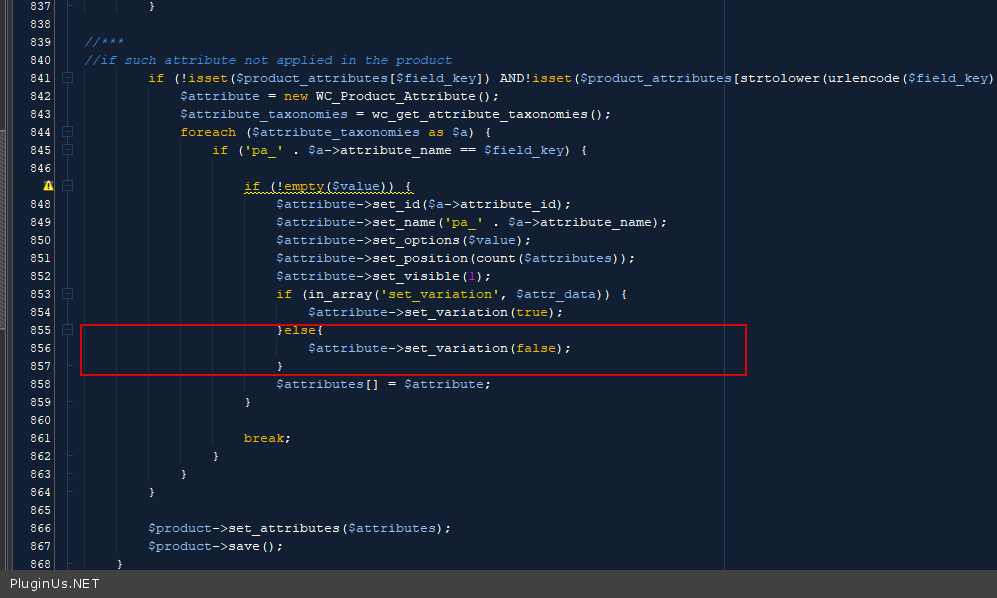
}else{
$attribute->set_variation(false);
}
clear all cache and do a test
Quote from Andersberra on January 27, 2022, 11:05OK I will check it out if there will be time. For now I use the older version. IT works perfectly for mer
OK I will check it out if there will be time. For now I use the older version. IT works perfectly for mer