

Quantity input field on separate td
The support doesn work on Saturdays and Sundays, so some Friday requests can be answered on Monday. If you have problems with registration ask help on contact us page pleaseIf you not got email within 24~36 business hours, firstly check your spam box, and if no any email from the support there - back to the forum and read answer here. DO NOT ANSWER ON EMAILS [noreply@pluginus.net] FROM THE FORUM!! Emails are just for your info, all answers should be published only here.
The support doesn work on Saturdays and Sundays, so some Friday requests can be answered on Monday.

Quote from shrinivas on October 31, 2020, 09:16Hello,
Thank you for your awesome support!
currently, i can see qty input and add to cart on same <td>
I need QTY in separate td
I used the below code snipet
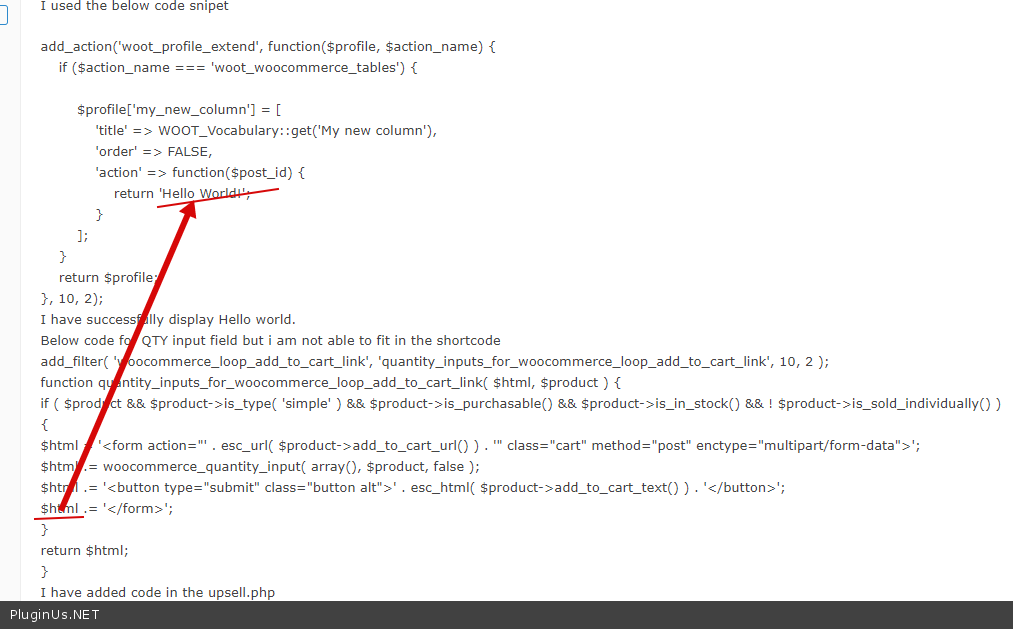
add_action('woot_profile_extend', function($profile, $action_name) {if ($action_name === 'woot_woocommerce_tables') {$profile['my_new_column'] = ['title' => WOOT_Vocabulary::get('My new column'),'order' => FALSE,'action' => function($post_id) {return 'Hello World!';}];}return $profile;}, 10, 2);I have successfully display Hello world.Below code for QTY input field but i am not able to fit in the shortcodeadd_filter( 'woocommerce_loop_add_to_cart_link', 'quantity_inputs_for_woocommerce_loop_add_to_cart_link', 10, 2 );
function quantity_inputs_for_woocommerce_loop_add_to_cart_link( $html, $product ) {
if ( $product && $product->is_type( 'simple' ) && $product->is_purchasable() && $product->is_in_stock() && ! $product->is_sold_individually() ) {
$html = '<form action="' . esc_url( $product->add_to_cart_url() ) . '" class="cart" method="post" enctype="multipart/form-data">';
$html .= woocommerce_quantity_input( array(), $product, false );
$html .= '<button type="submit" class="button alt">' . esc_html( $product->add_to_cart_text() ) . '</button>';
$html .= '</form>';
}
return $html;
}I have added code in the upsell.phpdo_shortcode('[woot_upsells columns="title,post_content,my_new_column,stock_quantity,price,add_to_cart" skin="skin-4" id= 10 ]') ;?>Please help me out!Thank you
Hello,
Thank you for your awesome support!
currently, i can see qty input and add to cart on same <td>
I need QTY in separate td
I used the below code snipet
function quantity_inputs_for_woocommerce_loop_add_to_cart_link( $html, $product ) {
if ( $product && $product->is_type( 'simple' ) && $product->is_purchasable() && $product->is_in_stock() && ! $product->is_sold_individually() ) {
$html = '<form action="' . esc_url( $product->add_to_cart_url() ) . '" class="cart" method="post" enctype="multipart/form-data">';
$html .= woocommerce_quantity_input( array(), $product, false );
$html .= '<button type="submit" class="button alt">' . esc_html( $product->add_to_cart_text() ) . '</button>';
$html .= '</form>';
}
return $html;
}

Quote from Pablo Borysenco on November 2, 2020, 12:56Hello
I do not understand you
If you need show QTY - display it here - https://c2n.me/49Fbxde.png
To get QTY - woocommerce_quantity_input( array(), $product, false );
To get $product - wc_get_product($post_id)
Hello
I do not understand you
If you need show QTY - display it here - https://c2n.me/49Fbxde.png
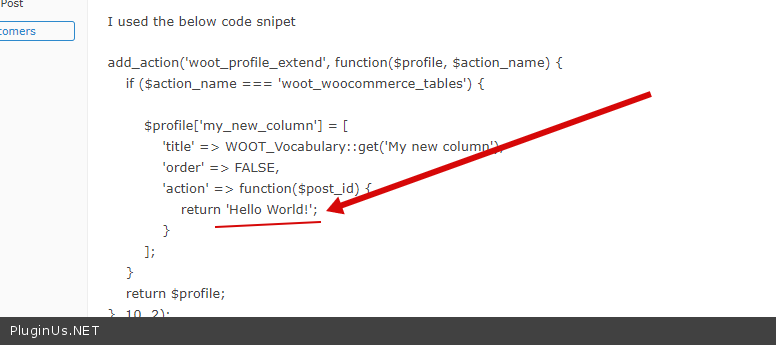
To get QTY - woocommerce_quantity_input( array(), $product, false );
To get $product - wc_get_product($post_id)
Quote from shrinivas on November 2, 2020, 20:31Hello,
Thank you for your quick response!
I am looking upsell product items in below table fashion.
https://ibb.co/8dDPqHy
I hope It gives clarity.
Thank you
Hello,
Thank you for your quick response!
I am looking upsell product items in below table fashion.
I hope It gives clarity.
Thank you
Quote from Pablo Borysenco on November 3, 2020, 11:47Hello
Ok! I understood that! I gave you all the information from the side of this plugin.
how to add content to a column - just pass a string - https://c2n.me/49G23pS.png
Hello
Ok! I understood that! I gave you all the information from the side of this plugin.
how to add content to a column - just pass a string - https://c2n.me/49G23pS.png
Quote from shrinivas on December 2, 2020, 22:35Hello ,
Recently i have purchased the script. I have followed your suggestions but the quantity is not working as expected.
Ajax issue and If i select quantity 3, it takes 1 default.
Please help me out.
code in functions.php
add_action('woot_profile_extend', function($profile, $action_name) {
if ($action_name === 'woot_woocommerce_tables') {
$profile['quantity'] = [
'title' => WOOT_Vocabulary::get('Qty'),
'order' => FALSE,
'action' => function($post_id) {
return woocommerce_quantity_input( array(), $product, false );
}
];
}return $profile;
}, 10, 2);Thank you
Hello ,
Recently i have purchased the script. I have followed your suggestions but the quantity is not working as expected.
Ajax issue and If i select quantity 3, it takes 1 default.
Please help me out.
code in functions.php
add_action('woot_profile_extend', function($profile, $action_name) {
if ($action_name === 'woot_woocommerce_tables') {
$profile['quantity'] = [
'title' => WOOT_Vocabulary::get('Qty'),
'order' => FALSE,
'action' => function($post_id) {
return woocommerce_quantity_input( array(), $product, false );
}
];
}
return $profile;
}, 10, 2);
Thank you
Quote from shrinivas on December 2, 2020, 22:38Sorry i missed url
https://druvakarthik.in/demo/nexcomm-asia/product/4g-transmitter-3/
Thank you
Sorry i missed url
https://druvakarthik.in/demo/nexcomm-asia/product/4g-transmitter-3/
Thank you
Quote from Pablo Borysenco on December 3, 2020, 14:06Hello
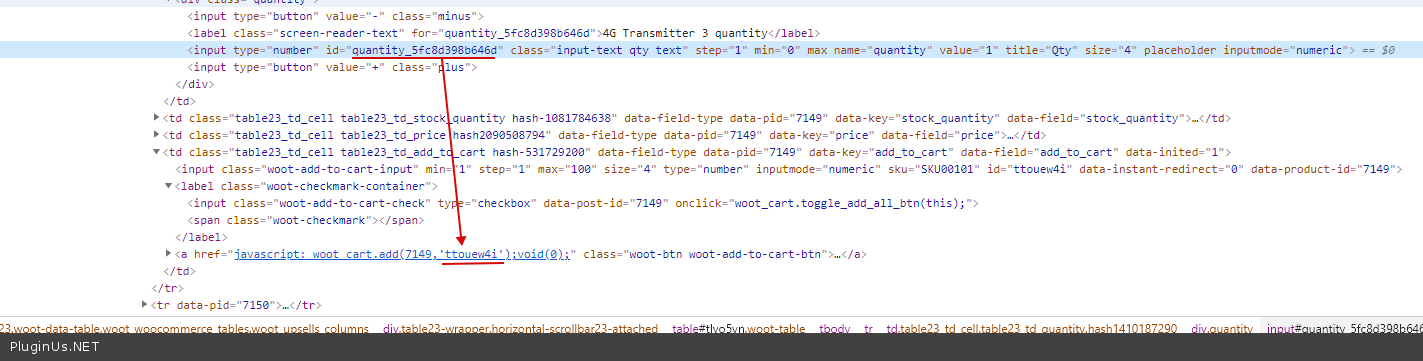
Ok! You need JS customization
https://c2n.me/4a4LdR6.png - you need ID sync for this to work
Hello
Ok! You need JS customization
https://c2n.me/4a4LdR6.png - you need ID sync for this to work
Quote from shrinivas on December 3, 2020, 15:20Hello
Thank you for quick respone.
I thought after buying premium script its works. Do you have a code snippet for this so I can add it in functions.php and make it work?
Thank you
Hello
Thank you for quick respone.
I thought after buying premium script its works. Do you have a code snippet for this so I can add it in functions.php and make it work?
Thank you
Quote from shrinivas on December 3, 2020, 15:27If i make a quantity of more than 1, only 1 updates to the cart
https://ibb.co/QjQLJcq
If i make a quantity of more than 1, only 1 updates to the cart
Quote from Pablo Borysenco on December 4, 2020, 14:11Hello
I thought after buying premium script its works. - ??? If your custom code doesn't work, then buying a plugin won't change anything. Unfortunately I don't have a ready-made solution for you. If you have no experience in programming, you should hire a developer
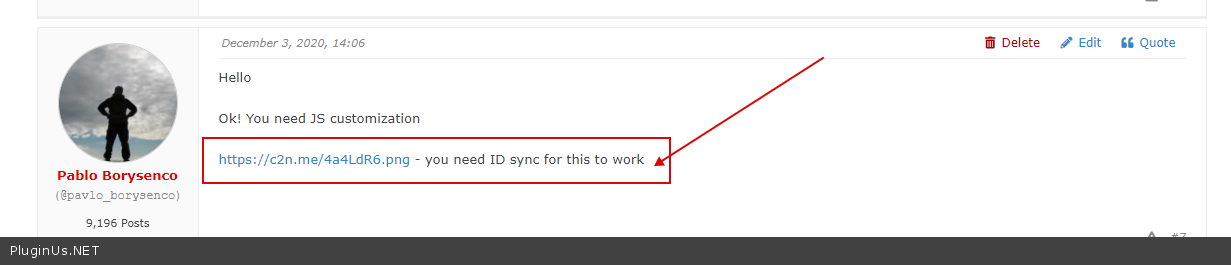
I told you the right way - https://c2n.me/4a5KaY3.png for this to work you need the same values here - https://c2n.me/4a4LdR6.png
Hello
I thought after buying premium script its works. - ??? If your custom code doesn't work, then buying a plugin won't change anything. Unfortunately I don't have a ready-made solution for you. If you have no experience in programming, you should hire a developer
I told you the right way - https://c2n.me/4a5KaY3.png for this to work you need the same values here - https://c2n.me/4a4LdR6.png
Quote from shrinivas on December 4, 2020, 21:27Hello,
Thank you
I mean to say, Primium script has extra features and it does my job easy. That's it.
I have a bit of coding knowledge, could you please share some reference links so i can try out.
Thank you
Hello,
Thank you
I mean to say, Primium script has extra features and it does my job easy. That's it.
I have a bit of coding knowledge, could you please share some reference links so i can try out.
Thank you
Quote from shrinivas on December 5, 2020, 07:09Hello Author,
Need to customize woocommerce.js file
Can you get it done custom work? if yes, please give pricing. you know the code flow from scratch.
Thank you
Hello Author,
Need to customize woocommerce.js file
Can you get it done custom work? if yes, please give pricing. you know the code flow from scratch.
Thank you
Quote from Pablo Borysenco on December 7, 2020, 13:47Hello
Need to customize woocommerce.js file - I do not know. need to investigate this
Better make a JS custom code that will change this value
An example:
var id = jQuery('#woot-add-to-cart-input').attr('id')
jQuery('Your_input').attr('id',id)
Can you get it done custom work? - Unfortunately we don't have time for custom tasks.
Hello
Need to customize woocommerce.js file - I do not know. need to investigate this
Better make a JS custom code that will change this value
An example:
var id = jQuery('#woot-add-to-cart-input').attr('id')
jQuery('Your_input').attr('id',id)
Can you get it done custom work? - Unfortunately we don't have time for custom tasks.
Quote from shrinivas on December 13, 2020, 20:47Hello
Thank you.
My last query.
When i click on add to cart Header cart not getting updating. I am using woodmart theme.
Reference url https://druvakarthik.in/demo/nexcomm-asia/product/4g-transmitter-3/
Thank you
Hello
Thank you.
My last query.
When i click on add to cart Header cart not getting updating. I am using woodmart theme.
Reference url https://druvakarthik.in/demo/nexcomm-asia/product/4g-transmitter-3/
Thank you
Quote from Pablo Borysenco on December 14, 2020, 19:35Hello
Try in file - \wp-content\plugins\woot-products-tables\profiles\woocommerce\js\woocommerce-cart.js - add code - https://c2n.me/4adWhxy.png
jQuery(document.body).trigger('wc_fragment_refresh');
Hello
Try in file - \wp-content\plugins\woot-products-tables\profiles\woocommerce\js\woocommerce-cart.js - add code - https://c2n.me/4adWhxy.png
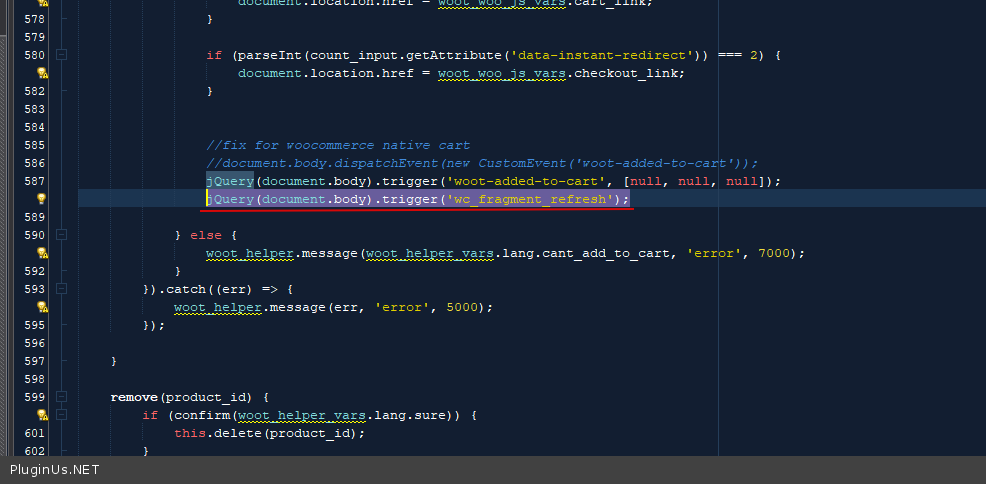
jQuery(document.body).trigger('wc_fragment_refresh');