

PRODUCTS AREN'T BEING SHOWN IN FILTER
The support doesn work on Saturdays and Sundays, so some Friday requests can be answered on Monday. If you have problems with registration ask help on contact us page pleaseIf you not got email within 24~36 business hours, firstly check your spam box, and if no any email from the support there - back to the forum and read answer here. DO NOT ANSWER ON EMAILS [noreply@pluginus.net] FROM THE FORUM!! Emails are just for your info, all answers should be published only here.
The support doesn work on Saturdays and Sundays, so some Friday requests can be answered on Monday.

Quote from Vyctor on September 27, 2021, 23:47Filtering by size, eventhoug the product has the size avaliable, isn't being shown
the options "in stock" that seek at variations is activated.
see these pictures ->> https://ibb.co/VMpjwx6
https://ibb.co/FmR5t5r
Filtering by size, eventhoug the product has the size avaliable, isn't being shown
the options"in stock" that seek at variations is activated.
see these pictures ->> https://ibb.co/VMpjwx6
https://ibb.co/FmR5t5r

Quote from Pablo Borysenco on September 28, 2021, 12:25Hello Vyctor
Please drop me exact link to the issue
and wp-admin access - https://share.pluginus.net/image/i20210618130558.png ->https://share.pluginus.net/image/i20210618130637.png
Hello Vyctor
Please drop me exact link to the issue
and wp-admin access - https://share.pluginus.net/image/i20210618130558.png ->https://share.pluginus.net/image/i20210618130637.png


Quote from Vyctor on September 28, 2021, 13:56
https://lojav2a.com.br/categoria-produto/masculino/calcado/slip-on/?swoof=1&stock=instock&pa_tamanho=tamanho_40&really_curr_tax=197-product_cat ->>> link with filter by size "40" and category "Slip On"
if you see these products ->> https://lojav2a.com.br/produto/slip-on-np-eco-camdaik/
https://lojav2a.com.br/produto/slip-on-np-confort-tric/
https://lojav2a.com.br/produto/slip-on-jeans-camdaik/these products are from category slip on and have size 40 available but aren't shown as result.
https://lojav2a.com.br/categoria-produto/masculino/calcado/slip-on/?swoof=1&stock=instock&pa_tamanho=tamanho_40&really_curr_tax=197-product_cat ->>> link with filter by size"40" and category"Slip On"
if you see these products ->> https://lojav2a.com.br/produto/slip-on-np-eco-camdaik/
https://lojav2a.com.br/produto/slip-on-np-confort-tric/
https://lojav2a.com.br/produto/slip-on-jeans-camdaik/
these products are from category slip on and have size 40 available but aren't shown as result.
Quote from Pablo Borysenco on September 29, 2021, 12:04Hello
each of these products has a variant: Size 40 and out of stock - https://c2n.me/4duBruQ.png https://share.pluginus.net/image/i20210929130100.png https://share.pluginus.net/image/i20210929130124.png
The filter sees that the product is out of stock and excludes the parent product. If you add a search by color to a query, the products will appear
Hello
each of these products has a variant: Size 40 and out of stock - https://c2n.me/4duBruQ.png https://share.pluginus.net/image/i20210929130100.png https://share.pluginus.net/image/i20210929130124.png
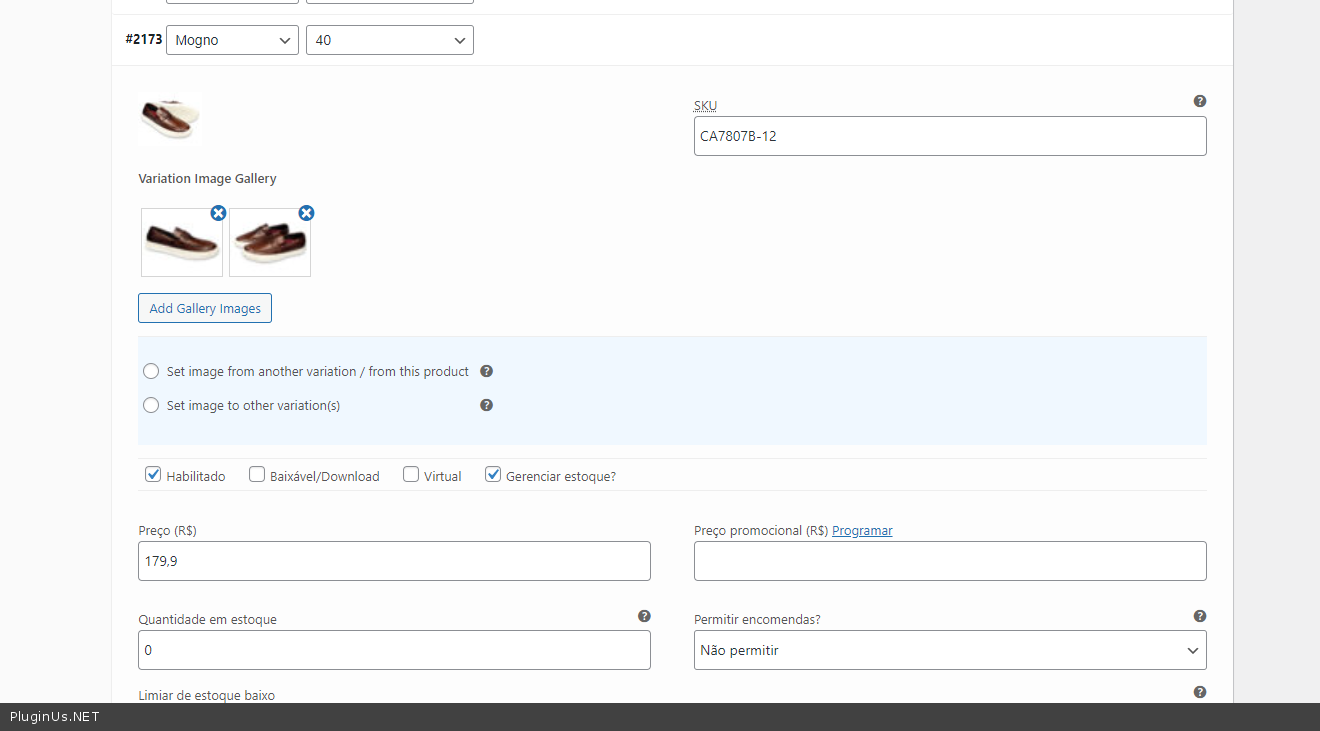


The filter sees that the product is out of stock and excludes the parent product. If you add a search by color to a query, the products will appear
Quote from Vyctor on September 29, 2021, 17:13But the variant product in color black isn't out of stock.
If i keep this way, the costumer won't see the product eventhough it's available
Is there a way to make filter seek in color variation too?
But the variant product in color black isn't out of stock.
If i keep this way, the costumer won't see the product eventhough it's available
Is there a way to make filter seek in color variation too?
Quote from Vyctor on September 29, 2021, 17:48whats i don't understand is why this product isn't shown since size 40 is in stock for color black
Its intuitive for costumers to show all options. don't you think?
whats i don't understand is why this product isn't shown since size 40 is in stock for color black
Its intuitive for costumers to show all options. don't you think?
Quote from Pablo Borysenco on September 30, 2021, 11:24Hello
Please try this link - https://lojav2a.com.br/categoria-produto/masculino/calcado/slip-on/?swoof=1&stock=instock&pa_tamanho=tamanho_40&pa_cor=cor_preto&really_curr_tax=197-product_cat
I will describe the search logic in a little more detail:
There is a request for variations that have the specified attributes and are not in stock. An example: Size 42 + out of stock
And if such a variant exists - the filter excludes the parent product from the main search query
the problem is that each variant can have from one to hundreds of attributes. And creating a request from all possible combinations is extremely unreasonable.
Hello
Please try this link - https://lojav2a.com.br/categoria-produto/masculino/calcado/slip-on/?swoof=1&stock=instock&pa_tamanho=tamanho_40&pa_cor=cor_preto&really_curr_tax=197-product_cat
I will describe the search logic in a little more detail:
There is a request for variations that have the specified attributes and are not in stock. An example: Size 42 + out of stock
And if such a variant exists - the filter excludes the parent product from the main search query
the problem is that each variant can have from one to hundreds of attributes. And creating a request from all possible combinations is extremely unreasonable.
Quote from Vyctor on September 30, 2021, 14:03thanks for your care trying to explain and i got it.
But i'd really appreciate woof to look all variations. Is there a way to do it?
Because if the costumer look for size 40, this product won't be found --> https://lojav2a.com.br/produto/slip-on-np-eco-camdaik/
https://lojav2a.com.br/produto/slip-on-np-confort-tric/but this product is in stock for number 40
thanks for your care trying to explain and i got it.
But i'd really appreciate woof to look all variations. Is there a way to do it?
Because if the costumer look for size 40, this product won't be found --> https://lojav2a.com.br/produto/slip-on-np-eco-camdaik/
https://lojav2a.com.br/produto/slip-on-np-confort-tric/
but this product is in stock for number 40
Quote from Pablo Borysenco on October 1, 2021, 12:31Hello
but this product is in stock for number 40 - Yes! Same way the product is out of stock for number 40 - https://share.pluginus.net/image/i20211001132217.png
I understand you. But we are technically dependent on the database structure
Is there a way to do it? - I can pass it to the developer. And in the best case (perfect solution) one query is added to the database for each product. And this will double the load on the server.
Hello
but this product is in stock for number 40 - Yes! Same way the product is out of stock for number 40 - https://share.pluginus.net/image/i20211001132217.png

I understand you. But we are technically dependent on the database structure
Is there a way to do it? - I can pass it to the developer. And in the best case (perfect solution) one query is added to the database for each product. And this will double the load on the server.
Quote from Vyctor on October 1, 2021, 13:39I can pass it to the developer. - Try it please. Let's see how it works. We don't have many products variations and we can improve our host service if need.
I can pass it to the developer. - Try it please. Let's see how it works. We don't have many products variations and we can improve our host service if need.
Quote from Pablo Borysenco on October 4, 2021, 11:08Hello
I passed it to the developer
I will write to you as soon as we get the result
Hello
I passed it to the developer
I will write to you as soon as we get the result
Quote from Pablo Borysenco on October 5, 2021, 18:35Hello
Try in file - wp-content\plugins\woocommerce-products-filter\ext\by_instock\index.php
add this code - https://share.pluginus.net/image/i20211005193423.png
foreach($args['meta_query'] as $key=>$data){
if(isset($data['key']) AND $data['key'] == '_stock_status'){
$args['meta_query'][$key]['value'] = 'instock';
}
}
$query_excl = new WP_Query($args);
if ($query_excl->have_posts()) {
foreach ($query_excl->posts as $p) {
if(isset($products[$p->post_parent])){
unset($products[$p->post_parent]);
}
}
}And do a test
Hello
Try in file - wp-content\plugins\woocommerce-products-filter\ext\by_instock\index.php
add this code - https://share.pluginus.net/image/i20211005193423.png

foreach($args['meta_query'] as $key=>$data){
if(isset($data['key']) AND $data['key'] == '_stock_status'){
$args['meta_query'][$key]['value'] = 'instock';
}
}
$query_excl = new WP_Query($args);
if ($query_excl->have_posts()) {
foreach ($query_excl->posts as $p) {
if(isset($products[$p->post_parent])){
unset($products[$p->post_parent]);
}
}
}
And do a test
Quote from Vyctor on October 6, 2021, 02:11Hey there! The image https://share.pluginus.net/image/i20211005193423.png can't load
Hey there! The image https://share.pluginus.net/image/i20211005193423.png can't load
Quote from Vyctor on October 6, 2021, 02:19I probably put the code at the wrong place. nothing happened
I probably put the code at the wrong place. nothing happened
Quote from Pablo Borysenco on October 6, 2021, 11:17Hello
add this code in line - 187
and drop me a screenshot with this code
Hello
add this code in line - 187
and drop me a screenshot with this code
Quote from Vyctor on October 6, 2021, 15:36Screenshot ->>> https://ibb.co/q5MnF8g
Screenshot ->>> https://ibb.co/q5MnF8g
Quote from Vyctor on October 6, 2021, 15:44after puting code, filter didin't change
after puting code, filter didin't change
Quote from Pablo Borysenco on October 7, 2021, 11:14Hello
Yes, you inserted the code in the wrong place
Insert the code a little higher before the line:
$product_ids = implode(',', $products);
Hello
Yes, you inserted the code in the wrong place
Insert the code a little higher before the line:
$product_ids = implode(',', $products);Quote from Vyctor on October 7, 2021, 13:50It worked!! You was very helpfull. thankyou bro
It worked!! You was very helpfull. thankyou bro
Quote from Pablo Borysenco on October 8, 2021, 12:24Hello
Ok! Great
Stay tuned for the plugin update, maybe we will connect this code using a hook
Welcome;)
Hello
Ok! Great
Stay tuned for the plugin update, maybe we will connect this code using a hook
Welcome;)