

Price Range Displays Incorrect Values for Variable Products
The support doesn work on Saturdays and Sundays, so some Friday requests can be answered on Monday. If you have problems with registration ask help on contact us page pleaseIf you not got email within 24~36 business hours, firstly check your spam box, and if no any email from the support there - back to the forum and read answer here. DO NOT ANSWER ON EMAILS [noreply@pluginus.net] FROM THE FORUM!! Emails are just for your info, all answers should be published only here.
The support doesn work on Saturdays and Sundays, so some Friday requests can be answered on Monday.

Quote from Ihor on February 7, 2026, 10:25Hello,
I am experiencing an issue with the price range display for variable products when using FOX – Currency Switcher Professional for WooCommerce.
My setup is the following:
- Product prices are entered in EUR.
- On the frontend, prices are converted and displayed in UAH according to the exchange rate.
- Prices are shown without decimals (rounded to whole numbers).
For a variable product, the general price range is displayed as:
5 356 грн. – 53 976 грн.However, after selecting a specific variation, the displayed price becomes:
5 350 грн. or 54 000 грн. depending on the chosen variation.So the price shown after selecting a variation is correct, but the price range shown before selection is slightly different and does not match the actual converted and rounded prices. (https://prnt.sc/N6HBJKWZnAP1)
Could you please clarify:
- Why does the plugin calculate and display different values in the price range compared to the final variation price?
- Is there a way to make the range use the same rounding and conversion logic as the selected variation price?
Thank you in advance for your help.
P.S. - I switched to the default theme, disabled plugins, turned off caching, and tested on another site (https://prnt.sc/otaD5LfomtMZ) with the same prices — the issue remains the same. Nothing helps. I contacted the plugin support forum on WordPress, and they advised me to write here.
Hello,
I am experiencing an issue with the price range display for variable products when using FOX – Currency Switcher Professional for WooCommerce.
My setup is the following:
- Product prices are entered in EUR.
- On the frontend, prices are converted and displayed in UAH according to the exchange rate.
- Prices are shown without decimals (rounded to whole numbers).
For a variable product, the general price range is displayed as:
5 356 грн. – 53 976 грн.
However, after selecting a specific variation, the displayed price becomes:
5 350 грн. or 54 000 грн. depending on the chosen variation.
So the price shown after selecting a variation is correct, but the price range shown before selection is slightly different and does not match the actual converted and rounded prices. (https://prnt.sc/N6HBJKWZnAP1)
Could you please clarify:
- Why does the plugin calculate and display different values in the price range compared to the final variation price?
- Is there a way to make the range use the same rounding and conversion logic as the selected variation price?
Thank you in advance for your help.
P.S. - I switched to the default theme, disabled plugins, turned off caching, and tested on another site (https://prnt.sc/otaD5LfomtMZ) with the same prices — the issue remains the same. Nothing helps. I contacted the plugin support forum on WordPress, and they advised me to write here.

Quote from Alex Dovlatov on February 9, 2026, 13:07Hello Ihor
According to this ticket https://wordpress.org/support/topic/price-range-displays-incorrect-values-for-variable-products/ you already did that what could be advised, so share please in the private area of this ticket wp-admin + ftp access to this or stage (better stage site) to make code tests
Stage site can bre creates on test subdomain on the same hosting using https://wordpress.org/plugins/duplicator/, you can create site without images if its weight a lot
https://share.pluginus.net/image/i20230222134241.png
https://share.pluginus.net/image/i20230222134615.png
Hello Ihor
According to this ticket https://wordpress.org/support/topic/price-range-displays-incorrect-values-for-variable-products/ you already did that what could be advised, so share please in the private area of this ticket wp-admin + ftp access to this or stage (better stage site) to make code tests
Stage site can bre creates on test subdomain on the same hosting using https://wordpress.org/plugins/duplicator/, you can create site without images if its weight a lot
https://share.pluginus.net/image/i20230222134241.png
https://share.pluginus.net/image/i20230222134615.png


Quote from Ihor on February 9, 2026, 13:23Wrote in private message
Wrote in private message
Quote from Alex Dovlatov on February 10, 2026, 17:58Hello Ihor
Just looked your site - its alive one. Can you please create stage site to avoid site breaking. I am going to disable all plugins and change wp theme there, also do some experiments with data base, it can broke the site. If you have back up and give us green light we will do our experiments on the site you provided
Clone of the site can be created by duplicator plugin https://wordpress.org/plugins/duplicator/ - you can exclude images there to make it more light, we not need medias
So tell us please your decision
Hello Ihor
Just looked your site - its alive one. Can you please create stage site to avoid site breaking. I am going to disable all plugins and change wp theme there, also do some experiments with data base, it can broke the site. If you have back up and give us green light we will do our experiments on the site you provided
Clone of the site can be created by duplicator plugin https://wordpress.org/plugins/duplicator/ - you can exclude images there to make it more light, we not need medias
So tell us please your decision
Quote from Ihor on February 11, 2026, 10:52https://test.hydrohub.com.ua/ — a website for testing. The access credentials are the same.
https://test.hydrohub.com.ua/ — a website for testing. The access credentials are the same.
Quote from Alex Dovlatov on February 11, 2026, 13:34Hello Ihor
I've identified and resolved the issue. The problem was not with FOX's rounding logic (which is working correctly), but with incorrect variation prices stored in the database.
What I Did
- ✅ Disabled all plugins except essential ones - issue persisted
- ✅ Switched to default Storefront theme - issue persisted
- ✅ Disabled all caching plugins - issue persisted
- ✅ Checked the product data at:
https://test.hydrohub.com.ua/wp-admin/post.php?post=44685&action=edit- ✅ Simply clicked the "Update" button on the product page
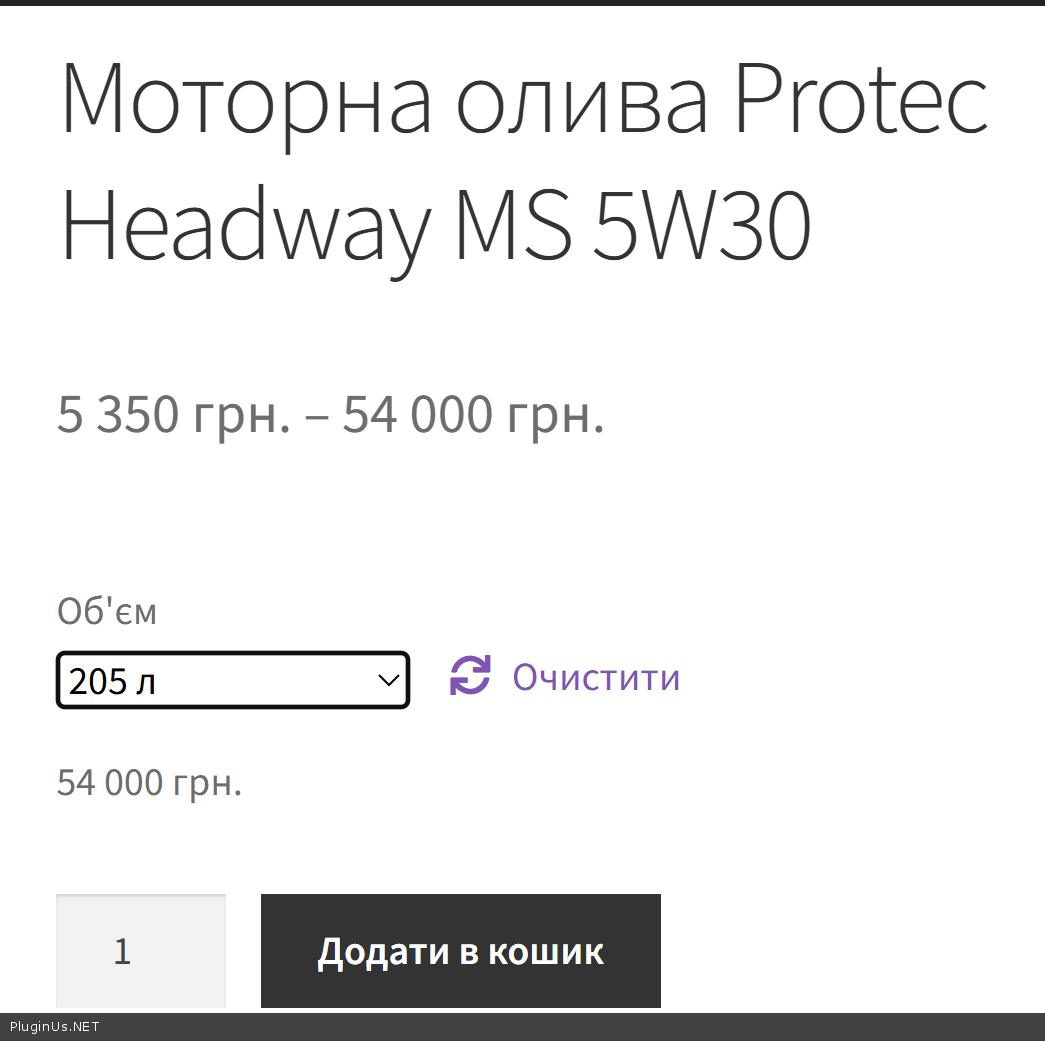
Result: Everything is now synchronized correctly:
- https://c2n.me/4nFJS9c.png
- https://c2n.me/4nFJSq4.png
- Live product: https://test.hydrohub.com.ua/katalog/mastyla/motorni-olyvy/motorna-olyva-protec-headway-ms-5w30/
Technical Explanation
With decimals set to 0 in FOX options, the rounding logic works correctly:
// WOOCS code - rounds to nearest integer when decimals=0
$prices_array['price'][$variation_id] = wc_format_decimal($price, $decimals);
$prices_array['regular_price'][$variation_id] = wc_format_decimal($regular_price, $decimals);
$prices_array['sale_price'][$variation_id] = wc_format_decimal($sale_price, $decimals);
Original prices (with decimals): 5 349.76 грн and 53 999.92 грн
Correctly rounded (decimals=0): 5 350 грн and 54 000 грн ✅Root Cause - Database Desynchronization
The variation prices in the database were somehow corrupted or outdated. When you click "Update" on a product, WooCommerce recalculates and resaves all variation prices, which fixed the desynchronization.
Possible Causes
Most likely culprits:
- WooCommerce Variation Swatches plugin - I noticed you have a swatches plugin installed. These plugins often hook into variation price saving and may have modified the values incorrectly during a previous save.
- Bulk editing plugins - Any plugin that does bulk price updates could have saved incorrect variation data.
- Import/migration - If you imported products or migrated data, the variation meta could have been corrupted during transfer.
- Another currency/pricing plugin conflict - If you had another pricing plugin active before FOX, it may have left incorrect data in variation meta.
Recommended Testing Steps
To prevent this in the future, when you install/uninstall plugins that might affect prices:
- Before making changes: Note down some test product variation prices
- Deactivate the suspected plugin
- Click "Update" button on affected products (this forces WooCommerce to recalculate variation prices)
- Check if variation prices are correct
Important: Just deactivating plugins is not enough - you must click "Update" on the products to trigger WooCommerce to resave the variation data with correct values.
I'll add some possible causes:
Most likely one of the following:When bulk importing/exporting products via CSV, variation prices weren't recalculated.
Some bulk editor plugin saved prices with decimals=2, but then the FOX settings were changed to decimals=0.
An older version of WooCommerce Swatches or another variation plugin didn't save price metadata correctly.
Migration from another server with different currency/decimal settings.

Hello Ihor
I've identified and resolved the issue. The problem was not with FOX's rounding logic (which is working correctly), but with incorrect variation prices stored in the database.
What I Did
- ✅ Disabled all plugins except essential ones - issue persisted
- ✅ Switched to default Storefront theme - issue persisted
- ✅ Disabled all caching plugins - issue persisted
- ✅ Checked the product data at:
https://test.hydrohub.com.ua/wp-admin/post.php?post=44685&action=edit - ✅ Simply clicked the"Update" button on the product page
Result: Everything is now synchronized correctly:
- https://c2n.me/4nFJS9c.png
- https://c2n.me/4nFJSq4.png
- Live product: https://test.hydrohub.com.ua/katalog/mastyla/motorni-olyvy/motorna-olyva-protec-headway-ms-5w30/
Technical Explanation
With decimals set to 0 in FOX options, the rounding logic works correctly:
// WOOCS code - rounds to nearest integer when decimals=0
$prices_array['price'][$variation_id] = wc_format_decimal($price, $decimals);
$prices_array['regular_price'][$variation_id] = wc_format_decimal($regular_price, $decimals);
$prices_array['sale_price'][$variation_id] = wc_format_decimal($sale_price, $decimals);
Original prices (with decimals): 5 349.76 грн and 53 999.92 грн
Correctly rounded (decimals=0): 5 350 грн and 54 000 грн ✅
Root Cause - Database Desynchronization
The variation prices in the database were somehow corrupted or outdated. When you click"Update" on a product, WooCommerce recalculates and resaves all variation prices, which fixed the desynchronization.
Possible Causes
Most likely culprits:
- WooCommerce Variation Swatches plugin - I noticed you have a swatches plugin installed. These plugins often hook into variation price saving and may have modified the values incorrectly during a previous save.
- Bulk editing plugins - Any plugin that does bulk price updates could have saved incorrect variation data.
- Import/migration - If you imported products or migrated data, the variation meta could have been corrupted during transfer.
- Another currency/pricing plugin conflict - If you had another pricing plugin active before FOX, it may have left incorrect data in variation meta.
Recommended Testing Steps
To prevent this in the future, when you install/uninstall plugins that might affect prices:
- Before making changes: Note down some test product variation prices
- Deactivate the suspected plugin
- Click"Update" button on affected products (this forces WooCommerce to recalculate variation prices)
- Check if variation prices are correct
Important: Just deactivating plugins is not enough - you must click"Update" on the products to trigger WooCommerce to resave the variation data with correct values.
I'll add some possible causes:
Most likely one of the following:
When bulk importing/exporting products via CSV, variation prices weren't recalculated.
Some bulk editor plugin saved prices with decimals=2, but then the FOX settings were changed to decimals=0.
An older version of WooCommerce Swatches or another variation plugin didn't save price metadata correctly.
Migration from another server with different currency/decimal settings.