Price filter is not working, everything else works
The support doesn work on Saturdays and Sundays, so some Friday requests can be answered on Monday. If you have problems with registration ask help on contact us page pleaseIf you not got email within 24~36 business hours, firstly check your spam box, and if no any email from the support there - back to the forum and read answer here. DO NOT ANSWER ON EMAILS [noreply@pluginus.net] FROM THE FORUM!! Emails are just for your info, all answers should be published only here.
The support doesn work on Saturdays and Sundays, so some Friday requests can be answered on Monday.

Quote from sarumbear on July 18, 2020, 22:59The price filter is not filtering the products. Everything else is working.
The following page has the following shortcode:
[woof autohide=1]
[products]https://shop.justevs.com/showroom/
How can I correct this?
The price filter is not filtering the products. Everything else is working.
The following page has the following shortcode:
[woof autohide=1]
[products]
https://shop.justevs.com/showroom/
How can I correct this?

Quote from Pablo Borysenco on July 20, 2020, 13:39Hello
Try to disable my plugin and do test with native woo price filter
Hello
Try to disable my plugin and do test with native woo price filter
Quote from sarumbear on July 20, 2020, 17:14Woo price filter only works on a page that is set as a shop page in the Woo settings. As you can see from my message above I'm using a standard page with your and Woo shortcodes.
Woo price filter only works on a page that is set as a shop page in the Woo settings. As you can see from my message above I'm using a standard page with your and Woo shortcodes.
Quote from Pablo Borysenco on July 21, 2020, 12:20Hello
Ok! Drop me wp-admin access https://c2n.me/43SC6rb.png -> https://c2n.me/42BAoj4.png I will do this test
Hello
Ok! Drop me wp-admin access https://c2n.me/43SC6rb.png -> https://c2n.me/42BAoj4.png I will do this test


Quote from sarumbear on July 21, 2020, 14:01I have copied the site to a staging site in order for you to test. Login credentials are on the private data pop in.
There are two pages. /shop is an empty page, /showroom is the page with your and Woo's shortcodes in.
When I change the Woo product page AND the shop permalink to /shop the price filter does make a different (though there is an issue read below) when I change BOTH to /showroom the price filter fails to make any change to the site.
When /shop is selected the price filter filters but does not reset. Neither the reset button nor the small red x next to price below the filter resets the page contents fully. The only option is to reload the page.
In short I have two issues:
1- Woof does not work on a page that displays products via a shortcode
2- Woof does not reset after price is filtered.
Thanks for your help.
I have copied the site to a staging site in order for you to test. Login credentials are on the private data pop in.
There are two pages. /shop is an empty page, /showroom is the page with your and Woo's shortcodes in.
When I change the Woo product page AND the shop permalink to /shop the price filter does make a different (though there is an issue read below) when I change BOTH to /showroom the price filter fails to make any change to the site.
When /shop is selected the price filter filters but does not reset. Neither the reset button nor the small red x next to price below the filter resets the page contents fully. The only option is to reload the page.
In short I have two issues:
1- Woof does not work on a page that displays products via a shortcode
2- Woof does not reset after price is filtered.
Thanks for your help.
Quote from Pablo Borysenco on July 22, 2020, 15:44Hello
- - https://c2n.me/48uuEdr - The filter works fine on this page
- - incompatibility of the current theme with ajax mode - Please disable ajax mode - https://c2n.me/48uv9Wy
Hello
- - https://c2n.me/48uuEdr - The filter works fine on this page
- - incompatibility of the current theme with ajax mode - Please disable ajax mode - https://c2n.me/48uv9Wy
Quote from sarumbear on July 22, 2020, 16:03I set no to the Try to ajaxify the shop option.
You said it works on this page: https://shop-staging.justevs.com/showroom/
I reduced the maximum price as seen on this image (https://snipboard.io/Sc8ybB.jpg) and the URL changed to this: https://shop-staging.justevs.com/showroom/?min_price=2999&max_price=20497
However, the page still shows cars that are above the maximum price set on the filter. And, the reset button is not showing.
In other words the price filter is not working.

I set no to the Try to ajaxify the shop option.
You said it works on this page: https://shop-staging.justevs.com/showroom/
I reduced the maximum price as seen on this image (https://snipboard.io/Sc8ybB.jpg) and the URL changed to this: https://shop-staging.justevs.com/showroom/?min_price=2999&max_price=20497
However, the page still shows cars that are above the maximum price set on the filter. And, the reset button is not showing.
In other words the price filter is not working.
Quote from Pablo Borysenco on July 23, 2020, 11:40Hello
Ok! Use [woof_products]
Hello
Ok! Use [woof_products]
Quote from sarumbear on July 23, 2020, 13:52It work. Is it normal that the Reset button doesn't appear next to the Filter button?
It work. Is it normal that the Reset button doesn't appear next to the Filter button?
Quote from sarumbear on July 23, 2020, 14:26I have just noticed that mileage filter is now failing. You cannot select any value other than 0.
I have just noticed that mileage filter is now failing. You cannot select any value other than 0.
Quote from Pablo Borysenco on July 24, 2020, 12:01Hello
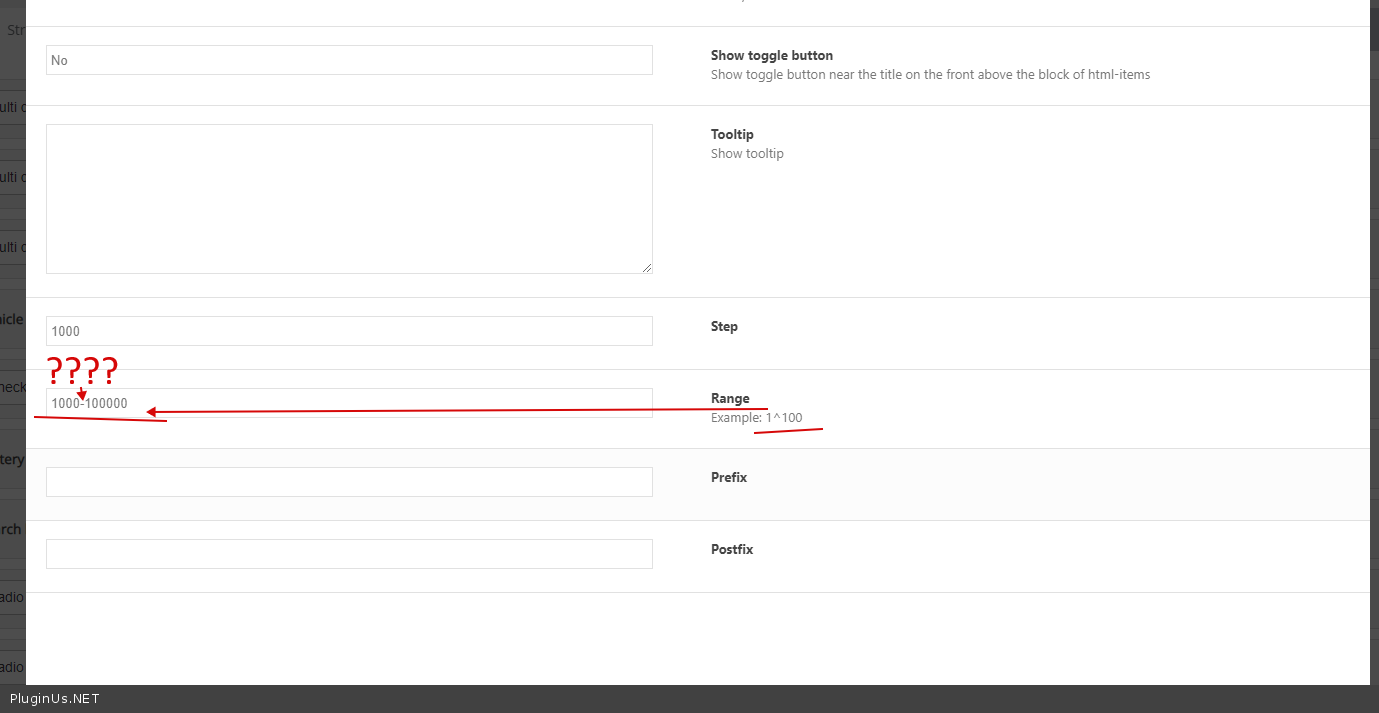
I have just noticed that mileage filter is now failing. - Your wrong settings - https://c2n.me/48w5iJN.png
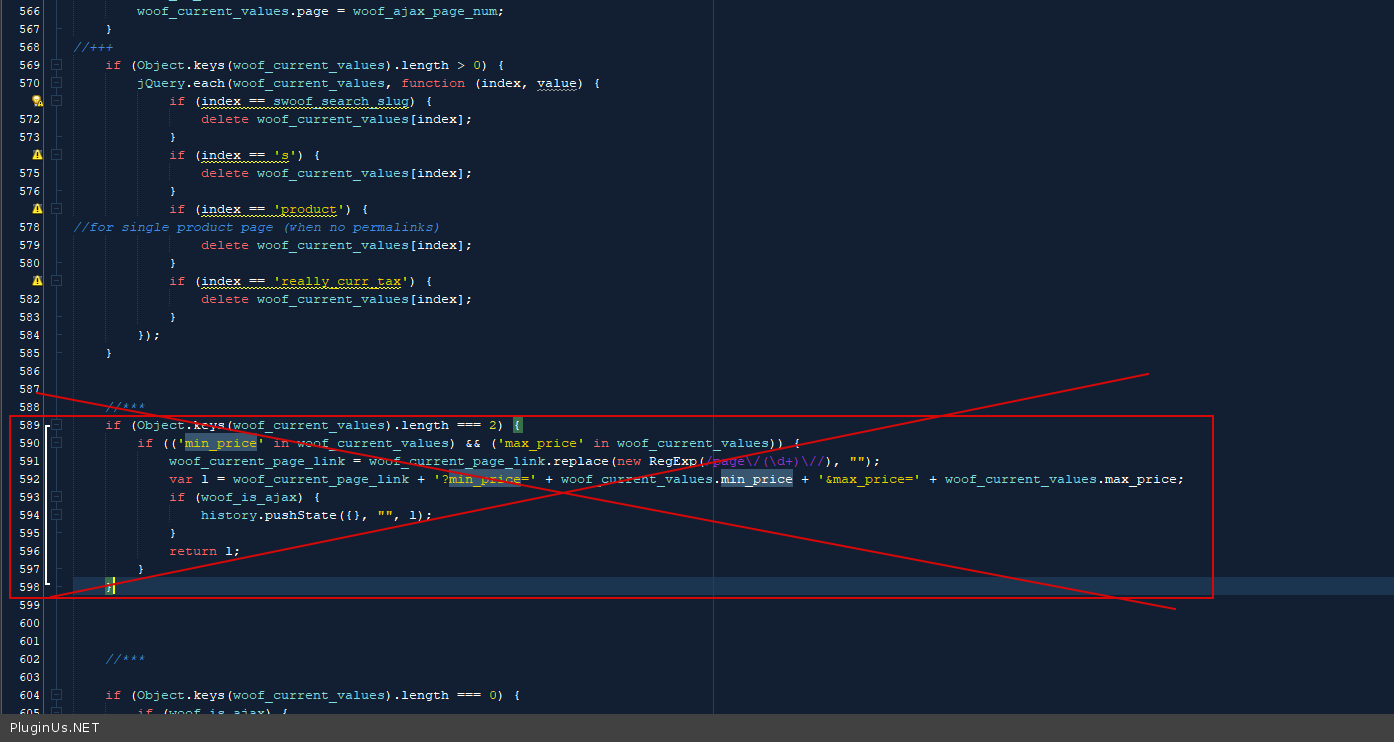
Is it normal that the Reset button doesn't appear next to the Filter button? - Yes! But you can change it - in file - wp-content\plugins\woocommerce-products-filter\js\front.js delete this code - https://c2n.me/48w5xvk.png
Hello
I have just noticed that mileage filter is now failing. - Your wrong settings - https://c2n.me/48w5iJN.png
Is it normal that the Reset button doesn't appear next to the Filter button? - Yes! But you can change it - in file - wp-content\plugins\woocommerce-products-filter\js\front.js delete this code - https://c2n.me/48w5xvk.png
Quote from sarumbear on July 24, 2020, 12:14I corrected the delimiter in the mileage filter setting and it started to work. Thank you.
The Reset button has also re-appeared even though I didn't edit any of your files.

I corrected the delimiter in the mileage filter setting and it started to work. Thank you.
The Reset button has also re-appeared even though I didn't edit any of your files.
Quote from sarumbear on July 25, 2020, 23:27It's me again. I found another issue. If nothing matches the filter criteria the page displays a message but there is no way to reset or change the filter. See the example below.
https://shop-staging.justevs.com/showroom/?swoof=1&slider_battery_capacity=90^100
It's me again. I found another issue. If nothing matches the filter criteria the page displays a message but there is no way to reset or change the filter. See the example below.
https://shop-staging.justevs.com/showroom/?swoof=1&slider_battery_capacity=90^100
Quote from Pablo Borysenco on July 27, 2020, 10:55Hello
The Reset button has also re-appeared even though I didn't edit any of your files. - The reset button always worked, my solution is only for the filter by price
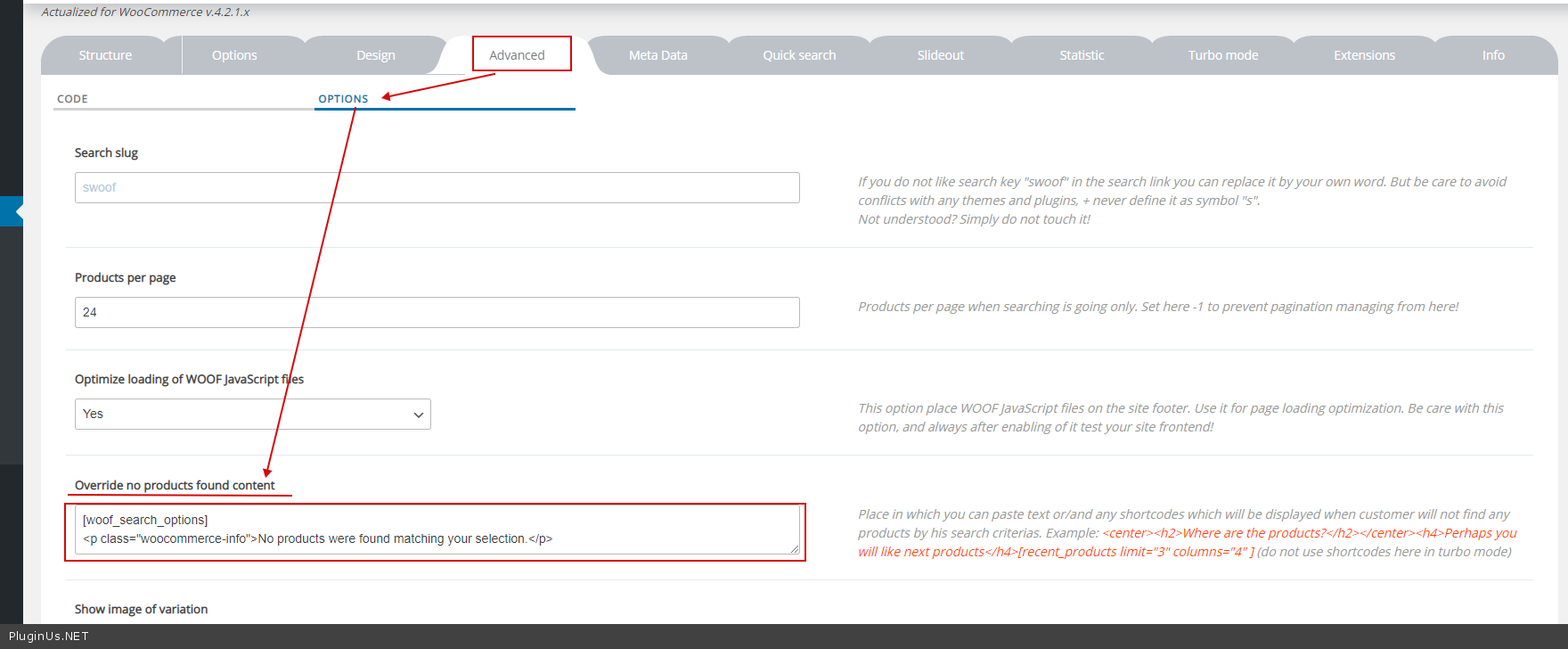
If nothing matches the filter criteria the page displays a message but there is no way to reset or change the filter - It only depends on your theme (no products found template) If this template does not have widgets and content - my plugin cannot display anything
You can try this solutions - https://c2n.me/48xGUjB.png
Hello
The Reset button has also re-appeared even though I didn't edit any of your files. - The reset button always worked, my solution is only for the filter by price
If nothing matches the filter criteria the page displays a message but there is no way to reset or change the filter - It only depends on your theme (no products found template) If this template does not have widgets and content - my plugin cannot display anything
You can try this solutions - https://c2n.me/48xGUjB.png
Quote from sarumbear on July 27, 2020, 14:40Thank you. The override setting you suggested worked well. May I suggest you make this the default setting, which can then be overridden.
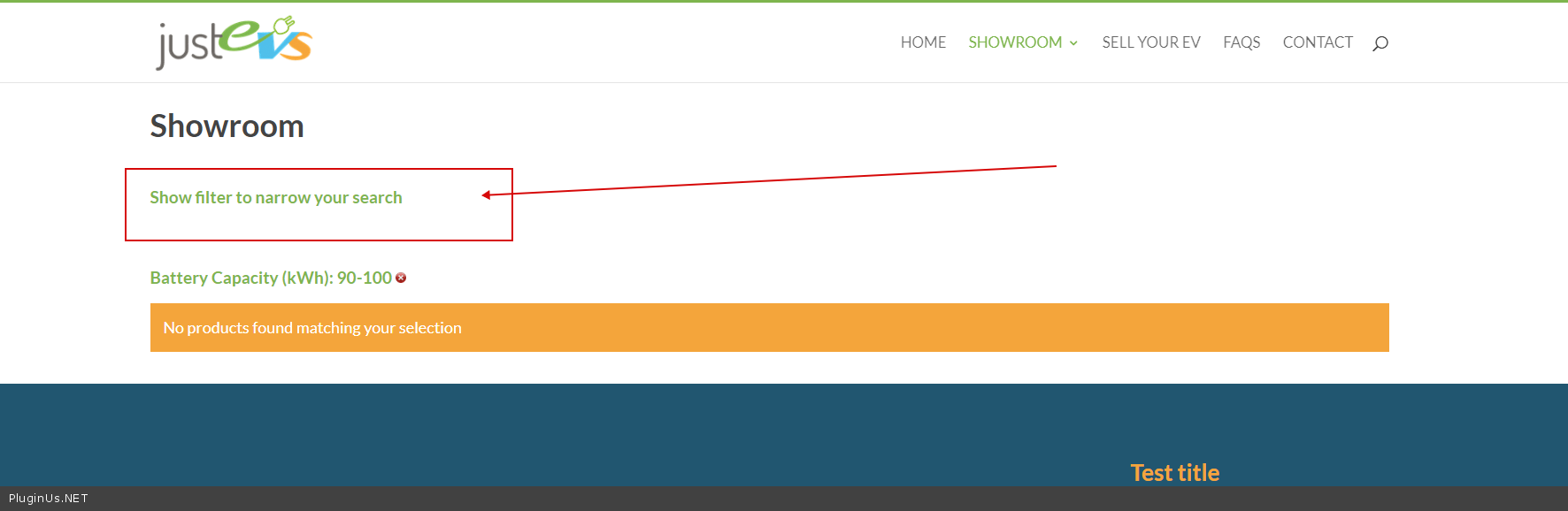
Meanwhile, please check the following filter selections. On the staging site the shortcode's message is "Battery Capacity (kWh): 90-100" but on the live site, which has the same override data and options, the message is "90^100". What am I doing wrong?
https://shop-staging.justevs.com/showroom/?swoof=1&slider_battery_capacity=90^100
https://shop.justevs.com/showroom/?swoof=1&slider_battery_capacity=90^100
Thank you. The override setting you suggested worked well. May I suggest you make this the default setting, which can then be overridden.
Meanwhile, please check the following filter selections. On the staging site the shortcode's message is"Battery Capacity (kWh): 90-100" but on the live site, which has the same override data and options, the message is"90^100". What am I doing wrong?
https://shop-staging.justevs.com/showroom/?swoof=1&slider_battery_capacity=90^100
https://shop.justevs.com/showroom/?swoof=1&slider_battery_capacity=90^100
Quote from Pablo Borysenco on July 28, 2020, 10:40Hello
https://c2n.me/48yEn2H.png - This page has a filter that gives information about the current request.
on another page, the plugin has nowhere to get information about the search query
May I suggest you make this the default setting, which can then be overridden - I will pass on your advice to the developers
Hello
https://c2n.me/48yEn2H.png - This page has a filter that gives information about the current request.
on another page, the plugin has nowhere to get information about the search query
May I suggest you make this the default setting, which can then be overridden - I will pass on your advice to the developers
Quote from sarumbear on July 28, 2020, 11:56This is a standard, stand alone WordPress page that has the following shortcodes:
https://shop-staging.justevs.com/showroom/
[woof autohide=1]
[woof_products]This page is the standard WooCommerce shop page that was created by the plugin upon setting it up. It is selected as the shop page in Woo settings and also in WP permalink settings. It is an empty page.
https://shop-staging.justevs.com/shop/
The first page displays "Battery Capacity (kWh): 90-100" but on the standard Woo page the message is "90^100". Does that mean that the filter will not display correctly if used on the standard Woo shop page?
This is a standard, stand alone WordPress page that has the following shortcodes:
https://shop-staging.justevs.com/showroom/
[woof autohide=1]
[woof_products]
This page is the standard WooCommerce shop page that was created by the plugin upon setting it up. It is selected as the shop page in Woo settings and also in WP permalink settings. It is an empty page.
https://shop-staging.justevs.com/shop/
The first page displays"Battery Capacity (kWh): 90-100" but on the standard Woo page the message is"90^100". Does that mean that the filter will not display correctly if used on the standard Woo shop page?
Quote from Pablo Borysenco on July 29, 2020, 11:35Hello
No! https://c2n.me/48zHw8e.png - This will work on any page where a filter exists.
Hello
No! https://c2n.me/48zHw8e.png - This will work on any page where a filter exists.
Quote from sarumbear on July 29, 2020, 13:58Simply saying no is not helping. I am showing you two pages on the same website, both are showing Woof on the page, hence the filter exists on both of them. First filter option is displaying correctly, the second, which is the standard Woo page isn't. Please see them below.
Shortcode page: https://shop-staging.justevs.com/showroom/?swoof=1&slider_battery_capacity=85^100
Standard Woo shop page: https://shop-staging.justevs.com/shop/?swoof=1&slider_battery_capacity=85^100
I appreciate if you can tell me why the standard Woo page is displaying the filter results badly compare to the shortcode page and if I am doing something wrong what is it.
Thank you
Simply saying no is not helping. I am showing you two pages on the same website, both are showing Woof on the page, hence the filter exists on both of them. First filter option is displaying correctly, the second, which is the standard Woo page isn't. Please see them below.
Shortcode page: https://shop-staging.justevs.com/showroom/?swoof=1&slider_battery_capacity=85^100
Standard Woo shop page: https://shop-staging.justevs.com/shop/?swoof=1&slider_battery_capacity=85^100
I appreciate if you can tell me why the standard Woo page is displaying the filter results badly compare to the shortcode page and if I am doing something wrong what is it.
Thank you
Quote from Pablo Borysenco on July 30, 2020, 11:35Hello
I already wrote you a reason. One page has no filter.
Now I can't make a video for you to demonstrate this again - https://c2n.me/48AG8rW.png
Hello
I already wrote you a reason. One page has no filter.
Now I can't make a video for you to demonstrate this again - https://c2n.me/48AG8rW.png