

premium versions meta data filter not working for custom fields(meta fields).
The support doesn work on Saturdays and Sundays, so some Friday requests can be answered on Monday. If you have problems with registration ask help on contact us page pleaseIf you not got email within 24~36 business hours, firstly check your spam box, and if no any email from the support there - back to the forum and read answer here. DO NOT ANSWER ON EMAILS [noreply@pluginus.net] FROM THE FORUM!! Emails are just for your info, all answers should be published only here.
The support doesn work on Saturdays and Sundays, so some Friday requests can be answered on Monday.

Quote from kailash on July 17, 2020, 16:51Hi
Greetings !
I purchased the (premium woof) metadata filter plugin to add meta fields filter in my website, i have followed all the provided videos but filters are not working for meta fields
I am getting issue while setting up meta filters, I have added filter for meta fields(i mean custom fields. these custom fields are generated by custom field plugin.) I have like 'material_front', 'material_back', but filters are not working on front end.
How to make working filters for custom fields?.Hoping to get earliest reply.
Thank you !
Hi
Greetings !
I purchased the (premium woof) metadata filter plugin to add meta fields filter in my website, i have followed all the provided videos but filters are not working for meta fields
I am getting issue while setting up meta filters, I have added filter for meta fields(i mean custom fields. these custom fields are generated by custom field plugin.) I have like 'material_front', 'material_back', but filters are not working on front end.
How to make working filters for custom fields?.
Hoping to get earliest reply.
Thank you !

Quote from Pablo Borysenco on July 20, 2020, 11:10Hello
Please paste your license key here - https://c2n.me/43SC6rb.png -> https://c2n.me/42HBIt7.png and wp-admin access - https://c2n.me/42BAoj4.png
Hello
Please paste your license key here - https://c2n.me/43SC6rb.png -> https://c2n.me/42HBIt7.png and wp-admin access - https://c2n.me/42BAoj4.png



Quote from kailash on July 20, 2020, 14:15Hi Required information is provided. so please guide me how to make this working?
Hi Required information is provided. so please guide me how to make this working?
Quote from Pablo Borysenco on July 21, 2020, 12:12Hello
I checked it - https://c2n.me/48tgAGw - everything seems to be working correctly
Hello
I checked it - https://c2n.me/48tgAGw - everything seems to be working correctly
Quote from kailash on July 21, 2020, 14:31Thanku for checking. but its not working in filter widget. when i am trying to filter from filter widget its not working. can you check what is the problem please.
here is the widget link-->https://xoodevelopment.wpengine.com/wp-admin/widgets.php
go to Shop Filter widget. there i have put "meta data filter." which is not working.
on shop page(https://xoodevelopment.wpengine.com/shop/)Please click on just below filters on filter icon a filter section will open and there is same meta data filter which you put on top of the page. from there i try to filter its not working.
Thanku for checking. but its not working in filter widget. when i am trying to filter from filter widget its not working. can you check what is the problem please.
here is the widget link-->https://xoodevelopment.wpengine.com/wp-admin/widgets.php
go to Shop Filter widget. there i have put"meta data filter." which is not working.
on shop page(https://xoodevelopment.wpengine.com/shop/)Please click on just below filters on filter icon a filter section will open and there is same meta data filter which you put on top of the page. from there i try to filter its not working.
Quote from kailash on July 21, 2020, 15:17One More question..i have a stageing site of same site which i shared with you. as in video there is a meta data tab from which we can add meta fields. in development site its working fine now. i have added one more field their. its working too. but that meta data tab is not showing in steaging site. what i have to do for display that. please let me know. i have shared staging site url above in privet field..
one more thing --may i need to work on metadata filter for meta fields or it directly works from woof filters. as you show me we are adding meta data fields in woof filters.
One More question..i have a stageing site of same site which i shared with you. as in video there is a meta data tab from which we can add meta fields. in development site its working fine now. i have added one more field their. its working too. but that meta data tab is not showing in steaging site. what i have to do for display that. please let me know. i have shared staging site url above in privet field..
one more thing --may i need to work on metadata filter for meta fields or it directly works from woof filters. as you show me we are adding meta data fields in woof filters.
Quote from Pablo Borysenco on July 22, 2020, 12:25Hello
"meta data filter" - This is a different filter! In this case, you need to write to another support. I did test with WOOF - it works correctly. also these filters are not compatible so use only one. For products, I recommend using WOOF
Hello
"meta data filter" - This is a different filter! In this case, you need to write to another support. I did test with WOOF - it works correctly. also these filters are not compatible so use only one. For products, I recommend using WOOF
Quote from kailash on July 23, 2020, 14:06Hi,
Thank you for your reply. i am using this woof plugin in my another site. i have shared url in private box(login details are same as for dvelopment site.). there is no "meta data" tab from where we can add meta fields. but in development site there is meta data tab from where i am adding meta fields and working too. please let me know how make this "Meta Data" tab is visible.
Hi,
Thank you for your reply. i am using this woof plugin in my another site. i have shared url in private box(login details are same as for dvelopment site.). there is no"meta data" tab from where we can add meta fields. but in development site there is meta data tab from where i am adding meta fields and working too. please let me know how make this"Meta Data" tab is visible.
Quote from Pablo Borysenco on July 24, 2020, 11:53Hello
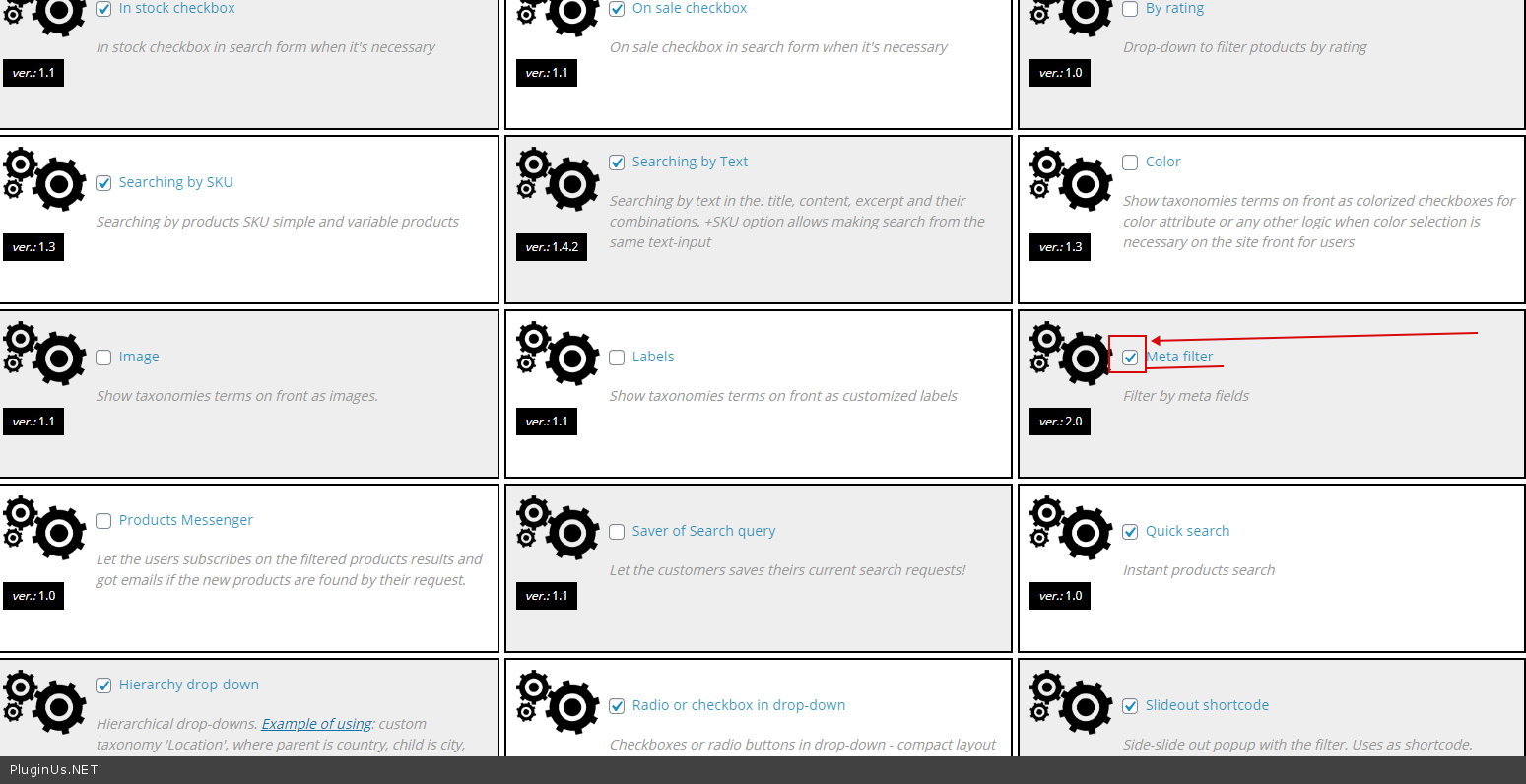
Please watch a video - https://products-filter.com/video-tutorials#video_beGT6p_look
Activate this extension - https://c2n.me/48w4VFU.png
Hello
Please watch a video - https://products-filter.com/video-tutorials#video_beGT6p_look
Activate this extension - https://c2n.me/48w4VFU.png
Quote from kailash on July 24, 2020, 12:30Thank you so much working now.
Thank you so much working now.
Quote from Pablo Borysenco on July 27, 2020, 10:25Hello
Welcome;)
Hello
Welcome;)
Quote from kailash on June 11, 2021, 12:31Hi
Greetings !
I purchased the (premium woof) metadata filter plugin to add meta fields filter in my website, i have followed all the provided videos but filters are not working correct way.
following are the issues.
1--> When i select any category from filter on shop page, its loads and show 10 products innitially. when i click on next page its showing 0 as result.
2-->Reset button not working after apply filter.
3--> can we create check box for meta fields. i have color, style and techniques are meta fields. they are created from advance custom fields plugin. i tried to create check box for these meta fields but its not working. if possible please show me one field how to create.
Here are login details of website.
PRIVATE DATA!
you can reply me on email also. earlier we had already talked on email also.
email--> Kailash.allalgos@gmail.com
Hoping to get earliest reply.
Thank you !
Hi
Greetings !
I purchased the (premium woof) metadata filter plugin to add meta fields filter in my website, i have followed all the provided videos but filters are not working correct way.
following are the issues.
1--> When i select any category from filter on shop page, its loads and show 10 products innitially. when i click on next page its showing 0 as result.


2-->Reset button not working after apply filter.

3--> can we create check box for meta fields. i have color, style and techniques are meta fields. they are created from advance custom fields plugin. i tried to create check box for these meta fields but its not working. if possible please show me one field how to create.


Here are login details of website.
PRIVATE DATA!
you can reply me on email also. earlier we had already talked on email also.
email--> Kailash.allalgos@gmail.com
Hoping to get earliest reply.
Thank you !
Quote from Pablo Borysenco on June 14, 2021, 11:01Hello
This is an open forum, I highly recommend changing access
please update the plugin to latest version - https://products-filter.com/how-to-make-auto-update-for-wordpress-plugins-and-themes-bought-on-envato/ - clear all cache and do a test
can we create check box for meta fields. - Unfortunately the plugin does not have this feature.
Hello
This is an open forum, I highly recommend changing access
please update the plugin to latest version - https://products-filter.com/how-to-make-auto-update-for-wordpress-plugins-and-themes-bought-on-envato/ - clear all cache and do a test
can we create check box for meta fields. - Unfortunately the plugin does not have this feature.
Quote from kailash on June 15, 2021, 15:16Hi..thank you so much for reply. yes i have downloaded latest version and its working now. one more issue now. when i select any category from filter. by default its showing 10 products only. how to increase number of product to show. i have set number of product 20 per page from theme. its working fine when we have not select any filter but when select filter its showing 10 product per page. how can solve this. ?
here is shop page url--
https://xoowpstageing.wpengine.com/shop/
login details i have already provided you.
using filter---
without filter
Hi..thank you so much for reply. yes i have downloaded latest version and its working now. one more issue now. when i select any category from filter. by default its showing 10 products only. how to increase number of product to show. i have set number of product 20 per page from theme. its working fine when we have not select any filter but when select filter its showing 10 product per page. how can solve this. ?
here is shop page url--
https://xoowpstageing.wpengine.com/shop/
login details i have already provided you.
using filter---

without filter

Quote from Pablo Borysenco on June 16, 2021, 10:42Hello
Please check an option - https://share.pluginus.net/image/i20210616114020.png
Hello
Please check an option - https://share.pluginus.net/image/i20210616114020.png

Quote from kailash on June 16, 2021, 12:09yes its working. thanku so much.
yes its working. thanku so much.