

Pre-sale Question: verify few advanced things before purchasing
The support doesn work on Saturdays and Sundays, so some Friday requests can be answered on Monday. If you have problems with registration ask help on contact us page pleaseIf you not got email within 24~36 business hours, firstly check your spam box, and if no any email from the support there - back to the forum and read answer here. DO NOT ANSWER ON EMAILS [noreply@pluginus.net] FROM THE FORUM!! Emails are just for your info, all answers should be published only here.
The support doesn work on Saturdays and Sundays, so some Friday requests can be answered on Monday.

Quote from Saurabh on December 17, 2020, 15:22Hi,
I tried all demos and even tried free version on my staging site, and it seems fine till now with those limited features.
Now, I have already one store running on from last few months and we are using another filter plugin as of now, that works fine too, except in some case.
So let me come to that case directly:
While we are on any category page, for ex.: on Clothing page, so at that time we don't need any size filter options those are not related to clothing(because obviously those size options will not have any product of clothing category, for ex: mobile cover sizes.)
So those options should not be there on filters while you are on particular category. so In short, options which are not having any product to show, should not be displayed.
Same case applies to bottom level filtering too, for ex, on clothing I am selecting jeans, so only sizes which has jeans products should be displayed and in reverse If I deselect jeans, again it should show all options those are applicable for clothing.Now this case is already covered in our current plugin, it jus hides all options which are not having products to show at current filtered state.
But while we activate that setting, to hide filter options which are not having products. It takes too much time in that query to load all things and page.
for example you are loading clothing page, it takes too much time in page loading due to that query of filter options and TTFB (first byte from server) increased too much.So I have to disabled that setting as of now.
We are having more than 1000+ active products and 8000+ draft product (those will be active slowly as we enter data in those products) and having 250+ total size options. Also above thins should work well with vendor filters as well.So now in Woof free version, this option is not enabled. Free version shows all possible filter options, there so I can not test performance of my site in above particular case with Free version.
So I wanted t0 confirm this things before purchasing plugin. Is there a way where I can try premium plugin for some days without purchasing ?
Hi,
I tried all demos and even tried free version on my staging site, and it seems fine till now with those limited features.
Now, I have already one store running on from last few months and we are using another filter plugin as of now, that works fine too, except in some case.
So let me come to that case directly:
While we are on any category page, for ex.: on Clothing page, so at that time we don't need any size filter options those are not related to clothing(because obviously those size options will not have any product of clothing category, for ex: mobile cover sizes.)
So those options should not be there on filters while you are on particular category. so In short, options which are not having any product to show, should not be displayed.
Same case applies to bottom level filtering too, for ex, on clothing I am selecting jeans, so only sizes which has jeans products should be displayed and in reverse If I deselect jeans, again it should show all options those are applicable for clothing.
Now this case is already covered in our current plugin, it jus hides all options which are not having products to show at current filtered state.
But while we activate that setting, to hide filter options which are not having products. It takes too much time in that query to load all things and page.
for example you are loading clothing page, it takes too much time in page loading due to that query of filter options and TTFB (first byte from server) increased too much.
So I have to disabled that setting as of now.
We are having more than 1000+ active products and 8000+ draft product (those will be active slowly as we enter data in those products) and having 250+ total size options. Also above thins should work well with vendor filters as well.
So now in Woof free version, this option is not enabled. Free version shows all possible filter options, there so I can not test performance of my site in above particular case with Free version.
So I wanted t0 confirm this things before purchasing plugin. Is there a way where I can try premium plugin for some days without purchasing ?
Quote from Saurabh on December 17, 2020, 15:25and one more thing I want to use all options, categories, vendors, sizes as checkboxes with multiple selection.
and one more thing I want to use all options, categories, vendors, sizes as checkboxes with multiple selection.

Quote from Pablo Borysenco on December 18, 2020, 12:32Hello
it takes too much time in page loading due to that query of filter options and TTFB (first byte from server) increased too much. - Unfortunately, this cannot be avoided for any filters.
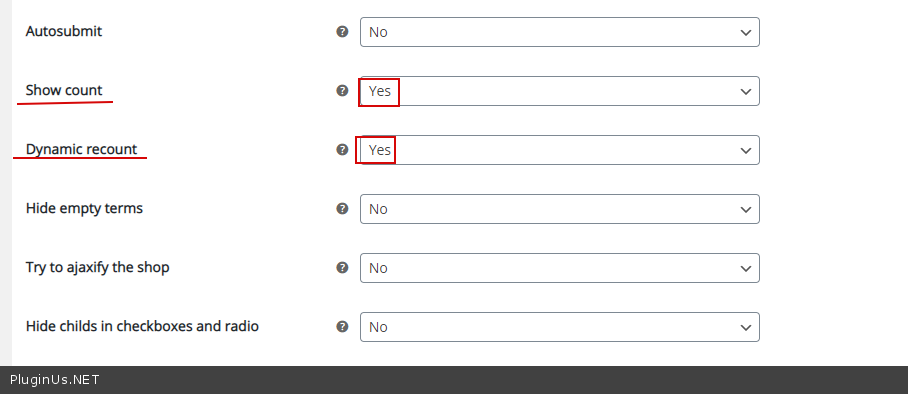
Free version shows all possible filter options, there so I can not test performance of my site in above particular case with Free version. - You can do tests with the free version . In the free version, "Hide empty terms" is not available - this function does not affect the speed. So do a test with these options - https://c2n.me/4ahkjdK.png
Hello
it takes too much time in page loading due to that query of filter options and TTFB (first byte from server) increased too much. - Unfortunately, this cannot be avoided for any filters.
Free version shows all possible filter options, there so I can not test performance of my site in above particular case with Free version. - You can do tests with the free version . In the free version,"Hide empty terms" is not available - this function does not affect the speed. So do a test with these options - https://c2n.me/4ahkjdK.png
Quote from Saurabh on December 18, 2020, 13:01but it is not hiding empty terms (means which doesn't have products).
I want that should be worked properly as that is our main goal to hide unnecessary filter options from filters.
but it is not hiding empty terms (means which doesn't have products).
I want that should be worked properly as that is our main goal to hide unnecessary filter options from filters.
Quote from Pablo Borysenco on December 18, 2020, 13:19Filters with a counter equal to zero in the paid version will be hidden
Filters with a counter equal to zero in the paid version will be hidden
Quote from Saurabh on December 18, 2020, 13:49Okay.. What is refund policy in case plugin doesn't work as expected ? and second question how can I have plugin in sidebar ? right now it is showing above the products grid
Okay.. What is refund policy in case plugin doesn't work as expected ? and second question how can I have plugin in sidebar ? right now it is showing above the products grid
Quote from Saurabh on December 21, 2020, 06:50anything on my last question ?
anything on my last question ?
Quote from Pablo Borysenco on December 21, 2020, 14:45Hello
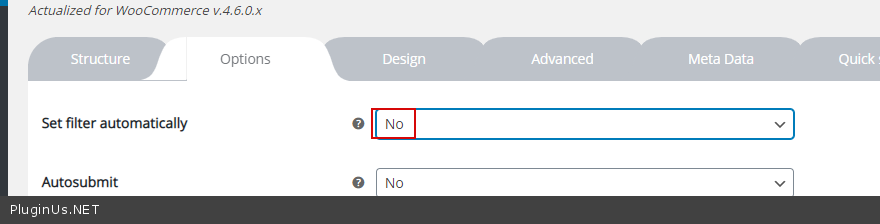
Firstly please wach a video - https://products-filter.com/video-tutorials#video_beGT6p_look (check an option - https://c2n.me/4ajj75w.png AND use widget)
Please read this - http://themeforest.net/page/
author_refund_policy
Hello
Firstly please wach a video - https://products-filter.com/video-tutorials#video_beGT6p_look (check an option - https://c2n.me/4ajj75w.png AND use widget)
Please read this - http://themeforest.net/page/
Quote from Saurabh on December 22, 2020, 09:35I have read policy, but there should be refund for not meeting expectations. Because my specific performance case can be tested only after purchasing.
So if doesn't work out in that case, then there is no use of plugin(because our existing plugin is already working well except that particular case).
So I think if doesn't work well in particular case that I mentioned, I think we should be allowed to have refund.
I have read policy, but there should be refund for not meeting expectations. Because my specific performance case can be tested only after purchasing.
So if doesn't work out in that case, then there is no use of plugin(because our existing plugin is already working well except that particular case).
So I think if doesn't work well in particular case that I mentioned, I think we should be allowed to have refund.
Quote from Pablo Borysenco on December 22, 2020, 13:06Hello
I think we should be allowed to have refund. - If the problem is related to my plugin
Hello
I think we should be allowed to have refund. - If the problem is related to my plugin
Quote from Saurabh on January 16, 2021, 08:59One more thing I noticed:
This plugin is not removing variable Out of stock products from product results. I have setting, which should not show any out of stock product, at Woocommerce inventory settings.
here you can see following product is out of stock
https://www.staging3.montaignemarket.com/product/forrestlesssleepers-frs-silk-printed-pant-2/but it still visible on https://www.staging3.montaignemarket.com/product-category/clothing/page/55/ this page
Is there anyway to achieve this ?
One more thing I noticed:
This plugin is not removing variable Out of stock products from product results. I have setting, which should not show any out of stock product, at Woocommerce inventory settings.
here you can see following product is out of stock
https://www.staging3.montaignemarket.com/product/forrestlesssleepers-frs-silk-printed-pant-2/
but it still visible on https://www.staging3.montaignemarket.com/product-category/clothing/page/55/ this page
Is there anyway to achieve this ?
Quote from Pablo Borysenco on January 18, 2021, 12:10Hello
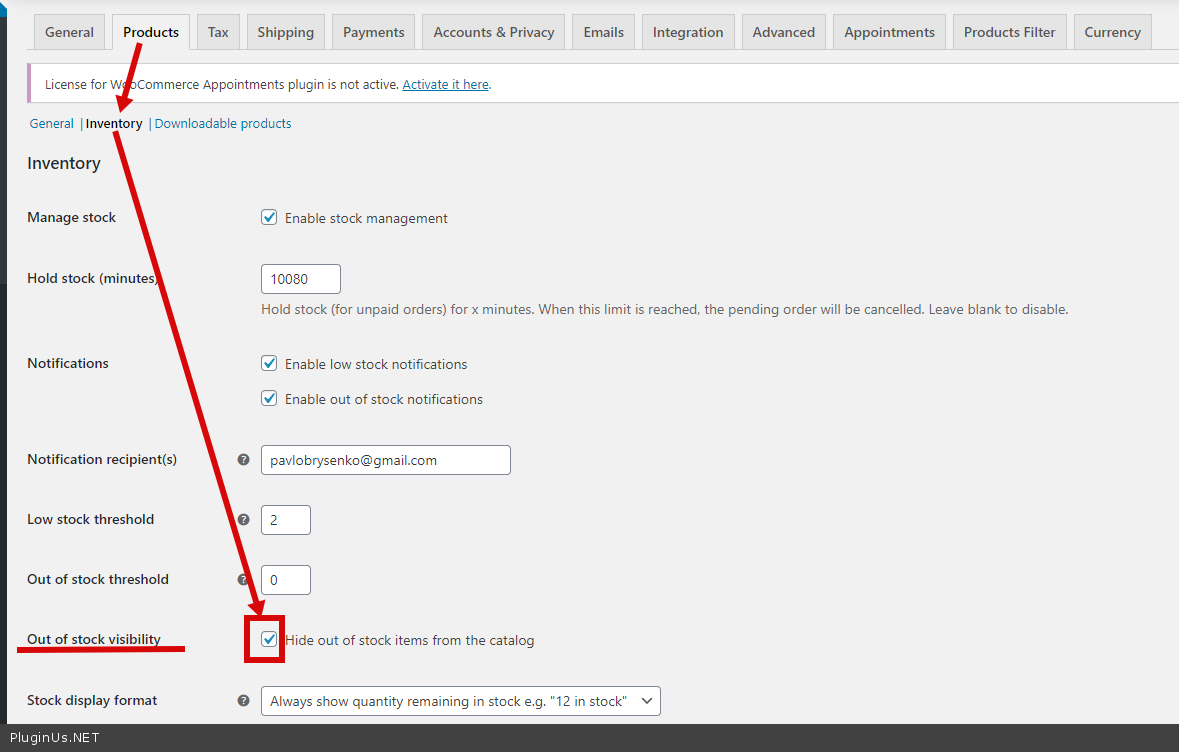
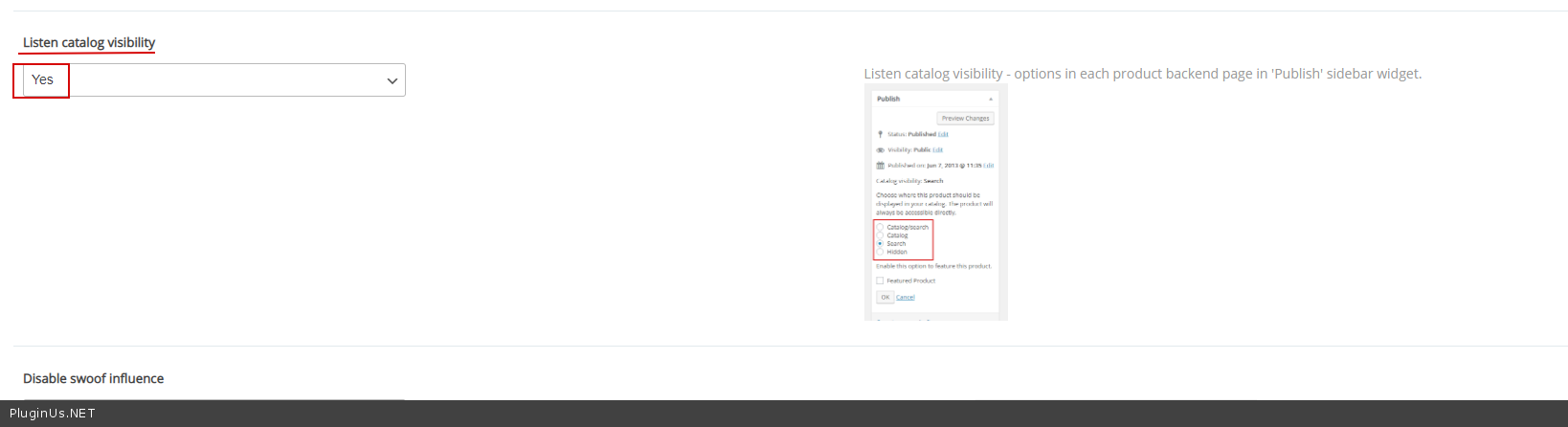
Please check option - https://c2n.me/4aAPvZf.png and - In woof settings->Advanced->Options- https://c2n.me/4aAPAgU.png
Hello
Please check option - https://c2n.me/4aAPvZf.png and - In woof settings->Advanced->Options- https://c2n.me/4aAPAgU.png
Quote from Saurabh on January 18, 2021, 12:37I already checked these options from research.
I already have Checked Hide out of stock products at inventory level and Listen catalog visibility to "yes" at plugin level.
https://www.staging3.montaignemarket.com/product-category/clothing/
Still it is showing out of stock products. FYI, almost all products are variable products.
I already checked these options from research.
I already have Checked Hide out of stock products at inventory level and Listen catalog visibility to"yes" at plugin level.
https://www.staging3.montaignemarket.com/product-category/clothing/
Still it is showing out of stock products. FYI, almost all products are variable products.
Quote from Pablo Borysenco on January 18, 2021, 13:32but it doesn't depend on my plugin. You can disable my plugins and check this link - https://www.staging3.montaignemarket.com/product-category/clothing/page/55/ - you will see the same result. I think you should contact woocommerce support
but it doesn't depend on my plugin. You can disable my plugins and check this link - https://www.staging3.montaignemarket.com/product-category/clothing/page/55/ - you will see the same result. I think you should contact woocommerce support
Quote from Saurabh on January 18, 2021, 13:41https://www.montaignemarket.com/product-category/clothing/
I have main site which is running on another plugin, and you can see it hides out of stock products properly as you can see here only 36 pages for clothing while on staging (with your plugin) having 56 pages for clothing.
So this doesn't seem issue from Woocommerce.
https://www.montaignemarket.com/product-category/clothing/
I have main site which is running on another plugin, and you can see it hides out of stock products properly as you can see here only 36 pages for clothing while on staging (with your plugin) having 56 pages for clothing.
So this doesn't seem issue from Woocommerce.
Quote from Saurabh on January 19, 2021, 11:54Did you get a chance to look ?
Did you get a chance to look ?
Quote from Saurabh on January 19, 2021, 13:36even I tried In Stock filter of plugin too, that is also not working.
even I tried In Stock filter of plugin too, that is also not working.
Quote from Saurabh on January 19, 2021, 17:06After some tries, Seems like issue is not with your plugin. But it is lacking the feature that another plugin is having. On another plugin, there is one option to hide out of stock products and that option is hiding all out of stock products including variable products.
After some tries, Seems like issue is not with your plugin. But it is lacking the feature that another plugin is having. On another plugin, there is one option to hide out of stock products and that option is hiding all out of stock products including variable products.
Quote from Pablo Borysenco on January 20, 2021, 12:29Hello
Yes, our plugin does not affect the product template, because it is a filter.
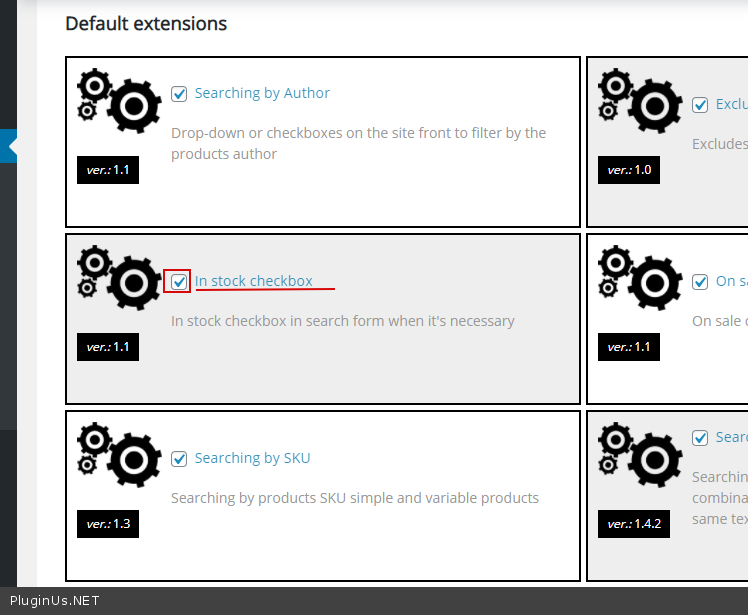
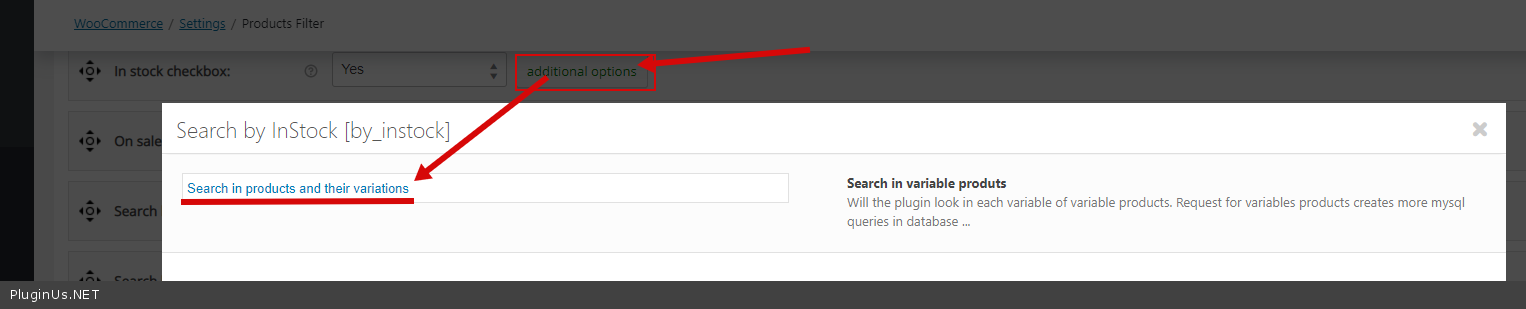
To filter "In stock" products - please activate this extension - https://c2n.me/4aCJLBQ.png - and check option - https://c2n.me/4aCJQvZ.png
Hello
Yes, our plugin does not affect the product template, because it is a filter.
To filter "In stock" products - please activate this extension - https://c2n.me/4aCJLBQ.png - and check option - https://c2n.me/4aCJQvZ.png
Quote from Saurabh on January 20, 2021, 16:02I applied extension as you suggested here: https://www.staging3.montaignemarket.com/product-category/clothing/
still same results. Still showing out of stock variable products.
I applied extension as you suggested here: https://www.staging3.montaignemarket.com/product-category/clothing/
still same results. Still showing out of stock variable products.