
Pre-Sale Query - urgent
The support doesn work on Saturdays and Sundays, so some Friday requests can be answered on Monday. If you have problems with registration ask help on contact us page pleaseIf you not got email within 24~36 business hours, firstly check your spam box, and if no any email from the support there - back to the forum and read answer here. DO NOT ANSWER ON EMAILS [noreply@pluginus.net] FROM THE FORUM!! Emails are just for your info, all answers should be published only here.
The support doesn work on Saturdays and Sundays, so some Friday requests can be answered on Monday.

Quote from eseller on June 3, 2026, 20:18Hi Husky Team
(1) At the moment, we are using FREE version of Product Filter plugin. Before upgrading to Pro version, please see below queries and let me know, thank you.
At the moment, whatever category link selected, all filter options are showing in the LHS. We would like to show ONLY the relevant filter options of the category link instead. Is this option available in PAID version?
eg: https://stage.spiderdns.co.uk/product-category/pcs/view-all-pcs/
https://stage.spiderdns.co.uk/product-category/accessories/
(2) Some of the filter option list are too long - https://prnt.sc/wzjRL48WKgRP So, is it possible to enable ''Show more'' link after 10 items? ie, In the screenshot for Processor, after 10 options, there will be a ''Show more'' link. Once it is clicked rest of the options will be visible. By default, only 10 options will be loaded for the customer. Is it possible in Free or Paid version?
(3) The count display is not correct. Hope it is bug in the plugin? Please see this link - https://stage.spiderdns.co.uk/shop/
This option showing count as 8 - https://prnt.sc/kx5xCRyeLjG5
But, whilst clicking it, only showing one product? https://stage.spiderdns.co.uk/shop/swoof/filter-mob-brand-apple/
Please let me know, thank you.
Regards
eSeller
Hi Husky Team
(1) At the moment, we are using FREE version of Product Filter plugin. Before upgrading to Pro version, please see below queries and let me know, thank you.
At the moment, whatever category link selected, all filter options are showing in the LHS. We would like to show ONLY the relevant filter options of the category link instead. Is this option available in PAID version?
eg: https://stage.spiderdns.co.uk/product-category/pcs/view-all-pcs/
https://stage.spiderdns.co.uk/product-category/accessories/
(2) Some of the filter option list are too long - https://prnt.sc/wzjRL48WKgRP So, is it possible to enable ''Show more'' link after 10 items? ie, In the screenshot for Processor, after 10 options, there will be a ''Show more'' link. Once it is clicked rest of the options will be visible. By default, only 10 options will be loaded for the customer. Is it possible in Free or Paid version?
(3) The count display is not correct. Hope it is bug in the plugin? Please see this link - https://stage.spiderdns.co.uk/shop/
This option showing count as 8 - https://prnt.sc/kx5xCRyeLjG5
But, whilst clicking it, only showing one product? https://stage.spiderdns.co.uk/shop/swoof/filter-mob-brand-apple/
Please let me know, thank you.
Regards
eSeller

Quote from Alex Dev on June 4, 2026, 13:48Hello eSeller
Thank you for your pre-sale questions!
(1) Showing only relevant filters per category
There are two approaches here:
First, if you upgrade to the Pro version and enable dynamic recount with the "hide empty terms" option, filters that have no products in the current category will automatically disappear. So on the PCs category, only processor/RAM/etc filters will show, and on Accessories only the relevant ones. No extra configuration needed — the plugin handles it automatically.
Second, if you prefer a free approach: you can place multiple [woof] shortcodes with different
tax=oronly=https://products-filter.com/shortcode/woof attributes on different pages, and control their visibility using a logic-based widget visibility plugin.(2) "Show more" after N items
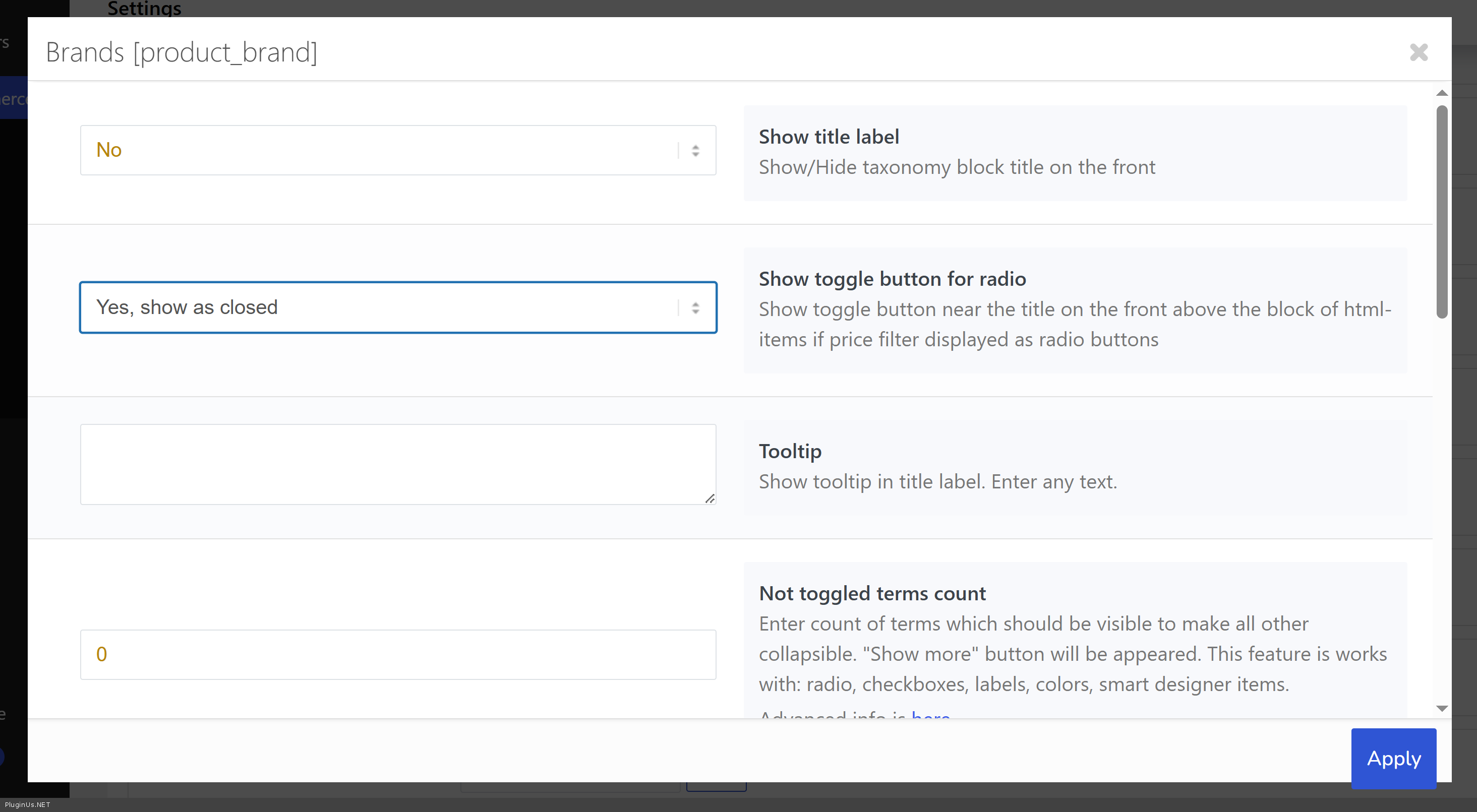
This is available in the free version. In the plugin settings, click on any taxonomy to open its options popup and find the field "Not toggled terms count" (radio and checkbox only). Set it to 10 (or any number you prefer) — the first N terms will be visible, and the rest will be hidden under a "Show more" button. Works for radio, checkboxes, labels, colors. Also you can use there "Show toggle button for radio" as closed
(3) Incorrect product count
In the free version, counts are static — they are calculated globally across all products and do not recalculate based on the current page context. This is why you see "8" for a brand on the Shop page but only 1 product appears after clicking.
To investigate this properly, could you please share temporary WP admin credentials for your staging site in the Private Data section of this ticket? I would like to check the plugin configuration and see what is happening with the count on that specific filter combination. Make backup before.
https://share.pluginus.net/image/i20230222134241.png
https://share.pluginus.net/image/i20230222134615.png
Hello eSeller
Thank you for your pre-sale questions!
(1) Showing only relevant filters per category
There are two approaches here:
First, if you upgrade to the Pro version and enable dynamic recount with the"hide empty terms" option, filters that have no products in the current category will automatically disappear. So on the PCs category, only processor/RAM/etc filters will show, and on Accessories only the relevant ones. No extra configuration needed — the plugin handles it automatically.
Second, if you prefer a free approach: you can place multiple [woof] shortcodes with different tax= or only= https://products-filter.com/shortcode/woof attributes on different pages, and control their visibility using a logic-based widget visibility plugin.
(2)"Show more" after N items
This is available in the free version. In the plugin settings, click on any taxonomy to open its options popup and find the field"Not toggled terms count" (radio and checkbox only). Set it to 10 (or any number you prefer) — the first N terms will be visible, and the rest will be hidden under a"Show more" button. Works for radio, checkboxes, labels, colors. Also you can use there"Show toggle button for radio" as closed
(3) Incorrect product count
In the free version, counts are static — they are calculated globally across all products and do not recalculate based on the current page context. This is why you see"8" for a brand on the Shop page but only 1 product appears after clicking.
To investigate this properly, could you please share temporary WP admin credentials for your staging site in the Private Data section of this ticket? I would like to check the plugin configuration and see what is happening with the count on that specific filter combination. Make backup before.
https://share.pluginus.net/image/i20230222134241.png
https://share.pluginus.net/image/i20230222134615.png


Quote from eseller on June 4, 2026, 15:13Hi Team Husky
Thank you for your reply.
- We wiill go with Pro version.
- Thank you, it works.
- Okay, so it will work fine in the Pro version? or Still you need the website access to check the settings?
Regards
eSeller
Hi Team Husky
Thank you for your reply.
- We wiill go with Pro version.
- Thank you, it works.
- Okay, so it will work fine in the Pro version? or Still you need the website access to check the settings?
Regards
eSeller
Quote from Alex Dev on June 5, 2026, 14:17Hello eSeller
For point 3 — in 90% of cases enabling dynamic recount in the Pro version will fix the counts automatically. If for any reason it does not work as expected, just continue this support ticket after the upgrade and we will investigate directly with you. If needed, we can take a look at the site with temporary admin access at that point.
Hello eSeller
For point 3 — in 90% of cases enabling dynamic recount in the Pro version will fix the counts automatically. If for any reason it does not work as expected, just continue this support ticket after the upgrade and we will investigate directly with you. If needed, we can take a look at the site with temporary admin access at that point.
Quote from eseller on June 30, 2026, 08:06Hi Team Husky
We have purchased PAID version and installed in the DEV site.
For Point 1 issue mentioned in this thread, we have enabled these settings - https://prnt.sc/Xd0pMgNdH0-V as you mentioned.
However, it doesn't worked. Example, if we take Laptop category, it is still showing filter attributes of other categories like Desktop, Monitor etc. https://stage.spiderdns.co.uk/product-category/laptops/view-all-laptops/
Could you please check and confirm whether we are doing correct?
Thank you
eSeller
Hi Team Husky
We have purchased PAID version and installed in the DEV site.
For Point 1 issue mentioned in this thread, we have enabled these settings - https://prnt.sc/Xd0pMgNdH0-V as you mentioned.
However, it doesn't worked. Example, if we take Laptop category, it is still showing filter attributes of other categories like Desktop, Monitor etc. https://stage.spiderdns.co.uk/product-category/laptops/view-all-laptops/
Could you please check and confirm whether we are doing correct?
Thank you
eSeller

Quote from Ross on June 30, 2026, 11:45Hello
Thank you for purchasing!
https://stage.spiderdns.co.uk/product-category/laptops/view-all-laptops - on this page, what item should I check to see that filter shows items which belongs to current category page? Describe by text and screens please, even with video better to show what is unnecessary in the filter.
Also share purchase code in the wprivate area of this ticket and wp-admin acess to this stage site to check all aspects, make backup before for any case, because I can make tests on the site
Use private area of this ticket:
https://share.pluginus.net/image/i20230222134241.png
https://share.pluginus.net/image/i20230222134615.png
https://share.pluginus.net/image/i20230222134511.png
Hello
Thank you for purchasing!
https://stage.spiderdns.co.uk/product-category/laptops/view-all-laptops - on this page, what item should I check to see that filter shows items which belongs to current category page? Describe by text and screens please, even with video better to show what is unnecessary in the filter.
Also share purchase code in the wprivate area of this ticket and wp-admin acess to this stage site to check all aspects, make backup before for any case, because I can make tests on the site
Use private area of this ticket:
https://share.pluginus.net/image/i20230222134241.png
https://share.pluginus.net/image/i20230222134615.png
https://share.pluginus.net/image/i20230222134511.png

Quote from eseller on July 2, 2026, 17:28Hello Team
Purchase code and admin credentials shared in private.
Please check this link LAPTOP Category - https://stage.spiderdns.co.uk/product-category/laptops/view-all-laptops
You will see multiple attribute filter for Laptop Memory - https://prnt.sc/VpH8m2QX9Qp4 For differentiating, we have renamed the labels to Memory 1, Memory 2, Memory 3 etc. in the Husky filter settings. Any idea why all of these are showing? If all of these memory attributes are associated with Laptop category products, why the filter not showing result if we select some of the memory options. eg: please click this option - https://prnt.sc/4VWIK-qcpWwhSimilar issue is showing on other categories as well. eg: ACCESSORIES category - https://stage.spiderdns.co.uk/product-category/accessories/view-all-accessories/
Please click on this Processor option - https://prnt.sc/g47JKzcb_kNk and no products will display. We don't have to show such attributes in the filter whilst selecting category links.Hope this clarifies.
Thanks
eSeller
Hello Team
Purchase code and admin credentials shared in private.
Please check this link LAPTOP Category - https://stage.spiderdns.co.uk/product-category/laptops/view-all-laptops
You will see multiple attribute filter for Laptop Memory - https://prnt.sc/VpH8m2QX9Qp4 For differentiating, we have renamed the labels to Memory 1, Memory 2, Memory 3 etc. in the Husky filter settings. Any idea why all of these are showing? If all of these memory attributes are associated with Laptop category products, why the filter not showing result if we select some of the memory options. eg: please click this option - https://prnt.sc/4VWIK-qcpWwh
Similar issue is showing on other categories as well. eg: ACCESSORIES category - https://stage.spiderdns.co.uk/product-category/accessories/view-all-accessories/
Please click on this Processor option - https://prnt.sc/g47JKzcb_kNk and no products will display. We don't have to show such attributes in the filter whilst selecting category links.
Hope this clarifies.
Thanks
eSeller
Quote from Alex Dev on July 3, 2026, 19:40Hello
I clicked on the links:
- Memory ram 4: https://stage.spiderdns.co.uk/product-category/laptops/view-all-laptops/?swoof=1&pa_upgrade-memory-ram=no&really_curr_tax=717-product_cat - this products belongs to
- https://stage.spiderdns.co.uk/product-category/laptops/view-all-laptops/?swoof=1&pa_memory-ram=16gb-ddr4-memory-ram-included&really_curr_tax=717-product_cat - 20 products, belongs to
That blocks are visible because for the currecnt category are existed attributes
If you not agree please make one video for one product where you shown that its not belongs to it but the block is still there. You have a lot of attributes and I didn't immediately understand what was going on, especially since many of these attributes have the same identical names, making it very difficult to navigate. Also I installed BEAR bulk editor https://stage.spiderdns.co.uk/wp-admin/edit.php?post_type=product&page=woobe - view-all laptops + product memory ram ->
Hello
I clicked on the links:
- Memory ram 4: https://stage.spiderdns.co.uk/product-category/laptops/view-all-laptops/?swoof=1&pa_upgrade-memory-ram=no&really_curr_tax=717-product_cat - this products belongs to
- https://stage.spiderdns.co.uk/product-category/laptops/view-all-laptops/?swoof=1&pa_memory-ram=16gb-ddr4-memory-ram-included&really_curr_tax=717-product_cat - 20 products, belongs to
That blocks are visible because for the currecnt category are existed attributes
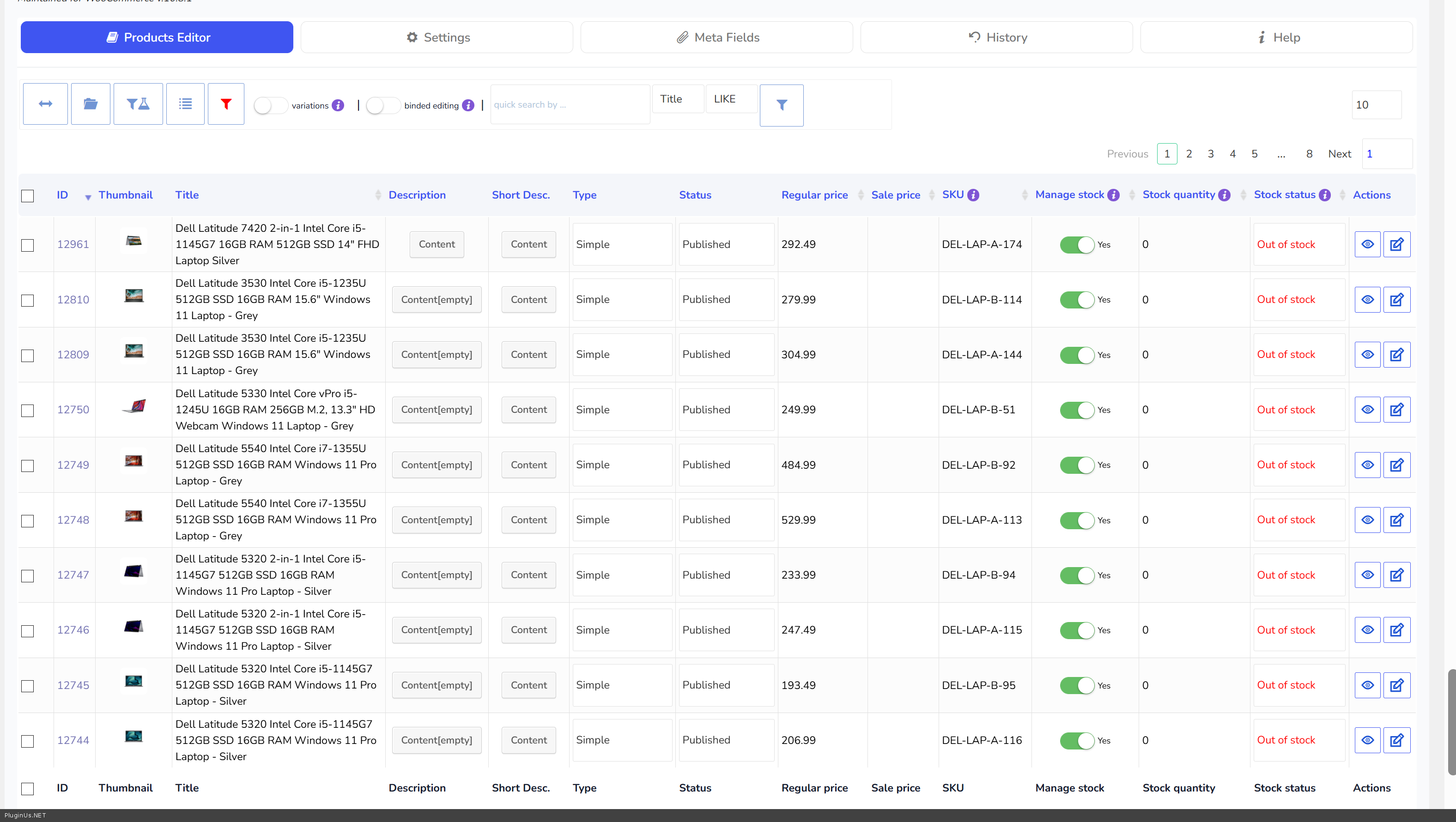
If you not agree please make one video for one product where you shown that its not belongs to it but the block is still there. You have a lot of attributes and I didn't immediately understand what was going on, especially since many of these attributes have the same identical names, making it very difficult to navigate. Also I installed BEAR bulk editor https://stage.spiderdns.co.uk/wp-admin/edit.php?post_type=product&page=woobe - view-all laptops + product memory ram ->
Quote from eseller on July 29, 2026, 08:00Hello
We have sorted out most of the issues and filter looks better now.Now, only one issue we are struggling to fix - please see one of the example below.
Tablet category link - https://stage.spiderdns.co.uk/product-category/tablets/
In the Filter, click on Screen Size > Upto 12.5'' option - https://prnt.sc/jnXIpcaq_n_8The count is showing 6 products are associated with UPTO 12.5'' option. But, the filter result is showing ''no products'' page.https://prnt.sc/YKg998aMsyAK
For your reference, Below are some of the products associated with the mentioned attribute -
https://stage.spiderdns.co.uk/product/dell-latitude-7212-rugged-extreme-tablet-laptop-core-i5-8th-gen-a-1/
https://stage.spiderdns.co.uk/product/dell-latitude-7212-rugged-extreme-tablet-laptop-core-i5-8th-gen-b/
https://stage.spiderdns.co.uk/product/microsoft-surface-pro-7-laptop-core-i5-grade-a-1/
https://stage.spiderdns.co.uk/product/microsoft-surface-pro-7-g10-laptop-core-i5-grade-b-1/
We can see similar issue on Storage Type attribute filter options as well - https://prnt.sc/zzACSMAyiNv9 in the Tablet category - https://stage.spiderdns.co.uk/product-category/tablets/
If you could let me know how to resolve this issue for these attributes, we can do the same steps for other categories as well.
Thanks
eSeller
Hello
We have sorted out most of the issues and filter looks better now.
Now, only one issue we are struggling to fix - please see one of the example below.
Tablet category link - https://stage.spiderdns.co.uk/product-category/tablets/
In the Filter, click on Screen Size > Upto 12.5'' option - https://prnt.sc/jnXIpcaq_n_8
The count is showing 6 products are associated with UPTO 12.5'' option. But, the filter result is showing ''no products'' page.https://prnt.sc/YKg998aMsyAK
For your reference, Below are some of the products associated with the mentioned attribute -
https://stage.spiderdns.co.uk/product/microsoft-surface-pro-7-laptop-core-i5-grade-a-1/
https://stage.spiderdns.co.uk/product/microsoft-surface-pro-7-g10-laptop-core-i5-grade-b-1/
We can see similar issue on Storage Type attribute filter options as well - https://prnt.sc/zzACSMAyiNv9 in the Tablet category - https://stage.spiderdns.co.uk/product-category/tablets/
If you could let me know how to resolve this issue for these attributes, we can do the same steps for other categories as well.
Thanks
eSeller
Quote from Ross on July 29, 2026, 19:47Hello eSeller
I have checked and this is a strange, isolated case. Other attributes on the same Tablets category work correctly, for example this one returns products as expected:
https://stage.spiderdns.co.uk/product-category/tablets/swoof/filter-memory-ram-12gb-16gb/
So the filter itself is working on that category. It is only Screen Size and Storage Type that behave this way, which points to something specific to those products or to that data, not to the filter logic in general.
Beyond that, there are two other possibilities I want to rule out on the site itself. Another plugin may be modifying the product query for these particular attributes, or there may be a stale count cached in the database from an earlier state of the products.
To check all of this properly I need to work on the staging site directly. I will need to activate and deactivate plugins, change settings and run queries, so I have to be honest with you, I may temporarily break something while testing. You are actively working on that site, so please make a full backup first, something you can restore with one click if needed.
Once the backup is done, just reply here and confirm, and I will go in and investigate. + Also will be more convinient if I have FTP acess to the site.
Hello eSeller
I have checked and this is a strange, isolated case. Other attributes on the same Tablets category work correctly, for example this one returns products as expected:
https://stage.spiderdns.co.uk/product-category/tablets/swoof/filter-memory-ram-12gb-16gb/
So the filter itself is working on that category. It is only Screen Size and Storage Type that behave this way, which points to something specific to those products or to that data, not to the filter logic in general.
Beyond that, there are two other possibilities I want to rule out on the site itself. Another plugin may be modifying the product query for these particular attributes, or there may be a stale count cached in the database from an earlier state of the products.
To check all of this properly I need to work on the staging site directly. I will need to activate and deactivate plugins, change settings and run queries, so I have to be honest with you, I may temporarily break something while testing. You are actively working on that site, so please make a full backup first, something you can restore with one click if needed.
Once the backup is done, just reply here and confirm, and I will go in and investigate. + Also will be more convinient if I have FTP acess to the site.
Quote from eseller on July 30, 2026, 06:48Hello
Yeah, as you mentioned it's a weird issue and we are struggling to identify the issue.
The issue is showing particularly for following attributes values only. Rest of the attributes and its values working fine.
Hard drive capacity :- value (upto 250 GB)
Screen Size :- value (Upto 12.5'')
Storage type :- For all values of this attribute showing issue.I have shared the Admin details in the private section. Please share your IP for whitelist and I can share the FTP details as well.
Thank you.
eSeller
Hello
Yeah, as you mentioned it's a weird issue and we are struggling to identify the issue.
The issue is showing particularly for following attributes values only. Rest of the attributes and its values working fine.
Hard drive capacity :- value (upto 250 GB)
Screen Size :- value (Upto 12.5'')
Storage type :- For all values of this attribute showing issue.
I have shared the Admin details in the private section. Please share your IP for whitelist and I can share the FTP details as well.
Thank you.
eSeller
Quote from Alex Dev on July 30, 2026, 18:10Hello eSeller
Looks like I found root of the issue: slugs names with '-'! I did experiment: deactivated SEO links and tried https://stage.spiderdns.co.uk/product-category/tablets/?swoof=1&pa_filter-screen-size=up-to-12-5&paged=1&really_curr_tax=705-product_cat - works
So I looked closely to link https://stage.spiderdns.co.uk/product-category/tablets/swoof/filter-screen-size-up-to-12-5/ and fount the issue, part -to- is related to syntax disaassemble for SEO link params, so I went here https://stage.spiderdns.co.uk/wp-admin/term.php?taxonomy=pa_filter-screen-size&tag_ID=262&post_type=product&wp_http_referer=%2Fwp-admin%2Fedit-tags.php%3Ftaxonomy%3Dpa_filter-screen-size%26post_type%3Dproduct and changed slug to upto-12-5 - now its works fine: https://stage.spiderdns.co.uk/product-category/tablets/swoof/filter-screen-size-upto-12-5/ - 6 products!!
Please do tests ...
Hello eSeller
Looks like I found root of the issue: slugs names with '-'! I did experiment: deactivated SEO links and tried https://stage.spiderdns.co.uk/product-category/tablets/?swoof=1&pa_filter-screen-size=up-to-12-5&paged=1&really_curr_tax=705-product_cat - works
So I looked closely to link https://stage.spiderdns.co.uk/product-category/tablets/swoof/filter-screen-size-up-to-12-5/ and fount the issue, part -to- is related to syntax disaassemble for SEO link params, so I went here https://stage.spiderdns.co.uk/wp-admin/term.php?taxonomy=pa_filter-screen-size&tag_ID=262&post_type=product&wp_http_referer=%2Fwp-admin%2Fedit-tags.php%3Ftaxonomy%3Dpa_filter-screen-size%26post_type%3Dproduct and changed slug to upto-12-5 - now its works fine: https://stage.spiderdns.co.uk/product-category/tablets/swoof/filter-screen-size-upto-12-5/ - 6 products!!
Please do tests ...