

Plugin ignoring GeoIP rules and not displaying correct currency.
The support doesn work on Saturdays and Sundays, so some Friday requests can be answered on Monday. If you have problems with registration ask help on contact us page pleaseIf you not got email within 24~36 business hours, firstly check your spam box, and if no any email from the support there - back to the forum and read answer here. DO NOT ANSWER ON EMAILS [noreply@pluginus.net] FROM THE FORUM!! Emails are just for your info, all answers should be published only here.
The support doesn work on Saturdays and Sundays, so some Friday requests can be answered on Monday.

Quote from Off The Wall on April 6, 2021, 13:51Hi,
On my site: http://offthewallprints.co/ the welcome currency is GBP, and i have set the GeoIP rules to display GBP when IP address is in UK. But when visiting the website (i am in the UK), it displays USD on the product pages and ignoring the settings in the GeoIP area.
Why does it do this?
thanks
Hi,
On my site: http://offthewallprints.co/ the welcome currency is GBP, and i have set the GeoIP rules to display GBP when IP address is in UK. But when visiting the website (i am in the UK), it displays USD on the product pages and ignoring the settings in the GeoIP area.
Why does it do this?
thanks

Quote from Pablo Borysenco on April 7, 2021, 12:21Hello
Please read this - https://currency-switcher.com/using-geolocation-causes-problems-doesnt-seem-to-work-for-me/
Please note that the GeoIP rules only works for the first visit, then the plugin stores the last currency of the user
Hello
Please read this - https://currency-switcher.com/using-geolocation-causes-problems-doesnt-seem-to-work-for-me/
Please note that the GeoIP rules only works for the first visit, then the plugin stores the last currency of the user
Quote from Off The Wall on April 7, 2021, 12:43Thanks for the article, but it doesnt seem to fix my issue. I have updated the setting etc as instructed - but on first visit the currency always defaults to USD. even when i test on localbrowser.com in different countries - USD is always the first currency to appear.
USD is not the welcome currency set either so theres no reason why it should be doing this. I think I need some input from the plugin support team to help fix the issue please.
Thanks for the article, but it doesnt seem to fix my issue. I have updated the setting etc as instructed - but on first visit the currency always defaults to USD. even when i test on localbrowser.com in different countries - USD is always the first currency to appear.
USD is not the welcome currency set either so theres no reason why it should be doing this. I think I need some input from the plugin support team to help fix the issue please.
Quote from Pablo Borysenco on April 8, 2021, 11:34Hello
Ok! Create a custom page with shortcodes [woocs_show_current_currency] [woocs_geo_hello] and drop me a link
Drop me screenshots of the plugin settings
Hello
Ok! Create a custom page with shortcodes [woocs_show_current_currency] [woocs_geo_hello] and drop me a link
Drop me screenshots of the plugin settings
Quote from Off The Wall on April 8, 2021, 14:04Great thanks Pablo!
See attached screenshots, and new page link as requested is: https://offthewallprints.co/41224-2/
Great thanks Pablo!
See attached screenshots, and new page link as requested is: https://offthewallprints.co/41224-2/


Quote from Pablo Borysenco on April 9, 2021, 12:19Hello
Paste your license key here - https://c2n.me/43SC6rb.png -> https://c2n.me/42HBIt7.png
Your server incorrectly detects the user's location - https://c2n.me/4bD3Pio
More likely this problem is caused by a caching plugin, or server side caching.
Hello
Paste your license key here - https://c2n.me/43SC6rb.png -> https://c2n.me/42HBIt7.png


Your server incorrectly detects the user's location - https://c2n.me/4bD3Pio
More likely this problem is caused by a caching plugin, or server side caching.
Quote from Off The Wall on April 9, 2021, 13:10Done the purchase code.
Let me know what you find.
The cache settings are as instructed? and shouldnt caching essentially reset the geoip detection on the pages?
Done the purchase code.
Let me know what you find.
The cache settings are as instructed? and shouldnt caching essentially reset the geoip detection on the pages?
Quote from Pablo Borysenco on April 12, 2021, 10:02Hello
But that doesn't depend on my plugin. My plugin uses native woocommerce functionality for location
In fact, your cache settings do not work correctly with woocommerce
Try to disable all cache and do a test
Hello
But that doesn't depend on my plugin. My plugin uses native woocommerce functionality for location
In fact, your cache settings do not work correctly with woocommerce
Try to disable all cache and do a test
Quote from Off The Wall on April 12, 2021, 11:54How can you tell my cache settings are not working correctly with woocommerce?
Ive set the cache settings in WP rocket as instructed but the issue didnt occur when i deactivated the plugin and tested.
What are the incorrect settings and what should they be to make your plugin work correctly?
thanks
How can you tell my cache settings are not working correctly with woocommerce?
Ive set the cache settings in WP rocket as instructed but the issue didnt occur when i deactivated the plugin and tested.
What are the incorrect settings and what should they be to make your plugin work correctly?
thanks
Quote from Pablo Borysenco on April 13, 2021, 10:19Hello
My plugin is working correctly!
The problem is that woocommerce incorrectly detects the user's location, and this error is caused by the caching plugin
Firstly check this option - https://c2n.me/4bFzOSJ.png
Ive set the cache settings in WP rocket as instructed - what instructions? Are these instructions recommended for woocommerce?
Hello
My plugin is working correctly!
The problem is that woocommerce incorrectly detects the user's location, and this error is caused by the caching plugin
Firstly check this option - https://c2n.me/4bFzOSJ.png
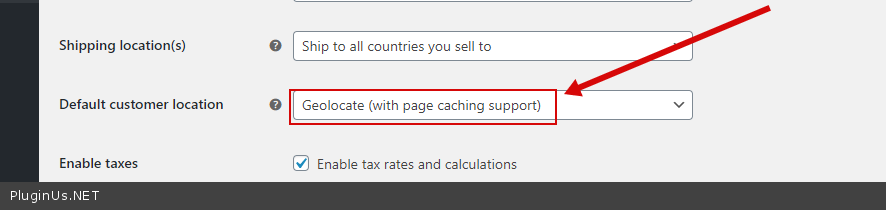
Ive set the cache settings in WP rocket as instructed - what instructions? Are these instructions recommended for woocommerce?
Quote from Off The Wall on April 13, 2021, 11:58The instructions from your plugin. that option is already selected from your screenshot.
So what is the incorrect setting in woocommerce that is stopping the plugin from working properly?
The instructions from your plugin. that option is already selected from your screenshot.
So what is the incorrect setting in woocommerce that is stopping the plugin from working properly?
Quote from Pablo Borysenco on April 13, 2021, 13:11what is the incorrect setting in woocommerce that is stopping the plugin from working properly - I probably explained to you incorrectly. Woocommerce+WOOCS - work fine. The problem is caching
Woocommerce + you cache settings (In the caching plugin) - user location does not work
Please drop me wp-admin access - https://c2n.me/43SC6rb.png ->https://c2n.me/42BAoj4.png
what is the incorrect setting in woocommerce that is stopping the plugin from working properly - I probably explained to you incorrectly. Woocommerce+WOOCS - work fine. The problem is caching
Woocommerce + you cache settings (In the caching plugin) - user location does not work
Please drop me wp-admin access - https://c2n.me/43SC6rb.png ->https://c2n.me/42BAoj4.png

Quote from Off The Wall on April 13, 2021, 13:15Ah ok. just done admin access
thanks
Ah ok. just done admin access
thanks
Quote from Pablo Borysenco on April 14, 2021, 10:44Hello
I clered cache and did a test - https://c2n.me/4bGAtBF - Everything seems to be working correctly.
Hello
I clered cache and did a test - https://c2n.me/4bGAtBF - Everything seems to be working correctly.
Quote from Off The Wall on April 14, 2021, 11:07So weird, I tried that and problem ocurred again the next day.
but thank you for checking and fixing.
in WP Rocket I have updated the global cache clear setting to 10 hours to stop this happening periodically? that sound ok?
So weird, I tried that and problem ocurred again the next day.
but thank you for checking and fixing.
in WP Rocket I have updated the global cache clear setting to 10 hours to stop this happening periodically? that sound ok?
Quote from Pablo Borysenco on April 15, 2021, 10:12Hello
I did a test today - https://c2n.me/4bHvffW - it seems to work correctly so far
I have updated the global cache clear setting to 10 hours to stop this happening periodically? that sound ok? - Unfortunately I am not a developer of the WP Rocket or woocommerce
This could also be a server side problem. This happens very often with Cloudflare. - https://stackoverflow.com/questions/65833337/use-cloudflare-provided-country-in-place-of-wordpress-internal-country-for-prici
Hello
I did a test today - https://c2n.me/4bHvffW - it seems to work correctly so far
I have updated the global cache clear setting to 10 hours to stop this happening periodically? that sound ok? - Unfortunately I am not a developer of the WP Rocket or woocommerce
This could also be a server side problem. This happens very often with Cloudflare. - https://stackoverflow.com/questions/65833337/use-cloudflare-provided-country-in-place-of-wordpress-internal-country-for-prici
Quote from Off The Wall on April 15, 2021, 12:09ok thanks for your help!
ok thanks for your help!
Quote from Pablo Borysenco on April 16, 2021, 11:18Hello
Welcome;)
Hello
Welcome;)