
Plugin crashed my website after setting storage to Redis
The support doesn work on Saturdays and Sundays, so some Friday requests can be answered on Monday. If you have problems with registration ask help on contact us page pleaseIf you not got email within 24~36 business hours, firstly check your spam box, and if no any email from the support there - back to the forum and read answer here. DO NOT ANSWER ON EMAILS [noreply@pluginus.net] FROM THE FORUM!! Emails are just for your info, all answers should be published only here.
The support doesn work on Saturdays and Sundays, so some Friday requests can be answered on Monday.

Quote from nelsonq on March 29, 2021, 03:40Hi there, I need urgent assistance. I have a live ecommerce website, and when I changed the storage setting to Redis, my website crashed. This is the error I get
Fatal error: Uncaught RedisException: protocol error, got 'E' as reply type byte in /home/551462.cloudwaysapps.com/ryrxgmarnz/public_html/wp-content/plugins/woocommerce-currency-switcher/classes/storage.php:160 Stack trace: #0 /home/551462.cloudwaysapps.com/ryrxgmarnz/public_html/wp-content/plugins/woocommerce-currency-switcher/classes/storage.php(160): Redis->exists() #1 /home/551462.cloudwaysapps.com/ryrxgmarnz/public_html/wp-content/plugins/woocommerce-currency-switcher/classes/storage.php(108): WOOCS_STORAGE->is_isset() #2 /home/551462.cloudwaysapps.com/ryrxgmarnz/public_html/wp-content/plugins/woocommerce-currency-switcher/classes/woocs_after_33.php(208): WOOCS_STORAGE->get_val() #3 /home/551462.cloudwaysapps.com/ryrxgmarnz/public_html/wp-content/plugins/woocommerce-currency-switcher/index.php(134): WOOCS->__construct() #4 /home/551462.cloudwaysapps.com/ryrxgmarnz/public_html/wp-content/plugins/woocommerce-currency-switcher/index.php(155): WOOCS_STARTER->get_actual_obj() #5 /home/551462.cloudwaysapps.com/ryrxgmarnz/ in /home/551462.cloudwaysapps.com/ryrxgmarnz/public_html/wp-content/plugins/woocommerce-currency-switcher/classes/storage.php on line 160
Can you help me solve this issue?
Thanks
Nelson
Hi there, I need urgent assistance. I have a live ecommerce website, and when I changed the storage setting to Redis, my website crashed. This is the error I get
Fatal error: Uncaught RedisException: protocol error, got 'E' as reply type byte in /home/551462.cloudwaysapps.com/ryrxgmarnz/public_html/wp-content/plugins/woocommerce-currency-switcher/classes/storage.php:160 Stack trace: #0 /home/551462.cloudwaysapps.com/ryrxgmarnz/public_html/wp-content/plugins/woocommerce-currency-switcher/classes/storage.php(160): Redis->exists() #1 /home/551462.cloudwaysapps.com/ryrxgmarnz/public_html/wp-content/plugins/woocommerce-currency-switcher/classes/storage.php(108): WOOCS_STORAGE->is_isset() #2 /home/551462.cloudwaysapps.com/ryrxgmarnz/public_html/wp-content/plugins/woocommerce-currency-switcher/classes/woocs_after_33.php(208): WOOCS_STORAGE->get_val() #3 /home/551462.cloudwaysapps.com/ryrxgmarnz/public_html/wp-content/plugins/woocommerce-currency-switcher/index.php(134): WOOCS->__construct() #4 /home/551462.cloudwaysapps.com/ryrxgmarnz/public_html/wp-content/plugins/woocommerce-currency-switcher/index.php(155): WOOCS_STARTER->get_actual_obj() #5 /home/551462.cloudwaysapps.com/ryrxgmarnz/ in /home/551462.cloudwaysapps.com/ryrxgmarnz/public_html/wp-content/plugins/woocommerce-currency-switcher/classes/storage.php on line 160
Can you help me solve this issue?
Thanks
Nelson
Quote from nelsonq on March 29, 2021, 09:21I've managed to rollback my website. But this is still an issue when I change this setting.
I've managed to rollback my website. But this is still an issue when I change this setting.
Quote from nelsonq on March 29, 2021, 10:09However i have another issue. please take a look at https://osowatch.co/product/orbit-abyss-with-steel-case/
Under the pricing, you can see a button with the text "Get $40 USD Off your first purchase". I used woocs shortcode to display the price based on the currency selected. "Get [woocs_show_custom_price value=40] [woocs_show_current_currency text="" flag=0 code=1]Off Your First Purchase"
However when I change my currency to JPY for example, I noticed that the currency symbol inside the button remain as "USD" while the price shows JPY. Also, if you click on the button, it will open up a popup. The shortcode in the popup doesn't seem to display the updated pricing and symbol based on the newly selected currency.
However i have another issue. please take a look at https://osowatch.co/product/orbit-abyss-with-steel-case/
Under the pricing, you can see a button with the text"Get $40 USD Off your first purchase". I used woocs shortcode to display the price based on the currency selected."Get [woocs_show_custom_price value=40] [woocs_show_current_currency text="" flag=0 code=1]Off Your First Purchase"
However when I change my currency to JPY for example, I noticed that the currency symbol inside the button remain as"USD" while the price shows JPY. Also, if you click on the button, it will open up a popup. The shortcode in the popup doesn't seem to display the updated pricing and symbol based on the newly selected currency.

Quote from Pablo Borysenco on March 29, 2021, 11:10Hello
Do you use a cache
the problem is that the plugin redraws prices but unfortunately does not redraw this shortcode[woocs_show_current_currency]
Hello
Do you use a cache
the problem is that the plugin redraws prices but unfortunately does not redraw this shortcode[woocs_show_current_currency]
Quote from nelsonq on March 29, 2021, 17:57Yes I use a cache plugin. Any solution to make this work?
Thanks
Nelson
Yes I use a cache plugin. Any solution to make this work?
Thanks
Nelson
Quote from Pablo Borysenco on March 30, 2021, 10:35Hello
Try in file - \wp-content\plugins\woocommerce-currency-switcher\js\front.js add code - https://c2n.me/4buEq3j.png
var shortcode_currency = jQuery('strong.woocs_current_currency_code');
if(shortcode_currency.length){
shortcode_currency.text(data.current_currency);
}clear all cache and do a test
Hello
Try in file - \wp-content\plugins\woocommerce-currency-switcher\js\front.js add code - https://c2n.me/4buEq3j.png
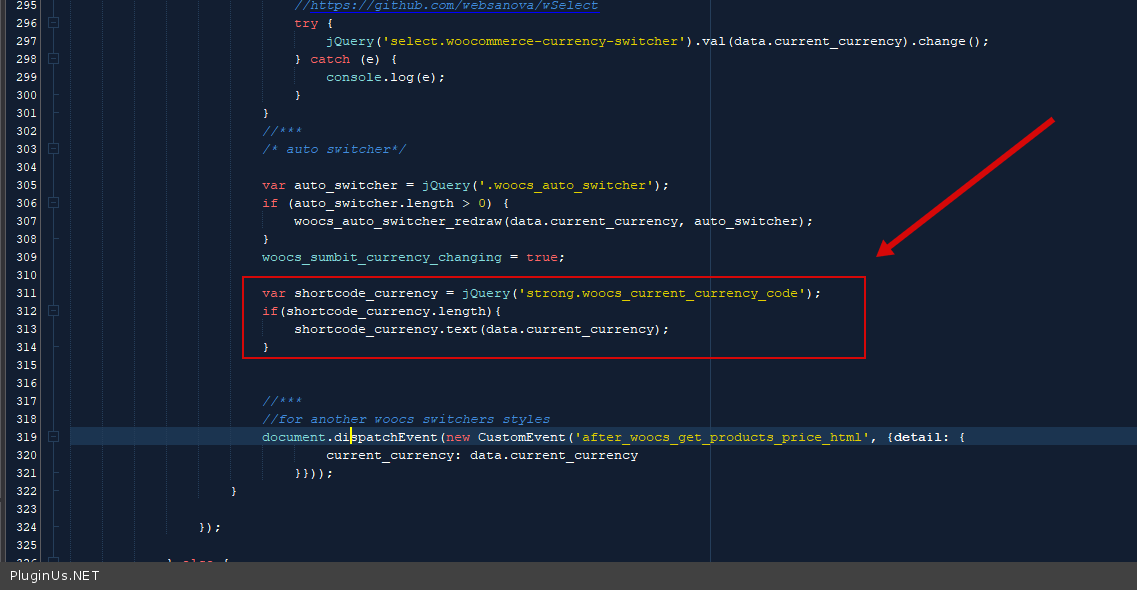
var shortcode_currency = jQuery('strong.woocs_current_currency_code');
if(shortcode_currency.length){
shortcode_currency.text(data.current_currency);
}
clear all cache and do a test