

Pagination Showing Incorrect Page Count and 404 Errors with Avada + Husky Filter
The support doesn work on Saturdays and Sundays, so some Friday requests can be answered on Monday. If you have problems with registration ask help on contact us page pleaseIf you not got email within 24~36 business hours, firstly check your spam box, and if no any email from the support there - back to the forum and read answer here. DO NOT ANSWER ON EMAILS [noreply@pluginus.net] FROM THE FORUM!! Emails are just for your info, all answers should be published only here.
The support doesn work on Saturdays and Sundays, so some Friday requests can be answered on Monday.

Quote from Ganqq on November 19, 2025, 18:21I'm having an issue with my site’s pagination. It displays more page numbers than it should. For example, the pagination shows 9 pages, but when I click on page 4, I get a 404 error.
I'm using the Avada theme, which I suspect might be part of the problem. I’ve already disabled Rocket Loader and tried enabling/disabling “Disable swoof influence,” but nothing seems to fix the issue.
I also have another problem: the search function for my posts in the WordPress admin panel stopped working right after installing the plugin.
I’ve already the code page builder layouts to my functions.php
The link to the affected site is in the private area of this ticket
HUSKY : v1.3.7.2
Wordpress : v6.8.3
I'm having an issue with my site’s pagination. It displays more page numbers than it should. For example, the pagination shows 9 pages, but when I click on page 4, I get a 404 error.
I'm using the Avada theme, which I suspect might be part of the problem. I’ve already disabled Rocket Loader and tried enabling/disabling “Disable swoof influence,” but nothing seems to fix the issue.
I also have another problem: the search function for my posts in the WordPress admin panel stopped working right after installing the plugin.
I’ve already the code page builder layouts to my functions.php
The link to the affected site is in the private area of this ticket
HUSKY : v1.3.7.2
Wordpress : v6.8.3

Quote from Alex Dovlatov on November 20, 2025, 12:55Hello
Just looked your site:
page 7 and 8 shows products
The same if filter applied: boutique/?swoof2=1&product_brand=alcatel-lucent - 4 pages and they works, maybe you fixed it already. If I not undertood you right make video please share here it
I also have another problem: the search function for my posts in the WordPress admin panel stopped working right after installing the plugin. - here is conflict with a script, I can suggest you disable all plugin exept woocommerce and HUSKY and make tests, also disable wp theme to find sourse of the issue
Hello
Just looked your site:
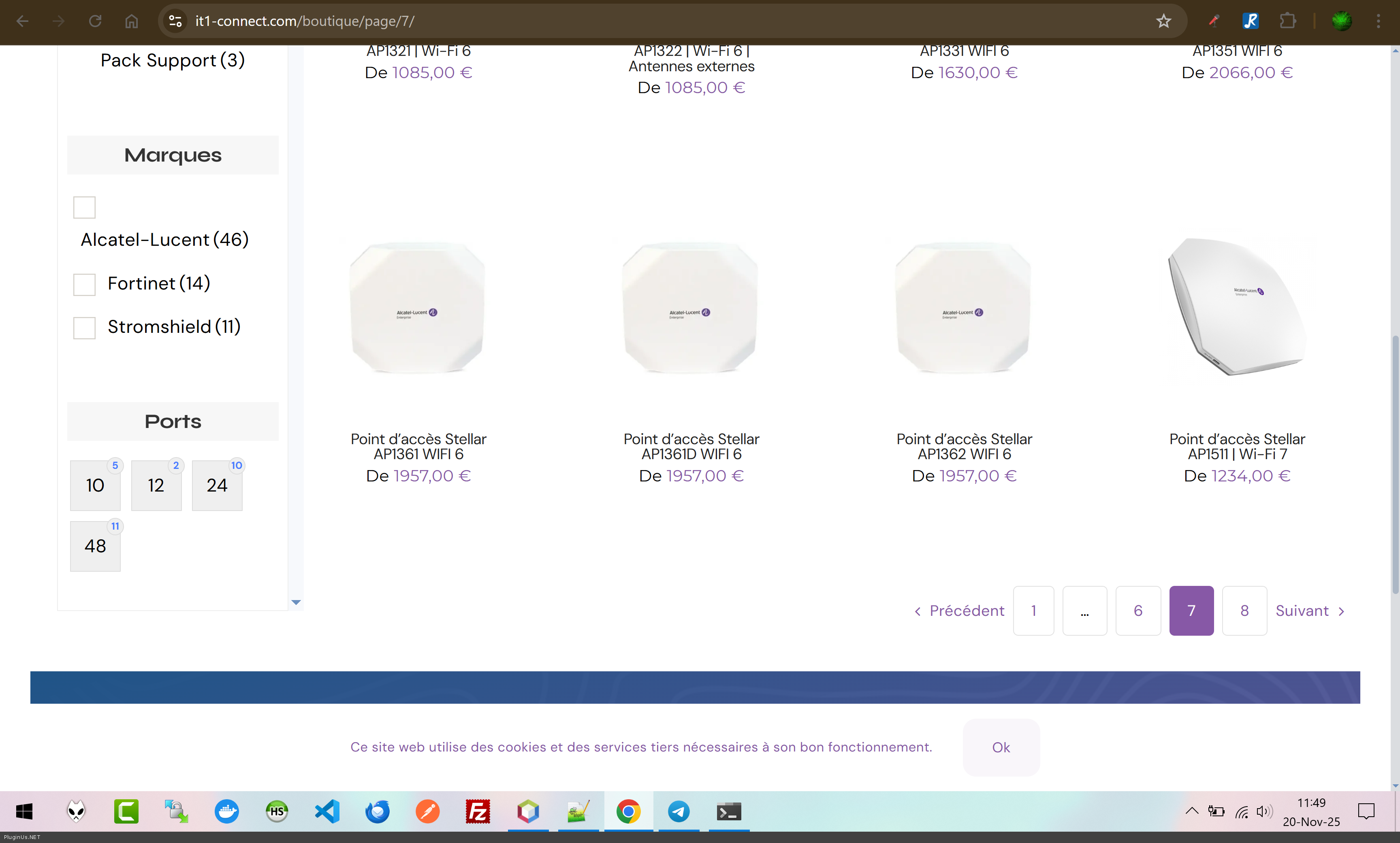
page 7 and 8 shows products
The same if filter applied: boutique/?swoof2=1&product_brand=alcatel-lucent - 4 pages and they works, maybe you fixed it already. If I not undertood you right make video please share here it
I also have another problem: the search function for my posts in the WordPress admin panel stopped working right after installing the plugin. - here is conflict with a script, I can suggest you disable all plugin exept woocommerce and HUSKY and make tests, also disable wp theme to find sourse of the issue
Quote from Ganqq on November 20, 2025, 19:33Hello !
Sorry, I wasn’t very clear yesterday.
I found out how to reproduce the bug:You need to select a category that contains multiple pages, go to the last page, and then additional pages will appear unexpectedly.
Here’s the video. At the beginning, we can see that there are only 3 pages, but as soon as I select page 3, more pages show up, containing products that don’t actually exist, and eventually it leads to a 404 page.
Here is the second bug I noticed: the admin product search menu no longer responds:
https://streamable.com/ql6t29Thanks for your help!
Hello !
Sorry, I wasn’t very clear yesterday.
I found out how to reproduce the bug:
You need to select a category that contains multiple pages, go to the last page, and then additional pages will appear unexpectedly.
Here’s the video. At the beginning, we can see that there are only 3 pages, but as soon as I select page 3, more pages show up, containing products that don’t actually exist, and eventually it leads to a 404 page.
Here is the second bug I noticed: the admin product search menu no longer responds:
https://streamable.com/ql6t29
Thanks for your help!
Quote from Alex Dovlatov on November 21, 2025, 13:24Hello
Thank you for the video, now I see the issue. Second one issue also is strange one, and we not see it on our side. Lets do next, if the site is in production mode, create please clone of the site on stage subdomain using https://wordpress.org/plugins/duplicator/ and share please wp-admin access there trought secret area, I will play with it, reason can be with the plugins or theme conflict, so it will be good also to provide ftp access to the stage site to make tests with the code and HUSKY options
Thank you!
Hello
Thank you for the video, now I see the issue. Second one issue also is strange one, and we not see it on our side. Lets do next, if the site is in production mode, create please clone of the site on stage subdomain using https://wordpress.org/plugins/duplicator/ and share please wp-admin access there trought secret area, I will play with it, reason can be with the plugins or theme conflict, so it will be good also to provide ftp access to the stage site to make tests with the code and HUSKY options
Thank you!
Quote from Alex Dovlatov on November 21, 2025, 13:25p.s. firstly plese try self in HUSKY options -> advanced -> options -> 'Disable swoof influence' -> set Yes and try, maybe it will resolve the issue
p.s. firstly plese try self in HUSKY options -> advanced -> options -> 'Disable swoof influence' -> set Yes and try, maybe it will resolve the issue
Quote from Ganqq on November 21, 2025, 13:38I tried to disable swoof influence, but it breaks everything. Here’s an example: https://ibb.co/20xWqRmx
I’ve placed the credentials in the thread’s secret section.
I tried to disable swoof influence, but it breaks everything. Here’s an example: https://ibb.co/20xWqRmx
I’ve placed the credentials in the thread’s secret section.
Quote from Alex Dovlatov on November 24, 2025, 13:32Hello
Just played with site and desable all plugins exept of themes and woo+HUSKY - still doesn work, so I wanted to add some code to fix, but got:
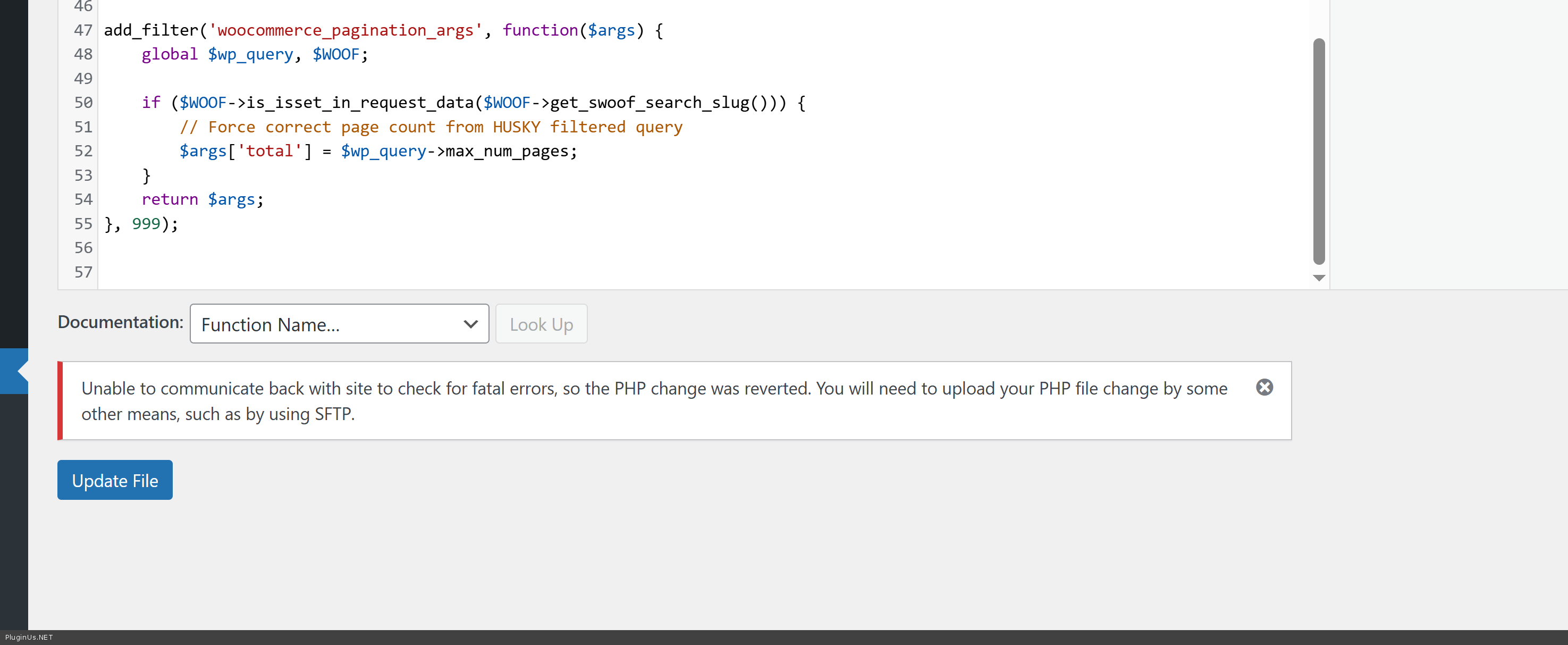
Unable to communicate back with site to check for fatal errors, so the PHP change was reverted. You will need to upload your PHP file change by some other means, such as by using SFTP.
Provide please also ftp to the site in the private area to play with code
Hello
Just played with site and desable all plugins exept of themes and woo+HUSKY - still doesn work, so I wanted to add some code to fix, but got:
Unable to communicate back with site to check for fatal errors, so the PHP change was reverted. You will need to upload your PHP file change by some other means, such as by using SFTP.
Provide please also ftp to the site in the private area to play with code
Quote from Ganqq on December 3, 2025, 15:28Hello,
I have added the SFTP credentials to the private area.
Thank you!
Hello,
I have added the SFTP credentials to the private area.
Thank you!
Quote from Alex Dovlatov on December 4, 2025, 14:36Hello
Fixed! in file /var/www/html/wp-content/themes/Avada-Child-Theme/functions.php I added next code:
add_filter('woocommerce_pagination_args', function($args) {global $wp_query, $WOOF;if ($WOOF->is_isset_in_request_data($WOOF->get_swoof_search_slug())) {// Force correct page count from HUSKY filtered query$args['total'] = $wp_query->max_num_pages;}return $args;}, 999);And its made job, try it please /boutique/swoof/product_cat-pare-feu/page/3/
Hello
Fixed! in file /var/www/html/wp-content/themes/Avada-Child-Theme/functions.php I added next code:
Quote from Ganqq on December 4, 2025, 14:58Thank you, the number of pages is correct, but I don’t think the issue is fully resolved.
When I select two categories (e.g., “Borne Wifi” & “Pack Support”), page 1 correctly shows the right products, but page 2 displays products that don’t have both tags (in fact, some have neither tag).
Here is an example link: /boutique/swoof2/product_cat-borne-wifi-and-pack-support/page/2/
None of the products on page 2 should be displayed with those filters enabled.
Thank you, the number of pages is correct, but I don’t think the issue is fully resolved.
When I select two categories (e.g., “Borne Wifi” & “Pack Support”), page 1 correctly shows the right products, but page 2 displays products that don’t have both tags (in fact, some have neither tag).
Here is an example link: /boutique/swoof2/product_cat-borne-wifi-and-pack-support/page/2/
None of the products on page 2 should be displayed with those filters enabled.
Quote from Alex Dovlatov on December 5, 2025, 13:17Hello
I set 'AND' as confition and n ow works boutique/swoof/product_cat-pack-support-and-borne-wifi/ -> https://share.pluginus.net/image/i20251205131635.png
boutique/swoof2/product_cat-pack-support-and-borne-wifi/ - is wrong version, in free version slug 'swoof' works only
Try it ...
Hello
I set 'AND' as confition and n ow works boutique/swoof/product_cat-pack-support-and-borne-wifi/ -> https://share.pluginus.net/image/i20251205131635.png

boutique/swoof2/product_cat-pack-support-and-borne-wifi/ - is wrong version, in free version slug 'swoof' works only
Try it ...

Quote from Ganqq on December 10, 2025, 11:45Hello,
This isn’t correct. Here is, for example, the list of products when I select only the ‘Borne Wifi’ category (boutique/swoof2/product_cat-borne-wifi/) — everything is fine:
https://imgur.com/a/vNFh0tr
If I select only ‘Pack Support’, everything is fine as well (boutique/swoof2/product_cat-pack-support/):
https://imgur.com/a/eWglfI6But if I select both categories, products that are not in either ‘Borne Wifi’ or ‘Pack Support’ start appearing on page 2, instead of showing the remaining correct products (boutique/swoof2/product_cat-pack-support-and-borne-wifi/):
https://imgur.com/a/BiMaOZE
Thanks !
Hello,
This isn’t correct. Here is, for example, the list of products when I select only the ‘Borne Wifi’ category (boutique/swoof2/product_cat-borne-wifi/) — everything is fine:
If I select only ‘Pack Support’, everything is fine as well (boutique/swoof2/product_cat-pack-support/):
But if I select both categories, products that are not in either ‘Borne Wifi’ or ‘Pack Support’ start appearing on page 2, instead of showing the remaining correct products (boutique/swoof2/product_cat-pack-support-and-borne-wifi/):
Thanks !
Quote from Alex Dovlatov on December 11, 2025, 14:16Hello
Ok, looks like I have an idea, but jut tried to enter sftp and it doesn work, file editor also gave me error:
Unable to communicate back with site to check for fatal errors, so the PHP change was reverted. You will need to upload your PHP file change by some other means, such as by using SFTP. - please check access and give me know here
Please check it, and will continue investigation OR give me permission to use duplicator and test your site on my hosting to see possible impact of your hosting
Hello
Ok, looks like I have an idea, but jut tried to enter sftp and it doesn work, file editor also gave me error:
Unable to communicate back with site to check for fatal errors, so the PHP change was reverted. You will need to upload your PHP file change by some other means, such as by using SFTP. - please check access and give me know here
Please check it, and will continue investigation OR give me permission to use duplicator and test your site on my hosting to see possible impact of your hosting
Quote from Ganqq on December 11, 2025, 14:34Hello,
Regarding the SFTP connection, it should work. Try adding sftp:// before the IP address, like this: sftp://XX.XX.XX.XX. I’ve added the correct format in the secure note. Don’t forget to include the port as well.
If you need anything else, feel free to let me know.
Hello,
Regarding the SFTP connection, it should work. Try adding sftp:// before the IP address, like this: sftp://XX.XX.XX.XX. I’ve added the correct format in the secure note. Don’t forget to include the port as well.
If you need anything else, feel free to let me know.
Quote from Alex Dovlatov on December 12, 2025, 12:39Hello
I shared video in the private area, I can not even save files in wp-admin/theme-editor.php?file=functions.php&theme=Avada-Child-Theme
I have an idea that it works geo location filter on your hosting, add please Spain to wgite list. If problems give me permission to create your site as clone on my test domain hosting to make invetigation there
Hello
I shared video in the private area, I can not even save files in wp-admin/theme-editor.php?file=functions.php&theme=Avada-Child-Theme
I have an idea that it works geo location filter on your hosting, add please Spain to wgite list. If problems give me permission to create your site as clone on my test domain hosting to make invetigation there
Quote from Ganqq on December 12, 2025, 13:23Hello,
Indeed, there must be a problem somewhere.
I changed an option, can you try the SFTP connection again?
If that doesn't work, you have permission to clone the site.Thanks!!
Hello,
Indeed, there must be a problem somewhere.
I changed an option, can you try the SFTP connection again?
If that doesn't work, you have permission to clone the site.
Thanks!!
Quote from Alex Dovlatov on December 12, 2025, 15:24Hello
Looks like works: https://tester2.pluginus.net/boutique/swoof2/product_cat-borne-wifi-and-pack-support/
Deal was about the hook race, and and it seems there is a delay in receiving the current filter slug 'swoof2' for current filter form, so to fix it do next please:
- open index.php file fo the plugin and replace function get_swoof_search_slug
public function get_swoof_search_slug() {
// Early initialization of front_builder if needed and not yet loaded
if (!isset(WOOF_EXT::$includes['applications']['front_builder'])) {
$fb_path = WOOF_PATH . 'ext' . DIRECTORY_SEPARATOR . 'front_builder';// Check if front_builder is activated
if (WOOF_EXT::is_ext_activated($fb_path)) {
// Force early load - this will add the woof_filter_search_slug filter
include_once $fb_path . DIRECTORY_SEPARATOR . 'index.php';
}
}if (function_exists('woof_get_slug')) {
return woof_get_slug();
}return apply_filters('woof_filter_search_slug', $this->get_swoof_search_slug_opt());
}- open file functions.php of your wp child theme and place there next code:
function woof_get_slug() {
global $WOOF;// Get default slug from settings
$default_slug = $WOOF->get_swoof_search_slug_opt();// Get current URL
$current_url = $_SERVER['REQUEST_URI'];// Pattern to match slug with optional number: swoof, swoof2, swoof3, etc.
// This will match the base slug (swoof) followed by optional digits
$pattern = '/' . preg_quote($default_slug, '/') . '(\d*)/';// Try to find the slug in URL
if (preg_match($pattern, $current_url, $matches)) {
// Found! Return slug with number if exists
return $default_slug . $matches[1]; // swoof + "2" = swoof2
}// Not found in URL, return default
return $default_slug;
}
Hello
Looks like works: https://tester2.pluginus.net/boutique/swoof2/product_cat-borne-wifi-and-pack-support/
Deal was about the hook race, and and it seems there is a delay in receiving the current filter slug 'swoof2' for current filter form, so to fix it do next please:
- open index.php file fo the plugin and replace function get_swoof_search_slug
public function get_swoof_search_slug() {
// Early initialization of front_builder if needed and not yet loaded
if (!isset(WOOF_EXT::$includes['applications']['front_builder'])) {
$fb_path = WOOF_PATH . 'ext' . DIRECTORY_SEPARATOR . 'front_builder';// Check if front_builder is activated
if (WOOF_EXT::is_ext_activated($fb_path)) {
// Force early load - this will add the woof_filter_search_slug filter
include_once $fb_path . DIRECTORY_SEPARATOR . 'index.php';
}
}if (function_exists('woof_get_slug')) {
return woof_get_slug();
}return apply_filters('woof_filter_search_slug', $this->get_swoof_search_slug_opt());
} - open file functions.php of your wp child theme and place there next code:
function woof_get_slug() {
global $WOOF;// Get default slug from settings
$default_slug = $WOOF->get_swoof_search_slug_opt();// Get current URL
$current_url = $_SERVER['REQUEST_URI'];// Pattern to match slug with optional number: swoof, swoof2, swoof3, etc.
// This will match the base slug (swoof) followed by optional digits
$pattern = '/' . preg_quote($default_slug, '/') . '(\d*)/';// Try to find the slug in URL
if (preg_match($pattern, $current_url, $matches)) {
// Found! Return slug with number if exists
return $default_slug . $matches[1]; // swoof +"2" = swoof2
}// Not found in URL, return default
return $default_slug;
}
Quote from Ganqq on December 15, 2025, 12:57Hello,
The fix doesn’t seem to work. The link you shared with me shows this: https://tester2.pluginus.net/boutique/swoof2/product_cat-borne-wifi-and-pack-support/
If you select only "Borne Wifi," you’ll notice that it doesn’t display the same results as when both categories are selected. I also tested this on the production site, and it behaved the same way. For now, I’ve rolled back the changes.
I’m really sorry for any trouble this may be causing and truly appreciate your help with this.
Hello,
The fix doesn’t seem to work. The link you shared with me shows this: https://tester2.pluginus.net/boutique/swoof2/product_cat-borne-wifi-and-pack-support/
If you select only"Borne Wifi," you’ll notice that it doesn’t display the same results as when both categories are selected. I also tested this on the production site, and it behaved the same way. For now, I’ve rolled back the changes.
I’m really sorry for any trouble this may be causing and truly appreciate your help with this.
Quote from Alex Dovlatov on December 16, 2025, 14:33Hello
In such case do next please:
- remove filter created by front builder
- place instead shortcode [woof]
- in the plugin settings select what filter types you want to use
- test: https://tester2.pluginus.net/boutique/swoof/product_cat-borne-wifi-and-pack-support/ - try please on your site
Hello
In such case do next please:
- remove filter created by front builder
- place instead shortcode [woof]
- in the plugin settings select what filter types you want to use
- test: https://tester2.pluginus.net/boutique/swoof/product_cat-borne-wifi-and-pack-support/ - try please on your site
Quote from Ganqq on December 16, 2025, 14:43Hello,
On your website, it’s still not correct: the products displayed are not in the “Borne Wifi” category, yet they still appear there.
Hello,
On your website, it’s still not correct: the products displayed are not in the “Borne Wifi” category, yet they still appear there.