Pablo Borysenco(@pavlo_borysenco)
34,196 Posts
Quote from Pablo Borysenco on December 21, 2020, 13:56
Hello
Please read this - https://products-filter.com/auto-scroll-to-element-after-ajax-is-done/
Hello
Please read this - https://products-filter.com/auto-scroll-to-element-after-ajax-is-done/
Pablo Borysenco(@pavlo_borysenco)
34,196 Posts
Quote from Pablo Borysenco on December 22, 2020, 12:26
Hello
The problem with your fixed hender
In this case please disable ajax mode
OR change code:
jQuery('html, body').animate({
scrollTop: jQuery("#page-container").offset().top
}, 777);
Hello
The problem with your fixed hender
In this case please disable ajax mode
OR change code:
jQuery('html, body').animate({
scrollTop: jQuery("#page-container").offset().top
}, 777);
Pablo Borysenco(@pavlo_borysenco)
34,196 Posts
Quote from Pablo Borysenco on December 23, 2020, 13:14
Hello
Ok! Disable ajax mode.
Hello
Ok! Disable ajax mode.
Pablo Borysenco(@pavlo_borysenco)
34,196 Posts
Quote from Pablo Borysenco on December 24, 2020, 13:16
Hello
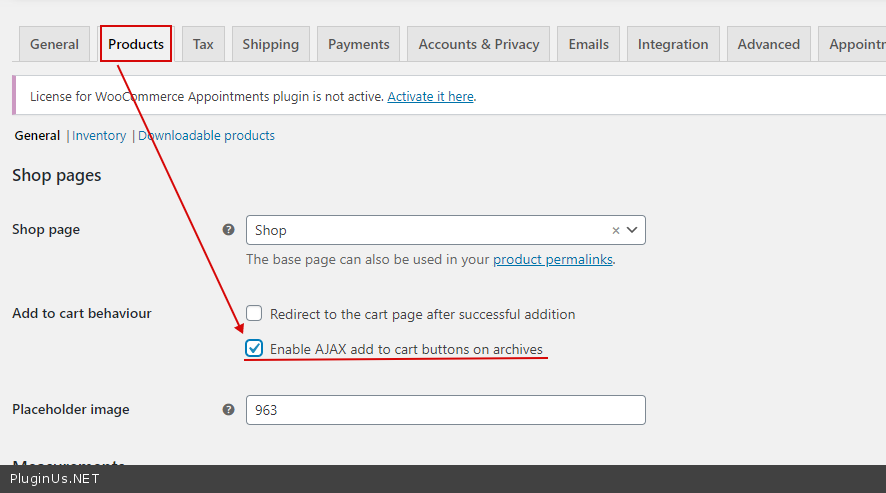
This is not standard functionality. try to check this option - https://c2n.me/4am0Isw.png
Hello
This is not standard functionality. try to check this option - https://c2n.me/4am0Isw.png
Pablo Borysenco(@pavlo_borysenco)
34,196 Posts
Quote from Pablo Borysenco on December 24, 2020, 13:16
Paste your license key here - https://c2n.me/43SC6rb.png -> https://c2n.me/42HBIt7.png and wp-admin access - https://c2n.me/42BAoj4.png
Paste your license key here - https://c2n.me/43SC6rb.png -> https://c2n.me/42HBIt7.png and wp-admin access - https://c2n.me/42BAoj4.png
Pablo Borysenco(@pavlo_borysenco)
34,196 Posts
Quote from Pablo Borysenco on December 29, 2020, 13:29
Hello
the license key is Ok! Thank you
But with this access, I cannot go to admin panel to check the settings
Did you try it - https://c2n.me/4am0Isw.png ?
Hello
the license key is Ok! Thank you
But with this access, I cannot go to admin panel to check the settings
Did you try it - https://c2n.me/4am0Isw.png ?
Pablo Borysenco(@pavlo_borysenco)
34,196 Posts
Quote from Pablo Borysenco on December 30, 2020, 12:55
Hello
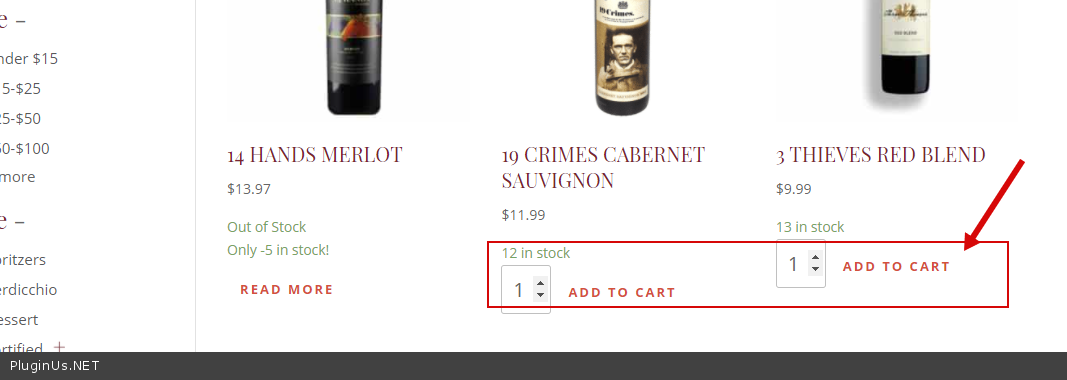
In this case, you should write to the support of the current theme. Their custom button( https://c2n.me/4apZWCx.png ) removes all GET requests in the URL and adding to cart in ajax mode doesn't work at all
Hello
In this case, you should write to the support of the current theme. Their custom button( https://c2n.me/4apZWCx.png ) removes all GET requests in the URL and adding to cart in ajax mode doesn't work at all