
Pagination not work
The support doesn work on Saturdays and Sundays, so some Friday requests can be answered on Monday. If you have problems with registration ask help on contact us page pleaseIf you not got email within 24~36 business hours, firstly check your spam box, and if no any email from the support there - back to the forum and read answer here. DO NOT ANSWER ON EMAILS [noreply@pluginus.net] FROM THE FORUM!! Emails are just for your info, all answers should be published only here.
The support doesn work on Saturdays and Sundays, so some Friday requests can be answered on Monday.

Quote from Md on April 29, 2026, 16:05We have online shop where if we click on a filter its load the products but when we want to move page 2 with pagination then its redirect us to shop page. for example
https://www.americanstonecraft.com/shop This is our shop page.
If we click the checkbox "And the url is https://www.americanstonecraft.com/shop/source/state-new-hampshire/
But then if we want to go to the second page and click ,then its redirect to https://www.americanstonecraft.com/shop/source/state-new-hampshire/page/2/ but the products not loaded instead https://www.americanstonecraft.com/shop page content is loaded.
We have online shop where if we click on a filter its load the products but when we want to move page 2 with pagination then its redirect us to shop page. for example
https://www.americanstonecraft.com/shop This is our shop page.
If we click the checkbox"And the url is https://www.americanstonecraft.com/shop/source/state-new-hampshire/
But then if we want to go to the second page and click ,then its redirect to https://www.americanstonecraft.com/shop/source/state-new-hampshire/page/2/ but the products not loaded instead https://www.americanstonecraft.com/shop page content is loaded.

Quote from Alex Dev on April 30, 2026, 20:24Place please actual purchase code of the plugin into the private area of this ticket:
https://share.pluginus.net/image/i20230222134241.png
https://share.pluginus.net/image/i20230222134615.png
https://share.pluginus.net/image/i20230222134511.png
Place please actual purchase code of the plugin into the private area of this ticket:
https://share.pluginus.net/image/i20230222134241.png
https://share.pluginus.net/image/i20230222134615.png
https://share.pluginus.net/image/i20230222134511.png
Quote from Alex Dev on May 1, 2026, 17:03Hello
Renew the support please, its expired 11-01-2023 18:21
After renovation write me here please that its done
Hello
Renew the support please, its expired 11-01-2023 18:21
After renovation write me here please that its done
Quote from Md on May 10, 2026, 01:31I have added again please check and let me know!
I have added again please check and let me know!
Quote from Alex Dev on May 11, 2026, 12:36Hello
Thank you for your cooperation!
The issue comes from a combination of two things happening at the same time.
First, your WooCommerce shop page is configured to display categories instead of products (but lets try to reload it). Second, your HUSKY filter is running in AJAX mode, which means when you apply a filter the browser URL does not change and stays as the plain shop URL with no filter parameters in it.
When you click to page 2, the pagination works as a regular redirect to that plain shop URL. At that point WooCommerce sees a clean shop page request with no filter context at all, so it falls back to its default behavior and shows categories again. The pagination and the filter are completely unaware of each other because the filter results only existed in the AJAX response, not in the URL.
To fix this, you need to switch HUSKY to redirect mode so that applying a filter does a full page reload and puts all filter parameters into the URL. Find your woof_products shortcode and change is_ajax=1 to is_ajax=0 and add redirect=1. After this change, both filtering and pagination will work through URL redirects and stay in sync with each other.
Once redirect mode is enabled, add this code to your theme's functions.php file:
add_filter('option_woocommerce_shop_page_display', function($value) {
    if (function_exists('is_woof_search_going') AND is_woof_search_going()) {
        return '';
    }
    return $value;
});

add_filter('option_woocommerce_category_archive_display', function($value) {
    if (function_exists('is_woof_search_going') AND is_woof_search_going()) {
        return '';
    }
    return $value;
});
This code detects when filter parameters are present in the URL and tells WooCommerce to show products instead of categories on those pages. Your default shop page will continue to show categories as before when no filter is active. Without redirect mode enabled first, this code will have no effect because there are nothing in the URL for it to detect.
If none of the above works for you, please provide FTP access and WordPress admin credentials in the private data section of this ticket so we can look into the code directly. If this is a live production site, please clone it first using the Duplicator plugin to a separate staging subdomain and give us access to that instead.
Please test and let us know how it goes.
Hello
Thank you for your cooperation!
The issue comes from a combination of two things happening at the same time.
First, your WooCommerce shop page is configured to display categories instead of products (but lets try to reload it). Second, your HUSKY filter is running in AJAX mode, which means when you apply a filter the browser URL does not change and stays as the plain shop URL with no filter parameters in it.
When you click to page 2, the pagination works as a regular redirect to that plain shop URL. At that point WooCommerce sees a clean shop page request with no filter context at all, so it falls back to its default behavior and shows categories again. The pagination and the filter are completely unaware of each other because the filter results only existed in the AJAX response, not in the URL.
To fix this, you need to switch HUSKY to redirect mode so that applying a filter does a full page reload and puts all filter parameters into the URL. Find your woof_products shortcode and change is_ajax=1 to is_ajax=0 and add redirect=1. After this change, both filtering and pagination will work through URL redirects and stay in sync with each other.
Once redirect mode is enabled, add this code to your theme's functions.php file:
add_filter('option_woocommerce_shop_page_display', function($value) {
    if (function_exists('is_woof_search_going') AND is_woof_search_going()) {
        return '';
    }
    return $value;
});

add_filter('option_woocommerce_category_archive_display', function($value) {
    if (function_exists('is_woof_search_going') AND is_woof_search_going()) {
        return '';
    }
    return $value;
});
This code detects when filter parameters are present in the URL and tells WooCommerce to show products instead of categories on those pages. Your default shop page will continue to show categories as before when no filter is active. Without redirect mode enabled first, this code will have no effect because there are nothing in the URL for it to detect.
If none of the above works for you, please provide FTP access and WordPress admin credentials in the private data section of this ticket so we can look into the code directly. If this is a live production site, please clone it first using the Duplicator plugin to a separate staging subdomain and give us access to that instead.
Quote from Md on May 13, 2026, 02:39Note: Everything was working perfectly
Problem 1 : When I use filter form "Origin of State" then products are showing but if i have many products and if I to click next page, its redirect to shop page (Categories) again. But it was working properly few weeks ago.
Problem 2 : If i select another filter then previous filter is checked also but it should not be.
Login credential :
URL : https://www.staging2.americanstonecraft.com/wp-admin
user : [removed]
pass : [removed]
My question is if its work few weeks ago then why not now?
Let me know if you need anything else
Note: Everything was working perfectly
Problem 1 : When I use filter form"Origin of State" then products are showing but if i have many products and if I to click next page, its redirect to shop page (Categories) again. But it was working properly few weeks ago.
Problem 2 : If i select another filter then previous filter is checked also but it should not be.
Login credential :
URL : https://www.staging2.americanstonecraft.com/wp-admin
user : [removed]
pass : [removed]
My question is if its work few weeks ago then why not now?
Let me know if you need anything else
Quote from Alex Dev on May 14, 2026, 11:49Hello
As to why it stopped working — we cannot say for sure. It could be a recently installed plugin causing a conflict, or something changed on the hosting side. We cannot know without looking directly.
One important note: please do not post login credentials in the public part of the ticket. You have used the private data section before and you know how it works — please use it again. Credentials posted publicly are visible to everyone.
We tried the login you shared but it did not work, so please add a fresh working set of credentials to the private data section. Also please make sure it is access to a staging clone of the site, not the live production site — as mentioned in our previous message.
While you are doing that, please try to remember the exact day when the problem first appeared. Think about what was installed or updated one or two days before you noticed it — a new plugin, a plugin update, a theme update, anything. That will most likely point us directly to the cause.
Hello
As to why it stopped working — we cannot say for sure. It could be a recently installed plugin causing a conflict, or something changed on the hosting side. We cannot know without looking directly.
One important note: please do not post login credentials in the public part of the ticket. You have used the private data section before and you know how it works — please use it again. Credentials posted publicly are visible to everyone.
We tried the login you shared but it did not work, so please add a fresh working set of credentials to the private data section. Also please make sure it is access to a staging clone of the site, not the live production site — as mentioned in our previous message.
While you are doing that, please try to remember the exact day when the problem first appeared. Think about what was installed or updated one or two days before you noticed it — a new plugin, a plugin update, a theme update, anything. That will most likely point us directly to the cause.
Quote from Md on May 14, 2026, 12:05I have update the user and password please check
Note : We didnt install new plugi for a whilte. Please teke a look.
I have update the user and password please check
Note : We didnt install new plugi for a whilte. Please teke a look.
Quote from Alex Dev on May 15, 2026, 12:50Hello
I found the root cause of the issue. The problem is specific to the shop page in combination with SEO links mode on your server.
Here is what I have established through testing:
Disabling all plugins and switching themes made no difference. Switching to non-SEO search links (query string mode) makes pagination work correctly. On a regular test page the SEO links work fine including pagination. On the shop page, the first filtered page works fine, but the second page is empty.
This points to a server-level URL routing conflict. Your server runs PHP as CGI/FastCGI, which handles the PATH_INFO variable differently compared to standard mod_php setups. This causes the shop page URL to be parsed incorrectly when both the filter path and the page number are combined, resulting in WooCommerce not recognizing the page as the shop archive.
I need either FTP/SFTP access or the ability to edit files directly to apply a targeted fix to the URL processing code. Right now the WordPress file editor is blocked by a fatal error check and reverts any changes.
Please do one of the following:
Provide FTP or SFTP credentials in the private section of this ticket, or fix the file editor permissions so changes can be saved.
As a working alternative in the meantime, you can disable SEO links mode in the HUSKY settings. Filtering and pagination will both work correctly in that mode
Hello
I found the root cause of the issue. The problem is specific to the shop page in combination with SEO links mode on your server.
Here is what I have established through testing:
Disabling all plugins and switching themes made no difference. Switching to non-SEO search links (query string mode) makes pagination work correctly. On a regular test page the SEO links work fine including pagination. On the shop page, the first filtered page works fine, but the second page is empty.
This points to a server-level URL routing conflict. Your server runs PHP as CGI/FastCGI, which handles the PATH_INFO variable differently compared to standard mod_php setups. This causes the shop page URL to be parsed incorrectly when both the filter path and the page number are combined, resulting in WooCommerce not recognizing the page as the shop archive.
I need either FTP/SFTP access or the ability to edit files directly to apply a targeted fix to the URL processing code. Right now the WordPress file editor is blocked by a fatal error check and reverts any changes.
Please do one of the following:
Provide FTP or SFTP credentials in the private section of this ticket, or fix the file editor permissions so changes can be saved.
As a working alternative in the meantime, you can disable SEO links mode in the HUSKY settings. Filtering and pagination will both work correctly in that mode
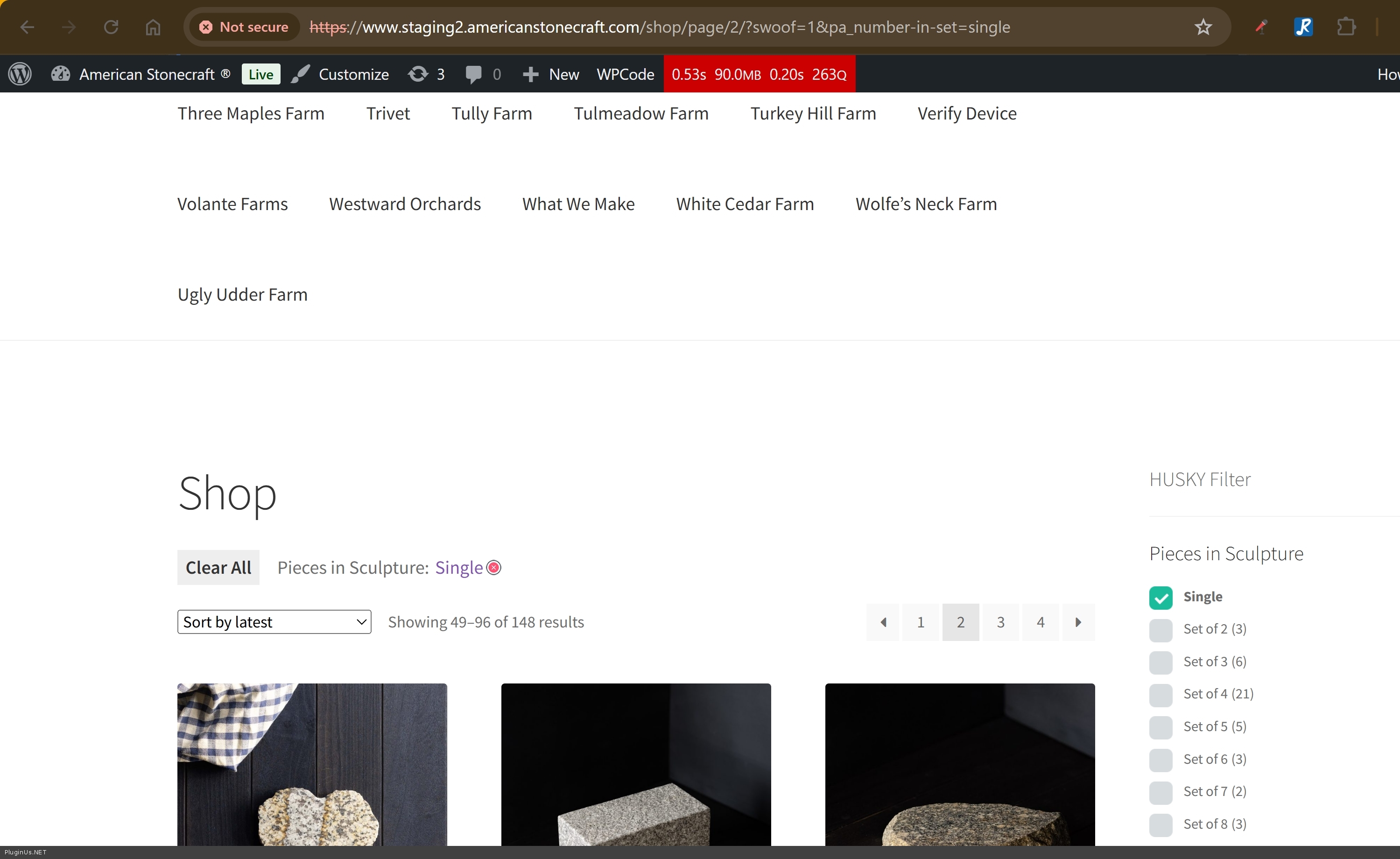
Quote from Md on May 15, 2026, 15:24I added the ftp credential. Please work on staging2.americanstonecraft.com this is staging site. Thanks
I added the ftp credential. Please work on staging2.americanstonecraft.com this is staging site. Thanks
Quote from Alex Dev on May 18, 2026, 13:39Hello
Fixed: https://www.staging2.americanstonecraft.com/shop/swoof/number-in-set-single/page/2/
Shop page as catalog: https://www.staging2.americanstonecraft.com/shop/
After deep investigation we found the root cause. The issue was a combination of two things happening at the same time. Your shop is configured to display categories on the main shop page, while the filter works with products. When navigating to page 2 during an active filter session, a stray slash was appearing in the internal URL processing, which caused WordPress to lose the filter context and fall back to the default shop page behavior.
We have fixed this at the plugin level and the fix will be included in the next HUSKY update so other users with similar setups will benefit from it automatically.
On your site specifically we also need two small snippets in your functions.php to handle the display logic correctly: when no filter is active the shop shows categories as you have it configured, and when a filter is active and you navigate through pages it shows products instead. Please add the following to your functions.php:
// Show products instead of categories when HUSKY filter is active
add_filter('option_woocommerce_shop_page_display', function($value) {
    if (function_exists('is_woof_search_going') AND is_woof_search_going()) {
        return '';
    }
    return $value;
});

add_filter('option_woocommerce_category_archive_display', function($value) {
    if (function_exists('is_woof_search_going') AND is_woof_search_going()) {
        return '';
    }
    return $value;
});
After adding these, filtering with pagination should work correctly on all pages. Let us know if you need any help adding the code.
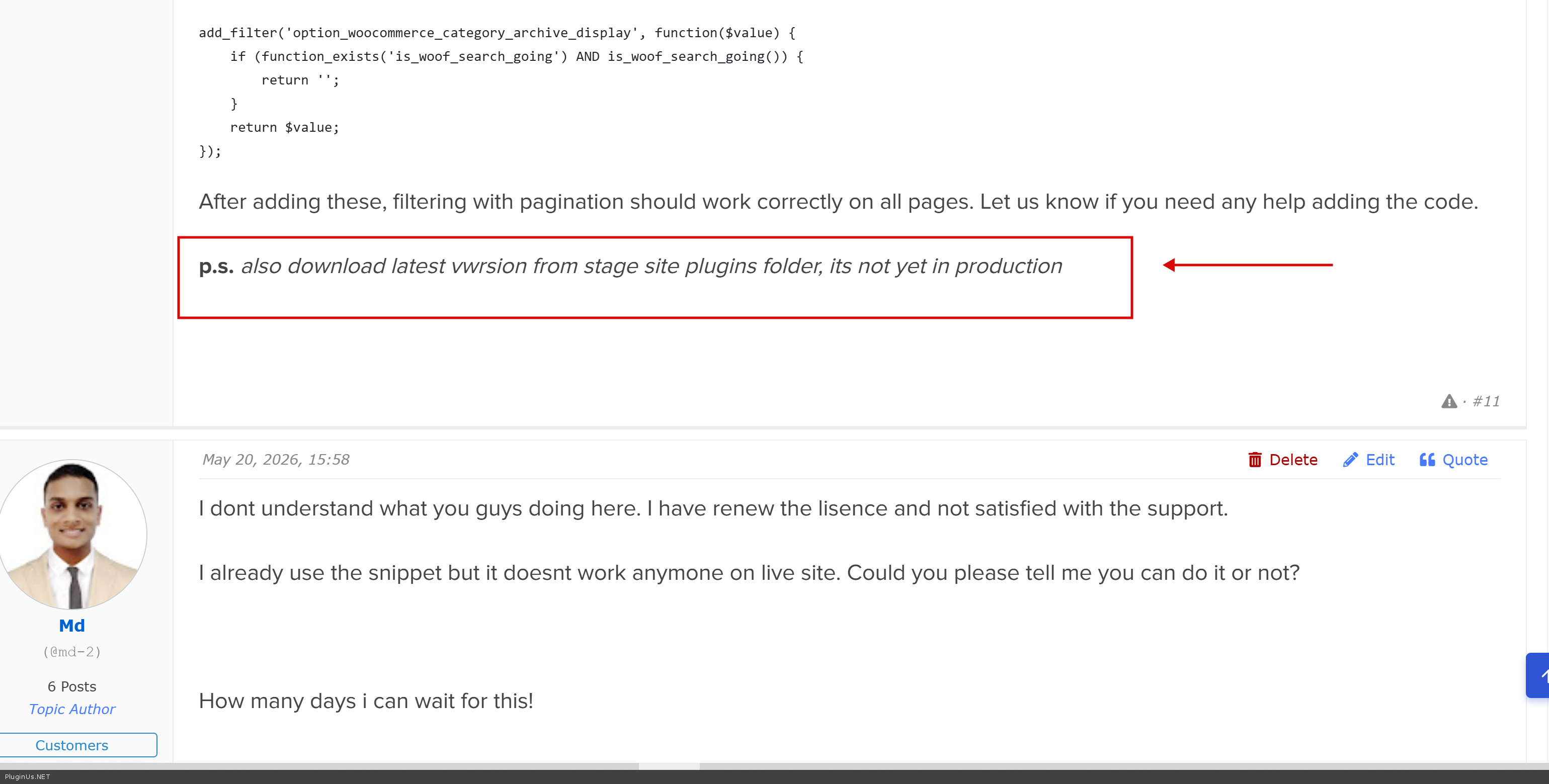
p.s. also download latest vwrsion from stage site plugins folder, its not yet in production
Hello
Fixed: https://www.staging2.americanstonecraft.com/shop/swoof/number-in-set-single/page/2/
Shop page as catalog: https://www.staging2.americanstonecraft.com/shop/
After deep investigation we found the root cause. The issue was a combination of two things happening at the same time. Your shop is configured to display categories on the main shop page, while the filter works with products. When navigating to page 2 during an active filter session, a stray slash was appearing in the internal URL processing, which caused WordPress to lose the filter context and fall back to the default shop page behavior.
We have fixed this at the plugin level and the fix will be included in the next HUSKY update so other users with similar setups will benefit from it automatically.
On your site specifically we also need two small snippets in your functions.php to handle the display logic correctly: when no filter is active the shop shows categories as you have it configured, and when a filter is active and you navigate through pages it shows products instead. Please add the following to your functions.php:
// Show products instead of categories when HUSKY filter is active
add_filter('option_woocommerce_shop_page_display', function($value) {
    if (function_exists('is_woof_search_going') AND is_woof_search_going()) {
        return '';
    }
    return $value;
});

add_filter('option_woocommerce_category_archive_display', function($value) {
    if (function_exists('is_woof_search_going') AND is_woof_search_going()) {
        return '';
    }
    return $value;
});
After adding these, filtering with pagination should work correctly on all pages. Let us know if you need any help adding the code.
p.s. also download latest vwrsion from stage site plugins folder, its not yet in production
Quote from Md on May 20, 2026, 15:58I dont understand what you guys doing here. I have renew the lisence and not satisfied with the support.
I already use the snippet but it doesnt work anymone on live site. Could you please tell me you can do it or not?
How many days i can wait for this!
I dont understand what you guys doing here. I have renew the lisence and not satisfied with the support.
I already use the snippet but it doesnt work anymone on live site. Could you please tell me you can do it or not?
How many days i can wait for this!
Quote from Alex Dev on May 21, 2026, 22:41Hi
did you read my previous message of 18 May? Its fixed, here is the results: https://www.staging2.americanstonecraft.com/shop/swoof/number-in-set-single/page/2/
Do what is described there
Hi
did you read my previous message of 18 May? Its fixed, here is the results: https://www.staging2.americanstonecraft.com/shop/swoof/number-in-set-single/page/2/
Do what is described there


Quote from Md on May 22, 2026, 06:26
- I want to make the filter like if i select a filter products is showing but if i select another filter then products is also showing but the previous filter is still checked. But i want single filter at a time.
- If i remove the filter then its not show the product category page but it showing the product list.
- I want to make the filter like if i select a filter products is showing but if i select another filter then products is also showing but the previous filter is still checked. But i want single filter at a time.
- If i remove the filter then its not show the product category page but it showing the product list.
Quote from Md on May 22, 2026, 10:22Hi There,
I have update the plugin 3.3.7 to 3.3.9 and i use the code below.
First Code :
// Show products instead of categories when HUSKY filter is active
add_filter('option_woocommerce_shop_page_display', function($value) {
    if (function_exists('is_woof_search_going') AND is_woof_search_going()) {
        return '';
    }
    return $value;
});

add_filter('option_woocommerce_category_archive_display', function($value) {
    if (function_exists('is_woof_search_going') AND is_woof_search_going()) {
        return '';
    }
    return $value;
});

But it doesnt work. I mean filter with pagination works fine but if i remove filter it not showing my category in shop page but it showing the product list.

Second Code :
add_action('template_redirect2', function() {
if (is_shop() && function_exists('is_woof_search_going') && is_woof_search_going()) {
add_filter('option_woocommerce_shop_page_display', function() { return ''; });
add_filter('option_woocommerce_category_archive_display', function() { return ''; });
}
});


This doesnt work also.

What is the final change i need to apply.
Hi There,
I have update the plugin 3.3.7 to 3.3.9 and i use the code below.
First Code :
// Show products instead of categories when HUSKY filter is active
add_filter('option_woocommerce_shop_page_display', function($value) {
    if (function_exists('is_woof_search_going') AND is_woof_search_going()) {
        return '';
    }
    return $value;
});

add_filter('option_woocommerce_category_archive_display', function($value) {
    if (function_exists('is_woof_search_going') AND is_woof_search_going()) {
        return '';
    }
    return $value;
});

But it doesnt work. I mean filter with pagination works fine but if i remove filter it not showing my category in shop page but it showing the product list.

Second Code :
add_action('template_redirect2', function() {
if (is_shop() && function_exists('is_woof_search_going') && is_woof_search_going()) {
add_filter('option_woocommerce_shop_page_display', function() { return ''; });
add_filter('option_woocommerce_category_archive_display', function() { return ''; });
}
});


This doesnt work also.

What is the final change i need to apply.
Quote from Alex Dev on May 22, 2026, 18:18Hello
Good news on both points.
The first issue is resolved. Please replace the code snippets in your functions.php with this updated version:
// Show products instead of categories when HUSKY filter is active add_filter('option_woocommerce_shop_page_display', function($value) { if (function_exists('is_woof_search_going') AND is_woof_search_going()) { return ''; // filter active = show products } return 'subcategories'; // filter not active = show catalog }); add_filter('option_woocommerce_category_archive_display', function($value) { if (function_exists('is_woof_search_going') AND is_woof_search_going()) { return ''; } return 'subcategories'; });Demo: https://www.staging2.americanstonecraft.com/shop/ (code snippets is here in functions.php file of it already)
The behavior will be as follows: when no filter is active the shop page shows categories as you want. When a filter is applied, page 1, page 2 and all subsequent pages show products. When you click Reset the shop returns to page 1 and shows categories again. You can verify this on the staging site: https://www.staging2.americanstonecraft.com/shop/
Regarding your second question — when selecting one option inside a filter group, do you want the previously selected option within that same group to be deselected automatically? For example inside Pieces in Sculpture, selecting one filter item clears the previous selection of sculpture, so only one state is active at a time. If that is what you need, this is done by switching the filter display type to radio buttons in the HUSKY settings. I have already enabled this on the staging site for all three of your filter groups — Pieces in Sculpture, Origin State and Product Length — so you can see how it works there.
Let us know if this matches what you had in mind.
Hello
Good news on both points.
The first issue is resolved. Please replace the code snippets in your functions.php with this updated version:
// Show products instead of categories when HUSKY filter is active
add_filter('option_woocommerce_shop_page_display', function($value) {
    if (function_exists('is_woof_search_going') AND is_woof_search_going()) {
        return ''; // filter active = show products
    }
    return 'subcategories'; // filter not active = show catalog
});

add_filter('option_woocommerce_category_archive_display', function($value) {
    if (function_exists('is_woof_search_going') AND is_woof_search_going()) {
        return '';
    }
    return 'subcategories';
});
Demo: https://www.staging2.americanstonecraft.com/shop/ (code snippets is here in functions.php file of it already)
The behavior will be as follows: when no filter is active the shop page shows categories as you want. When a filter is applied, page 1, page 2 and all subsequent pages show products. When you click Reset the shop returns to page 1 and shows categories again. You can verify this on the staging site: https://www.staging2.americanstonecraft.com/shop/
Regarding your second question — when selecting one option inside a filter group, do you want the previously selected option within that same group to be deselected automatically? For example inside Pieces in Sculpture, selecting one filter item clears the previous selection of sculpture, so only one state is active at a time. If that is what you need, this is done by switching the filter display type to radio buttons in the HUSKY settings. I have already enabled this on the staging site for all three of your filter groups — Pieces in Sculpture, Origin State and Product Length — so you can see how it works there.
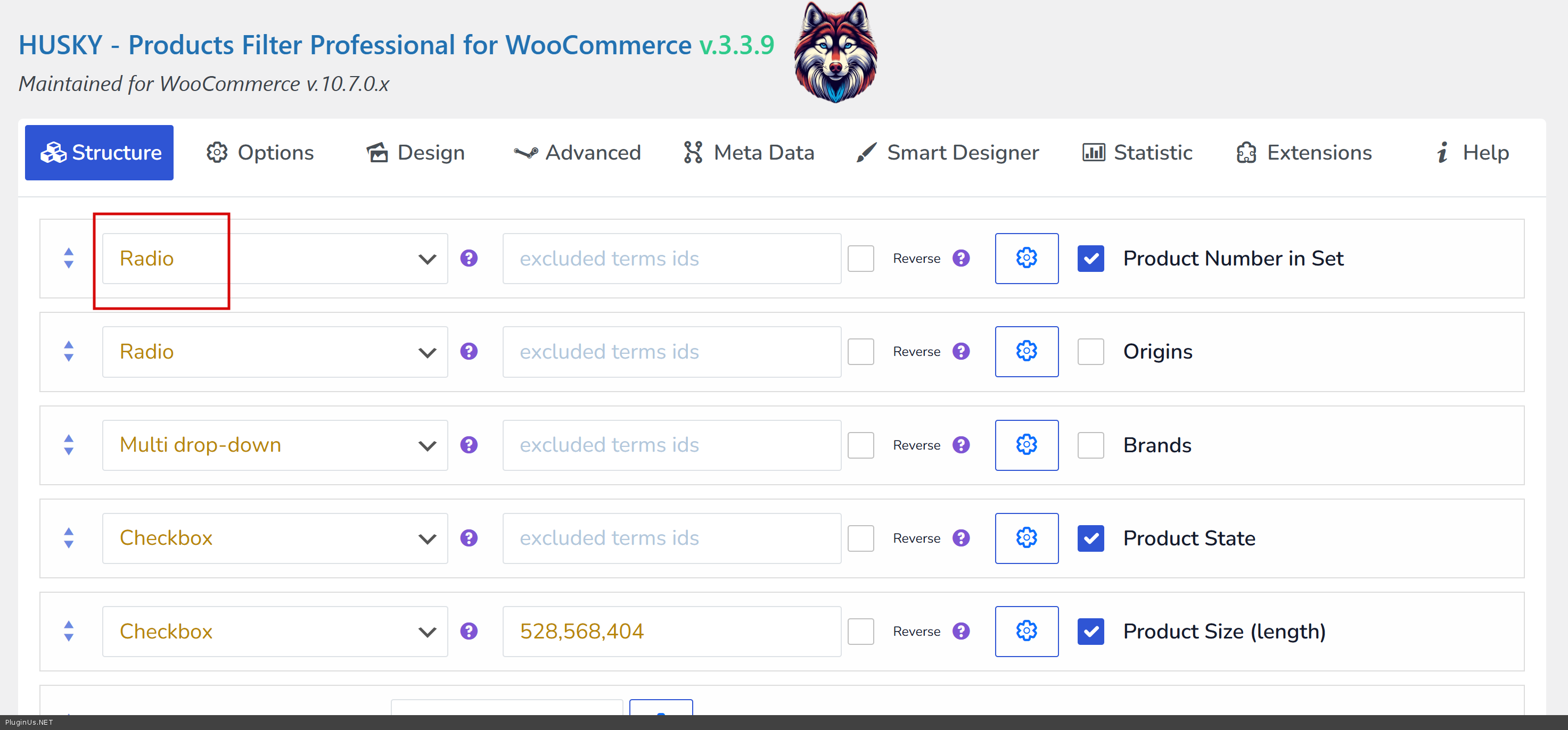
Let us know if this matches what you had in mind.