Page redirect behaviour and 3rd party integration.
The support doesn work on Saturdays and Sundays, so some Friday requests can be answered on Monday. If you have problems with registration ask help on contact us page pleaseIf you not got email within 24~36 business hours, firstly check your spam box, and if no any email from the support there - back to the forum and read answer here. DO NOT ANSWER ON EMAILS [noreply@pluginus.net] FROM THE FORUM!! Emails are just for your info, all answers should be published only here.
The support doesn work on Saturdays and Sundays, so some Friday requests can be answered on Monday.
Quote from Nawfel on September 6, 2020, 12:45Hello there,
I have three questions:
1.
I wanted to use Woo Commerce Product Table with WOOF. But unfortunately it does not work if WOOF Ajax is enabled. The reason is WOOF doesn't support such an integration currently. If WOOF starts proving the option for 3rd party plugins to replace its AJAX response grid with other markup then I can set an integration.
So First question, do you plan on allowing 3rd party plugins to replace AJAX?2.
The reason I am looking for Ajax filtering is that I want to have a different banner at the top of each product category. If I don’t use AJAX in WOOF, then every time a filter is set, the user is redirected to the Catalog page. For instance if you go to this Printer category page and use any filter, then you get redirected to the catalog page page which has a different banner at the top.
Second question: Is it normal to be redirected to the category page when a filter is clicked? Is there a way to stay on the same page?3.
I tried to add your code "Auto scroll to products after their filtering in redirect mode" in a PHP snippet but it does not work. Could you please help resolve the issue?Thank you
Hello there,
I have three questions:
1.
I wanted to use Woo Commerce Product Table with WOOF. But unfortunately it does not work if WOOF Ajax is enabled. The reason is WOOF doesn't support such an integration currently. If WOOF starts proving the option for 3rd party plugins to replace its AJAX response grid with other markup then I can set an integration.
So First question, do you plan on allowing 3rd party plugins to replace AJAX?
The reason I am looking for Ajax filtering is that I want to have a different banner at the top of each product category. If I don’t use AJAX in WOOF, then every time a filter is set, the user is redirected to the Catalog page. For instance if you go to this Printer category page and use any filter, then you get redirected to the catalog page page which has a different banner at the top.
Second question: Is it normal to be redirected to the category page when a filter is clicked? Is there a way to stay on the same page?
I tried to add your code"Auto scroll to products after their filtering in redirect mode" in a PHP snippet but it does not work. Could you please help resolve the issue?
Thank you
Quote from Nawfel on September 6, 2020, 12:54Hi I just rephrased the above:
First question
I wanted to use Woo Commerce Product Table with WOOF. But unfortunately it does not work if WOOF Ajax is enabled. The reason is WOOF doesn't support such an integration currently. If WOOF starts proving the option for 3rd party plugins to replace its AJAX response grid with other markup then I can set an integration.
Do you plan on allowing 3rd party plugins to replace AJAX response grid?Second question
The reason I am looking for AJAX filtering is that I want to have a different banner at the top of each product category. If I don’t use AJAX in WOOF, then every time a filter is set, the user is redirected to the Catalog page. For instance if you go to this Printer category page and use any filter, then you get redirected to the catalog page page which has a different banner at the top.First, I would like to know if it's normal to be redirected to the category page when a filter is clicked? Is there a way to stay on the same page upon clicking on a filter?Third question
I tried to add your code "Auto scroll to products after their filtering in redirect mode" in a PHP snippet but it does not work. Could you please help resolve the issue?Thank you
Hi I just rephrased the above:
First question
I wanted to use Woo Commerce Product Table with WOOF. But unfortunately it does not work if WOOF Ajax is enabled. The reason is WOOF doesn't support such an integration currently. If WOOF starts proving the option for 3rd party plugins to replace its AJAX response grid with other markup then I can set an integration.
Do you plan on allowing 3rd party plugins to replace AJAX response grid?
Second question
Third question
Thank you

Quote from admin on September 7, 2020, 16:14Hello
- I can suggest you use WOOT instead, https://demo.products-filter.com/demonstration-of-woot-and-woof-compatibility/ - it will work with WOOF in AJAX mode, you can test free version https://products-tables.com/upgrading-to-premium/
- Maybe this can help: tab Advanced -> Options -> 'Disable swoof influence' set 'No'
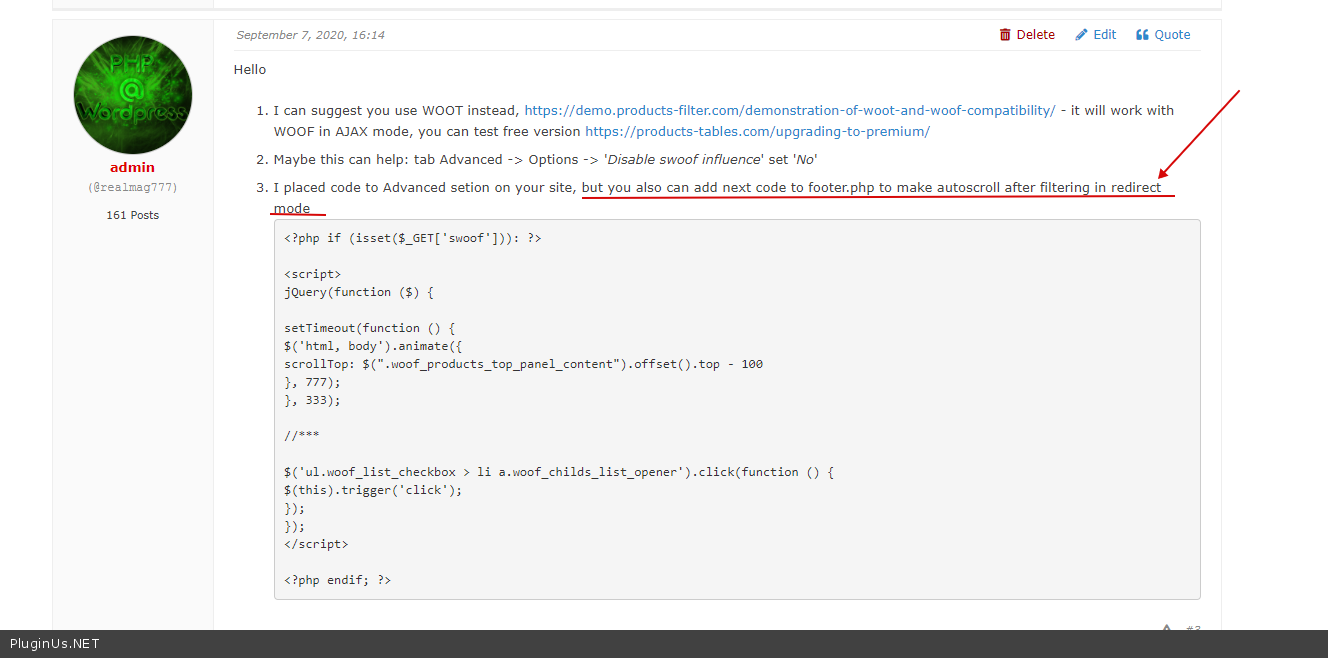
- I placed code to Advanced setion on your site, but you also can add next code to footer.php to make autoscroll after filtering in redirect mode
<?php if (isset($_GET['swoof'])): ?>

<script>
jQuery(function ($) {

setTimeout(function () {
$('html, body').animate({
scrollTop: $(".woof_products_top_panel_content").offset().top - 100
}, 777);
}, 333);

//***

$('ul.woof_list_checkbox > li a.woof_childs_list_opener').click(function () {
$(this).trigger('click');
});
});
</script>

<?php endif; ?>
Hello
- I can suggest you use WOOT instead, https://demo.products-filter.com/demonstration-of-woot-and-woof-compatibility/ - it will work with WOOF in AJAX mode, you can test free version https://products-tables.com/upgrading-to-premium/
- Maybe this can help: tab Advanced -> Options -> 'Disable swoof influence' set 'No'
- I placed code to Advanced setion on your site, but you also can add next code to footer.php to make autoscroll after filtering in redirect mode
<?php if (isset($_GET['swoof'])): ?>

<script>
jQuery(function ($) {

setTimeout(function () {
$('html, body').animate({
scrollTop: $(".woof_products_top_panel_content").offset().top - 100
}, 777);
}, 333);

//***

$('ul.woof_list_checkbox > li a.woof_childs_list_opener').click(function () {
$(this).trigger('click');
});
});
</script>

<?php endif; ?>
Quote from admin on September 7, 2020, 16:15Demo of autoscroll here: https://demo.products-filter.com/
You can change 'woof_products_top_panel_content' to another css class or id
Demo of autoscroll here: https://demo.products-filter.com/
You can change 'woof_products_top_panel_content' to another css class or id
Quote from Nawfel on September 16, 2020, 21:51Hi there,
Thank your for your help.
- Got It
- It was actually set to "No". I set it to "Yes" and now it works.
- Which part of the website did you added this code? It partially worked. If you go to the Pinter page and use the first set of filter under "Marque" then it works. BUT if you use the second set of filters under "Vitesse d'impression" then it does not.
Please help.
Hi there,
Thank your for your help.
- Got It
- It was actually set to"No". I set it to"Yes" and now it works.
- Which part of the website did you added this code? It partially worked. If you go to the Pinter page and use the first set of filter under"Marque" then it works. BUT if you use the second set of filters under"Vitesse d'impression" then it does not.
Please help.

Quote from Pablo Borysenco on September 17, 2020, 11:38Hello
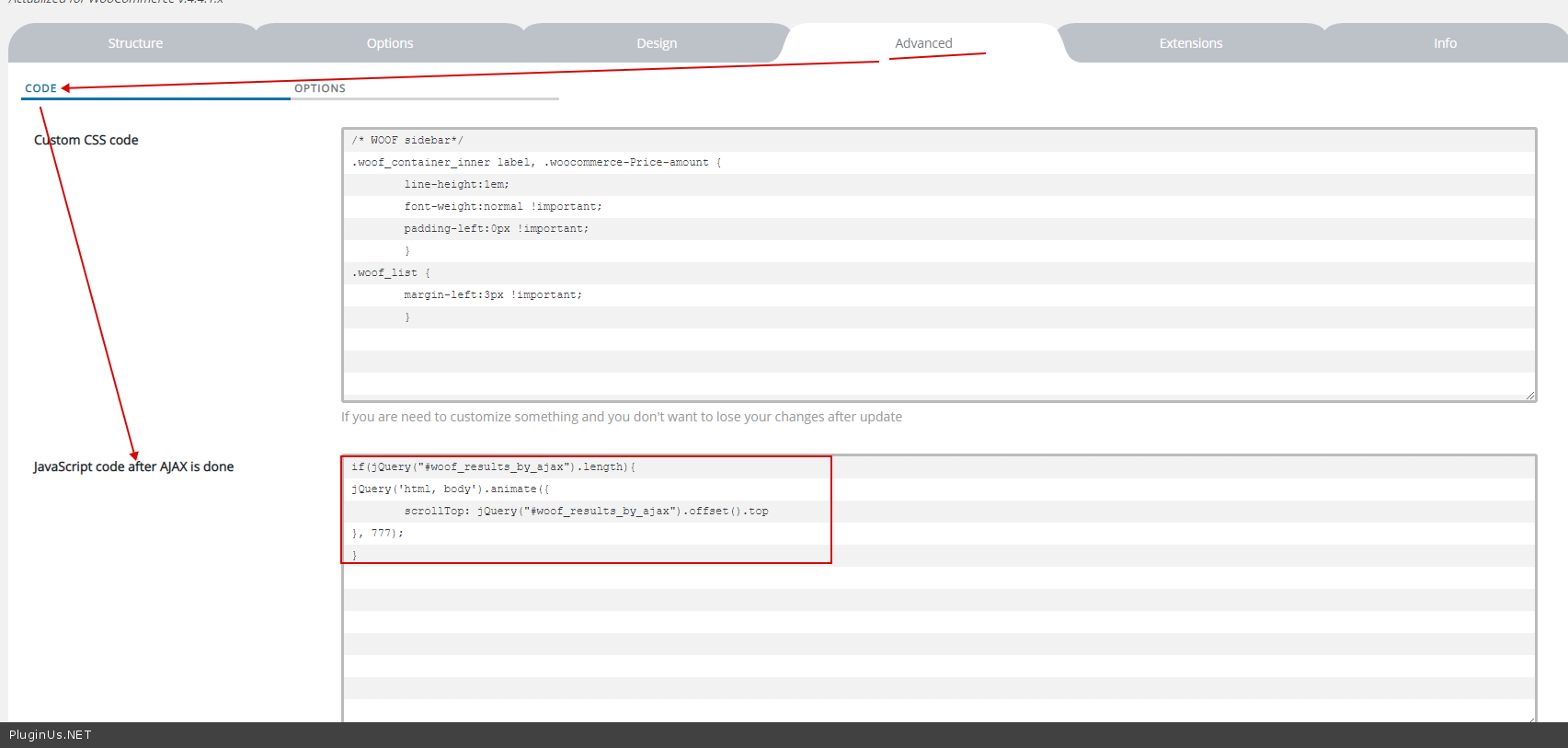
You use redirect mode, so please read this - https://c2n.me/4975XVL.png
for ajax mode this code is already there - https://c2n.me/4976cwU.png
Hello
You use redirect mode, so please read this - https://c2n.me/4975XVL.png
for ajax mode this code is already there - https://c2n.me/4976cwU.png